Greg
-
Posts
2,936 -
Joined
-
Last visited
Everything posted by Greg
-
I think I'd rather have ELFX as well.
-
I think I prefer to keep ELFX as well. As noted in my post above, I never noticed these issues anyway.
-

ACCEPTED A Clear Map of Skyrim and Other Worlds (by DoubleYouC)
Greg replied to z929669's topic in Skyrim SE Mods
I vote Interface for this one as well and this is generally where I place map mods for the Fallout games. -
This seems nitpicky and it can be confusing but it's actually .NET 5.0. .NET Framework (1.0 through 4.8) is exclusively for Windows whereas .NET 5.0 (and future version) is a cross-platform framework supported on Windows, Mac and Linux. The two may seem the same from some perspectives, but they are completely different beasts.
-
DROPPED Inferno - Fire Effects Redux (by iRetrospect)
Greg replied to TechAngel85's topic in Skyrim SE Mods
If we use Embers XD, I suggest dropping this mod from the guide as well. -
I prefer the torch in Embers XD so this mod can be dropped from the guide.
-
If you are adding overrides to a conflict-resolution patch and accidentally modified the Ordinator plugin, you can either keep going and come back to this later or exit xEdit now. xEdit asks which plugins you want to save, so uncheck everything except the conflict-resolution patch in the save dialog. If you are modifying the records in the Ordinator plugin for some reason and want to save these changes, you'll have to exit xEdit without saving anything and start over. xEdit does not support undo so you can't easily revert that change.
-
ACCEPTED Atlas Map Markers SE - Updated with MCM (by kryptopyr)
Greg replied to wojsku's topic in Skyrim SE Mods
Yes, I have and I think it looks great with Atlas Map Markers. The one issue is that the Blackreach map isn't quite centered, but I think this is a vanilla bug with the Blackreach is laid out. I mean if I'm at Sinderion's Field Laboratory at the north end of Blackreach, the top of the Blackreach map is near the bottom of the screen and I can't quite scroll all the way to the bottom of the map. -
ACCEPTED Atlas Map Markers SE - Updated with MCM (by kryptopyr)
Greg replied to wojsku's topic in Skyrim SE Mods
I have no issue using Atlas Map Markers with DobuleYou's maps if DoubleYou is good with this. I usually install Atlas Map Markers anyway to get at least some kind of map in the areas Bethesda did not cover and for the additional map markers it adds everywhere. DoubleYou's maps are like gold-plated platinum so the additional map markers are just icing on the cake. -
The CR patch contains two records from Alternate Start - Live Another Life: INFO:000EA261 ("They say Helgen got hit by a dragon. One of those horrors comes here, we'll be ready." in Dialog Topic 0002BDDD carries forward changes from Guard Dialog Overhaul. This record doesn't really need Alternate Start as a master. It's just here because LOOT sorts Alternate Start after Guard Dialog Overhaul so the VMAD and Conditions changes need to be carried forward into the patch. CELL:0000963F actually carries forward a change in a cell from Alternate Start that would otherwise be reverted by Realistic Water Two. If you are experienced with xEdit, you can remove Alternate Start - Live Another Life as a mater from the CR patch relatively easily. Install Alternate Start per the guide and use LOOT to sort the load order. Run xEdit and load the Step Skyrim SE - CR Patch.esp. Wait until xEdit completes loading and building all references. Once this is complete, past 0000963F into the FormId filter at the top left (above the the plugin list). This takes you directly to the record in question. You'll see a lot of stuff with plugin names in the right pane. Scroll the right pane all the way over to the right until you find Step Skyrim SE - CR Patch.esp. Right click on the Step Skyrim SE - CR Patch.esp name at the top right and select Remove. You may have to wait a bit for xEdit to unlock the confirmation dialog so click Yes I'm Sure. Now that the record is removed from the patch, scroll the left pane all the way to the bottom and you should see Step CR Patch very close to the bottom. Right click Step CR Patch and click Clean Masters (= Remove all unused masters). Once this is done, expand Step Skyrim SE - CR Patch.esp, click File Header and scroll down the right pane to verify Alternate Start - Live Another Life.esp is no longer listed as a master. If everything is good, close xEdit and let it save Step Skyrim SE - CR Patch.esp (a backup will be saved in your Overwrite folder). If Alternate Start - Live Another Life is still listed as a mater, use the FormId filter for 000EA261 and remove this record from Step Skyrim SE - CR Patch.esp. I doubt you'll need to do this, so just including this to cover the bases. You can now uninstall Alternate Start - Live Another life and install Skyrim Unbound in its place. Note that you'll need to resolve any conflicts with Skyrim Unbound (if there are any) on your own.
-
How to use xEdit to change a Mod's Masters
Greg replied to Hydonix's question in General Skyrim SE Support
The preferred method is to install the missing masters so you have an accurate picture of the records within the plugins you are trying to edit without potentially lots of missing references. If you don't have and can't find the master required by the plugin, I'd create a new empty plugin with the same name as the missing master and activate it in your load order. Once you've done this, you should be able to least load the plugin into xedit, but you'll likely end up with a lot of missing references that you'll need to figure out how to fix or remove. -
i think BS_DLC_patch.esp is the Beyond Skyrim DLC Integration Patch for Beyond Skyrim - Bruma. I haven't used that mod yet but it may be ESM-flagged similarly to the Unofficial Skyrim Special Edition Patch so this may explain why it's at the top with the other masters. You might try loading a previous save to see if your latest save is broken somehow before digging into all the mods.
-
No, there is no karma system in Skyrim and you are basically forced to pickpocket and steal if you want to get into the Thieves Guild if you use the Thieves Guild Requirements mod.
-
This is much better and I think I somewhat see what you mean now. The difference between lightside and default is subtle with default being perhaps just a shade darker. I prefer to stay with lightside given we have no compelling reason to switch to default and lightside seems to be closer to vanilla.
-
When I expanded the spoiler just now, I got an empty spoiler box for about 30 seconds ago and was wondering if someone had deleted the images. I was just about to come back here to post about it when the images suddenly started loading, but it took a while for the images to slowly load. The images are also difficult to compare given the need to scroll up and down. The images from DoubleYou (third post from the top of page 3) are somewhat smaller but highchart/whatever makes them easier to compare with the left/right arrows.
-
I usually use the Alternate Start where I'm camping in the woods outside the Helgen exit cave. I do the basic Helgen quest from here. On the road to Riverwood I coax the wolves out of the forest and take their pelts so I can craft them into leather and leather strips for armor. I then go into Bleak Falls Barrow and loot what I can carry there. After I sell everything in Riverwood and Whiterun and talk to the jarl, I go hunting in the woods between Whiterun and Morthal to collect more wolf pelts and to level my character. Once I've collected what I can carry, I'll go back to Whiterun, craft the hides into leather and use the leather to make armor that I can sell. I haven't tried DoubleYou's trick to enchant everything, but that is an interesting approach to increase the value of everything.
-
ACCEPTED Atlas Map Markers SE - Updated with MCM (by kryptopyr)
Greg replied to wojsku's topic in Skyrim SE Mods
I just started a new game using the STEP 1.0 guide and used coc BlackreachSinderionsShack to enter Blackreach, tmm 1 to enable all map markers, and took this screenshot of the map.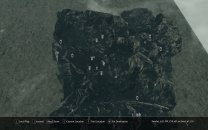
-
ACCEPTED Atlas Map Markers SE - Updated with MCM (by kryptopyr)
Greg replied to wojsku's topic in Skyrim SE Mods
I seem to recall it adds maps for Soul Cairn, Blackreach and Forgotten Vale and it is my go to map. I usually leave pretty much everything at Default so the map markers aren't completely overwhelming in towns like Whiterun and Solitude. -
Can Not Copy Resource / The system cannot find the path specified
Greg replied to ravenRpg38's question in DynDOLOD & xLODGen Support
If you installed Mod Organizer within the Skyrim folder, that may be your problem. The virtual file system does not always work correctly when it's installed in the game folder. -
The BSA archives are loaded in the same order as the plugin they are associated with, but the priority order of the plugins has no bearing on the order of loose files. Also note that the game always uses loose files even if this asset is included in a BSA archive with higher priority. The distinction is that the order of the plugins in the right pane determines which records are used in each plugin. The order of the mods in the left pane determines which assets (meshes, textures, scripts, etc.) are used by the game. And, yes, you should use LOOT to sort the plugins in the right pane and you should use xEdit to resolve any conflicts in the plugins.
-
Skyrim 10th Anniversary Edition Announced
Greg replied to DoubleYou's topic in General Skyrim SE Discussion & Support
This is the breakdown that I'm taking from this announcement: All platforms will have access to Fishing, Survival Mode, and Saints and Seducers PlayStation 5 and XBox Series X|S will receive a free enhanced edition of the game Skyrim Anniversary Edition includes Fishing, Survival Mode, Saints and Seducers, and over 500 pieces of unique content from Creation Club Existing owners of Skyrim Special Edition will receive the option to purchase the Anniversary Edition upgrade So basically Anniversary Edition sounds as if it's nothing more than Skyrim Special Edition plus a bunch of Creation Club content. The enhanced edition of the game is only for PlayStation and XBox. -
When I update BethINI, I download the archive from Nexus, right click on the downloaded archive and click Unblock+OK so Windows doesn't freak out because it came from the Internet, and then extract it to a path like C:\Modding Tools\BethINI.
-
Skyrim 10th Anniversary Edition Announced
Greg replied to DoubleYou's topic in General Skyrim SE Discussion & Support
This is how I am interpreting the announcement as well. It looks as if the new quests are from Saints and Seducers. -
I corrected the link.
-
I updated the the detailed instructions for Dragonbone Mastery with this information.