z929669
-
Posts
13,082 -
Joined
-
Last visited
Everything posted by z929669
-
The only rule of thumb for interpreting these crash logs that I can thin of is to pay attention to the "Possible relevant objects" part at the top and begin looking at those formIds in xEdit. From what I can see, you are running Simplicity of Snow along with BDS, and they likely aren't compatible. I would drop Simplicity of Snow and use BDS unless there is some requirement that you have the former.
-
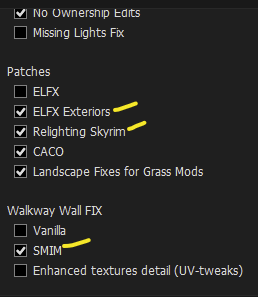
Agree. The ELFX - Exteriors patch changes a mesh to fix holes. It is overwritten by flickering mesh fixes though. Difficult to check this one, since it's a huge mesh. No idea if they also applied the FMF changes to this. Simplest way would be to check in game if you know what FMF fixes and where the 'holes' are. I can't check this anytime soon. Same goes for the walkwaycwall01.nif fix for SMIM, which is overwritten by BDS in Step
-
There's a couple extra options I'm installing to check.

-

How do I actually create a custom plugin load order with MO2 and LOOT ?
z929669 replied to Lucas2703's question in Mod Organizer Support
In MO, you can drag/drop plugins before loading into xEdit where you can then confirm LO, drag/drop some more and validate. Once you have your LO, you can grab %LocalAppData%\ModOrganizer\{InstanceName}\profiles\{ProfileName}\loadorder.txt as a reference (save it as another file name). Then sort with LOOT and check that file again and compare the diff in WinMerge. Then use LOOT rules to set changes to LOOT behavior such that LOOT sorts with your key prioritizations. The full LO doesn't matter really, It's always key mods you need to change. If you want certain mods to sort together, then you can merge them into a single mod or create a patch to effectively accomplish the same. The downside to all of this is constant upkeep as mods are changed with updates. You could also miss some important details and get it wrong. We advise using LOOT for sorting regardless, since it is programmatic and won't miss things. If a change in sorting behavior is really needed, you can submit a report to the LOOT team to consider adding a new rule. Also review this article for other methods and some good practices with LOOT -
Step SkyrimSE Patches (by Step Modifications)
z929669 replied to TechAngel85's topic in Step Skyrim SE Guide
Are you using a Step ENB with all patches and recommended TexGen and DynDOLOD_SSe.ini settings for grass? If so, then you should be close to optimal. Keep in mind that CG will not always match grass LOD, depending on weather and ToD. At the console type set timescale to 5000, from a good vantage with plenty of loaded and LOD grass looking N or S across the tundra, for example. If you want to minimize the CG effect, then edit enbseries.ini CG as follows from current for these settings: [COMPLEXGRASS] IgnoreWeatherSystem=true SubSurfaceScatteringAmountDawn=0.1 SubSurfaceScatteringAmountSunrise=0.2 SubSurfaceScatteringAmountDay=0.25 SubSurfaceScatteringAmountSunset=0.2 SubSurfaceScatteringAmountDusk=0.1 SubSurfaceScatteringAmountNight=0.1 FakeLightDawn=0.0 FakeLightSunrise=0.0 FakeLightDay=0.0 FakeLightSunset=0.0 FakeLightDusk=0.0 ... you could also edit each weather INI likewise, leaving IgnoreWeatherSystem=false in enbseries.ini, but that's more work. Alternatively, increase Direct/Ambient for grass in TexGen by about 20 each, ish. Or do some combination of the above. -
Can I get Xedit to work with both GOG Skyrim and Steam Skyrim? UPDATE: Fixed
z929669 replied to Hilda1007's question in xEdit Support
Improper command-line string in MO: C : instead of C: -
Not sure plugin-wise, but it may conflict with other mods behaviorally/aesthetically in the game.
-
Glitched Whiterun Barracks and People's Eyes
z929669 replied to Arel's question in General Skyrim SE Support
The skin issue is related to ENB. These settings resolves that in the Step ENB: [SUBSURFACESCATTERING] IgnoreWeatherSystem=false IgnoreWeatherSystemInterior=true Amount=0.5 AmountInterior=0.5 EnableOldSSS=false EnableSeparateInteriorParameters=true EpidermalAmount=1.5 EpidermalAmountInterior=1.2 EpidermalDiffuseSaturation=0.15 EpidermalDiffuseSaturationInterior=0.05 EpidermalMix=0.1 EpidermalMixInterior=0.05 Quality=1 Radius=5.0 RadiusInterior=3.0 SubdermalAmount=1.0 SubdermalAmountInterior=1.0 SubdermalDiffuseSaturation=0.85 SubdermalDiffuseSaturationInterior=0.85 SubdermalMix=0.05 SubdermalMixInterior=0.02 SubdermalPhase=0.0 SubdermalPhaseInterior=0.0 SubdermalTranslucency=0.5 SubdermalTranslucencyInterior=0.5 SurfaceBrightness=1.6 SurfaceBrightnessInterior=1.1 The eyes may be the [EYE] SSS ENB settings. I also see what looks like stuck LOD. The other stuff is very likely due to OCS compatibility problems with the Step mod list. -
Green glowing water when leaving castle volkihar
z929669 replied to TFVgen's question in General Skyrim SE Support
This is not a great solution, since you sacrifice some relevant reflections and (most likely )neither is running an extra mod to 'fix' this issue. Instead, try setting fWaterSSRIntensity=0.5 in skyrim.ini An even better answer: Use BethINI. It has this tweak and many others that 'fix' game issues using proper configuration settings instead of adding mods or patching. -
Yes indeed. It will work now but for a few mods mentioned above (see previous two posts). Those can be disabled for now without much impact.
-
problem transferring saves to profiles
z929669 replied to mm_half's question in Mod Organizer Support
The save games are just files like any other with created/modified timestamps in Windows. Each has data pertaining to the state of the game at the time, and doesn't change. New saves will not overwrite the old ones unless you save over an existing one in game. It is the same exact file with same file hash as previously. If your load order changes in a different profile, the save data may or may not be compatible, so the only sure way to ensure save compatibility is to not change the copied profile at all. Either way, those are your saves, and you will have lost nothing. I don't really use the copy saves procedure and have not had any issues when I did use it once or twice. I tend to situate things manually so I know what is what for myself. -
The ESP relies on the ESM, so I wouldn't assume it's the latter. I would do as recommended in that post: remove records other than those with the Editor ID Tamriel_Firstborn* or Tamriel_Minion*. This is the same method used when narrowing down a problem mod in your install: Disable top half > test. If problem persists, disable bottom half > test. One of those will almost always resolve the problem, so you focus on first or second half and repeat by disabling half of that (one quarter disabled), and so on until you isolate the problem. Just save our your DynDOLOD.esp somewhere so you have the original. You are just deleting records and saving in xEdit and testing until the problem is resolved, and report back the record. Always use the same clean save to test. Of course, there is always the chance that if you regenerate, the problem will be resolved (due to cleaning mods or some other action).
-
sheson typically must sleep, and I suspect that time is now where he lives. In the meantime: Have you cleaned all of your plugins using xEditAutoClean as he instructed? Then you would want to rerun TexGen and DynDOLOD from scratch for Tamriel worldspace to test. Also look at his last post link and reference to cell D74. You may want to sort this out before rerunning, but that's up to you. Delete/move all DynDOLOD logs before regenerating TexGen and DynDOLOD. This will give you clean logs to share. And don't forget to disable all of the existing output mods for those before regenerating new object LOD.
-
DROPPED Rudy HQ - More Lights for ENB SE - Bthardamz (by rudy102)
z929669 replied to z929669's topic in Skyrim SE Mods
Thanks. We understand this but still use it this way, since we were told that Blood Splatter Fix will be included in each individual mod at some point (not holding my breath). I think they are gaming Nexus DP with that mod though if you read more history in that topic. -
problem transferring saves to profiles
z929669 replied to mm_half's question in Mod Organizer Support
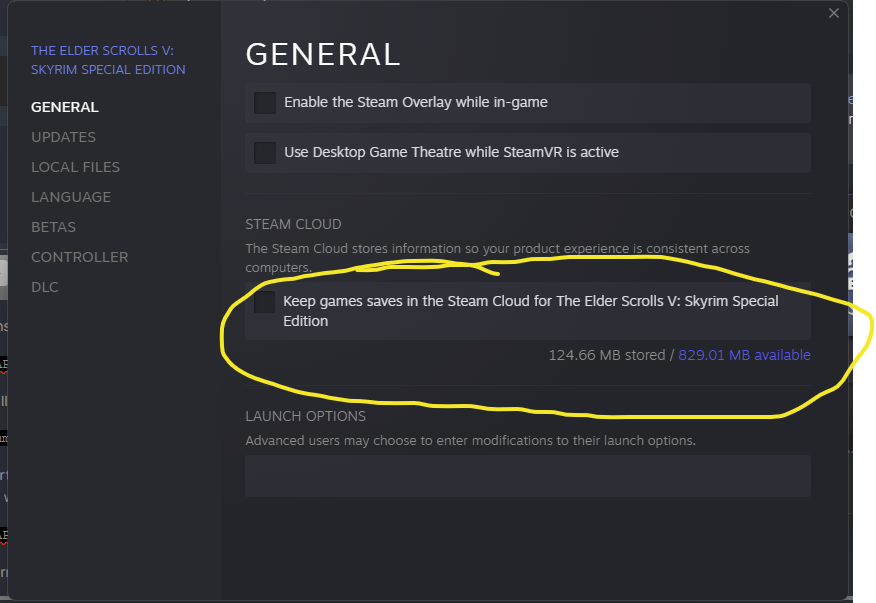
How did you install MO? We recommend using the 'Instances' method as described here. This method installs a single MO application into: %LOCALAPPDATA%%\ModOrganizer ... and keeps all save games under a common path: ..\Documents\My Games\Skyrim Special Edition\Saves\ If you did a portable install, then you have multiple MO instances by game installed wherever you chose. I haven't run portable in a long time, but I think you would get save games in something like: %LOCALAPPDATA%%\ModOrganizer\{GameNameLocation}\profiles\{ProfileName}\saves\ Given this information, you should be able to at least find your save games and copy them into the desired profile(s) EDIT: Steam also has an option to store your save in the cloud (I don't use it):
-
Please help me. Unplayable stutter with DynDOLOD 3 Enabled
z929669 replied to Saint_Chewy's question in General Skyrim SE Support
It might matter, but the Step build will produce one as large as 322 Mb without issue ... and that's pretty huge. -
Please see top of forum and OP for logs to include in all posts here.
-
That's exactly what we are doing
-
Please help me. Unplayable stutter with DynDOLOD 3 Enabled
z929669 replied to Saint_Chewy's question in General Skyrim SE Support
If all is fine and your stuttering only coincides with your use of DynDOLOD 3, then you will need to post for help in the DynDOLOD support forums using instructions in the OP and the forum. -
Please help me. Unplayable stutter with DynDOLOD 3 Enabled
z929669 replied to Saint_Chewy's question in General Skyrim SE Support
If you follow the Step guide linked in the top nav, you will have installed SSE Display Tweaks. This (and other game config and your driver settings together) resolves many stuttering issues. You should read up on SSE Display Tweaks config and see the Step guide BethINI settings to use in conjunction with these settings. -
ACCEPTED Storm Lightning for SSE (by Shizof)
z929669 replied to TechAngel85's topic in Skyrim SE Mods
Fixed, thanks. -
See the OP
-
Look at the mod tables. Those required by the patches are flagged.
-
ACCEPTED Realistic AI Detection SE (by OlivierDoorenbos)
z929669 replied to TechAngel85's topic in Skyrim SE Mods
Yes, I plan on incorporating Lite modifiers into the Step CR patch with next update. -
Step SkyrimSE Patches (by Step Modifications)
z929669 replied to TechAngel85's topic in Step Skyrim SE Guide
The Step CR patch is all that's needed. It has the grass files for the build. NGIO is not compatible with updated SSE game