DoubleYou
-
Posts
7,935 -
Joined
-
Last visited
Everything posted by DoubleYou
-
We are going to need more information to provide any additional help. Screenshots, ini files, load order, etc.
-
Perhaps you have altered uLockedObjectLOD? Check to see if a plugin ini or Skyrim.ini modifies this setting. [MapMenu] uLockedObjectLOD=16
-
 DynDOLOD can do everything except Terrain LOD.
 -
Fallout 4 Bethini does nothing and only getting 60 fps.
DoubleYou replied to Quick's question in BethINI Support
Quite simple. Just navigate to the location indicated for Profiles. -
These are required for environment maps to show at a far enough distance. If you dislike the environment maps on armors, you should be altering the relevant textures/meshes instead of removing details from the game.
-
Not all texture packs are compatible with one another. The STEP guide provides a compatible texture setup. I cannot advise on how to pick compatible textures other than what we know works together. There is no need for tweaking fNearDistance on most setups, and I am not convinced that it actually improves anything while coming with its own downsides. Light reflection on armors... no idea what you are referring to here.
-
Fallout 4 Bethini does nothing and only getting 60 fps.
DoubleYou replied to Quick's question in BethINI Support
You must have set custom paths, so I wonder why you can't remember where you put them. Go into Mod Organizer settings and check the paths there as to where your profiles folder is. -
The solution is to use BethINI.
-
Fallout 4 Bethini does nothing and only getting 60 fps.
DoubleYou replied to Quick's question in BethINI Support
Yes. You just need to browse and select the INI files in that folder. -
Fallout 4 Bethini does nothing and only getting 60 fps.
DoubleYou replied to Quick's question in BethINI Support
If it is not portable, than your profiles are in your local app data directory. This is typically hidden on your system, which is probably why you cannot find it. WinKey + R %localappdata% Enter Your profiles are in the \ModOrganizer\{instanceName}\profiles\{your profile} directory -
Fallout 4 Bethini does nothing and only getting 60 fps.
DoubleYou replied to Quick's question in BethINI Support
The detection isn't perfect, and if you have multiple Mod Organizer installs, it can also cause issues. It looks like your Mod Organizer installation is in portable mode, as I see a Profiles folder. In BethINI, under INI Path, choose browse, and select the INI file inside your profile inside that profiles folder. -
Cleaning unused masters in STEP Patch Conflict Resolution
DoubleYou replied to Guba's topic in Step Skyrim SE Guide
Unused masters are added so that LOOT sorts it below the implicit master. Just ensure that the patch is loaded low enough in the load order to apply all the patches correctly. -
Fallout 4 Bethini does nothing and only getting 60 fps.
DoubleYou replied to Quick's question in BethINI Support
Quit talking about OneDrive. That is not the issue. Your ini files are not in OneDrive. Yes, OneDrive can cause issues related to this kind of thing because of its method of using a weird kind of link instead of an actual file, but that's a system setup issue that will not affect Mod Organizer and its profiles, so long as it is not also on OneDrive (unlikely). In BethINI setup tab, under Mod Organizer location, browse and select the Mod Organizer executable. BethINI should then automatically detect your MO2 profiles and populate them in the INI Path dropdown. Select the profile from the dropdown. BethINI will automatically restart and you will be back in business. To otherwise manage fps, you should be using High FPS Physics Fix. https://stepmodifications.org/wiki/Fallout4:High_FPS_Physics_Fix -
Fallout 4 Bethini does nothing and only getting 60 fps.
DoubleYou replied to Quick's question in BethINI Support
Most likely you failed to direct BethINI to your MO2 profile INI Path via the Setup tab. MO2 by default uses a separate set of INI files for each profile, and it is necessary to point BethINI to these in order to change the correct INI files. This is made simple via the MO2 detection and profile detection that typically works, although it isn't perfect, as MO2 does not leave many registry keys to check against install location. -
What happened was I removed the instructions because it was unnecessary, then Z re-added it because he thought it was necessary, then I mentioned it was unnecessary again, so it was removed again. So I have now removed the line from the changelog.
-
BethINI -> Details -> Particles -> 7500
DoubleYou replied to Kattmandu's topic in Step Skyrim SE Guide
You need to expand the + spoilers to see the instructions.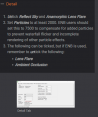
-
We don't add this info to LOOT because it is similar to a dynamic patch in that it varies between releases what content is included, dependent on the mods included in the guide release.
-
bug Mod Organizer 2 crashes when trying to select files
DoubleYou replied to fluqua's question in Mod Organizer Support
You're probably not waiting long enough. Some mods are large compressed files and take a while to extract. Depends on your system too. -
FEEDBACK v2.2.0 - Feedback & Bug Reports
DoubleYou replied to z929669's topic in Step Skyrim SE Guide
Do you not see that both images show the same different settings? In actuality, there is a misprint on the second set. -
Yes, I didn't add the slider, as I considered it better to be set in-game.
-
Discussion topic: Boston Public Library Settlement by pra Wiki Link Allows the ability for the Boston Public Library to be a settlement following clearing the location, rebuilding the precombines for the affected cells and the navmeshes. Notably uses partial form flags to help prevent compatibility issues, which are verified to work correctly. Should load after Previsibines Repair Pack. Small conflict with Clarity's interior fog setting (shouldn't be a big deal). There aren't too many interior cell settlements, and this is a large enough interior location that making a settlement inside makes some sense. This is one of my more favorite interior cell locations, so I like the idea of it becoming a settlement.
-
FEEDBACK v2.2.0 - Feedback & Bug Reports
DoubleYou replied to z929669's topic in Step Skyrim SE Guide
We do not. -
Discussion topic: The HD Enhancement Project by Blackwolf24 Wiki Link Retextures creatures. The screens on the mod page look promising.
-
1. I will probably add this at some point. 2. Summary of Changes will display all changes made by BethINI.
-
Thank you for your contributions, and many congratulations on the new baby!