DoubleYou
-
Posts
7,933 -
Joined
-
Last visited
Everything posted by DoubleYou
-
It's on the list. You must have missed it or are looking at the wrong list.
-

ACCEPTED Complete Alchemy and Cooking Overhaul (by kryptopyr)
DoubleYou replied to TechAngel85's topic in Skyrim SE Mods
I prefer option two. -
ACCEPTED Complete Alchemy and Cooking Overhaul (by kryptopyr)
DoubleYou replied to TechAngel85's topic in Skyrim SE Mods
The Ironwood Tree normal map for this mod is misnamed. There is a bug report for this in the Bugs tab on the mod page. Easiest solution will be to instruct to install the CACO Cleaned Textures file and rename textures\ccor\plants\imp45\ironwood_n.dds to textures\ccor\plants\imp45\ironwood01_n.dds -
Screens look very good. I think I know this author too!
-
ACCEPTED A Clear Map of Skyrim and Other Worlds (by DoubleYouC)
DoubleYou replied to z929669's topic in Skyrim SE Mods
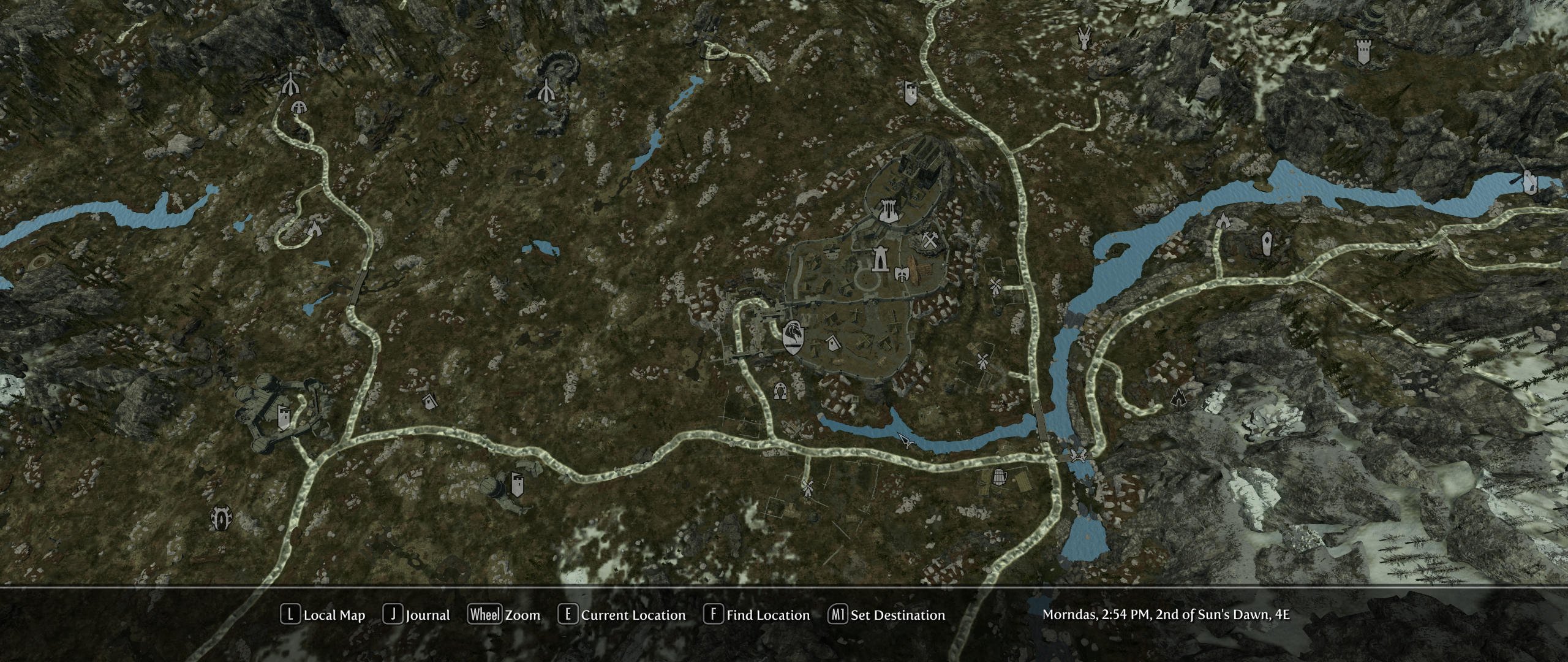
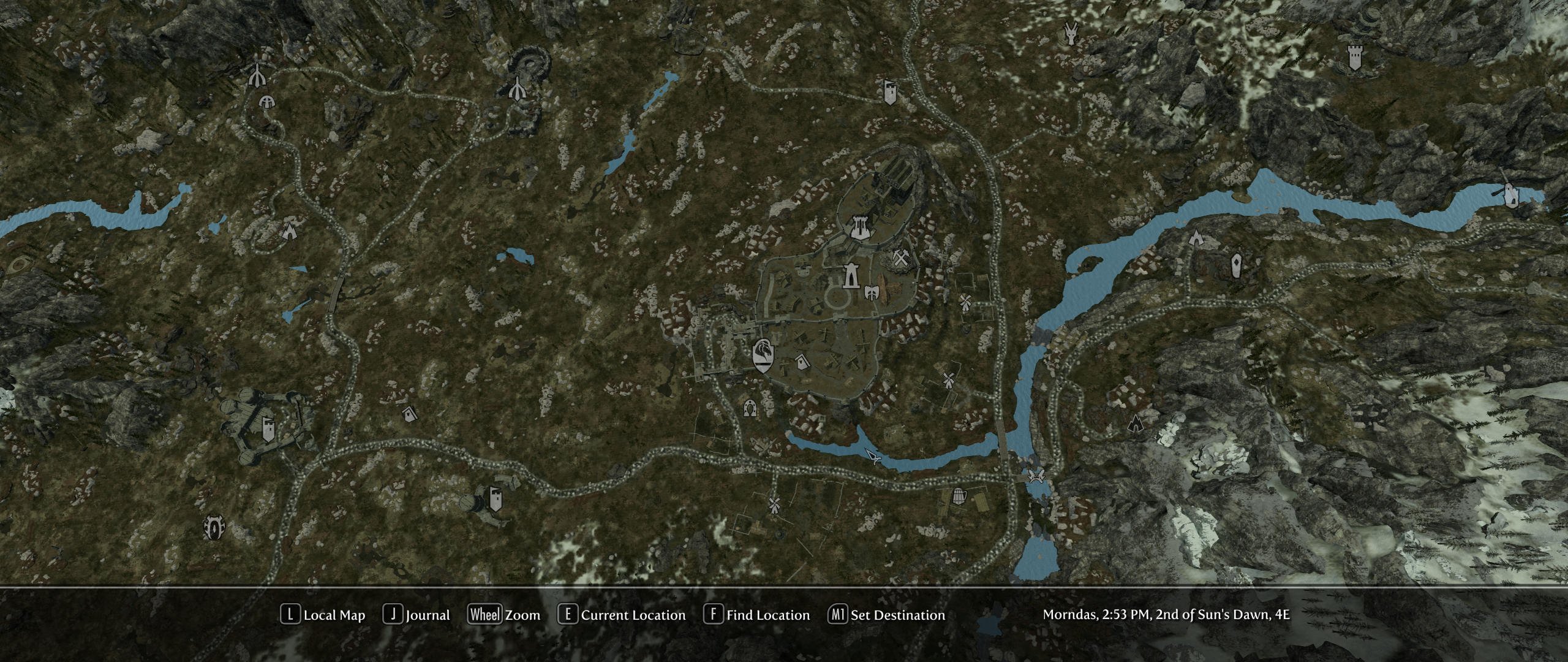
I think this looks better, but let me know if you prefer the old style road. Old Road --> New Road
-
Discussion topic: MCM Recorder by Mrowr Purr Wiki Link Could be used to remove our MCM setup section by just running a recording with all of this setup as instructed.
-
I don't think it has anything to do with the BTOs used and everything to do with the game being buggy and/or bad INI settings being used.
-
You're almost right. The game has shipped with a bad pregenerated grass cache within Skyrim - Misc.bsa since Oldrim was released. In Oldrim, using it caused the infamous floating grass bug. In SSE, using them causes extreme graphical glitches, as illustrated in the included screenshots on the page. This mod overrides these bad grass gid files with one's that will simply display 0 grass. You then add an NGIO generated grass cache on top of it, and use the vanilla bAllowLoadGrass method to display it. You can always just not use the grass cache, and Skyrim will create it every time you enter a new cell (bAllowCreateGrass method).
-
Discussion topic: LOD Unloading Bug Fix by wankingSkeever Wiki Link I'm not sure if this is needed or not, but could prove useful. I've not really seen this issue while using a correct LOD setup, although I know the issue exists in specific circumstances. I want to believe that this doesn't happen because we have proper LOD settings, but it may be simply a matter of "distance" as the author states.
-
To be clear, you do NOT need this to use grass LOD. This is only useful in the ability to load the grass cache, gaining the other benefits baked into the pregenerated grass cache by NGIO, such as no grass growing through objects. It is mainly a fix for areas where the user may have not generated a grass cache file which will cause the game to use the bugged grass cache files included with the game in Skyrim - Misc.bsa. NGIO works around this issue by renaming them .cgid instead of .gid, and loading only .cgid files.
-
SE/AE Compatibility - Grass Cache Pregen
DoubleYou replied to burnersaurus's question in General Skyrim SE Support
First, this is an extremely difficult thing to accomplish for most people. I do not recommend this process to anyone who doesn't fully understand what they are doing, as they could easily screw up their installation. This is why I have done my best to not publicize this process very much, as providing support for this will be nightmarish. I highly recommend you to just wait for the relevant mods to update instead of doing this. How to run grass cache for other game version (AE or VR) Your setup should now be your final setup for whatever game version you are using with all associated mods. Temporarily remove all SKSE plugin mods (they will not work because wrong game version, and do not need to work for grass cache generation). There may be many methods to do this. Simplest is to hide the Data\SKSE directory in the Data tab of MO2. Make a backup of your current base game folder files (where the game executable is located). Backup of folders should not be necessary. Remove Engine Fixes (all of it, including game directory) Remove SKSE for the current game version (remove from game directory and the scripts) Remove ENB Remove any other mods you have added to the base game directory Download and install DLL Plugin Loader binkw64.dll to the game directory. Copy binkw64.dll from 1.5.97.0 version to the game directory, but rename it binkw64_.dll (add a _ to the end of the filename). Copy SkyrimSE.exe runtime 1.5.97.0 to the game directory. For Skyrim VR only, create a txt file in the game directory called steam_appid.txt with 489830 in it (this may be unnecessary, but it will not hurt). Install the Legacy SE build 2.0.20 of Skyrim Script extender to the game directory Follow the Grass LOD Guide Quick Start section steps 1 through 6 If the Precache Grass plugin fails to generate the grass cache, create an empty PrecacheGrass.txt file in the game directory and launch SKSE to generate the grass cache without using the plugin. You will need to relaunch SKSE any time the game crashes during grass cache generation until the "Grass generation finished successfully!" error message appears. If this still fails to generate the grass cache, you did something wrong and probably shouldn't be attempting this. If you insist on trying to continue to fix this, go over all these steps and try and figure out what is going wrong, but there are a lot of necessary steps, and all of them have to be exactly right for this to work. You should now have a successfully generated grass cache. Revert step 1. Delete all files added to the game directory (see steps 7 through 10) and restore it to how it was in the backup you made in step 2. Ensure you now have the correct version of SKSE installed and its scripts. Your setup should now be your final setup for whatever game version you are using with all associated mods, but now with the added grass cache files. If there were any other changes you had made in order to create the grass cache, you should change them to how they need to be now. Complete steps 7 through 9 of the Grass LOD Guide Quick Start. Ensure that you use Mode 1 for grass LOD in DynDOLOD. Optionally, add Grass Cache Fixes and follow its Usage instructions (but you can skip step 5 since you already just did it). Profit. Hopefully I didn't miss anything. -
SE/AE Compatibility - Grass Cache Pregen
DoubleYou replied to burnersaurus's question in General Skyrim SE Support
Just disable all other extensions. They won't be needed for generating the grass cache. -
ACCEPTED XP32 Maximum Skeleton Special Extended (by Team XPMSE)
DoubleYou replied to TechAngel85's topic in Skyrim SE Mods
You are remembering to run FNIS or Nemesis when changing options, right? I haven't had any issues with this mod. -
You do realize that you don't always have to be on the latest version.... The fact is that the more updates a mod receives, the more traction and popularity a mod gains. I have definitely noticed an uptick any time I have released an update. Part of this is it draws users back to the mod page, and they remember to endorse the mod. It also encourages users to comment or add bug reports. Also, the mod briefly gains front page status on the Updated tab on the Nexus. Just remember that such frequent updates are a blessing, as it means the author really enjoys their work.
-
TESTING Cathedral Weathers and Seasons (by The Community)
DoubleYou replied to TechAngel85's topic in Skyrim SE Mods
Still mostly useless, but innocuous ini file. -
ACCEPTED A Clear Map of Skyrim and Other Worlds (by DoubleYouC)
DoubleYou replied to z929669's topic in Skyrim SE Mods
Thanks. I'll correct it in the next update. -
Happy Little Trees Add-On - DynDOLOD 3 (by z929669 and T4gtr34um3r)
DoubleYou replied to DoubleYou's topic in Skyrim SE Mods
Hmmm. I really don't know what happened, other then somehow my TexGen had different results yesterday versus today. TexGen from yesterday was missing them. TexGen from today has them. I'll take it. -
I assure you that BethINI did not add those lines, as I am the author. You likely had added them yourself, but didn't set the INIs to Default before applying your preset.
-
You have some fancy INI tweaks there. Not sure what you were trying to accomplish, but setting the following in Skyrim.ini will very likely fix your issue. [Display] bDirShadowMapFullViewPort=1 fMaxHeightShadowCastingTrees=5000.0000
-
Happy Little Trees Add-On - DynDOLOD 3 (by z929669 and T4gtr34um3r)
DoubleYou replied to DoubleYou's topic in Skyrim SE Mods
I doubt that most users truly pay attention to these kinds of warnings, unfortunately. The Quality option does the same thing. The changelog indicates changes to "logs" and "stumps," and so I think that the CRCs might have changed. -
Happy Little Trees Add-On - DynDOLOD 3 (by z929669 and T4gtr34um3r)
DoubleYou replied to DoubleYou's topic in Skyrim SE Mods
@z929669 I was going to test these out using the performance option, but DynDOLOD is throwing a bunch of warning on missing textures, presumably caused by crc mismatch. I see that Happy Little trees had an update to on November 20, but this addon was only last updated November 14. -
Discussion topic: Happy Little Trees Add-On - DynDOLOD 3 by z929669 and T4gtr34um3r Wiki Link
-
Odd Lighting Glitch near Boat.
DoubleYou replied to zsark's topic in General Skyrim SE Discussion & Support
This makes sense. The swirl is coming from the swirl on the boat in the image. Realistic Water Two recommends setting fWaterSSRIntensity=0.5 under [Display] in Skyrim.ini. That may fix the issue, since that lowers the intensity of Screen Space Reflections on the water. -
Skyrim SE ENB's and sky mesh(?) Issue
DoubleYou replied to zsark's question in Post-Processing Support
My guess is you are seeing banding, as that is NOT the infamous horizon seam. Set bUse64bitsHDRRenderTarget=1 under [Display] in SkyrimPrefs.ini. -
I believe that the latest SSE Engine Fixes may fix this issue, but I never tested. At any rate, ensure that Sun-Shadow Transitions is unchecked in the Detail tab under Shadows.