DoubleYou
-
Posts
7,933 -
Joined
-
Last visited
Everything posted by DoubleYou
-
I do believe there is a setting in the MCM menu to modify this behavior, because I remember it annoying myself.
-
The Step guide includes the Unequip Quiver SE mod, which is most likely the cause of your quiver being unequipped.
-

Restoring a STEP modding setup on a new computer
DoubleYou replied to robmtl's topic in Step Skyrim SE Guide
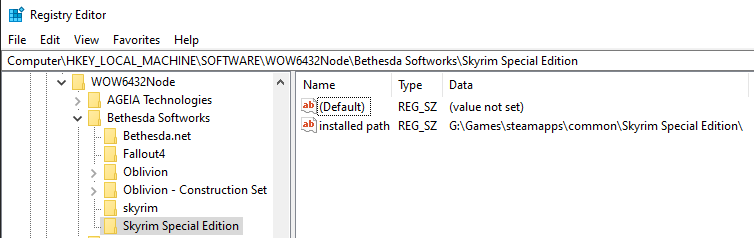
I think if you put Steam in Offline mode, you don't have to worry about it updating on you. However, the necessary registry entry that I know about is shown below: Newer mods may require newer versions of the game/skse.
-
It looks like you just need to increase your block distances in your INI.
-
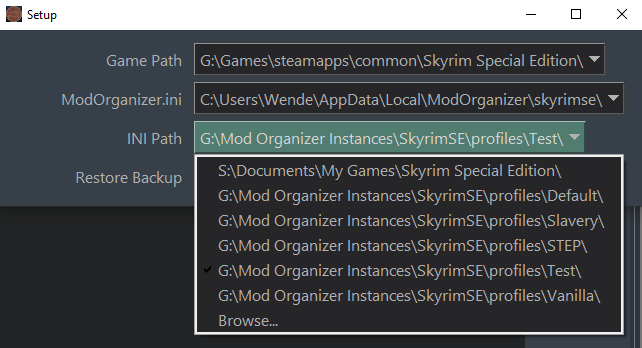
The Restore Backup button will not have any backups it can restore until the user has actually saved their INI files at least once. I can make it say "No backups found" to make this more apparent. I found a bug looking into this. If you change the INI Path, it will not update the backups in Restore Backup until restart. I'll have to call a refresh on that if the user changes the INI Path. This is good feedback. This is currently how it is designed, but an OK button would be far more intuitive. Yes, this confused many of my users, so it made sense to give the user more control. Did it not populate your MO profiles in the dropdown? I may have to work on my MO detection, as it can be difficult finding its location given different installation methods. Do note that if you launch BethINI through Mod Organizer, the default path will work.
-
No. They are independent of each other. If you have a Custom ini, however, I do not yet have support built in for it yet.
-
I would install it as it's own mod. I actually prefer to install each file as it's own mod in this case, and place it right below the mod it overwrites, but that's just so I can remember what files I used.
-
I added a standalone beta test version to Miscellaneous files on the SSE Nexus page. Let me know if you find any bugs. You do not need to install Python, as this has been compiled with pyinstaller. It only includes the SSE plugin for now. If you want to test the Fallout 4 plugin, you can grab it from the Github repository. Bethini Pie can be run through Mod Organizer. It doesn't need to be. Since this is a complete rewrite of the application, not all features are included between this version and the old BethINI app, but all necessary functions should work correctly.
-
I use 21:9 widescreen. To use it with STEP, install the following files from https://www.nexusmods.com/skyrimspecialedition/mods/1778 and make sure they overwrite the relevant mods: Complete Widescreen Fix for SkyUI 5.2 SE Alpha - 2560x1080 Better Dialogue Control Widescreen Fix Better MessageBox Control Widescreen Fix Race Menu SE - WIdescreen Fix SkyUI SE - Flashing Savegames FIx - Widescreen Fix I also recommend using one of the Wider MCM Menu for SkyUI options. Just choose one you like. You shouldn't really need to mess with anything in your display settings this way. Make sure you set your resolution back to 2560x1080 afterward.
-
Probably not an easy way. I don't have Enderal SE, so I haven't looked at what all they changed. Post your inis and I can fix them up if you like.
-
The author hasn't been active for 2 years.
-
I like the last option the best. Anything to make this bush less horrid.
-
ACCEPTED 3D Junipers - Trees and Berries (by wSkeever)
DoubleYou replied to TechAngel85's topic in Skyrim SE Mods
Besides the color blending of the stick with the ground texture in those shots, I prefer current STEP better based on these shots. -
Iconic's Bust Of The Gray Fox Retexture (by IconicDeath)
DoubleYou replied to TechAngel85's topic in Skyrim SE Mods
The main difference I see is additional noise. If the statue is supposed to be old, this would make sense. However, as a work of art, I would think a sculpture would be more smooth like the vanilla version. -
I honestly don't see any stutter. Perhaps you need a new cord for your monitor?
-
About Winterhold College LOD flicker
DoubleYou replied to WYH77787980's question in DynDOLOD & xLODGen Support
Could you please post your Skyrim.ini and SkyrimPrefs.ini? -
ACCEPTED Odin - Skyrim Magic Overhaul (by EnaiSiaion)
DoubleYou replied to TechAngel85's topic in Skyrim SE Mods
Time to build another mage character I guess.... -
There is more than one kind of depth of field in SSE, and not all forms of it are currently toggled off with the Depth of Field toggle. It currently only toggles the Oldrim equivalent form of DOF (bDoDepthOfField:Imagespace). Be aware that disabling depth of field can make underwater vision appear far too clear. I haven't made a comprehensive INI solution to removing DOF in its entirety as of yet. Relevant settings that need tested: Skyrim.ini [Display] bDOFApplyCenterWeight=1 bDOFBilateralBlur=1 bDynamicDOF=1 fDDOFAngleThreshold=2.0000 fDDOFFocusCenterweightExt=1.6000 fDDOFFocusCenterweightInt=1.0000 fDDOFFocusDelay=500.0000 fDDOFFocusDuration=1000.0000 fDDOFPositionThreshold=5.0000 fDOFCenterWeight=0.6000 fDOFMaxDepthParticipation=50000.0000 fDynamicDOFBlurMultiplierMax=1.0000 fDynamicDOFBlurMultiplierMin=0.0000 fDynamicDOFFarBlur=0.7000 fDynamicDOFFarDist=1000.0000 fDynamicDOFFarRange=10000.0000 fDynamicDOFNearBlur=1.0000 fDynamicDOFNearDist=100.0000 fDynamicDOFNearRange=100.0000 [Imagespace] bDoRadialBlur=1 fRenderDepthMaxDepth=10000.0000 iRadialBlurLevel=0 SkyrimPrefs.ini [Display] fDynamicDOFBlurMultiplier=0.8000 If you have ENB installed, the easiest way to disable the game's DOF is by setting DisableGameDOF=true under [FIX] in enblocal.ini. However, since I see you have a lot of settings disabled, I think it is safe to believe that you do not use ENB. I haven't tested yet, but setting the following probably will turn all the other forms of DOF off. It may also crash the game! Skyrim.ini [Display] bDOFApplyCenterWeight=0 bDOFBilateralBlur=0 bDynamicDOF=0 [Imagespace] bDoRadialBlur=0 As for donations, you can click the link in the header of the website here.
-
I am an amateur, and this project is helping me learn how to become better.
-
Restoring a STEP modding setup on a new computer
DoubleYou replied to robmtl's topic in Step Skyrim SE Guide
There are some mods that get installed to the main game directory, like SSE Engine Fixes. You're probably missing one or more of those dll loaders I would guess. -
You would need to select the theme in preferences.
-
What exactly IS "micro-stutter"?
DoubleYou replied to Hal900x's question in General Oblivion Support
Can you capture a video of it? -
SKYRIMSE Far distant mountain LOD
DoubleYou replied to Braxus's question in DynDOLOD & xLODGen Support
You have the right settings, just the wrong values. I can tell you right now that the majority of the stuttering is caused by the fact that fSplitDistanceMult is set to 4.0. A little understood fact is that this value is multiplied by the fBlock distances to set the terrain LOD values. Therefore, since 4 x 75000 = 300000, your highest quality terrain LOD is being pushed out about as far as the view cone. This causes massive stuttering in and of itself on most systems. If "mountains are bald," the main thing that is missing is object LOD, typically because the fBlock distances are too low. So to keep similar performance and similar terrain lod levels, you should decrease fSplitDistanceMult as you increase the fBlock distances. fBlockLevel0Distance is the most performance intensive and should probably never go above 100000. FBlockLevel1Distance and fBlockLevelMaximumDistance are more forgiving, so you can push these out, depending on your system, about as far as you like, but any farther than around 350000 is beyond the view cone. Please remember that increasing these settings too high is one of the biggest causes of stuttering, so try to be as conservative as you can. The easiest way to tweak these and see the results is to find a good location where you can look out and see a bunch of mountains and modify these settings in the DynDOLOD MCM menu, as you can see the change when you exit the menu. That all being said, I have been using the following for awhile. It's a little overkill, but it looks good. [TerrainManager] fBlockLevel0Distance=95000 fBlockLevel1Distance=330000 fBlockMaximumDistance=350000 fSplitDistanceMult=1.5 -
Restoring a STEP modding setup on a new computer
DoubleYou replied to robmtl's topic in Step Skyrim SE Guide
It may just be that you need to reset your INI files in the profile's folder due to changed screen resolution? Describe what happens exactly when you crash. Also, make sure you start the game outside Mod Organizer at least once to set up important registry settings and stuff. -
Don't use Clamped. It's there because you can use it, but you don't want to use it. In fact, I'm going to remove it from my next update, as it's an extremely advanced use case tweak that anybody using it should be knowledgeable enough to go find it in Custom. FPS is for maximum framerate supported by game physics. Basically, if you have a framerate above 60 and you have your physics set to 60, items can just randomly fly all over the place. This however, can be ignored since you use Oblivion Display Tweaks. Probably the only BethINI setting you should be interested in is Vsync aka iPresentInterval. Do make sure you read the docs for ODT carefully. You might consider removing OSR altogether and seeing if that makes a difference. Are you using a Freesync/Gsync monitor? Make sure you have that setup properly if you are relying on it for removal of screen tearing.