z929669
-
Posts
13,079 -
Joined
-
Last visited
Everything posted by z929669
-

textures Skyrim Every Single Texture Upscaled and Reworked
z929669 replied to Tutorion's topic in Skyrim SE Mods
Testing required, but it looks interesting on its face. This should really be posted in the SkyrimSE Mods forum using the editor tool. Moved to Mods forum
-
Just don't exploit the game if you want to role play and enjoy it. Google can help with your question, but it seems easy to resolve by avoiding the 'farming' potential that exists in many games.
-
SKSE plugins not working due to read/write permissions
z929669 replied to nikwriter's topic in Step Skyrim SE Guide
It's fine to keep this topic in case someone else has a similar issue. Regardless, this is sounding like an OS-level permissions issue likely related to the user profile. If files and directories are copied from one PC to the other in replicating the setup, that could cause problems if they are associated with the user profile or the Steam game directory. My advice is to create the build on each computer independently as the user of each profile and the two Steam accounts. Recreate everything independently as the respective PC user, including application/tool installations. -
DynDOLOD does not generate any LODs, no matter what I do.
z929669 replied to imellowzmoon's question in DynDOLOD & xLODGen Support
In order to make your post, you were presented with very clear instructions about what logs to provide and where they are found on your PC. Please revisit the parent forum posting guidelines and the DynDOLOD OP for those instructions, and then post your logs likewise. Thanks. -
No Grass in New Lands
z929669 replied to nikwriter's topic in General Skyrim SE Discussion & Support
Ahh, so the worldspaces must be added by ID. I was actually wrong, it seems. The GRASS records must exist, but NGIO doesn't know about those worldspaces unless you tell it. I pinned that post. Mouse is an encyclopedia of useful info. -
No Grass in New Lands
z929669 replied to nikwriter's topic in General Skyrim SE Discussion & Support
Most of the staff here don't mess with new lands, so we can't speak from experience, but I'd say it's related to your grass mods not impacting the new lands (no corresponding GRASS records for these locations). Ask on the DynDOLOD support forum (provide the logs requested if you want to save yourself some time). -
We only use ELFX meshes, so nothing about Step is related to ELFX lighting. We use RS for lighting, and Ambient for color temps and aesthetics, which is very vanilla friendly. Your problem is most likely entirely related to the Step ENB. Try the Light and Milk Drinker Step ENB presets. those disable certain effects that likely exacerbate the darkness issue. Did you look into Windows HDR as I mentioned? Disable that to test if it's contributing.
-
This is fairly subjective and also depends on your graphics hardware/software. You can adjust the ENVIRONMENT AmbientLightingIntensityInteriorDay/Night in the ENB to something a bit higher to suit your tastes. Also be aware of using Windows HDR, which creates black crush for me in this game. I disable it. It's also a good idea to avoid image scaling/sharpening in your graphics software for this game, which can affect the post-processing result.
-
Veydogolt has LODs with >>10,000 triangles for several trees and not-so-optimized crowns in many cases. Very high draw calls. This is well known. I haven't tested NotWL LODs, but several are > 700 kb, and there's a huge number of LODs, so my guess is that it also has a huge number of draw calls in many areas of the game.
-
NGIO PrecacheGrass not starting on main menu.
z929669 replied to barreleye's question in General Skyrim SE Support
Try disabling all mods besides those required by NGIO, BEES, and Engine Fixes. Delete everything in Overwrite. Clean out your game folder of all third-party binaries besides NGIO and Engine Fixes. If you can generate the grass cache, you know it's your LO or mods. If not, then it's possibly a downgrade issue (dirty downgrade/mixed versions), OS or OS environment related. Search the NGIO posts on Nexus for hints. -
As mentioned previously, I recommend disabling all non-Step-2.3 mods and verifying you installed them all correctly. Then test these issues on a new character and not a save. That tests if the issue is with respect to your changes.
-
NGIO PrecacheGrass not starting on main menu.
z929669 replied to barreleye's question in General Skyrim SE Support
You need BEES. Keep all mods enabled. Sort with LOOT. Check plugins for errors. Make sure you have the correct version of the NGIO grass generation plugin for your build/MO instance. Try referencing the Step Grass LOD Guide. -
toggle off your ENB to rule it out as the problem in all visual glitches you are reporting (Shift+F12)
-
ACCEPTED Sun Guard Headgear Logic Fixes (by PushTheWinButton)
z929669 replied to Majorman's topic in Fallout: New Vegas Mods
I think 1599483574 is the timestamp. The modID of the file should be available with "Query Info" in MO downloads tab using that file. It should be a 5 digit value. -
ACCEPTED Sun Guard Headgear Logic Fixes (by PushTheWinButton)
z929669 replied to Majorman's topic in Fallout: New Vegas Mods
I don't have any of the FNV mods, but all we need is the Nexus modID and fileID to access the archived file on Nexus. Even if it's hidden. https://www.nexusmods.com/newvegas/mods/{midID}?tab=files&file_id={fileID} It can be found using the Nexus API or from anyone with the file you need. It will be in the MO meta.ini. I'm not set up to access the API right now. -
We can't really get too detailed/accurate here without creating a lot more work for ourselves by adding even more instructions and potential confusion. We do have the forums and this topic for people that get confused to ask questions. It looks like you figured it out, so I think it's working. Sorting with LOOT may be necessary for some. It doesn't matter if it's redundant for others. I can modify the cleaning masters instructions to be a bit looser here. The reference image is there for reference to the folder structure. It doesn't matter if it's not showing Windows Explorer. Address Lib instructions updated. Thanks.
-
ACCEPTED FNV BSA Decompressor (by zilav)
z929669 replied to Majorman's topic in Fallout: New Vegas Mods
I modified the wiki recommendations. Let me know if this is still incorrect. -
Agree that this may be a weather inconsistency. Are you loading the same savegame in both instances? Do that, or try forcing a weather in both instances using the console and then compare to rule out it being a weather issue. Otherwise, it could be differences in your game INI settings. Be certain you are using the same Skyrim and SkyrimPrefs configs. Also check Skyrim Custom.ini in each instance. TIP: Use WinMerge to compare INI files.
-
ACCEPTED A Clear Map of Skyrim and Other Worlds (by DoubleYouC)
z929669 replied to z929669's topic in Skyrim SE Mods
My first guess is that your video card post processing is adjusting the brightness to account for the dimmed local map and then not doing so when you re-open the local map (since it's accounting for the total brightness). Second guess is that it's ENB doing the same. Either way, I think it's post processing. I cannot test myself at this time, so take this with several grains of salt. -
See the SSG for completely reverting to vanilla and revalidating your game instance via Steam. That should get you to where you need to be. No need to mess with MO at all. Just close that until you are finished getting back a clean game and user profile settings for the game. You will need to reinstall binaries for SKSE, SSE Engine Fixes, and ENB (and the CK with patches if you use it). Then MO should just 'work'. I'm using my home Lunux server with a rudimentary gui overlay to run Firefox while I wait for a new card. Inconvenient and limited in terms of both usage capacity and ergonomics.
-
My thanks to Mouse for jumping in ... I've had an issue with my video card, and my system doesn't have functional onboard video, because my CPU doesn't support it. I'm waiting on a new card and will mostly be AFK for the next week or so.
-
xEdit won't save FacegenForKids.esp
z929669 replied to storyinmypocket's topic in Step Skyrim SE Guide
Did you run xEdit via MO with all Arguments set in the MO executable as instructed under Tools Setup? What version of xEdit are you using? -
Did you install the complete Step 2.3 Guide according to all instructions without any deviation?
-
ACCEPTED Farmhouse Chimneys SE (by Scarla/TechAngel85)
z929669 replied to TechAngel85's topic in Skyrim SE Mods
I'll add this when I have time. -
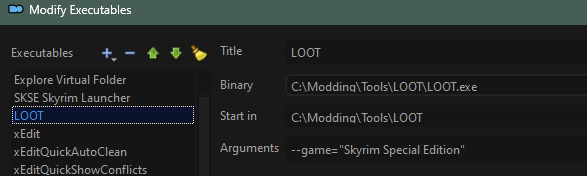
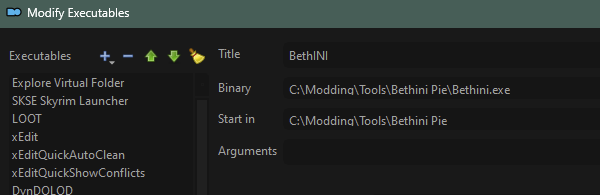
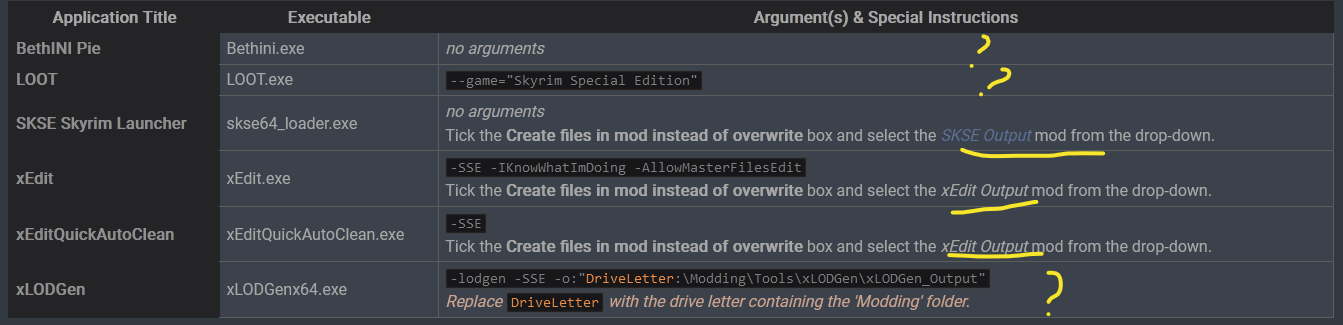
LOOT and BethINI binaries still need to be added as executables as indicated in the Tool Setup table. I think the instructions a very clear, and they've been reworked many times.