z929669
-
Posts
13,086 -
Joined
-
Last visited
Everything posted by z929669
-
Since it's a switch, and the executables are independent, I think it can be used only on the autoclean one only.
-

What does the STEP Lighting and Weather Patch contain/do?
z929669 replied to WryCynic's topic in Step Skyrim SE Guide
The LW patch is same principles as the CR patch but includes different mods in the patch. Tech will fix the LoS lights next update. You can use xEdit to see what records the patches touch. You could CTD if you remove LoS and retain the patch, but maybe not. You can certainly not use the patch, but you would probably notice other lighting issues then. loot may also complain. I recommend leaving it be until we update unless you know how to remove the LoS dependency in xEdit/CK. If you want to add a substitute, it gets even more complex. -
Changing Majestic Mountains (Lightside, Darkside, Main)
z929669 replied to Whitestar127's topic in Step Skyrim SE Guide
Mostly correct, but you DO need to run DynDOLOD again. I suggest: Untick the MM Darkside mod, TexGen Output, DynDOLOD Output, and Occlusion mods in MO in case you want to compare with Main later (you don't even need the MM xLODGen file, since it is 100% redundant with the MM DynDOLOD file, which you DO need ... it works for all MM versions) Rename TexGen/DynDOLOD Output mods with a "MM - Darkside" suffix Delete everything under "TexGen/DynDOLOD Output - MM - Darkside" (except for meta file) Re-run LOOT Install MM Main and tick the mod. Move it to just after the MM Darkside mod (and before the MM DynDOLOD mod) Refresh MO by hitting F5 (to be sure all assets are prioritized correctly before next steps) Run TexGen as normal Create NEW "TexGen Output - MM Main" mod Create NEW "DynDOLOD Output - MM Main" Add to new "TexGen Output - MM Main" mod, and place just after the Darkside one. Tick this mod. Run DynDOLOD as normal Add to NEW "DynDOLOD Output - MM Main" mod, and place just after the Darkside one. Tick this mod. Enable Occlusion mod Run LOOT Launch game & take screens Now you can simply untickall MM Main mods and tick all MM Darkside stuff (MM DynDOLOD is always enabled), run LOOT and launch to get screen compares. -
Thanks for the analysis! Guess we should check the 'bugs' area to see if there's any issues. if not, then we will need to see about what it could possibly replace.
-
Then we either need to switch to the beta or add the switch mentioned previously.
-
So you had the bad ground texture, and your game loaded. Then you disabled the CL terrain mod and the game still shows the bad ground textures? Use More informative Console to find the texture names and sources, then look in Data of MO right pane to find the mod and hide the texture or disable the mod.
-
Nope, Just run the game. The CL terrain stuff is overriding the intended textures. It should just be fixed. Let us know if that's the case and mark Techs reply as best answer for posterity.
-
Great responses. Thanks a LOT for taking the time. I have read through all of the relevant manuals by now, but I can get hung up on phraseology and semantics, so sometimes seeing it explained in a different or familiar context really helps. The good news is that I think I am picking it up with your continued responses and can share what I know likewise ... without spreading misinformation intentionally or otherwise!
-
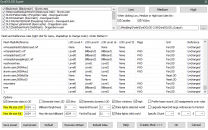
So unrelated to my follow-up Qs just above, I have questions on LODgen efficiency for testing. I want to only generate and use 3D statics and not tree billboards (so that I can determine if any 3D statics are borked without having to guess if I am looking at a tree billboard). I know I need to tick "Tree/Gass LOD Billboards" & 'Render' option in TexGen, but which of the two top options is necessary? I'm also unsure what these settings correspond to in DynDOLOD:

-
Alright, the need to regen makes sense. I wasn't thinking comprehensively. The 3D statics textures are not used directly but rather in the supermeshes (which are used directly), so change to any aspect of the static mesh must then be incorporated into the supermesh during LOD(re)Gen to be resolved in game. Sound correct? Regarding alpha (sorry to rehash what is probably 'basic' prerequisite knowledge): There are potentially two definitions in the static model. One inherent to any textures referenced by the model One defined in the BSLightingShaderProperty (what I assume you mean by "alpha setting on the shader") NiAlphaProperty alpha threshold value affects #1 and NOT #2? #2 on the 3D static is binary, and should only be 0 or 1? Alpha threshold value/16? If the threshold is 128, 64, or 0, what are the relative impacts to the crown appearance in game?
-
@sheson Per the doc, to modify 'fullness' of tree branches in Level0-2 statics, it is suggested that the NiAlphaProperty alpha threshold should be modified rather than the alpha in the BSLightingShaderProperty. I am not noticing any change in Nifskope or in game after changing alpha threshold in NiAlphaProperty of the static from 140 to 0. I also am guessing that the value of 140 is interpreted as 128, due to the cap. I am changing this in the static model without re-running DynDOLOD ... must I regenerate via DynDOLOD to see the change in game?
-
Inaccuracies in STEP 2 and 3 in the guide?
z929669 replied to Whitestar127's topic in Step Skyrim SE Guide
Thanks for the feedback. If you have suggestions relating to particular mods, you can post on the mod topics themselves under Skyrin SE Mods topic (you can find links to the topics from the wiki mod pages). If you have general feedback pertaining to the guide itself, you can post here or on a new topic under this guide forum. -
Which mod? If you read the OP, the 2 effects bug is cited as the most attractive thing about this mod.
-
It may have been one of the magi-related mods Tech recently posted for consideration. Swear I saw it somewhere.
-
No problem. Now to the business of fixing it I guess ...
-
Storm Lightning for SSE - FOMOD is outdated
z929669 replied to Nebulous112's topic in Step Skyrim SE Guide
For posterity:
-
Looks like the snow textures to me rather than LOD. Try using More Informative Console to find the texture and the source in the right pane of MO. Then disable the texture or mod to verify.
-
This is a good description of the pros/cons. We recommend borderless as the most flexible solution, and it facilitates testing situations. It also seems to have good situational compatibility. Run fullscreen or windowed for performance tuning for those having FPS issues. The best mode is probably specific to hardware and GFX settings.
-
SKSE Log reports Incompatible Plugins, but all load correctly
z929669 replied to Vtnarg's topic in Step Skyrim SE Guide
Be certain that each of the mods in the list are updated to current versions. -
Cannot run texgen or dynDOLOD because plugins.txt file is not present
z929669 replied to Darkwrath92's question in General Skyrim SE Support
Follow the System Setup Guide -
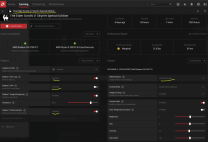
This can definitely happen as a result of driver settings' interactions with the game display settings. I will assume you are using Radeon graphics? If so, see that your settings correspond to the following: SSE Display Tweaks INI: Fullscreen=false Borderless=true EnableVSync=true EnableTearing=true SwapEffect=flip_sequential set the following to your monitor's refresh rate) MaximumRefreshRate=144 FramerateLimit=144 Follow our BethINI instructions, but you shoukld DISABLE Vsync there with the settings above. Probably do not use limiter and vsync stuff in ENB either (untested)
-
I thought we already had the 2 on-hit-effects fix. Forget which mod though. Will need to take a look ... unless you can do this research to confirm what this covers that we do not?
-
Storm Lightning for SSE - FOMOD is outdated
z929669 replied to Nebulous112's topic in Step Skyrim SE Guide
No worries ... are you able to edit mod pages? Then you could make these corrections as you go. We encourage that, so I will give you the necessary perms so you can make such changes. We could use the help! EDIT: See the wiki edit announcement at top of forums for the gist. -
That's a good assumption. @ZXJosh Ensure that you untick that mod as instructed.
-
Storm Lightning for SSE - FOMOD is outdated
z929669 replied to Nebulous112's topic in Step Skyrim SE Guide
OK, now I see. Should be good. thanks!