z929669
-
Posts
13,086 -
Joined
-
Last visited
Everything posted by z929669
-
Yeah, slowing the game a bit seems like a good thing. I personally like 10 min, but 15 is a nice compromise.
-

ACCEPTED Iconic's Remastered Paragon Gems Retexture
z929669 replied to Greg's topic in Skyrim SE Mods
Thanks for the shots. I like Iconic's for sure, and either gold or bronze seem to be a nice replacer for vanilla. I prefer the crispness of the bronze but I like them both. -
New Profile. Now Letterbox on sides, can't change in ini.
z929669 replied to Darklustre's question in Mod Organizer Support
You are suffering from a classic conflation of "too many factors". Please read and follow our setup guide to get a stable base game and to configure modding tools correctly. Understand the differences in how MO can be installed and used. Understand how profiles and 'instances' work. Copying a profile versus creating a new one. Installing and initializing Skyrim for the first time. -
You need to find that out for yourself. Every PC environment is more-or-less unique. SSE Display Tweaks is the best GFX & Havok-fixing mod I know of, so you should be using it. What I'm saying is that it has several key settings that can fix the wild frame-rate and lagging issues that more modern systems can experience running Skyrim. I had the same sorts of issues, and my PC is pretty beefy. Turned out it was related to how I was capping my frame rates and using vsync. The game config files, driver-soft settings, and any number of mods can redundantly set these things and 'break' them (e.g., ENB, grass mods, SKSE mods, etc.). SSE Display Tweaks helped me to resolve them. Read through the settings and look at SwapEffect setting. I have it at 'auto' now, but flip_sequential also worked for me. Set your INI according to the recommendations I linked, and carefully read through the SSE Display Tweaks settings. Don't invoke a bunch of your driver-soft settings just because they seem 'good'. Skyrim is not a modern game and cannot benefit from much of that. More is not better. Rule out all of the potential factors disrupting your game by making things solid and stable BEFORE you begin generating LOD. Get vanilla running perfectly before you begin installing a bunch of mods. Then begin by installing only foundational mods, extenders, and fixes. Test along the way. Otherwise, it becomes very difficult to pin down your issues. I recommend disabling all LOD mods and getting your general config and mod list in order. You should also NOT be using an ENB until base game, mod list, and LOD are all working properly. It's an iterative process.
-
Sounds like GFX settings. For Skyrim, I hand off almost everything to the game and don't use any driver software to manage AA/AF or texture optimization, etc. I do use driver-soft for vsync though. You might want to look at SSE Display Tweaks SwapEffect and frame limiter settings. Sounds to me like these might be the issues. Occlusion helps rather than hurts performance.
-
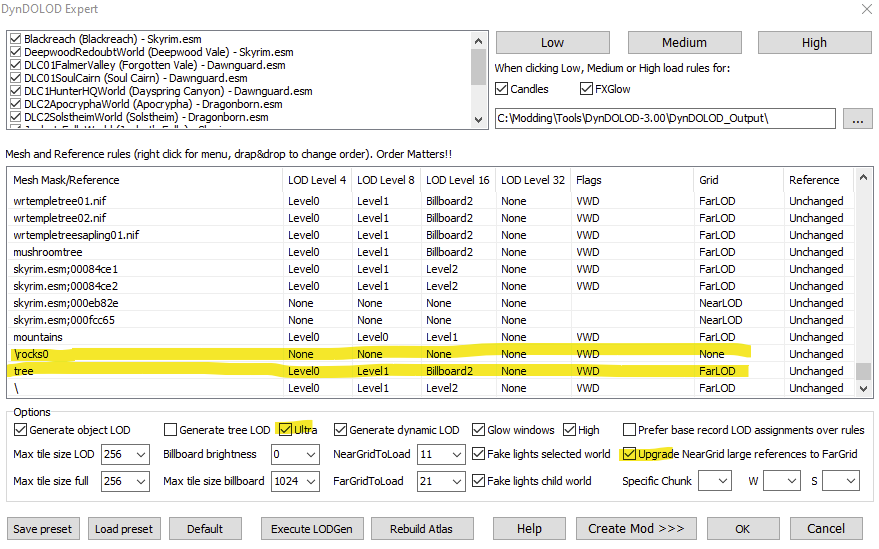
There are many performance options with DynDOLOD and Skyrim in general. First step is to modify your game INI settings ... you can use BethINI or the Skyrim Launcher to select between low/medium/high/ultra presets. Doing so modifies various settings automatically (like view distances that DynDLOD also uses). I am currently writing instructions for this in our development guide. With DynDOLOD, you can also do many other things. Using the low/medium/high presets in that adjusts many mesh rules that help. Unchecking 'Ultra' (no more 3D trees though) and Upgrade NearGrid references to FarGrid improve performance. I use 'high' setting and add the following mesh rules (changing LOD Level 8 to Billboard/Billboard2 for 'tree' should improve performance though): Grass LOD config changes can also help ... again this is a WIP and not finalized. Also will need sheson's vetting once I'm done. Lastly, look at the OPs on this thread for sheson's recommendations for DynDOLOD 3 ... and also read through the many, many help documents in the DynDOLOD subfolders.
-
I made the adjustment in those instructions.
-
If you skim our LODGen instructions, you will find that there are three (four) basic steps to the overall LODGen process. Terrain, (texture-prep,) objects, and occlusion. DynDOLOD 3.00 changes (texture-prep) and object LODGen (so you can use this for general guidance, but the specifics are different, since this applies to TexGen/DynDOLOD 2.xx), but terrain and occlusion are both handled by xLODGen application, which hasn't changed. DynDOLOD also can do occlusion, but the doc recommends letting xLODGen do it. Keep in mind that these instructions pertain to the Step SE 1.0.0 mod list, but the general process applies.
-
@Greg Thanks for adding that bit. I didn't think of it, and it could be the issue. Much faster to resolve than perusing each of the sources. Also, did you know MO has a theme switcher now with at least one dark theme? No need for that horrific white nonsense anymore
-
It sounds like you grabbed the wrong version(s) of the software. Exactly what part of LODGen process is failing? There are 4 steps (terrain [xLODGen64.exe], TexGen [TexGen64.exe w/DynDOLOD], DynDOLOD [DynDOLOD64.exe], Occlusion [xLODGen64.exe]), and all of them rely on the 'LODGen' app but come packaged with their own compatible versions of that. These downloads also can have multiple versions specific to different games (SE/LE/FO4/etc.) Please look back at each section under LODGen in the guide (and 03-Resources and Tools in the Skyrim Sertup Guide) and follow those links to the Nexus or posts with the software. Some of the sources have multiple downloads, so you need to carefully read the instructions/links.
-
Damn. I missed that update. I will test again with that. I was using what you last linked me to a few days ago.
-
I don't think #2 is possible, but I haven't researched.
-
So it happened again first during DLC2SolstheimWorld ... event: Faulting application name: xLODGenx64.exe, version: 4.1.3.1, time stamp: 0x6075af33 Faulting module name: xLODGenx64.exe, version: 4.1.3.1, time stamp: 0x6075af33 Exception code: 0xc0000005 Fault offset: 0x00000000013e6ef9 Faulting process id: 0x43e4 Faulting application start time: 0x01d742d3018be86e Faulting application path: C:\Modding\Tools\xLODGen\xLODGenx64.exe Faulting module path: C:\Modding\Tools\xLODGen\xLODGenx64.exe Report Id: f4007d5d-7708-4b79-a39e-22136aa898e1 Faulting package full name: Faulting package-relative application ID: ... so I deleted log and tried again. Then it quit during DLC2ApocryphaWorld. LODGen_log.txt ...and here is the event for that: Faulting application name: xLODGenx64.exe, version: 4.1.3.1, time stamp: 0x6075af33 Faulting module name: KERNELBASE.dll, version: 10.0.19041.906, time stamp: 0x2f2f77bf Exception code: 0x0eedfade Fault offset: 0x0000000000034b59 Faulting process id: 0x4c3c Faulting application start time: 0x01d742d62b3eee1d Faulting application path: C:\Modding\Tools\xLODGen\xLODGenx64.exe Faulting module path: C:\Windows\System32\KERNELBASE.dll Report Id: 898e25e3-3dfe-4676-8526-54fc327ae45f Faulting package full name: Faulting package-relative application ID: I'm not seeing a bugreport.txt
-
Step SkyrimSE Patches (by Step Modifications)
z929669 replied to TechAngel85's topic in Step Skyrim SE Guide
Ahh, makes perfect sense. Virtually earmarked to remove the unneeded config file from the CR Patch mod. -
Step SkyrimSE Patches (by Step Modifications)
z929669 replied to TechAngel85's topic in Step Skyrim SE Guide
Agree with your conclusions ... so the INI in the Step patch is neither a gain or a loss, but redundant. Interesting that we have 13 NPCs total without Step/Step patch/mod and 8 total with in both cases. This may indicate that the mod/Step/Step patch prevents 5 NPCs from coming to the inn at all during your testing time frame. -
I have reported your comment so that TechAngel85 can chime in here. I'm no xEdit guru myself and cannot speak to these switches. In the meantime, some illumination or a pointer to relevant sources would be much more helpful than a curt statement. There is mention from other non-authoritative sources like this. Being rid of the 4 sec warning is a boon in and of itself, which seems to be why most people use it and probably why it was added to the guide. I never saw any value in the added barrier. Indeed, even more official doc doesn't describe the risks. I assume that one could break the plugin or the game and cause undue support queries ... but does the gate REALLY prevent this? EDIT: sorry, I was composing this as Tech was responding ... obviously, I echo his sentiment.
-
Agree, but it's not the light source but the particle aura that is perplexing. We both have the light sources but not the aura. Are such lighting auras dictated by the plugin or the mesh or both?
-
@Greg Agree. The only things that could be causing the aura are the game INI settings or more likely the Texture Filtering in the display-soft settings. Maybe try turning them all off if possible to see if the aura disappears. Otherwise, I'm stumped.
-
Check my previous post, and examine your LOD distance settings as described.
-
First, follow all of the instruction sheson advised, but do note that some of your Skyrim INI settings are pretty far off from what we recommend in our guides. DynDOLOD MCM uses [terrainmanager] settings from the game INIs at first load of a new DynDOLOD under a new game in my XP. The LOD distances you have set are significantly lower than my own in some cases, and your multiplier is 1/8 of what we recommend (4.00, which I think is also mentioned somewhere in DynDOLOD doc). Please try following our BethINI instructions for basic game INI setup so that that is not a contributing factor. This will get your view distances set at a reasonable 'medium' baseline (you can fine tune later). We also have basic guidelines for LODGen using DynDOLOD 2.xx. The general principles and UI are very similar under DynDOLOD 3 alpha. None of this instruction pertains to grass LOD, but it should help you get the basics situated and reduce the 'noise' of these other issues so that you can focus on your original grass problem.
-
Step SkyrimSE Patches (by Step Modifications)
z929669 replied to TechAngel85's topic in Step Skyrim SE Guide
I'm not sure if the version of that mod that was available when we constructed the current guide and if it was fully compatible with AI Overhaul at the time. There could be other reasons why @TechAngel85 added the compatibility INI to the patch. Either way, I suspect this will not harm anything, but you can obviously disable the compatibility INI if you want to verify it fixes your issue. Please post back to confirm if that's the case, and we'll then have a good reason to remove it. -
Could be the texture. We don't use that mod for various reasons. One reason is that whenever all textures are batch reprocessed, there are inevitably artifacts introduced here and there. I still think it could the mesh though, and a mod could be adding the mesh to the vanilla object. It can be tricky to click what you intend with More Informative Console in certain situations. Get really close and crouch if that may be the case here. The mesh name should show up at upper left in MIC. Then you can search for it in the right Pane of MO under Data tab. If it's in the BSA, it won't show up here, so try disabling the mod to confirm.
-
Bright Shrubs and Juniper Trees
z929669 replied to gmahadhika91's question in General Skyrim SE Support
Cathedral Weathers works fine, but some mods may use meshes that look strange under certain weathers and/or under ENB. This can happen with any weather mod. It's probably more of an issue with the mod mesh. That doesn't look like a juniper to me, so use More Informative Console to determine the mesh and find source in MO Data tab of right pane. The mod author may provide ENB-friendly meshes -
ENB can cause this. If you use an ENB, try switching off in game using Shift + F12 to test. Otherwise, you can adjust grass color via DynDOLOD_SSE.ini and grass billboard direct/ambient brightness in TexGen to compensate. It's probably also exacerbated by certain weathers.
-
That looks like a mesh issue if it isn't water or oil. Hard to tell from that shot. Use More Informative Console to determine the mesh and it's source from the Data tab in MO right pane. Then try disabling the mod to confirm.