z929669
-
Posts
13,086 -
Joined
-
Last visited
Everything posted by z929669
-
I use this one, and it's very handy ... although I have not set it up completely. If you care to install this with all three of the mods mentioned as we have them configured in the guide and tweak around to see what you find out, that would be helpful. I mostly do targeted mod config and testing outside of standard gameplay and likely have not had issues because of that; however, I suspect it's just a matter of configuration to get all of these working properly together (I just don't have time to test the unsupported setup with controllers): https://www.nexusmods.com/skyrimspecialedition/mods/5682
-
This generally isn't necessary, but it's good practice, especially with a modded setup. Whenever you are in a dungeon or any non-worldspace cell, you are technically 'indoors'. If I really care about a save game, I will typically go into a mundane, small NPC home. Anything is less problematic than outdoors. It is related to scripts, timers, and triggers in effect, and there are always a lot more of those outdoors or in very active cells.
-
Try loading the last save, and go into a interior cell (indoors) before saving. Do nothing else. Then try to load that save. If it loads fine, talk to the NPC and go indoors again to save. When modding a game, it is important to save your mod-manager profile before changing your setup if you have a save that is important. In MO or Vortex, this is easy. Then you make your changes in the new profile. If there are issues, you can easily go back to your previous profile as a fallback. There are ways to check and troubleshoot the problematic cell, but that's complicated. That error is essentially meaningless and unhelpful, IMO, since the count is identical. Others may have specific advice for this error. I don't play so much as mod, so saves are not really anything I care much about for my own games.
-
Always save indoors as a first measure when trying to fix. Always use uGrids 5 if that has been raised. What exactly changed between your setup that generated that save and your current setup? Reverting to that previous setup should resolve, and then you can go from there, adding changes piecemeal.
-
How do you know controllers are not compatible with these mods? I think some workarounds have been posted for issues with these mods and controllers if you search these forums. I use a xBoxOne controller and have found no issues. I also use a remapping mod for that controller. Sounds like you need to mess with your configuration. We don't support controllers (or mention them) because there is so much variation in what people use and how they may or may not want use it. The mod you are suggesting has no clear description. Why use SkyUI if you are going to hide its menus? SkyUI makes the vanilla menu system much more efficient and usable on a PC in our opinion (which is why it is recommended and the most highly endorsed SkyrimLE/SE mod of all time). I don't see any rationale or before/after screens that would make me want to use that mod. Seems like a personal choice (for whatever seemingly-illogical reason).
-
Discussion topic: Pine Branches Redone by TheSithLord Wiki Link Looks like a promising optional enhancement to EVT and vanilla trees in general Doesn't look right with EVT. Causes duo-tone branch colors, darker on top.
-
What version of EVT are you using? SLE or SSE? If generating LOD for SSE, be certain to use latest SSE version that has been updated for use with DynDOLOD 3, and Billboards Generator is not needed with this mod (and is obviated by TexGen 3), so any output created from that is not needed. I can't speak to SLE version. EDIT: I see you are using SLE version, so you can disregard above statement/advice.
-

Can Not Copy Resource / The system cannot find the path specified
z929669 replied to ravenRpg38's question in DynDOLOD & xLODGen Support
It's always possible that OS updates will throw a wrench into things. I get them and haven't seen this issue, so it could be UAC if install path is in "Program Files", etc., or that I have disabled Windows Security and Defender (I use ESET) ... not at home now to verify, and I forget. As you know, some people say they do things but they don't actually do them correctly or jump to conclusions ... or there is some other related issue with their setup. I find this post to be the best procedure to share: ... I may just add this to our guides as well. -
That should work fine, but @Majorman will need to confirm to be certain. You should just install and enable it and sort with LOOT to test. You can simply disable it in MO if there are problems. EDIT: to be safe, use it only for testing and disable afterward (until Majorman confirms). Always sort your mods whenever plugins are added/removed/enabled/disabled
-
Which is exactly what people will learn when searching the forums for "cannot find the path specified" It's as easy as falling off a log
-
Can Not Copy Resource / The system cannot find the path specified
z929669 replied to ravenRpg38's question in DynDOLOD & xLODGen Support
Or exclude the files as described in "best answer" on the two answered posts i linked. Windows will always update Defender and Windows Security, so excluding the relevant files should be simpler and less maintenance. -
When it fails to load, are you starting new or loading a save? These issues can always come from a save game that depends on different plugins or load order. Always test by launching a new game to be sure.
-
Can Not Copy Resource / The system cannot find the path specified
z929669 replied to ravenRpg38's question in DynDOLOD & xLODGen Support
This is what has been mentioned. Just above, sheson linked the fix someone else posted: ... I just marked it as best answer on that topic ... and on this one: -
Can Not Copy Resource / The system cannot find the path specified
z929669 replied to ravenRpg38's question in DynDOLOD & xLODGen Support
All, this is like THE most common error people are reporting. It's most likely related to Win OS UAC or AV. You will need to install the tools in a location that is not under UAC control and possibly set an exception for TexGenx64.exe (and possibly DynDOLODx64.exe) in your AV. See System Setup Guide and search the DynDOLOD topic for "system cannot find the path specified" This issue has been reported at least 50x as have the resolutions. -
You can adjust the grass lighting in TexGen for overall brightness of grass billboards specifically. I have found that setting ambient from default 160 to 145 works well with ENB (depends on ENB settings). Even better is to ALSO adjust the grass lighting by channel for upper/lower in DynDOLOD_SSE.ini. Increase red and decrease blue for upper, and subtract at least 0.010 from all of them. For lower, decrease red a bit and also subtract about 0.010 from all three. Then regen. You will find that this looks much better. Weather can still potentially cause minor issues with matching, but playing with these settings resolves it almost completely.
-
If I'm not mistaken, your rule additions have conflicting priority with the default preset. I believe that you could use a spreadsheet to interleave your custom rules with the default, merging and renumbering in the wanted priority. You will need to remove default rules matching your new ones also, I'd say. Seems faster than inputting via the gui anyway. Oof ... I guess I didn't know that the preset INIs allowed 'append' of custom mesh rules via mod-included rules. Duh. I assumed that the line numbering like "LODGen 202" actually indicated priority ... but it seems like it's just a line counter that must update internally (without duplication) when eternal rules are appended/injected/interleaved.
-
Yeah, those are the records I found frequently (in addition to this one) in a random quick scan in xEdit with all 2.0.0 activated. Looking at Smooth Shores.
-
At least this mod is in active development. It would be great if it incorporated Smooth Shores edits and all were patched with MM, RWT, USSEP, etc.
-
Yeah, just looked at the mod more carefully. Lots of conflicts with Realistic Water Two as well as USSEP and many others. Too bad it's abandoned. Looks to be about 75% completed. Nothing in the icy shores is fixed though. Looks like it will never be updated unless someone takes it over.
-
Where to look for these 'holes'? All over or in certain areas? Does it edit river shorelines too? I hadn't noticed anything, but I also haven't been looking at shorelines. EDIT: Nevermind, I see that the author is tackling river shorelines, too. Looks like it's a WIP, so if it gets finished, that would be a plus. People usually quit these big projects before completing. This may be why nobody is patching for it ... yet. I can imagine that it will conflict with many mods though. LSaWF addresses a ton of issues that this mod will likely never touch, so it would seem that they should be patched. Curious why this is in Locations rather than Fixes
-
SKYRIMSE Skyrim SE crash on startup with MO2
z929669 replied to KanickelKanone's question in Mod Organizer Support
No problem. Glad it helped -
SKYRIMSE Skyrim SE crash on startup with MO2
z929669 replied to KanickelKanone's question in Mod Organizer Support
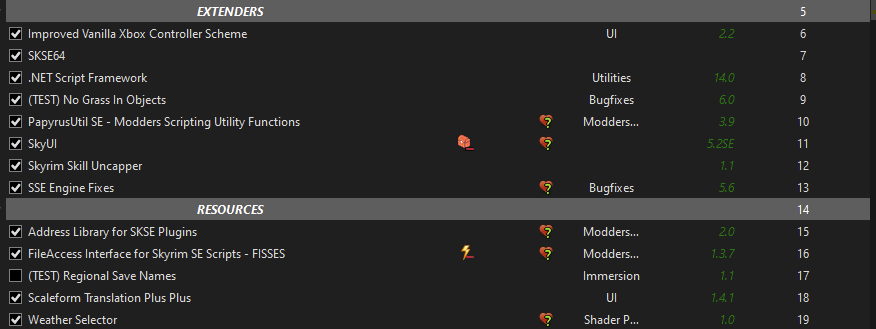
MO2 should be installed outside of any location under UAC authority, so as long as the program is installed this way, you are good. Using an 'instanced' install (recommended), MO2 will create resources and profiles in %LOCALAPPDATA%/ModOrganizer, so that's OK. As instructed, set up a default vanilla Skyrim profile and ensure that you are able to launch the game via MO2 without any mods at all. Then install SKSE64 and see that you are able to use the SKSE launcher to launch via MO2 under the vanilla profile. Then you can try using your podded profile in the same way. If you crash, then you probably have something installed incorrectly or wrong version. This process will rule out any issues with game, MO2, and SKSE64 installation. From there, you will need to disable all mods in your intended MO2 profile and ensure that it starts up fine. Simply enable mods in groups from extenders and foundation mods on up, until you find what's causing the crash. You can also look for crash logs under .Net Script Framework. The following are the foundational mod types that you should have installed at lowest priority that you want to ensure are working properly (you don't need the xBox controller mod or the Weather Selector mod, but the rest are pretty standard:
-
SKYRIMSE Skyrim SE crash on startup with MO2
z929669 replied to KanickelKanone's question in Mod Organizer Support
First off, you shouldn't run MO2 as admin, so you can reset that. Second, you must launch Skyrim from the Steam launcher before trying to do so with MO2. This establishes all of the registry settings and initializes the game. Read through our System Setup Guide to verify that you have completed all necessary steps to properly setting up your environment. -
Well I see an issue in the mod list. The ESP, BS_DLC_patch.esp, is loading before other ESMs. Not sure what the patch is, but you should be sorting with LOOT regardless. You are also running Wyrnstooth and Falskaar, so new lands can cause issues with compatibility with 200+ mods installed. Try disabling some of those big mods if sorting with LOOT doesn't resolve.
-
Sounds like an INI issue that @DoubleYou may be able to help with.