Greg
-
Posts
2,936 -
Joined
-
Last visited
Everything posted by Greg
-

CTD outside of Riften - Unhandled exception "EXCEPTION_ACCESS_VIOLATION"
Greg replied to TheCashman's question in General Skyrim SE Support
It looks as if game is trying to apply a lighting shader to lod\ice\icebergsmall02_lod.nif so do what @duy123a says and re-run DynDOLOD to see if this solves the problem. -
Is this the most demanding visuals oriented mod list available?
Greg replied to rask's topic in Step Skyrim SE Guide
You'll need the Anniversary Edition (all of the Creation Club content) from Steam and the guide is written for the latest version of Skyrim Special Edition available on Steam. If you have the Anniversary Edition (all of the Creation Club content) with an older version of the game's executable, you may need to carefully go through the various SKSE plugins in the guide to find ones that work for your version of the game's executable. Also note that we do not support installing the guide on older version of Skyrim Special Edition. -
Sounds fine to me and I agree that the gas masks are not really worth using.
-
Terre's 4K Fur Textures for CoverKhajiits (by JazzJr and Terreflare)
Greg replied to CorneliusC's topic in Skyrim SE Mods
I prefer option 2 for both male and female. I might be persuaded to go with option 3 for female, but I'm not much of a fan of the CK male head either. -
FPSL - Lighting and Tweaks Performance (by Droname)
Greg replied to DoubleYou's topic in Fallout 4 Mods
I'm letting Workshop Rearranged win the conflicts on the activators, but I think the same applies to Furniture/000DB83B WaterPump01Furn that increases water from 3 to 15. I'm overriding this in my patch to revert it to vanilla. It looks as if all these edits are increasing output and decreasing power requirements. -
LOOT Cleaning Creation Club Content
Greg replied to Kattmandu's topic in General Skyrim SE Discussion & Support
These weren't originally tagged in the LOOT masterlist because the LOOT team probably hadn't gotten to them yet or hadn't received reliable information to add to the masterlist from contributors. The LOOT team is also maintaining the masterlist for a lot of the mods on nexus and it's a lot of work. -
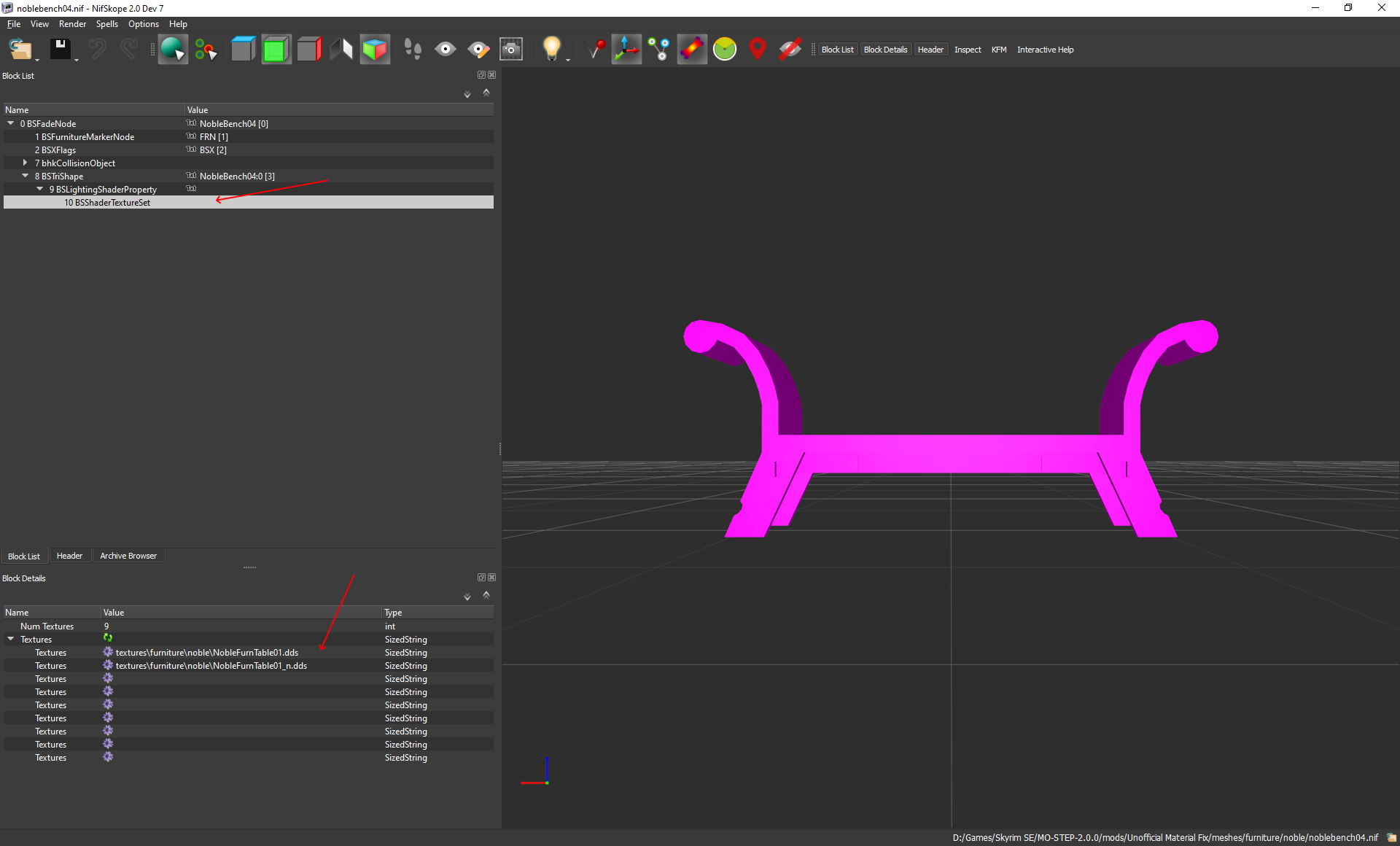
It may be confusing due to the name, but CandelHornTable01 is the candle horns that are placed on top of the table. You should look at the table itself and I believe the mesh should be in meshes\furniture. Once you know which mesh it is, you'll need to open the mesh in nifskope to find the name of the textures. I think the textures are in BSFadeNode/BSTriShape/BSLightingShaderProperty/BSShaderTextureSet.
-
ECO (Equipment and Crafting Overhaul) - FIS (FallUI Item Sorter) patch
Greg replied to Greg's topic in Fallout 4 Mods
Removed from testing. This is an older patch for FIS1 and ECO 3.3.7 that is not necessary when using FIS2 and ECO 3.5. -
Use File Explorer to browse to the D:\Program Files (x86)\Steam\steamapps\common\Subnautica folder to verify whether doorstop_config.ini actually exists. If this file doesn't exist, you'll need to figure out how to get Subnautica to create this file. As z929669 mentioned, this is normally done in Bethesda games by running the launcher from either Windows or Steam. With Bethesda games, this is e.g. SkyrimSELauncher.exe that has the options to configure the resolution and other settings. I'm not familiar with Subnautica.
-
ACCEPTED MCM Categorizer - Sorter Folder Categories (by m8r98a4f2)
Greg replied to Greg's topic in Fallout 4 Mods
I think so, too. I added a FallUI category that includes all of the FallUI and FIS mods and an MCM category that includes all of the MCM and Hotkey mods. It's actually really easy to work with and the MCM menu seem to be so much easier to navigate with just these two categories. -
ACCEPTED MCM Categorizer - Sorter Folder Categories (by m8r98a4f2)
Greg posted a topic in Fallout 4 Mods
Discussion topic: MCM Categorizer - Sorter Folder Categories by m8r98a4f2 Wiki Link I really like the ability to create collapsible folders to group mods in the MCM menu. See the screenshots on the mod page. -
I added the mod authors to the title for you.
-
Option to generate grass billboards greyed out in TexGen
Greg replied to Chlam's question in General Skyrim SE Support
Can you select Grass after you unselect HD Grass? -
Skyrim Realistic Overhaul Update not merging with regular files
Greg replied to fartooloud's question in General Skyrim SE Support
I usually install part 1, name it "Skyrim Realistic Overhaul" in the install dialog, copy the name to the clipboard, and just paste that name into all of the subsequent parts and updates. -
Discussion topic: M8r98a4f2's Complex Item Sorter by m8r98a4f2 Wiki Link This is a set of xEdit scripts that can be installed as a mod in Mod Organizer. Run the included "Complex Sorter.bat" to run xEdit with the Complex Item Sorter scripts, select the options, and click Generate Patch to generate a patch plugin.
-
When you post mod topics, use the Step icon (triangle looking thing) in the toolbar. It's the next to last icon.

-
Will it be possible to update from 2.1.0 to 2.2.0 ?
Greg replied to TadasTheLithuanian's topic in Step Skyrim SE Guide
The changelog just notes which mods are added or removed from the guide. You may still need to refer back to the guide if the mods added to the guide have custom instructions or to verify the position of the mods. You might make it a bit easier by opening the guide and then opening the changelog in a new tab so you can tab back and forth if necessary. -
There seems to be a conflict with the candles on the table in the Sanctuary house with the workbench. If I enter workshop mod and try to select the coffee table with the candles, it shows I'm selecting the candles instead of the table and I can't move the table.
-
I think Genuinely Intelligent Soul Trap already fixes the issue for underfilled soul gems and DoubleYou may be correct that some of these conflict with other mods in the guide. EDIT: I seem to recall we have another mod that automatically equips arrows/bolts when equipping a bow or crossbow and this behavior may conflict with Equip Best Ammunition. I just don't remember whether it always equips the last arrows that were equipped or whether it allowed linking arrows to each bow (equip iron arrows with an Imperial bow or equip ebony arrows with a more powerful bow).
-
Unlimited Bookshelves Mod Page L.O. Instructions
Greg replied to Berzerkernox's topic in Step Skyrim SE Guide
Just sort with LOOT when you get to the point where the guide instructs to do so. Any conflicts (if any) should be handled in the CR patch. -
I think the screenshots on the left may be downstairs and the screenshots on the right may be upstairs. I'm sort of guessing as well, but I see the two screenshots on the left have a chair to the left of the fireplace and the screenshots on the right do not include that chair. @CorneliusC it generally helps to organize screenshots with one object per row with text above each row to document what you're comparing something like this: Downstairs: Step (Goldenhills) > Goldenhills + Embers XD Upstairs: Step (Goldhills) > Goldenhills + Embers XD
-
ACCEPTED Audio Overhaul for Skyrim SE (by DylanJamesWasTaken)
Greg replied to TechAngel85's topic in Skyrim SE Mods
This one may a tricky because the new version contains a plugin that contains many of the same records in the old version so it may not be as easy as removing the overrides/forwards from the CR patch and then installing the new version in place of the old version. I suggest doing this in a copy of your existing profile just in case. You should already have a mod named Audio Overhaul Skyrim (3.3.2) and the new version defaults to Audio Overhaul Skyrim (3.9.1), so install the new version, let it use the default name so it installs as a new mod (don't overwrite or replace the 3.3.2 version) and do not check/activate the 3.9.1 version yet. Move the 3.9.1 mod so it's just below the existing 3.3.2 mod. Run xEdit and load only the Audio Overhaul Skyrim.esp plugin. Once loading is complete, right click Audio Overhaul Skyrim.esp, select Compare To, and browse to and select the 3.9.1 version of Audio Overhaul Skyrim.esp. This should be in the mods\Audio Overhaul Skyrim (3.9.1) folder in the profile and is probably in %APPDATA%\ModOrganizer\profile_name. You should see the 3.9.1 version load with a fake name like Audio Overhaul Syrim00.esp just below the 3.3.2 plugin. As you browse through all of the records in the 3.3.2 plugin, note any changes in the 3.9.1 plugin and record all records that are removed in the 3.9.1 plugin. it looks as if the 3.9.1 versions removes records in the Weapon group and all records in the Region group with the exception of AudioIntCustom_AOS. I may be overlay cautious here, but I'd keep good notes the changes and records that are removed. Once complete, exit and rerun xEdit. If the CR patch has Audio Overhaul Skyrim.esp as a master, you can load only the CR patch; otherwise, I'd load everything. Now go through the records that were removed in the 3.9.1 version to see if any of these records are overridden by the CR patch. If these are overridden in the CR patch, look closely at the CR patch to determine what exactly is overridden. You can remove the record from the CR patch if it is overriding only AOS; otherwise, revert the AOS changes to vanilla. Exit xEdit and save the CR plugin when you are finished. Activate the 3.9.1 plugin first and then deactivate the 3.3.2 plugin. I do it in this order to keep the plugin in the same position in the right pane. Now run xEdit and carry forward any necessary changes from the 3.9.1 plugin into the CR patch. You can also remove any overrides from the CR patch if these are no longer necessary. -
Enemy (R)Evolution of Skyrim - EEOS Installer has been archived
Greg replied to Berzerkernox's topic in Step Skyrim SE Guide
It's still there in Old Files when I just looked at the mod page just now. -
I've seen it mysteriously autogenerated on a few occasions when I least expected it and I never really attempted to track down what creates or it why. I think BethINI has an option to Modify Custom INIs, but I leave it unchecked and I usually run BethINI once during initial setup of a new profile. I also agree with DoubleYou that the SkyrimCustom.ini doesn't seem to be all that useful because it can't override anything in SkyrimPrefs.ini.
-
If I'm not mistaken, the landscape fix for Tundra Homestead is in the Unofficial Skyrim Creation Club Content Patches.