Mousetick
-
Posts
1,263 -
Joined
-
Last visited
-
Days Won
113
Everything posted by Mousetick
-
No idea, sorry. I don't use any of the ENB and Post-Processing stuff. But it could be related. You may want to explore/experiment in that direction. It could be a waste of time. Have you ever visited that area before in your playthrough? In other words, has it ever worked before you made whatever changes that broke it? Or are you discovering now that it never worked? Also, have you tried without DynDOLOD? If you have not, I'd suggest you do. Make sure to follow the proper procedure for disabling DynDOLOD. See if you can reproduce the crash once you've made your 'clean save' and disabled DynDOLOD plugins.
-
Check in MO2 where meshes\lod\ice\icebergsmall02_lod.nif comes from. Some of the mods you recently installed may have replaced it with a bugged version. Also, is this 100% reproducible and the same crash log every time?
-
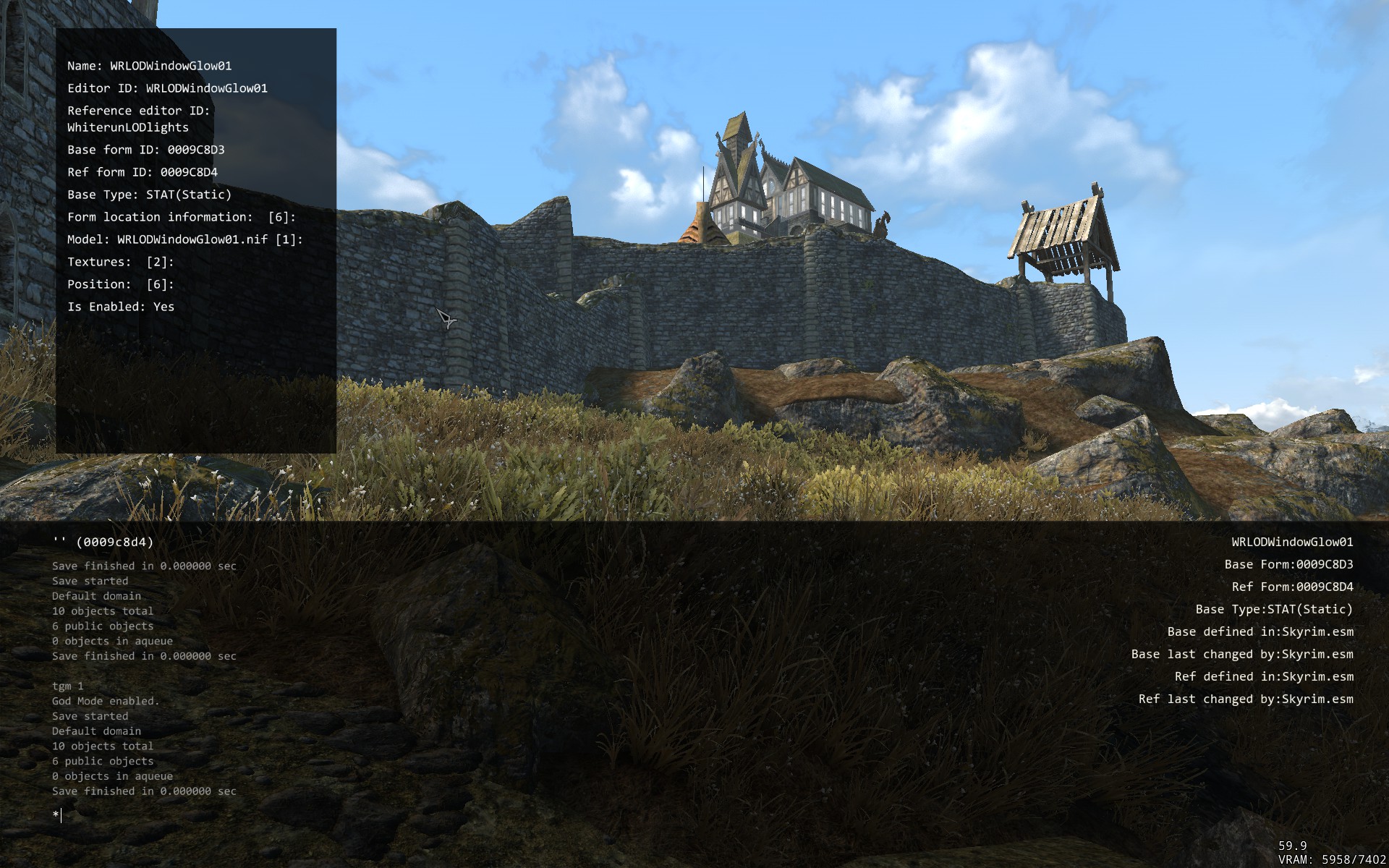
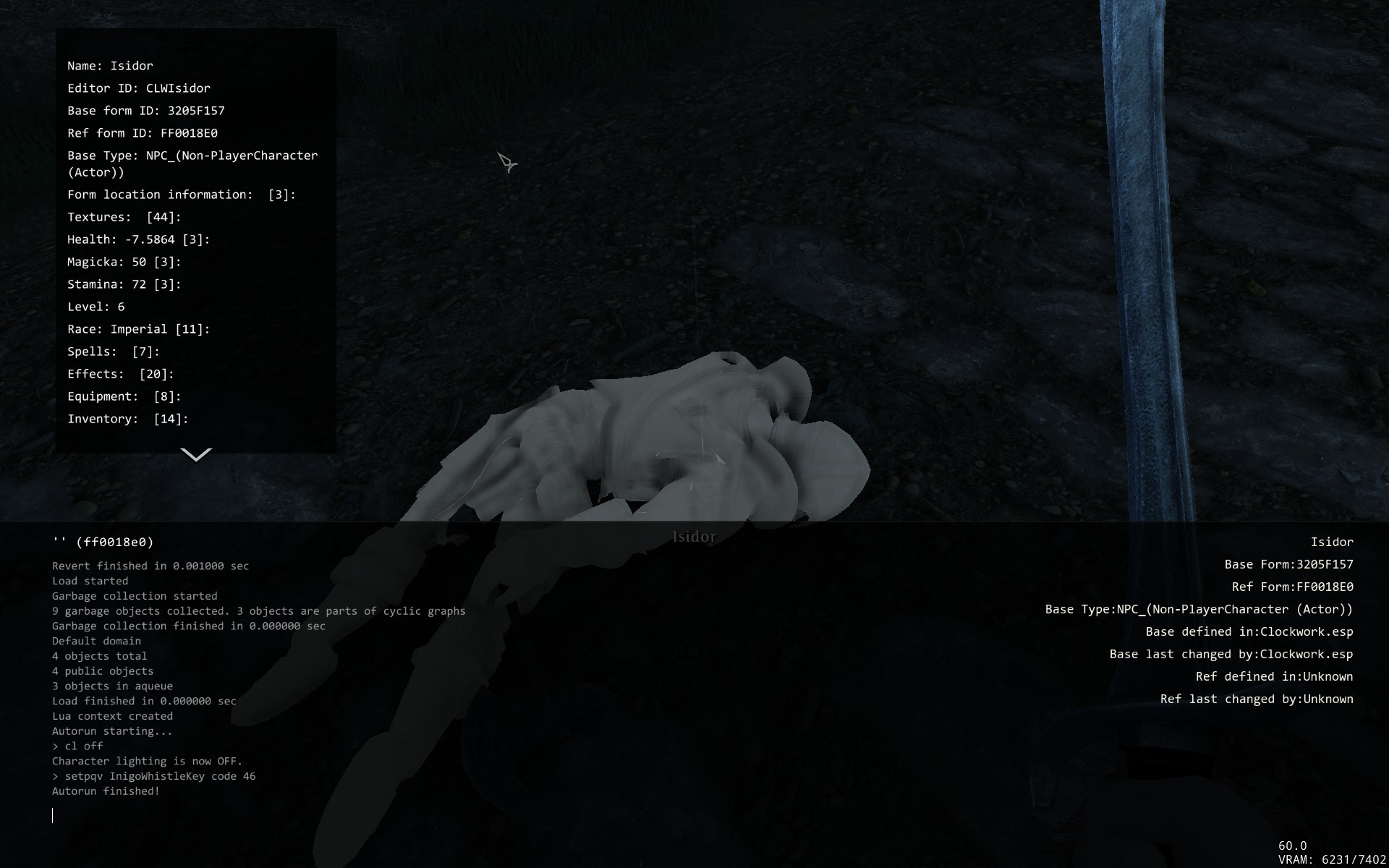
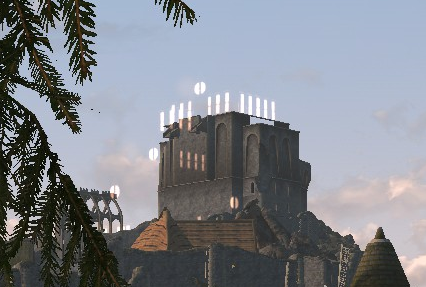
As ridiculous as it may sound, I actually did but from my vantage point most of it wasn't visible. I could definitely see it was a vanilla object through-and-through and took a screenshot. Then I got distracted with the artifacts on the lod treetops. I've now looked at the model in NifSkope and it all makes perfect sense. Sorry for bothering you... this was indeed a really stupid question. Thanks for your patience. Side-note: I use a mod that highlights selected objects in the console, painting them in transparent white - very useful in general, but not on white glow objects. Here it is: https://drive.google.com/file/d/1GORwmN43Uy0LC4EXq5ogPv89azwTAz7s/view Thanks.
-
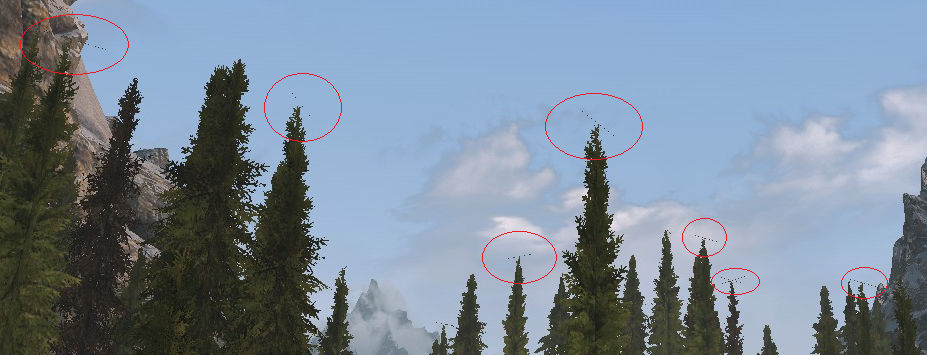
I hate to be a pain in the bottom, but I'd appreciate if you wouldn't mind answering my earlier questions: Ok, that's good, better that than ugly z-fighting. But what I'm not understanding is: why is the glow visible at all? I didn't select the 'Glow windows' option on the DynDOLOD generation panel. Is Dragonsreach an exception? Or you could tell me to stop asking stupid questions and RTFM, that'd be fine too. Thanks in advance, either way Form id of one of the base trees is 000B927A <TreePineForest01Dead>. The specific reference I picked is 00019125 along the Whiterun/Riverwood road. The base record is modified by a custom plugin to tweak the animation settings, the rest is vanilla Skyrim.esm. The reference is modified by the same custom plugin to make it x1.2 times larger, the rest is vanilla Skyrim.esm. Full logs here: https://drive.google.com/file/d/1LEfGV8BFFUbhPUlXNgrjP0bhpJaYTqVI/view Edit: I figured the next thing you'd ask to look at are the billboards for 000B927A <TreePineForest01Dead>, so I put them there: https://drive.google.com/file/d/1S_X_8SbElowX1lwIyyuudyMkfWhAuirn/view. Thanks. No this is LVT (Lush Vanilla Trees) with texture replacers that only work with vanilla branch meshes, so wouldn't work with EVT, as per textures MA. All you guys are discussing and suggesting sounds very interesting, but I can barely understand a word of what you're saying!
-
Large Reference Bug Fix Explained
Mousetick replied to z929669's question in DynDOLOD & xLODGen Support
Perhaps. As mentioned in the instructions "This duplicate doesn't strictly need to be in LRFix.esm, it could be created into any other plugin, including BadPlugin.esp itself." Creating new Temporary references in a master plugin is more efficient for the engine than adding them in a patch plugin. Temporary references added in a patch plugin are always loaded in memory whether they are used in active cell or not, like Persistent references. By contrast, Temporary references added in a master plugin are loaded in memory only on an as-needed basis, i.e. when they are used in an active cell, and unloaded otherwise. That's why ESM-flagging entire patch plugins to become master plugins, in order to prevent LR bugs, can break mods due to bugs that were not noticeable before: Temporary references that used to be permanently loaded from the patch plugin, are now truly temporary. -
Large Reference Bug Fix Explained
Mousetick replied to z929669's question in DynDOLOD & xLODGen Support
Yes one definitely ought to. No, doing so would perpetuate or re-create the overriden LR issue that we're supposed to fix Example of a correct fix: Before: Skyrim.esm REFR ID1 places Big Rock scaled 100% at position X1/Y1/Z1 in Tamriel BadPlugin.esp REFR ID1 places Big Rock scaled 150% at position X2/Y2/Z2 in Tamriel ^^^ This triggers an 'Overwritten large reference' warning from DynDOLOD After: Skyrim.esm REFR ID1 places Big Rock scaled 100% at position X1/Y1/Z1 in Tamriel LRFix.esm REFR ID1 places Big Rock scaled 100% at position X1/Y1/-30000 in Tamriel LRFix.esm REFR ID2 places Big Rock scaled 150% at position X2/Y2/Z2 in Tamriel End Result in-game: 2 references ID1 & ID2 REFR ID1 places Big Rock scaled 100% at position X1/Y1/-30000 in Tamriel REFR ID2 places Big Rock scaled 150% at position X2/Y2/Z2 in Tamriel Note the 2 references are completely distinct of each other, they each have their own ID. One overrides the original LR to make it not visible, the other is a duplicate copy of the BadPlugin override, it's now separate from the original LR and doesn't bug it out. Reference ID2 is not an override of anything, it's an entirely new reference added to the world. There is now one more Big Rock object placed into the world than there was before. Reworded complete procedure to remove ambiguities: Create a master plugin that should not be overridden by anything else. Let's call it LRFix.esm. Override the original LR (e.g. from Skyrim.esm) and move it underground in LRFix.esm. Practically speaking, make an ITM of the LR, using 'Copy as override into...' and change its Z coordinate to -30000. That is the only change made to the original LR. Don't set it Initially Disabled, don't set it Enable Parent Opposite Player. Make a duplicate of the LR from BadPlugin.esp into LRFix.esm. Practically speaking, use 'Copy as new record into...' in xEdit, from BadPlugin.esp into LRFix.esm. This duplicate doesn't strictly need to be in LRFix.esm, it could be created into any other plugin, including BadPlugin.esp itself. Remove the LR override from BadPlugin.esp, so that LRFix.esm can be the last override.- 15 replies
-
- 1
-

-
- SKYRIMSE
- large reference
- (and 1 more)
-
Large Reference Bug Fix Explained
Mousetick replied to z929669's question in DynDOLOD & xLODGen Support
Ok I think I'm understanding now. This particular reference is not a LR, so there's nothing to worry about. If you want to find out if a reference is a LR or not, you can use these instructions. Since it's not a LR, making it an UDR is equivalent to removing it in a clean, safe way. It could have been simply marked as Initially Disabled, but making it a full UDR ensures it can't be re-enabled, as long as it's not overwritten by another plugin. Yes, exactly. Not exactly, but your remark made me realize I went overboard with the manual fix, which is still valid for overridden LRs in general, but overkill for Initially Disabled LRs. You don't need to duplicate the LR if it's simply Initially Disabled, burying the original LR underground is enough: Create a master plugin that should not be overridden by anything else. Let's call it LRFix.esm. Override the original LR (e.g. from Skyrim.esm) and move it underground in LRFix.esm. Practically speaking, make an ITM of the LR, using 'Copy as override into...' and change its Z coordinate to -30000. That is the only change made to the original LR. Don't set it Initially Disabled, don't set it Enable Parent Opposite Player. If BadPlugin.esp is a patch plugin, remove the LR override from it, so that LRFix.esm can be the last override. Before: Skyrim.esm REFR ID1 places Big Rock at position X/Y/Z in Tamriel BadPlugin.esp REFR ID1 places Big Rock at position X/Y/Z in Tamriel + Initially Disabled After: Skyrim.esm REFR ID1 places Big Rock at position X/Y/Z in Tamriel LRFix.esm REFR ID1 places Big Rock at position X/Y/-30000 in Tamriel Regarding the distinction between override/overwrite, this is subject to interpretation and context. I don't really make the distinction myself for plugins but your point is well taken. Hopefully the revised and shortened manual fix procedure above should be clearer. xEdit uses 'Copy as override (with overwriting) into...' to overwrite an existing override DynDOLOD's documentation and logs use the term 'overwritten' -
Large Reference Bug Fix Explained
Mousetick replied to z929669's question in DynDOLOD & xLODGen Support
Warning: wall of text ahead. 1. It's not clear what you're showing in the xEdit screenshot, but if I'm understanding correctly, the BDA-DisableRefs.esm contains an hypothetical fix for a LR bug? The overwrite made by BDA-DisableRefs.esm doesn't fix anything, it would actually cause LR bugs if it overwrote a LR. For sake of clarity, there are 2 types of plugin: master (as in ESM) or patch (as in ESP): Master: plugin with .esm extension, or with .esl extension, or with .esp extension and ESM-flagged in the header. Patch: plugin with .esp extension and not ESM-flagged in the header. To avoid any ambiguity about ESP plugins, I'll only refer to master and patch plugins. One cause of LR bugs is: a plugin, of any type (master or patch), overwrites a LR, or overwrites the Enable Parent of a LR, and sets it as Initially Disabled. Let's call it BadPlugin.esp. The manual fix is: Create a master plugin that should not be overwritten by anything else. Let's call it LRFix.esm. Overwrite the original LR (e.g. from Skyrim.esm) and move it underground in LRFix.esm. Practically speaking, make an ITM of the LR and change its Z coordinate to -30000. That is the only change made to the original LR. Don't set it Initially Disabled, don't set it Enable Parent Opposite Player. Make a duplicate of the LR from BadPlugin.esp into LRFix.esm. Practically speaking, use 'Copy as new record into...' in xEdit. This duplicate doesn't strictly need to be in LRFix.esm, it could be created into any other plugin. I prefer to keep it together into the same LRFix.esm plugin. If BadPlugin.esp is a patch plugin, remove the LR overwrite from it, so that LRFix.esm can be the last overwrite. That's it. What does this translate into for the game engine? You now have two references instead of one LR: The original LR, which is still enabled and in its original position/state, except it's moved vertically underground where it's not visible. It's still loaded/unloaded and processed normally by the LR system, without bugs (we hope). The duplicate, which is not a LR and therefore not processed by the LR system, that is initially disabled (or its Enable Parent is initially disabled). The same manual solution works well, at least in my experience, to fix issues caused by a LR moved to another cell. The manual solution works independently of DynDOLOD, whether it's used or not. But it's not foolproof: if another plugin overwrites the same LR and is loaded after LRFix.esm, it's back to square one - the new overwrite, depending on what changes it makes, could cause LR bugs again. 2. Setting "initially disabled" flag, z = -300000, and "PlayerRef" as enable parent is also known as UDR (UnDeleted Reference) for short. This is what xEdit does to references marked as Deleted in a plugin when autocleaning such plugin. This is not a fix for #1, per se. This is one set of conditions that DynDOLOD uses to determine if it can apply the fix automatically, the other conditions being last overwrite in load order, and overwrite made in a master plugin. Making an UDR in a master plugin can be a solution to trigger DynDOLOD's autofix but it's dependent on DynDOLOD being used. On the other hand it can be more foolproof, as DynDOLOD.esm is always the last master in load order (doesn't change the situation). About Enable Parent: When making an UDR, xEdit adds an Enable Parent condition to the reference to prevent the initially disabled reference from being potentially re-enabled via a Papyrus script. Without it there would be a risk that a mod could re-enable the reference by script. Making it opposite of Player guarantees that the Enable Parent condition is never satisfied. -
Skyrim Landscape and Water Fixes (by Wizkid34)
Mousetick replied to D1Z4STR's topic in Skyrim SE Mods
It's pretty safe to update, in case of conflicts, this mod always loses as its plugin is loaded very high (with LOOT). If you're still unsure, you can skip it, it's completely fine. None of this mod's fixes (or arbitrary changes, as the case may be) are essential, they're just nice to have. They don't make the game work better, they don't solve gameplay issues. The majority of changes fall in the "cosmetic" category that you might not even notice. -
MO2 problem with mods overwriting game files??
Mousetick replied to Darklustre's question in Mod Organizer Support
Obviously it's not supposed to happen so it's something very specific to your setup. It would be easier to help you if you were a little more specific in your descriptions. What is this mod you installed exactly and then uninstalled? The one that removes the essential flag. Please provide a name and a link to the mod page. Make a new, empty MO2 profile. Add 3DNPCs only, nothing else. Start new game. Verify its NPCs are flagged essential or protected in the console (use More Informative Console if needed). See if they die. -
It depends on the quest and how this mod changes them. Some quests start in the background at game start (after creating the player character), to set things up, without showing up in the journal. They only appear in the journal once a certain stage is reached, typically by the player entering a specific location, activating a trigger, talking to an NPC or progressing through another quest. Examples: Delayed Burial, Ill Met by Moonlight. In those cases, enabling this mod mid-game probably won't work, even if the affected quest has "apparently" not started. It might even break the quest. To be safe if I were you, I'd only enable this mod before starting a new game.
-
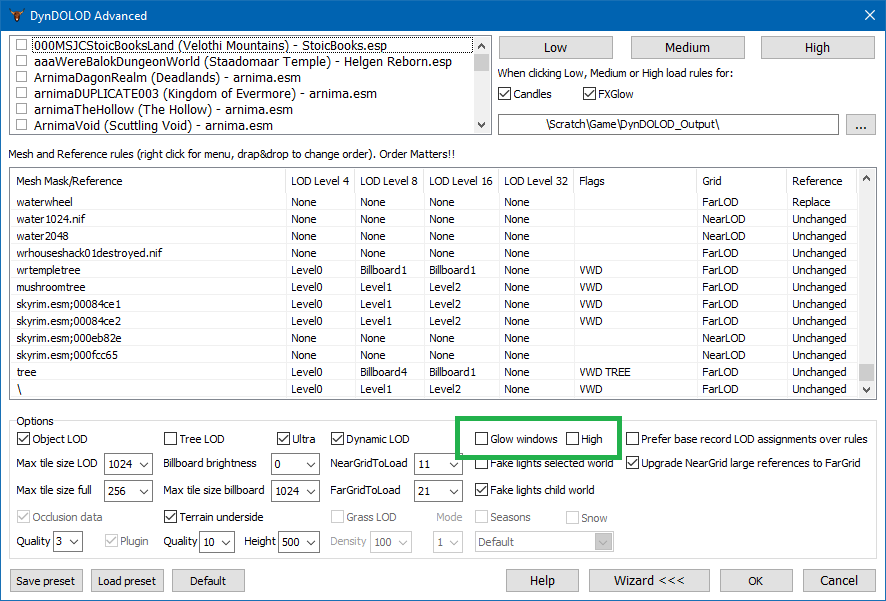
Ok, that's good, better that than ugly z-fighting. But what I'm not understanding is: why is the glow visible at all? I didn't select the 'Glow windows' option on the DynDOLOD generation panel. Is Dragonsreach an exception? Here: https://drive.google.com/file/d/1FFzKzPkyZ5zTrbtupbCgxKhdek_KTfLm/view At a glance looking at ObjectAtlasMap, LOD textures have power-of-2 dimensions. But I didn't check every single one (659 total) or verify their height is divisible by 4. Thanks.
-
Dynamic Treasure Map Journal (by Dr Mabuse)
Mousetick replied to Mousetick's topic in Skyrim SE Mods
Ok, fair enough. There are instructions on the mod page to move the journal to the player using the console, so you can pick it up whenever and wherever you are. You could do that in the abandoned prison for instance before talking to Mara (with ASLAL). It's not a regular book so you can't just use player.additem in the console, you need to move it as you would with an NPC for instance. -
MO2 problem with mods overwriting game files??
Mousetick replied to Darklustre's question in Mod Organizer Support
What do you mean by 'everything still dies'? Who or what is dying in your game that should not die? Mudcrabs are expected to die. Bandits are expected to die. Even Nazeem can die. In short, anybody can die. There are very few NPCs in Skyrim that are essential. But to answer you question: mods can't overwrite game files. -
Dynamic Treasure Map Journal (by Dr Mabuse)
Mousetick replied to Mousetick's topic in Skyrim SE Mods
Would you rather it being automatically added to your inventory at game start? A lot of mods do that, they add their own stuff (hint books, configuration spells or powers, misc. junk) to the player's inventory upon exiting character creation. It's convenient, but it's not immersive. The journal tracks the treasure maps and found treasures, whether you have it with you nor not. You can pick it up later, when you stumble upon it by chance or specifically go look for it. -
MO2 problem with mods overwriting game files??
Mousetick replied to Darklustre's question in Mod Organizer Support
You forgot to tell what game you're modding with MO2. -
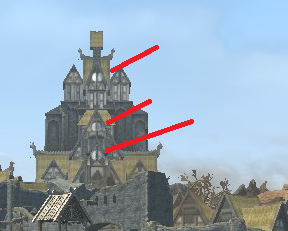
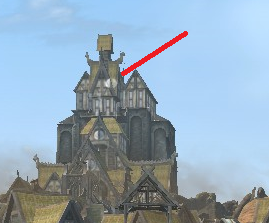
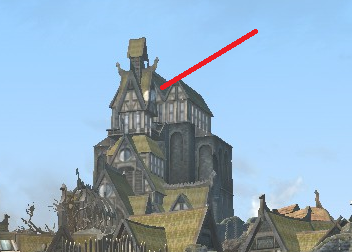
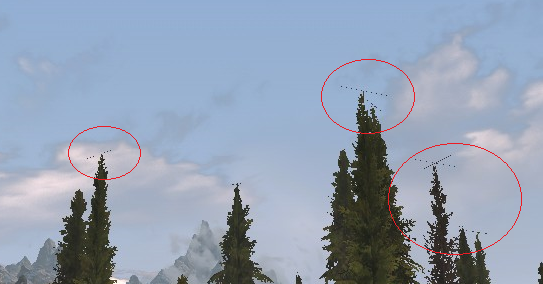
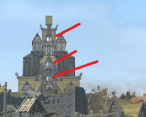
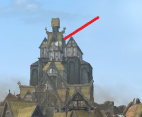
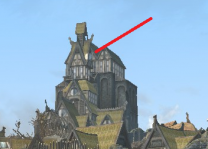
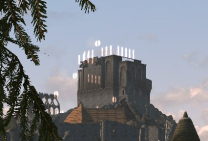
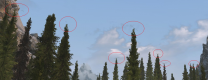
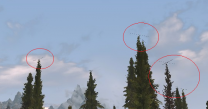
DynDOLOD Alpha 106 1. Seeing Dragonsreach window glow LOD "through" the tower roofs. LODs generated without Glow windows. Sorry for the postage stamp shots, forgot to use free camera. Is the window glow expected even though 'Glow windows' option is off? Is the glow expected not to be obstructed by objects in front of it? 2. I seem to have the same problem as discussed here but that discussion went nowhere. Thin, 1-pixel thick apparently, and short lines appearing on top of trees LODs, sometimes one line, sometimes two in a cross depending on viewing distance and angle I guess. Visible on different tree models (e.g. dead vs. not dead). Again sorry for the hard to see shots, but if I get any closer even in free camera mode they become invisible. Any idea what might be causing this? Full logs here: https://drive.google.com/file/d/1LEfGV8BFFUbhPUlXNgrjP0bhpJaYTqVI/view Thanks.
-
Discussion topic: Dynamic Treasure Map Journal by Dr Mabuse Wiki Link A journal that displays treasure maps as you read them and tracks which treasure you have already found. No SKSE necessary. All Skyrim SE/AE versions should be compatible. ESP-FE. Notes: This is just an immersive way of keeping all your treasure maps in one place and keeping track of which ones you've found. Supports vanilla treasure maps, as well as LotD ones from the same journal. Supports New Treasure Hunt SSE and Treasure Hunter for SSE in a separate journal. Uses Book Covers Skyrim assets. Not quite similar, but along the same line of helping the player in searching for items without cheating and in an immersive way: Bromjunaar Journal (by Hyacathusarullistad) Adds a journal in Labyrinthian giving direction on where to locate all eight Dragon Priest masks. Stones of Barenziah Whereabouts (by BaSsGaz) Adds a book to the game giving out the location of the Stones of Barenziah, purchasable from Urag (Winterhold). The Puzzle version (recommended) doesn't give the exact location and how to find the stone, but instead gives a puzzle that hints to the location and directions on how and where to find the stone. This mod is for LE. The MA says it works fine as is on SE, but I'd recommend converting it to SE by simply loading and saving its plugin in CK, which is what I've done. Unlike Dynamic Treasure Map Journal, these 2 mods are not dynamic: they don't keep track of items found.
-
ACCEPTED Odin - Skyrim Magic Overhaul (by EnaiSiaion)
Mousetick replied to TechAngel85's topic in Skyrim SE Mods
Well yes I get it in a way, but not really If you're alluding to your research into WACCF and CCOR patching and using AMB Content Addon as a guide, I still don't understand your thought process. But I don't mean to interfere or argue with it, so don't mind me. I just hope it works out well for you -
Never used QuickLoot RE but I tested this EE version as I was wondering what the QuickLoot fuss was about. These mods seem to be quite popular. It worked fine and I liked it, but I had to drop it because it was causing distracting visual glitches with another mod (Simple Activate) I can't live without. The activation prompt would briefly flash before disappearing.
-
Query regarding application of additional game settings
Mousetick replied to username42's question in BethINI Support
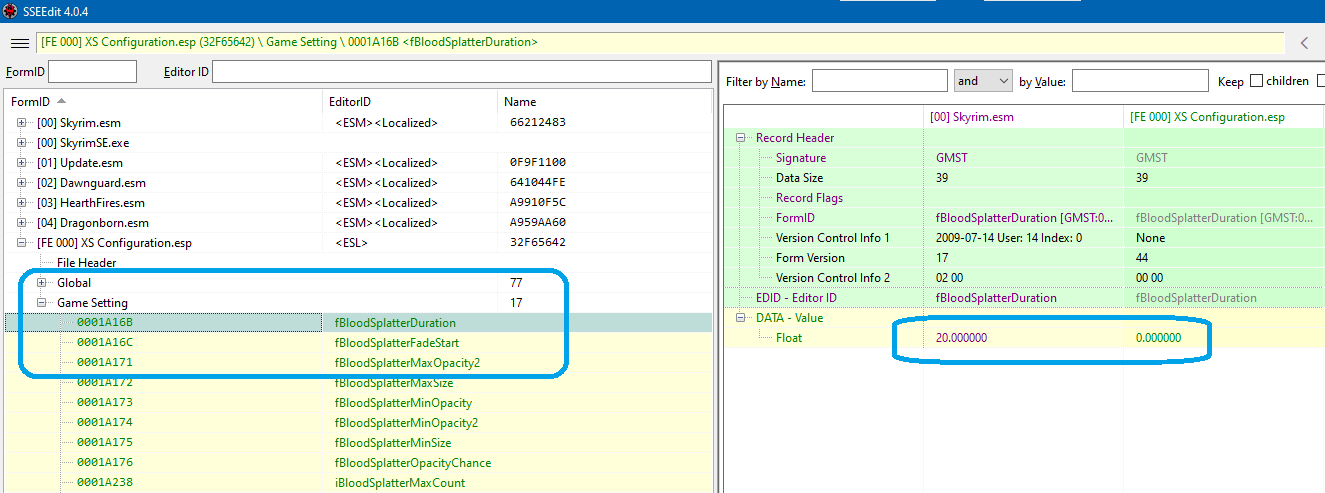
The settings you're referring to can't be configured in SkyrimFallout's INI files, they don't exist there. They are Game Settings defined in the master plugin(s). They can only be changed by another plugin overriding them or via the 'SetGS' special command in the console. Create a patch plugin in xEdit. As in the example below (this is for Skyrim but you should get the idea):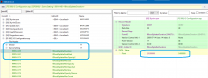
-
ACCEPTED aMidianBorn Content Addon (by CaBaL & kryptopyr)
Mousetick replied to Mercury71's topic in Skyrim SE Mods
AFAIK there are no AMB plugins currently in the guide (the one that gets installed is moved to 'optional'). Disable the AMidian Book of Silence mod on MO2's left side (or you can remove it completely as it will be completely overwritten, but you may want to keep it around if you're testing and want to go back easily to previous state). Download and install 'aMidianBorn Book of Silence SE -- CCOR CONTENT ADDON' main file from aMidianBorn Book of Silence. It's a just a BSA containing assets, the plugin comes in the next step. Download and install 'aMidianBorn Content Addon SE' main file from aMidianBorn Content Addon. Enable the plugin. Make sure 'Armor Mesh Fixes' overwrites both (there is just one conflicting mesh). Yes, look for them there. There is at least one for ICH + WACCF + AMB.- 35 replies
-
- 1
-

-
- SKYRIMSE
- 06-models and textures
- (and 2 more)
-
I think in general the STEP team tries to avoid "overhaul"-type mods in the guide, particularly those which could potentially make the game more difficult to play, or to understand, compared to vanilla, as the guide's intended audience is the Skyrim user base at large. By this principle, the presence of CACO, CCOR, Odin and Vokrii in the guide is questionable. I don't know the long history of the STEP guide, but I guess they've always been there and are part of the legacy. If they were evaluated today for inclusion, they might not make the cut. Even though the aforementioned overhauls are "light" and fairly close to vanilla, they deviate from it quite a bit from in some aspects, and require a lot of reading and/or playing with them to familiarize oneself with their modified mechanics and new features. They're all very good mods which deepen the gameplay, but ultimately they're quite subjective. When you play with them, you're not playing Skyrim, you're playing the MA's game based on Skyrim.
-
ACCEPTED Odin - Skyrim Magic Overhaul (by EnaiSiaion)
Mousetick replied to TechAngel85's topic in Skyrim SE Mods
It's an interesting patch that can't be made intuitively just by looking at stuff in xEdit. Whoever made it must have an excellent knowledge of both Odin and CACO poisoning and poison resistance mechanics. I used to use an unofficial Odin + CACO patch before, which was made intuitively and was incomplete compared to this new one. -
Discussion topic: Toggle Compass Hotkey by hhuuggss Wiki Link Press a key to toggle the compass/floating markers on and off. The current version has more features, configurable in an MCM: Toggle on/off, or press hotkey to display compass for N seconds. Display/hide compass independently of Shout bar and Survival temperature indicator. Display/hide floating markers with compass or not. Note: Redundant with Immersive HUD. Meant to be used in complement of Contextual Crosshair, both as a replacement for iHUD.