


z929669
-
Posts
13,086 -
Joined
-
Last visited
Everything posted by z929669
-

DynDOLOD 3 - Is This As Good As Trees Get?
z929669 replied to mooit's topic in General Skyrim SE Discussion & Support
That screen looks much better ... I would test threshold of 164 or so, but keep in mind that your aspens and other deciduous trees may not look so good if you go too high. You may want to try increasing direct lighting a bit and lowering ambient for Tree and HD Tree in TexGen to fine tune for consistency ... just a tad from defaults though. Maybe +10/-10, respectively. I have yet to fine tune this myself but was going to test that. Any of the EVT flavors from the latest version should look good. Custom Trees uses lush meshes, but some texture variants may not play so nicely in LOD without more aggressive tweaks. I forget which ones offhand. The Step ENB works nicely without making drastic changes. All the benefits of ENB without the crazy stuff. I will be pushing out an update of this though at next release of the guide, and it fixes many things, including the dark faces. You can use these tweaks for that: [SUBSURFACESCATTERING] IgnoreWeatherSystem=false IgnoreWeatherSystemInterior=false Amount=0.5 AmountInterior=0.5 EnableOldSSS=false EnableSeparateInteriorParameters=true EpidermalAmount=1.5 EpidermalAmountInterior=1.2 EpidermalDiffuseSaturation=0.15 EpidermalDiffuseSaturationInterior=0.05 EpidermalMix=0.1 EpidermalMixInterior=0.05 Quality=1.0 Radius=5.0 RadiusInterior=3.0 SubdermalAmount=1.0 SubdermalAmountInterior=1.0 SubdermalDiffuseSaturation=0.85 SubdermalDiffuseSaturationInterior=0.85 SubdermalMix=0.05 SubdermalMixInterior=0.02 SubdermalPhase=0.0 SubdermalPhaseInterior=0.0 SubdermalTranslucency=0.5 SubdermalTranslucencyInterior=0.5 SurfaceBrightness=1.6 SurfaceBrightnessInterior=1.1 -
It should, but we need to think about this mod and XPM+Nemesis mods. If we only use the XP32 meshes, need to see if this mod is still relevant. I use FP, so it matters little to me.
-
Dropping as of 2.1.0 in favor of the revamped version.
-
Marked accepted
-
DROPPED FileAccess Interface for Skyrim SE Scripts (by TerenceYao)
z929669 replied to TechAngel85's topic in Skyrim SE Mods
I vote to drop this one then. -
I will check it out. I also don't get much from Crash logger in terms of definitive clues.
-
Since Mouse is running on a potato, I think we have the performance question answered. Marked accepted.
-
ACCEPTED Cathedral - 3D Lavender (by DrJacopo)
z929669 replied to TechAngel85's topic in Skyrim SE Mods
Marked accepted. -
DROPPED FileAccess Interface for Skyrim SE Scripts (by TerenceYao)
z929669 replied to TechAngel85's topic in Skyrim SE Mods
There is only the one mod that has a ton of FISS MCM options we were recently discussing, but I cannot recall at this time. Hmmm -
I think we can mark this as accepted.
-
I'm dropping from testing if nobody advocates in the next day or two.
-
Are we dropping this from testing? I thought there was an alternative or another mod we are using that may be doing this but I can't recall.
-
Indeed, I vote to accept this one, as I have been running it preliminarily for a while now. Screens
-
Removed from testing
-
@DoubleYou @Mousetick Have either of you guys landed on a final position with this one and others like it in terms of LOD? It seems like a no brainer in loaded cells though, so I'm inclined to vote for this one for that reason alone. I have been running this since this topic was created and have no issues.
-
See my previous post. Can anyone else confirm my findings? I vote for this one, as it does work at least, but just not for my PC.
-
ACCEPTED Cathedral - 3D Lavender (by DrJacopo)
z929669 replied to TechAngel85's topic in Skyrim SE Mods
Can I get a vote for this mod or Cathedral Plants version? See screens. I vote to go with Cathedral Plants version but this would be my second choice. Only need @Eliian @DoubleYou @TechAngel85 or @Greg to vote for this one or Cathedral's to replace hybrid's (current Step). -
ACCEPTED ENB Lights For Effect Shaders (by powerofthree)
z929669 replied to D1Z4STR's topic in Skyrim SE Mods
See my previous post. I vote to include this one to maximize coverage of all applicable ENB effects. -
ACCEPTED Highland Cows More Wooly - Cut Content Restoration (by Exalderan)
z929669 replied to D1Z4STR's topic in Skyrim SE Mods
What do you recommend for the upscaled textures? Did you post your version, or should we use the other one that @DoubleYou found a while back? Trying to get things ready for 2.1.0 -
DynDOLOD 3 - Is This As Good As Trees Get?
z929669 replied to mooit's topic in General Skyrim SE Discussion & Support
TexGen output size is what it is depending on the LO. As mentioned in this post, my advice for next step is to save out your game INIs somewhere, delete them from the source location (should be in MO profile, but I have no idea in your setup), reset them to default via Stem launcher, delete all files in ..\DynDOLOD\...\Presets\, and revert all changes in DynbDOLOD_SSE.ini (keep TexGen_SSE.ini alpha threshold change at 144). This gets you back to default INI settings that impact DynDOLOD. Then run BethINI using 'Ultra' according to the guide instructions. This gets your game INIs in order with valid changes only. Then disable all tree mods other than EVT Lush and configure/run DynDOLOD according to the guide instructions. This gets you an apples:apples so that we have a known baseline. My guess is that your trees will look just like mine less the ENB. Then you can post a screen as proof and what you don't like, and I can make reasonable recommendations to get you where you need to be. Then you can consider that advice and revert to your old game INIs and DynDOLOD INIs as you see fit. If you don't want to do all of this, then I have pointed to config tweaks that do have drastic impact on your LOD, and you can play with these until you optimize your result for how you want it. -
@Eliian So given your last two posts, can you devise a recommendation for conflict resolutions and the mod you recently linked with the krypto update? As I mentioned, I have no desire to play for hours and hours to test quest lines an the like. As long as the solutions fit the Step Mandate, I am in favor of quest-line improvements. I just need to know what to set up for testing and xEdit choices for the CR patch. @TechAngel85 @DoubleYou @Greg ... you guys should chime in with recommendations based on what Eliian has found and recommends so that I can implement correctly for testing 2.1.0. Otherwise, I just don't have the will to make quest-line changes like this for 2.1.0
-
DynDOLOD 3 - Is This As Good As Trees Get?
z929669 replied to mooit's topic in General Skyrim SE Discussion & Support
See my previous post. I edited it quite a bit after posting, because I wanted to compare the images before speculating further. I think that mod is only placing more of the vanilla trees, so it should work basically the same in terms of LOD (and kill performance in the meantime!). -
DynDOLOD 3 - Is This As Good As Trees Get?
z929669 replied to mooit's topic in General Skyrim SE Discussion & Support
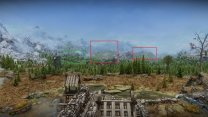
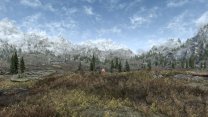
I'd say it's a very different result from your first image: You also have a lot more trees in the distance than I'd expect, so something is definitely amiss that I cannot speak to. I also don't see any difference in your Terrainmanager settings. This is my result using the tree settings recommended in the Step guide with EVT Lush and the Step ENB. This is from just to the north of the spot your screens were taken and looking west like you: So you have some INI settings or mods that need fixing. You should revert all DynDOLOD settings back to default, and use BethINI exactly as the guide mentions. I recommend saving your current INIs and removing them entirely. Then run Skyrim from the Steam launcher to reset to default INIs. Then follow our BethINI recommendations. Then install EVT Lush as the guide mentions. Then run DynDOLOD as the guide specifies. I'm afraid there are too many unknown variables in your current build for me to speculate further. MO loads your INIs from your profile, and BethINI expects them there as well. I'm betting none of this is configured as we might expect, since you are using MO in a non-standard way. I'd recommend strictly following our guide using our methods so that you can see for yourself what is possible. Otherwise, you will need to independently troubleshoot what is happening in your setup. All I know is that your results are completely unexpected based on what you have shared thus far (other than the impact of the settings I recommended, which is expected).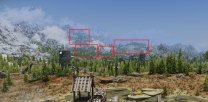
-
DynDOLOD 3 - Is This As Good As Trees Get?
z929669 replied to mooit's topic in General Skyrim SE Discussion & Support
Its the NVIDIA GPU tech (CUDA, IIRC) that Radeon doesn't have I think that made Texconv much faster for faster TexGen processing. This is no longer an issue with latest DynDOLOD alpha releases. -
DynDOLOD 3 - Is This As Good As Trees Get?
z929669 replied to mooit's topic in General Skyrim SE Discussion & Support
'Help' in terms of what, generation time? probably not. The limiting factor is most likely CPU and system RAM. Probably also GPU clock/RAM in some cases. I run a pair of RAID striped M.2, and my read/write speeds are as fast as it gets, but it still takes upwards of 40 min to gen full DynDOLOD with terrain/occlusion with a fill mod build. Game loading, system boot, and file transfer times are definitely better though.


