z929669
-
Posts
13,086 -
Joined
-
Last visited
Everything posted by z929669
-

Support for ENB Complex Grass In LOD
z929669 replied to z929669's question in DynDOLOD & xLODGen Support
The normal map needs a alpha specular map with rgb(127,127,127) pixels in lower left corner for SSS. Pixels for normal lower left must be valid normal like rgb(127,127,255). THis is what ENB is reading for the effect to work. I have inspected the TexGen temp folder created during processing and have seen how the atlas is split apart presumably to grab the diffuse/normal for the atlas, so keeping the specular alpha in the normal atlas may be possible if grasses were split from the combined DynDOLOD texture atlas. But who knows what the mesh needs on the grass billboard node ... -
Support for ENB Complex Grass In LOD
z929669 replied to z929669's question in DynDOLOD & xLODGen Support
I poked Boris and some others thinking about this on the ENB Discord. https://discord.com/channels/708699116519161907/708703386161381387/996783478446235688 I don't have the knowledge to be of much assistance on either side (but I can test). -
@sheson I am wondering if you have looked at complex grass support in LOD. I don't know if it's even possible, given the ENB requirements vs DynDOLOD atlas-texture requirements, but there is no way I can find to get a good LOD match in all lighting/weather conditions with LOD grass behaving similarly to loaded grass in terms of light sources and observer PoV. Basically, ENB-CG looks at lower-left pixels of 2:1 (vertical:horizontal) texture atlas with diffuse/normal, opacity/specular in the alpha. I'm not sure if this could work using the DynDOLOD atlas and grass components of the super meshes, but figured you would have some idea of the limitations for LOD. I created CG for vanilla and Cathedral Landscapes for testing purposes if you ever have appetite for looking into it.
-
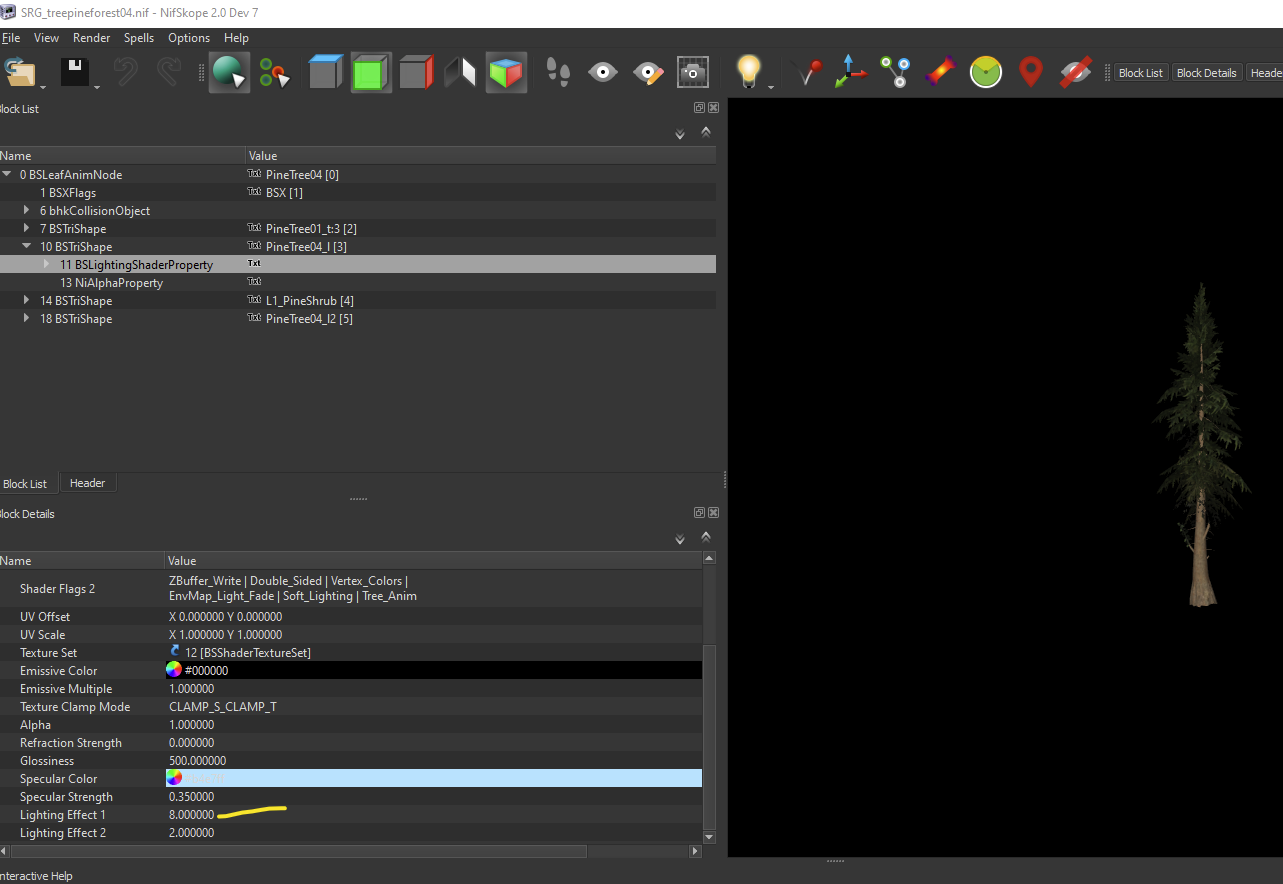
As I have mentioned in the other topic, the normal faces don't point towards the sky light source like lower branches do, so you can get T/B differences in different lighting situations (weather and ToD). This can be exacerbated by the textures chosen for EVT and to some extent the mesh Lighting Effect values. I don't recommend using the darker meshes, as those probably also exacerbate the issue. Go with the defaults for installing EVT, or choose a few different options , and install as different mods (there are hundreds of combinations and results). Run different outputs of TexGen and DynDOLOD for compares.
-
DynDOLOD 3 - Is This As Good As Trees Get?
z929669 replied to mooit's topic in General Skyrim SE Discussion & Support
The effect is only barely visible wihtout your ENB, and your ENB exacerbates the issue dramatically more than other ENBs. Yes, those settings for TB. Preview in TexGen to see the effect on a tree.
-
Increasing the Render View Distance?
z929669 replied to mooit's topic in General Skyrim SE Discussion & Support
It seems to me that Landscape fixes isn't at all the problem and that you likely changed > 1 thing in your method or config that allowed GID to work as expected. There is no way LFfGM could cause GID/CGID to work any differently than expected. More likely, you had GID/CGID active in your LO and DynDOLOD settings mismatch or other config inconsistencies. This is precisely why we recommend people follow the System Setup Guide and use other best-practice methjodology, because it removes much of the noise and inconsistency from the equation. I still think this is the root cause of many of your issues ... inconsistency/unpredictability, and altering > 1 variable between tests. -
DynDOLOD 3 - Is This As Good As Trees Get?
z929669 replied to mooit's topic in General Skyrim SE Discussion & Support
Your ENB definitely exacerbates many graphical issues for one. The light tops are caused by normal faces on the meshes. They don't point up but at the top but rather sideways on pine trees, which causes differences in lighting at tops of trees. You can lower the Lighting Effect on the NIF of the LOD models < 0.5 (not the tree itself or you will break the LOD connection), or you can try different textures for EVT, which may help a bit. Otherwise, you need to increase ambient and lower direct lighting for HD tree in TexGen as Phlunder suggests. This has nothing to do with the alpha threshold. EDIT: you can also change top/bottom lighting of HD tree in TexGen which may help -
Increasing the Render View Distance?
z929669 replied to mooit's topic in General Skyrim SE Discussion & Support
Then you are doing something unexpected, because we have it working without issue with only GID in BSA and GrassGID=gid as described previously. You probably can have GID as loose files, but I defer to @DoubleYou on this nuance, since he has more time in development around this stuff than me. -
Agree. The file re-naiming path details are in the OP.
-
The author of ACMoS posted just before this post. I'm not clear on this statement. You shouldn't be hiding the ACMoS BSA but rather letting xLODGen Output 'mod' override ACMoS and all other mods (except for DynDOLOD Output 'mod'). ACMoS should be active (with unhidden BSA) when generating terrain LOD with xLODGen.
-
To get all of its benefits, ACMoS relies on DynDOLOD, so you have to enable Level32 in DynDOLOD_SSE.ini and set your '/' mesh rule to Level0 at LOD32. There are game INI settings to consider as well. Use xLODGen to generate terrain LOD. There is no "xLODGen Resources". Instead, there is "DynDOLOD Resources" needed by DynDOLOD, which is used to generate object LOD. Don't install xLODGen as a mod, and send it's output to a path inside the xLODGen install folder outside of your game folder (default behavior). Much is explained in the OP of this topic. Also carefully read the ACMoS description ... scroll down to the xLODGen and DynDOLOD instructions, and we explain how to set all of this up in the Step guide as well: Install xLODGen Generate LOD This is all fairly advanced and requires careful reading through documentation or guides and understanding of your mod manager (MO it seems).
-
Increasing the Render View Distance?
z929669 replied to mooit's topic in General Skyrim SE Discussion & Support
Check that you have grass textures in your TexGen output under \terrain\lodgen\skyrim.esm Be certain to set GrassGID=gid in DynDOLOD_SSE.ini Enable Grass Cache Fixes -
Increasing the Render View Distance?
z929669 replied to mooit's topic in General Skyrim SE Discussion & Support
The grass option is greyed out if you don't have TexGen grass textures. Yes, you only need GID. I suggest packaging into a BSA, but you don't need to. -
Increasing the Render View Distance?
z929669 replied to mooit's topic in General Skyrim SE Discussion & Support
What??? Look at your previous post in this topic. I quoted that. you are creating a lot of topics and obviously posting on the wrong ones yourself apparntly. -
Your trees are only showing up in Loaded cells. Your INI settings are set for rendering NO distant trees with DynDOLOD, because DynDOLOD is rendering them in object LOD. If you want traditional LOD trees, you would enable them in your game INI again, but that's not what you want. Rebuild DynDOLOD or convert your setup back to traditional LOD. fTreeLoadDistance
-
Your words: There should be NO LOD if you don't have DynDOLOD enabled. If you want LOD, you must enable DynDOLOD again. The clean save is when you are changing your object LOD with the same character. Disable DynDOLOD Clean save. Rebuild DynDOLOD Enable DynDOLOD Load save. I have never needed to do the whole business of waiting 24 hours, so that's just not true. Maybe necessary for other mods in your save, but not rebuilding object LOD
-
Increasing the Render View Distance?
z929669 replied to mooit's topic in General Skyrim SE Discussion & Support
As instructed in the guide, name the SSE Terrain mod and CL terrain mods accordingly using '(TEMP)' in the file name. All other mods stay enabled. This is why we provide the instructions. They are complete and fairly explicit about disabling plugins or mods and when. -
Be sure you have the DynDOLOD plugins and outputs installed and enabled. Sort with LOOT.
-
GUIDE CrashLogger cannot load plugin
z929669 replied to Whitecrane02's topic in Step Skyrim SE Guide
Just search your mods for DLL files and disable those mods in blocks until the issue goes away. Then you will at least know where to look. It's easy using MO > Data (in right pane, filter at bottom), but not positive how to easily do it outside of using Windows Explorer. This happened to me once using a map icons mod. -
Step doesn't seem to touch this texture, so it's either a mesh issue or particle effects of ENB that we are using. @TechAngel85 would know for sure, since he is the lighting wizard.
-
ACCEPTED Major Cities Mesh Overhaul (by raiserfx)
z929669 replied to DoubleYou's topic in Skyrim SE Mods
Done -
My candles look like those on the right with Radiant - Candles ... using the Step ENB anyway.
-
Increasing the Render View Distance?
z929669 replied to mooit's topic in General Skyrim SE Discussion & Support
As the Grass LOD Guide states: create your grass cache in 1.5.97 using a mod build that is as close as possible to what you use for 1.6.xxx (which will only differ with respect to certain engine-level mods like NGIO and SKSE stuff for the most part. Maybe a few mods that depend on SKSE). You only need the GID files with latest DynDOLOD alpha (see grassGID setting in DynDOLOD_SSE.ini). Package these into an uncompressed BSA and load with a plugin. You must disable NGIO. Forget about it. Use only Grass Cache Fixes with it's default config. Follow our SSE guide BethINI instructions, DynDOLOD, and LOD instructions if using SSE 1.6.xxx runtime. If it's not working, then there is an instruction that you are not following correctly OR your non-standard setup wit your modding environment is precluding. Can't help you with that, and my feeling is that many of your barriers are related to this. If you won't move to our standard setup recommendations and methods of installing supporting apps like MO and DynDOLOD, then much of our advice and instructions may either not work or have caveats. You would be better off asking about these issues on the DynDOLOD support forum, as sheson's methods are not dependent on this. What I can tell you is that if you are using Cathedral Landscapes and Grass Cache Fixes on 1.6.xxx and you have a proper grass cache, you CAN get grass LOD. If you aren't getting any, you know it's config or user error that sheson can help with. -
ACCEPTED Major Cities Mesh Overhaul (by raiserfx)
z929669 replied to DoubleYou's topic in Skyrim SE Mods
DY took care of that recently I think -
So you 'removed' it by removing the IsFullLOD flag from the record? You cannot see it from Tamriel but you can still see it from Solstheim? If so, that was next on my list. I would assume this would be the case, since that's the vanilla behavior.