z929669
-
Posts
13,086 -
Joined
-
Last visited
Everything posted by z929669
-
Updated BethINI instructions and PP alert to include sun size tweak. Updated changelog likewise.
-

Unsure if this can be changed
z929669 replied to Mephitic's topic in General Skyrim SE Discussion & Support
I hadn't noticed that. I will update to your current targets .. we should also mention that using BethINI will also provide the correct settings. I just hate duplicating instructions, since it causes the need to keep them consistent. EDIT: We are mentioning use of BethINI for this, so I replaced with the following and will make edits likewise to previous posts. [TerrainManager] fBlockLevel0Distance=57344 fBlockLevel1Distance=147456 fBlockMaximumDistance=327680 fSplitDistanceMult=1 -
Unsure if this can be changed
z929669 replied to Mephitic's topic in General Skyrim SE Discussion & Support
Always remember that the NGIO grass mode and DynDOLOD grass mode travel together as described in the doc. You should be setting DynDOLODGrassMode=1 in NGIO and using the terrainmanager settings and grass settings I posted previously. You must run TexGen 3 with grass ticked followed by DynDOLOD 3 using Mode 1 and selecting 'High' preset. You have grass LOD, so that's not the issue. The only other potential issue is that you have NGIO config settings overriding game INI settings. With the terrainmanager settings I provided, be certain that you have the following either commented out or enabled with these values. This could fix your entire issue without regenerating cache or DynDOLOD: OverwriteGrassDistance = 6144 OverwriteGrassFadeRange = 14128 If you care to try again at some point in the future, this will work Otherwise, post on the DynDOLOD topic with your DynDOLOD logs, and sheson will help you find the issue. It will take some doing that route. I also just updated our Grass LOD guide so that it is now correct for your situation. -
Yeah, I never use the "create mod" feature of overwrite context menu. I think I saw/tried it once, but my knee jerk to creating a mod outside of the normal MO install process is to use top menu of left pane > Create empty mod > drag overwrite content (or send output to) the empty mod I just created/named. Lots of ways to skin this one it seems. Always a sign of a good application, IMO.
-
It's really inconsistent for me. I still often get the download prompt when I start a new game (but not every time it seems ... maybe just on a new instance?). I must hit enter to 'download' and make the message go away.
-
ACCEPTED Realistic Water Two SE (by isoku/SparrowPrince/TechAngel85)
z929669 replied to TechAngel85's topic in Skyrim SE Mods
SparrowPrince is making rocks right now, so it seems like a good idea to me -
They could be in Overwrite because you are not directing your xEdit output as instructed (into "xEdit Output" mod). Also, if you downloaded the mods from within the game, I believe they would go into Overwrite (I never did that though). The Anniversary Ugrade CC DLC should be purchased and downloaded via Steam, and they will go into your game directory outside of MO with all the other vanilla game files.
-
Unsure if this can be changed
z929669 replied to Mephitic's topic in General Skyrim SE Discussion & Support
BethINI will set your [terrainmanager] LOD distance settings as they should be if you followed that piece of the guide. You can also check these settings in DynDOLOD MCM config to see if they match expected values, which should be as follows for 'Ultra' BethINI and slightly lower (but proportionately similar) for 'High': [TerrainManager] fBlockLevel0Distance=57344 fBlockLevel1Distance=147456 fBlockMaximumDistance=327680 fSplitDistanceMult=1.0000 You should NOT need to run Mode 2 to get this working. Something is off in your setup if that's the case. -
ACCEPTED A Clear Map of Skyrim and Other Worlds (by DoubleYouC)
z929669 replied to z929669's topic in Skyrim SE Mods
Double check your MO xLODGen executables config command parameters in Tools Setup. Do not install xLODGen as a mod in MO. Revisit the System Setup Guide indicated in Step 1 of the guide. Your output has gone into an unknown location (possibly MO overwrite or some random OS path) -
I link to this guide frequently, so I updated it to reflect the current GUI and recommendations and also noted that AE is not supported at this time.
-
Unsure if this can be changed
z929669 replied to Mephitic's topic in General Skyrim SE Discussion & Support
Try setting "Mode" in the bottom-middle of the DynDOLOD GUI to '1'. Either use our BethINI configuration to set your game INI values correctly for LOD distance and grass, or configure as follows: skyrim.ini [Grass] bAllowCreateGrass=1 bAllowLoadGrass=0 bEnableGrassFade=0 fGrassFadeRange=14128 skyrimprefs.ini [Grass] fGrassMaxStartFadeDistance=6144 fGrassMinStartFadeDistance=0 fGrassStartFadeDistance=6144 NGIO UseGrassCache = True ExtendGrassDistance = True ExtendGrassCount = False The following override the two corresponding game INI settings above, so they can be set as follows or commented: OverwriteGrassDistance = 6144 OverwriteGrassFadeRange = 14128 Use ..\DynDOLOD\Edit Scripts\DynDOLOD\DynDOLOD_SSE.ini to configure GrassBrightness* values to alter grass LOD tint if defaults don't match your grass. -
FEEDBACK v2.0.0 - Feedback & Bug Reports
z929669 replied to DoubleYou's topic in Step Skyrim SE Guide
Fixed, thanks! -
ACCEPTED Realistic Water Two SE (by isoku/SparrowPrince/TechAngel85)
z929669 replied to TechAngel85's topic in Skyrim SE Mods
I can validate that warning in Step 2.0.0: Warning: Initially disabled large reference in RealisticWaterTwo - Resources.esm [REFR:1200AE48] (places RockPileL02Wet [STAT:00039393] in GRUP Cell Temporary Children of [CELL:000095D7] (in Tamriel "Skyrim" [WRLD:0000003C] at 10,-1)) @TechAngel85 recently fixed all of the LR issues with RWT and this one may be an outlier that he flagged by mistake (or for a number of other reasons). Do share, and I'm sure he will verify if this was or wasn't intentional. EDIT: Flag not set for me?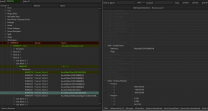
-
STEP Guide 2.0 for use with non-AE 1.6xx SSE
z929669 replied to joober's topic in Step Skyrim SE Guide
The update to SSE 1.6.xx from 1.5.97 is what broke things. This is because the code base version changed and deprecated many engine-level mods (e.g., SKSE-related and the like). The AE CC DLC content doesn't 'break' anything. They are just officially-provided mods from the Creation Club like any mod on the Nexus but validated by Bethesda as being content they thought was appropriate to offer at the source. If you are debating running 1.6.xxx vs 1.5.97, we encourage you to let Bethesda update your game. That's the future of modding, and staying behind is harder and will grow even harder over time. If you upgrade, we recommend grabbing the Anniversary Upgrade CC DLC as well if you can afford the $20. They are good additions that fit the vanilla game by definition. What you don't like will inevitably be corrected by mods now and in the future. Then you can run our 2.0.0 guide and have a SSE build better than any previous Step build and likely as good or better than any other vanilla-friendly SAE mod build. Then you can expound upon this as desired. Far less work and allows you to mod at a reasonable pace to pick up the knowledge. I would recommend not using the mod you linked. It will very likely cause issues with the Step build, but IDK. We don't use it. -
STEP Guide 2.0 for use with non-AE 1.6xx SSE
z929669 replied to joober's topic in Step Skyrim SE Guide
This is why I included the game versions link above. Since you have 1.6.xxx, why not upgrade to the full AE for reduced price of $20? Isn't the avoidance of the hours of work you will inevitably put in trying to learn how to reconfigure our patches worth $20? I find this position very curious (and not uncommon). -
From this mod, particle lights are added to torches and can be disabled. The Step ENB in development now has also increased point lighting intensity and some particle lighting values have also been tweaked for our upcoming release in the next ENB version. probably available later today.
-
GUIDE v1.1.0 - Feedback & Bug Reports
z929669 replied to TechAngel85's topic in Step Fallout New Vegas Guide
This one was all @Majorman with testing and guidance by/from @Greg so it's nice to get some validation I'm sure. Maybe one of them will have advice for your issue. -
@TechAngel85@DoubleYou@Greg In testing the torch particles for this one, I wanted to let torches provide as much 'lighting' as possible while turning off torch particles with ENB (Tech's compares illustrate that ENB point lighting intensity was too low ... that's fixed in latest WIP ENB, BTW). In doing so, I noticed that the red/yellow glow are not obvious to me with ENB (I looked for them but did not see them when toggling ENB), so I think we should probably reassess the options for this mod, given that like 50 versions have been released since we last tested with screenshots. I suspect we may be missing some features. I tested latest 2.5.5 beta Lite version, so it may not be entirely bug free or final.
-
ACCEPTED Worldspace Transition Tweaks (by AndrealphusVIII)
z929669 replied to DoubleYou's topic in Skyrim SE Mods
I love the idea (and look) of this one. it seems like a disruptor with lots of potential conflicts for Step though. maybe for 2.1.0 though? I changed the tag likewise, as I think this constitutes a big enough change that it wouldn't fit for hotfix versioning. -
Glitches at cave entrance terrain and a little more
z929669 replied to TaxTalis's topic in Step Skyrim SE Guide
This has never worked for me ... oh so sadly, and I don't know why Most likely if you are not running our SAE guide, but I have not checked and cannot at the moment. Use More Informative Console to identify the missing wall in vanilla and search for that reference in your lineup. -
STEP Guide 2.0 for use with non-AE 1.6xx SSE
z929669 replied to joober's topic in Step Skyrim SE Guide
First off, if you never backed up your 1.5.97 SSE prior to Nov 11, 2021, this is the process you should use to do so. you should also understand the game versions. Historically and presently, the Step Patches essentially do three things: Forward changes from the USSEP for plugins from mods we use that fail to do so (these mods change from guide to guide) Fix plugin issues in mods that we use (mostly for mods that may not be up to current standards as known today) Resolve conflicts among plugins from mods that we use The Step Patches are therefore essential for a stable and trouble-free game when installing a Step guide. Anyone can do this patching for any mod list (within reason), but it requires a lot of knowledge about the mods being used, what they do, and how they do it ... not to mention some level of proficiency with xEdit and rudimentary understanding of how to save plugins in the CK, compress plugins, and flag plugins as ESL/M where necessary. There is a ton of room for error, so patching a lengthy plugin/mod list will result in a trade-off of issues if you don't know what you are doing. Our patches are constructed by hand (not using Smashed, Bashed, or Merged Patches tools), because automated tools never do the job without committing some errors (either qualitative or quantitative), so even with such tools, there is inevitably some validation and manual labor involved. Why do you want to revert to 1.5.97 exactly? I can tell you for certain, that this will be much harder a game to mod, as all guides I know of are essentially more/less 'broken' for this version without implementing some deviations and doing some novel work not mentioned by these guides. It's far simpler to stick with the latest version of SSE (1.6.xxx). My advice would be to follow our SAE guide linked in the top nav. If for whatever reason you don't want to spend $20 on the Anniversary Upgrade DLC, then all you will need to do is remove the inapplicable CC masters and records from our patch. Everything else will just work and no further plugin work will be necessary. There may even be a topic around here for user-user support for doing this (our staff don't officially support it, since we have plenty to do just maintaining and supporting our official guides. I created a topic for those that want to assist one another in modding SAE without the Anniversary Upgrade. Please post your questions there and maybe knowledgeable community members will contribute. -
Starting this topic for user-to-user support for modding current SSE 1.6.xxx for those without the Anniversary Upgrade. Step does not support any game version other than the full game with all optional DLC. This applies to all of our official guides, as always. To use the latest Step SSE guide (for Skyrim Anniversary Edition), the Anniversary Upgrade DLC is required (official Creation Club DLC). This only costs $20 and is well worth it just to remain compatible with relevant/contemporary mods of today and in the future. ... take it away folks. Also, please let us know why you don't want the Anniversary Upgrade.
-
Looks to me like ENB needs point lighting from torch fire increased. Particle light values seem OK. Definitely need to use torch particles with our ENB, all else remaining equal. I will test after dinner.
-
Dear Diary Dark Mode - SkyUI Menus Replacer SE (by uranreactor)
z929669 replied to Pug's topic in Skyrim SE Mods
I like it! -
FEEDBACK v2.0.0 - Feedback & Bug Reports
z929669 replied to DoubleYou's topic in Step Skyrim SE Guide
Fair point. Why not settle for the best, eh?