Greg
-
Posts
2,936 -
Joined
-
Last visited
Everything posted by Greg
-
As bad as this may sound, it's nice to see confirmation that Steam may mysteriously update itself and games even while allegedly in offline mode. I'm a bit behind at this point, but I currently have backup copies of Skyrim Special Edition 1.5.97, 1.6.318, 1.6.353, and 1.6.640. It looks as if I missed the 1.6.1130 update.
-

ACCEPTED M8r98a4f2's Complex Item Sorter (by m8r98a4f2)
Greg replied to Greg's topic in Fallout 4 Mods
If you follow the steps to install Complex Item Sorter, you should not need to edit anything in Binary, Start In or Arguments. Steps 1 - 4 create Complex Sorter as an executable with the correct Binary and Arguments already set. Steps 5 - 7 set Start In by selecting the appropriate folder. Step 8 sets Create files in... by selecting the Step Fallout 4 - Complex Sorter Output from the list. One potentially confusing point is that the box shows Binary set to e.g. C:\Windows\system32\cmd.exe and Arguments set to e.g. /C "D:\Games\Mods\M8r98a4f2's Complex Item Sorter\Complex Sorter.bat". If you have Binary set to e.g. "D:\Games\Mods\M8r98a4f2's Complex Item Sorter\Complex Sorter.bat" and Arguments is empty, this is fine. Just note that I am using the paths on my system so your paths may be slightly different. -
Please bear in mind that what I am writing here should approximate correctness as a high level overview, although it is based on my understanding of the implementations and direction Intel was heading up through the Pentium processor in real mode (with an actual memory management unit and flat address space). It's the latter. Modern processors have an internal memory management unit (MMU) that maps logical memory allocations to physical memory and tracks which areas of memory are allocated to a process and the actions that are allowed in each memory block (execute and read/write). Modern languages like C/C++ and several others also have the concept of a null pointer (0x0) that is used to trap illegal memory accesses (typically because the pointer was never initialized or assigned a valid address). The 64-bit address space is so large (0x0000 0000 0000 0000 - 0xFFFF FFFF FFFF FFFF) and physical memory is so comparatively small (0x0000 0000 0000 0000 - 0x0000 003F FFFF FFFF for 256GB) that this works in our favor. Note the instruction pointer in the crash is (expanded out to 64 bits) 0x0000 7FF6 DACC C4B3 and (if my math is correct) this is in the 127 terabyte block of logical memory space. I won't go into the details of how the MMU works because I'll probably be wrong at worst and outdated at best. The high level is that when the processor needs to access a logical memory address, it consults the MMU to get the physical memory address in RAM1. If the logical memory address is not mapped in the MMU, the process raises an access violation exception. This may be naive on my part and is based on observation of a small sample of debugging sessions, but I've never seen a legitimate allocation in the lower logical address space. I believe this is intentional and works to the advantage of address randomization (in which Windows loads executables and DLLs into random addresses to minimize predictable load patterns). 1This is a very simplified because it does not account for mapping logical address blocks to the page file. The MMU also tracks whether the process is allowed to execute, read or write to this logical address space and throws an exception if you attempt to execute in a non-executable block or write to a non-writable block.
-
If you are referring to to the probably call stack, these are processor instructions. The mov instruction is typically used to move data from memory to a register or vice versa (from a register to memory). It's been too many decades since I fiddled with x86 assembly so I don't remember if mov supports register to register or memory to memory. PROBABLE CALL STACK: [0] 0x7FF6DACCC4B3 SkyrimSE.exe+01CC4B3 -> 15507+0x333 test byte ptr [rcx+0x0C], 0x01 [1] 0x7FF6DACC923C SkyrimSE.exe+01C923C -> 15469+0x5C movzx r9d, byte ptr [0x00007FF6DC9465B0] [2] 0x7FF6DAC7C648 SkyrimSE.exe+017C648 -> 13760+0x78 mov [r13+0xDAA], r15b [3] 0x7FF6DAC7AC58 SkyrimSE.exe+017AC58 -> 13753+0x328 xor dil, dil [4] 0x7FF6DB0E92C6 SkyrimSE.exe+05E92C6 -> 36553+0x346 call 0x00007FF6DACC92A0 [5] 0x7FF6DB0F285C SkyrimSE.exe+05F285C -> 36644+0x1C xor eax, eax [6] 0x7FF6DB745E4D SkyrimSE.exe+0C45E4D -> 68445+0x3D mov rcx, [0x00007FF6DDB06898] What i can say is that (looking at very top of the stack and the registers), it looks is if the game is attempting to read the English string files (perhaps for a BGSStoryManagerBranchNode a bit further down the stack) and this caused an unhandled access violation exception at 0x7FF6DACCC4B3 (test byte ptr [rcx+0x0C], 0x01). This is getting the address in RCX, adds 0x0C to this address, and then tests whether the byte at this memory address has the 0x01 bit set. The issue here is that in REGISTERS, i see that RCX is 0x0 (a null pointer). This basically means RCX+0x0C is pointing into unallocated memory space and this is why the game crashed. I also see EngineFixes.dll and tbbmalloc.dll in the stack trace, so I'm inclined to think it's remotely possible something in Engine Fixes or you are correct that the vanilla game files may be at fault. Take this with a grain of salt because the honest answer is that I don't see anything in this crash log that definitively points to the culprit. I haven't tinkered with assembly since just after the the 80386 was released, and I have zero RE skills with game engines.
-
This just changes the tile that appears into the executables dropdown to something a bit cleaner and is cosmetic. The title can be anything you want, but we suggest using "xLODGen64" so it clearly represents the name of the executable this runs.
-
Best Mod Manager for Fallout 3? And load order ?
Greg replied to SergeTroy's question in Mod Organizer Support
I use and recommend Mod Organizer 2 for pretty much all Bethesda games. I know it works well with Fallout 3, Fallout New Vegas, Fallout 4, Oblivion, Skyrim and Starfield.Mod Organizer 2 also makes it easier to follow guides. Vortex probably works, but you'll have to jump through hoops with manual LOOT rules to keep mods and plugins sorted in the correct order. One point to bear in mind is that Clear and Present Danger for Fallout 3 and Fear and Loathing in New Vegas for Fallout New Vegas have not been maintained for a long time so you may have to do some investigating and troubleshooting to get these up to date. I know Compiled Fixes for Fallout 3 is no longer available and the darnified.net site was taken down a while back, although I think Darnified UI may be available on alternate sites still. -
Immortal Remnant Redguard Elite Variants Open Helmets.esp and master
Greg replied to Hyperiel's topic in Step Skyrim SE Guide
If you click on the plugin missing the master in the right pane to select it, Mod Organizer will highlight the mod containing this plugin in the left pane. This should tell you which mod needs to reinstalled correctly. -
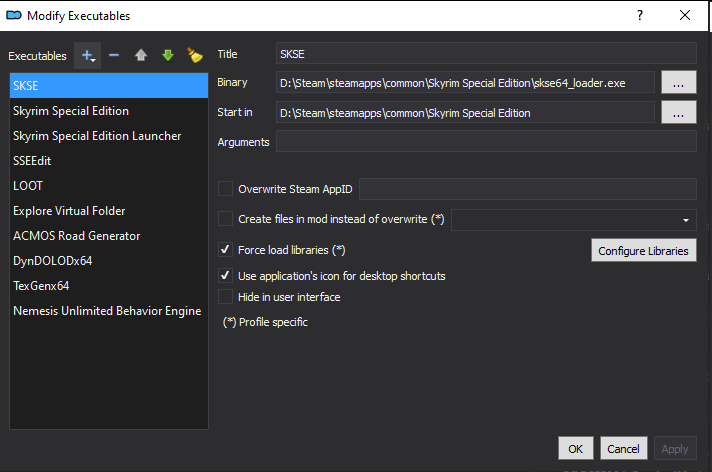
The Start In field can be left empty for most executables since these (SKSE, xEdit/SSEEdit, LOOT, DynDOLOD, TexGen, etc.) find and use the game data folder themselves. I think the Force Load Libraries libraries checkbox is checked by default, but I doubt it really matters. If i remember correctly, you have to click Configure Libraries and manually add a list of library to force loading. This isn't configured by default so the checkbox has no effect.
-
Skyrim updated to 1.6.1170
Greg replied to ButchDiavolo's topic in General Skyrim SE Discussion & Support
This may be confusing for a while because Bethesda released Skyrim 1.6.659 on GOG and this is not the same executable as Skyrim 1.6.659 on Steam. The downside is that some folks may mistakenly install the 1.6.659 version of the plugins on the GOG version of the game and SKSE, Bug Fixes, etc. may detect this as the Steam version of the game and likely CTD without a compatibility warning. -
BGS Game Runtime Updates & Status of Mod Dependencies
Greg replied to z929669's topic in Step Skyrim SE Guide
The wiki z929669 linked is owned by Nexus so you'll need to report this issue to them. As you mentioned, I can't find a clickable element to collapse the left pane and the and the right pane containing all of the useful information flows off the right side of the browser window and can't be scrolled into view. I did find that if you click the Print button and cancel without printing, the left pane magically collapses so this gives the right pane a bit more space. If you still can't read everything in the table, you might try clicking Print, select Microsoft XPS Document Writer, change orientation to Landscape. It's not exactly a perfect solution, but but at least I can read the entire table this way. -
What exactly needs to be re-done when copying a profile?
Greg replied to Brambleshire's topic in Mod Organizer
I think most of us were using profiles the days prior to instances because the only options were to use profiles or install multiple copies of Mod Organizer. I still have multiple copies of Mod Organizer floating around (pretty much one for each Bethesda game from Fallout3/Oblivion to Starfield) that I need to migrate to instances at some point Multiple portable instances were my preference in the days of old, but it's also a pain having to update multiple copies of Mod Organizer. At some point I want to migrate all of my portable installs to instances. The pain point with instances is that Mod Organizers defaults instances to %AppData% or %LocalAppData% (on the sacred boot drive) and many people have small boot drives. I'll just need to spend some time to move the instance folder to my game drive. -
It's funny you say that because I ate my two cookies while reading this and had to laugh out loud when I read this sentence. I may have mistaken that screenshot, but I'm interpreting this as SKSE saying it detected Skyrim version 1.6.640 and is why I posted instructions to get this version of SKSE. I hadn't looked at that Wabbajack list, but it does seem to be a bit dated based on your findings.
-
What exactly needs to be re-done when copying a profile?
Greg replied to Brambleshire's topic in Mod Organizer
I agree with @z929669 that profiles are too fiddly to bother using. Profiles are great in that mods are shared in both profiles so it uses significantly less disk space, but this is also it's major sore point. This essentially means you can install the STEP guide, get it working correctly, and easily create a new profile containing an exact copy of your existing profile. If you then install let's say JK's Skyrim and redo TextGen, DynDOLOD, etc. you just clobbered Texgen Output and DynDOLOD Output in your STEP profile. Instances uses more disk space because none of the mods are shared between instances, but this also means you can make all the changes you want to this instance without affecting any other instances. -
https://www.nexusmods.com/skyrimspecialedition/mods/30379?tab=files and download the first main file. You'll see this one is "Compatible with Skyrim Special Edition 1.6.640 from Steam."
-
Moved to General Skyrim SE Discussion & Support.
-
if you are using Mod Organizer, you can click Configuration (screwdriver/wrench icon), Workarounds tab, and check Enable archive parsing (experimental). This allows you to see the assets in BSA files when looking at asset conflicts (double click a mod in the left pane and select the Conflicts tab) and in the Data tab in the right pane. The one caveat is that it won't show assets in the base game archives because these are huge and require too much time to parse.
-
The best solution is to use the Steam UI to move Skyrim Special Edition to another folder so Steam and your modding tools are all in sync with the correct location. You can find the instructions to do so at https://help.steampowered.com/en/faqs/view/4BD4-4528-6B2E-8327#move. After you create a new Steam Library and move Skyrim Special Edition into this new Steam Library, use file Explorer to run SkyrimSELauncher.exe so it updates the path in the registry. If you don't do this, SSEEdit and other tools complain that it can't find the game.
-
Go back to the Tool Setup section of the guide and note that xLODGen in the executables list should have Argument(s) set to -lodgen -SSE -o:"DriveLetter:\Modding\Tools\xLODGen\xLODGen_Output" where DriveLetter should be replaced with the drive letter you created the Modding folder in. This is your xLODGen Output folder. Back to the xLODGen section of the guide. When you run xLODGen to generate terrain LOD, the files should be generated in your xLODGen Ouput folder (e.g. D:\Modding\Tools\xLODGen\xLODGen_Output on my system). You can examine this folder with File Explorer to verify it has a bunch of files. If the folder is empty, you need to redo "Generate terrain LOD". Paint roads on terrain LOD: When you run ACMOS Road Generator at Step 3, click the button to the right of "Path to LOD:" and browse to your XLOdGen Output folder. When you are finally in this folder, click OK to select this folder. I seem to recall this is the Open Folder dialog so it shows only folders.
-
If you used zedit to merge plugins and created a bashed patch on top of that, I'd run SSEdit, click OK to load all plugins and watch for any errors as it loads the plugins. Be patient and wait until SSEdit builds all references. If you don't see any errors after all plugins are loaded and references are built, right click the merged plugin(s) and check for errors. If these all look good, right click the bashed patch and check for errors. This is more or less just a quick way to rule out any potentially bad plugins that may be causing issues. Mousetick is also spot on in saying that adding 1,500 mods at once and expecting everything to work never goes according to plan. It is significantly easier to start small and add a few mods at a time with good testing in between to resolve any issues before adding more mods into the mix.
-
TESTING Scanner Closest Path Highlight Improvements (by LarannKiar)
Greg replied to DoubleYou's topic in Starfield Mods
You don't actually need to close and reopen the scanner to highlight the path again. When you initially open the scanner, it highlights the path for a certain distance and time. When the path vanishes, point the scanner at the target quest marker (blue dot) and it will highlight the path again. It's still a pain, but not as painful as closing and reopening the scanner. -
If you are using the Referenced By tab to explore references, it's handy to set a bookmark where you are before following the reference so you can easily return back to where you were. Use Ctrl+1 through Ctrl+5 to set the bookmark and Alt+1 to Alt+5 to go back to the bookmark. You can find some jewels in What's New, although it requires a lot of reading.
-
ENB Dynamic Cubemaps has some more information that indicates this is apparently a feature in ENBseries. It looks as if this mod (ENB Dynamic Cubemaps) just provides the cubemap textures for various objects. Release notes on the ENBSeries 0.494 page.
-
GUIDE Optional Edit to Guide for Nemesis
Greg replied to G7_Connoisseur's topic in Step Skyrim SE Guide
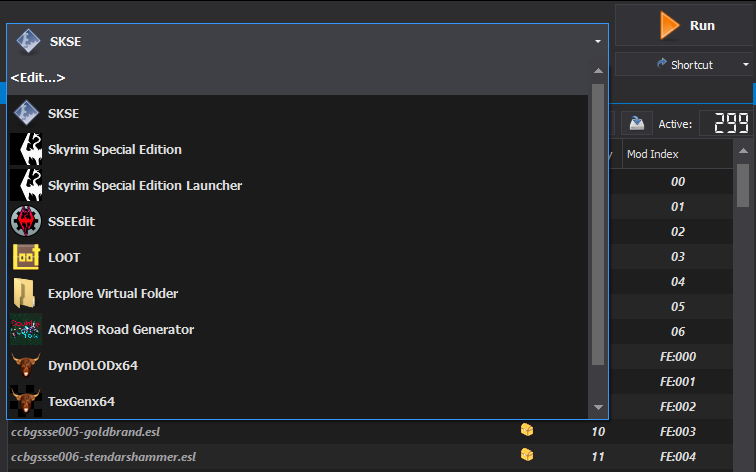
Click the Executables dropdown at the top right and click <Edit...> at the top of the list. This opens the Modify Executables dialog so it's pretty much the same thing.
-
It looks as if you may have skipped 17-Locations since you are missing most of the mods in this section: Bring Out Your Dead, Cutting Room Floor, Landscape Fixes for Grass Mods, Oakwood, Smooth Shores, Snow landscapes for Snowy Regions, Worldspace Transition Tweaks, and Hearthfire Extended.
-
Your must-haves for Starfield
Greg replied to rootsrat's topic in General Starfield Discussion & Support
I think it's just missing the 7 at the end and should be https://www.nexusmods.com/starfield/mods/1247