DoubleYou
-
Posts
7,933 -
Joined
-
Last visited
Everything posted by DoubleYou
-

Jarls Gilded Wristguards Restored (by Exalderan)
DoubleYou replied to D1Z4STR's topic in Skyrim SE Mods
I think there was a reason this content was cut... it just doesn't look right. -
I don't play with followers typically in Skyrim, but this sounds useful for those who do, but probably more so for those who want to abuse the Ritual Stone.
-
That could be possible in the future. Ensure your INI Path under Setup is set correctly.
-
Discussion topic: NPCs use Potions by KoeniglichePM Wiki Link Sounds promising. An alternative to EEOS with respect to potions to avoid flooding the economy with extra potions (can still use EEOS for spells/shouts) by allowing for modulation via config settings. NEED WILLING TESTERS - If anyone wants to test this with or in comparison to EEOS (with that potions SPID disabled), it would be appreciated. We have some data.
-
Version 3.6.1 -Presets: Fallout 4 BethINI presets updated to fix balance of texture upgrade/degrade settings. Also bugfix for Medium preset where bScreenSpaceSubsurfaceScattering was set to 0 while bScreenSpaceReflections was set to 1. bNVFlexEnable is now set to off by default, as it can cause crashes without the Weapon Debris Crash Fix mod. You can re-enable it in the Custom tab. Also lowered the shadow distance for Ultra and High presets. -Changed icon. Unfortunately, Nexus currently has the compiled version quarantined, so here's a Mega link in the meantime: https://mega.nz/file/8FZiUJaL#TOxdL5ccLxCkRManoRg-9hYoy9lyM1b7OGLDhACMwDY Virustotal: https://www.virustotal.com/gui/file/c25cecfd6e53086a5c0ff72694982ec1f13eca17c2a7e5c5672844eee23dd405 (these two antiviruses flag virtually everything and have zero contact info for whitelisting). I PM'd Pickysaurus, but it's the weekend, so I'm uncertain when it will be accepted, so I have also left the previous version in Old Versions for now.
-
(mouse) movement makes surrounding area brighter
DoubleYou replied to Eagleman's question in General Skyrim SE Support
Drop Detailed Draw Distance down to 2896 and see if that helps. Shadows in SSE are not perfect, so you may not be able to get rid of it entirely. -
(mouse) movement makes surrounding area brighter
DoubleYou replied to Eagleman's question in General Skyrim SE Support
Looks like your shadow settings. -
Blackscreen after closing map and missing cities on map
DoubleYou replied to Eagleman's question in General Skyrim SE Support
I noticed the black screen issue starting with the Anniversary Edition. I think it is just a bug in the new game version. Minor inconvenience, as cycling it makes it go away. -
Blackscreen after closing map and missing cities on map
DoubleYou replied to Eagleman's question in General Skyrim SE Support
This is incorrect. The \ rule must have Level0 for Level32. -
Yes, this is possible. Jonx0r goes into detail in his Skyrim New Lands Mod Mega Tutorial: https://drive.google.com/file/d/1j0xoZFy3tj_J9aL-O0JVqHMLcizGl0Vj/view
-
The same water normal texture you use in the game for distant water is the same as seen on the map. You need to find which mod is providing/overriding this texture and remove it. This is a base water texture in the game and does not have anything to do with your generated lods.
-
You might have another mod overwriting the RWT water texture normal used for distance.
-
How long is Acmos road generator suppost to take?
DoubleYou replied to Dzone's topic in Step Skyrim SE Guide
Well, that doesn't tell me anything much. It looks like it wasn't allowed to read the list of files in your D:\Games\Modding\Tools\xLODGen\xLODGen_Oputput directory. I see that you have it named "xLODGen_Oputput." Perhaps this is incorrect. Otherwise, I'm guessing the antivirus was interfering. -
How long is Acmos road generator suppost to take?
DoubleYou replied to Dzone's topic in Step Skyrim SE Guide
Should take about 5 minutes or so. You can post the log and I can help you determine what the issue might be. -
Other mods may or may not work. Pay attention to the mod page descriptions which typically will tell you what mods they are incompatible with. Things changing landscape or adding buildings will likely be incompatible with loading the gid grass cache, so make sure you disable that (you can still use it to make grass lods with DynDOLOD). Be aware that these mods will also require regeneration of lods. Body mods will require care for compatibility with the provided body mods, and you may need to remove those in order to replace them. And remember to rerun Nemesis if you do so. Mods adding new weapons and outfits likely will need to be added to the leveled lists. Adding mods is not within the purview of the guide itself, but we do try to give guidance if we are able. That being said, we would be spectacular nerds to know about all mods out there and their compatibility status with our guide.
-
Unofficial Skyrim Special Edition Downgrade Patch
DoubleYou replied to mulliganplummer's topic in Step Skyrim SE Guide
I think that should be fine. -
Because it is not a valid tweak, and is not recognized or used by the game.
-
https://support.microsoft.com/en-us/topic/use-the-system-file-checker-tool-to-repair-missing-or-corrupted-system-files-79aa86cb-ca52-166a-92a3-966e85d4094e You could try these troubleshooting steps. If this doesn't work, my next step would probably be to reinstall Windows.
-
The Assembler and Compiler are two different applications with different versions, which is normal. You could try and check the Windows Event Log. It might have more information that will help identify the exception. I still think it sounds like a missing c++ redistributable. Make sure you install both the x86 and x64 redistributables for 2012, even if your machine is 64-bit, not all applications are. The game pre-bundles these installers in Fallout 4\_CommonRedist\vcredist\2012
-
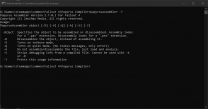
Those bat files look like internal Bethesda bat files, and shouldn't relate to us. If you're savy with the command prompt, try executing... papyrusassembler -? and see what it does. If you don't know how to navigate to the directory, you can use the full path in the command prompt like this: "D:\SteamLibrary\steamapps\common\Fallout 4\Papyrus Compiler\PapyrusAssembler.exe" -? If this is returning the same error, it is likely your Creation Kit installation is corrupt somehow, in which case I would uninstall and reinstall.
-
Perhaps reinstall your vc 2012 redistributable? https://docs.microsoft.com/en-us/cpp/windows/latest-supported-vc-redist?view=msvc-170
-
SSR in SSE break when applying "recommended tweaks"
DoubleYou replied to charmics's question in BethINI Support
Every change can be seen in the Summary of Changes window. Every setting can be changed in the Custom tab. I have largely frozen development of BethINI except for major issues while I continue to develop its successor Bethini Pie. -
SSR in SSE break when applying "recommended tweaks"
DoubleYou replied to charmics's question in BethINI Support
The problem is where the reflections bug out. They look good until they look buggy. Our guide is based on Realistic Water Two, which recommends this setting for this reason. -
Since you are on SE, the only setting that should apply to you for grass are the Grass Fade-in checkbox being disabled. The rest of these shouldn't matter as long as you use the described NGIO config settings in that guide, which will override most of the settings already. Using ultra trees means that the Far-off Tree Distance setting can be set to 0, since tree LODs will be handled in object LOD. The Tree Detail Fade setting is still relevant for adjusting performance/removing pop-in, but only applies to the trees in the loaded cells, and nothing to do with LODs. If you notice pop-in, you may find increasing this may alleviate this.
-
Which guide are you using? The Step 2.0.0 guide contains pregenerated grass cache since it uses the Anniversary Edition, which is not supported by NGIO. It also instructs how to configure the INI settings.