z929669
-
Posts
13,082 -
Joined
-
Last visited
Everything posted by z929669
-

STARFIELD Starfield Default Values for All Known Valid INI Settings
z929669 replied to DoubleYou's topic in INI Tweaking
I'd test the following (assuming meters here, but maybe its game units). Setting both to the same value should impact only NPCs at this exact distance. With the delays, point times and #actors values, this might effectively disable head tracking and provide some insight: fMaxPathLookAtPointDist=1.000 fMinPathLookAtPointDist=1.000 -
Starfield Mod Installation
z929669 replied to TechAngel85's topic in General Starfield Discussion & Support
This is Microsoft's mandated implementation, I assume. Thanks MS. Thanks. So put simply, forgetting the path variants "..\Documents\My Games" (bad) versus "..\Steam\steamapps\common\Starfield" (good), the subfolders trigger the conflicts between the two 'root' paths: ..\Textures\ ..\Meshes\ ..\Strings\ etc. If the bad location has one of these subfolders, the same subfolder in the good location is ignored (as are its contents), so each subfolder represents an independent conflict with respect to underlying loose assets, and both locations will override BA2 archived assets. Priority ..\Documents\My Games\Data\{folder}\* (bad, default) ..\Steam\steamapps\common\Starfield\Data\{folder}\* (good, alternate) ..\Steam\steamapps\common\Starfield\Data\*.ba2 (default fallback) Does this reflect what we know ATM? Side note: I just checked the BA2 archives, and divided the largest by 1024. This gives a decimal just shy of 4096, so I'm guessing max size of a BA2 archive is 4096 * 1024 = 4,194,304 Kb. -
Starfield Mod Installation
z929669 replied to TechAngel85's topic in General Starfield Discussion & Support
OK, thanks ... I will do so once we have more clarification if you don't beat me to it. I just think the whole situation is unnecessarily confusing, complex, and ambiguous ... not at all conducive to "a modders paradise" as Todd assumes. All due to MS being in the mix and requiring support for their ancillary crap that is NOT conducive to modding this game. It's a broken tractor trailer stuck in the driveway. -
Starfield Mod Installation
z929669 replied to TechAngel85's topic in General Starfield Discussion & Support
Thanks. First, as DY stated previously: ... so it makes sense that loose textures alone are only recognized in this^ path. Your A) findings corroborate that. However, your B) findings highlighted make little sense to me. Are you saying that if a custom strings file (or custom ANYTHING) exists in ... ..\Documents\My Games\Starfield\Data ... the game will not recognize ANY custom files in ... ..\Steam\steamapps\common\Starfield\Data ... ? For now, we must assume that meshes or any other loose assets behave like strings and loose textures stand alone because of the unique treatment of textures for Photo Mode and Message of the Day, as evidenced by the path ... ..\Documents\My Games\Starfield\Data\Textures\ In other words, custom loose assets under the path: ..\Steam\steamapps\common\Starfield\Data\Textures|Strings|Meshes|etc\ ... are INVALID if any custom loose assets exist under ... ..\Documents\My Games\Starfield\Data\Textures|Strings|Meshes|etc\ I'd like the OP to reflect these details rather than implying that all loose assets must be under the ..\Documents\My Games\Starfield\ path, because that's just not true it seems. PS: I don't want to mention anything related to xBox/Gamepass on this site other than mentioning that we do not support it. It's just confusing to the paradigm of interest that we do support (and the Nexus seems to be doing the same). I'm only interested in what must be done to support loose assets in the historically standard path for Bethesda games, so the "My Games" path should NOT be used at all, IMO. -
This had been posted incorrectly in the DynDOLOD forum, so not sure what game applies.
-
SkyrimSE v2.2.0 Guide - Crashing at Section 20 (Patches)
z929669 replied to Montey30's topic in Step Skyrim SE Guide
Be certain the MAIN exclamation error in MO disappears (the on ein the upper right corner of MO). If it doesn't there's still a problem you need to resolve by ensuring all plugins (right pane) and mods (left pane) are enabled. If the MO message disappears and you still CTD at launch, it's most likely a SKSE dependency problem. In that case, you have not installed SKSE or one of the mods that depends on that correctly. This is where the binary testing comes in by disabling all mods after Extenders and rerunning the smoke test earlier in the guide at the end of 02-Extenders. -
Starfield Mod Installation
z929669 replied to TechAngel85's topic in General Starfield Discussion & Support
Yeah, but what are the facts? As I understand it, only textures are impacted per @DoubleYou's post above. I honestly don't know and am planning on referring to the OP for the facts at some point, so trying to establish what we know for sure to avoid misunderstanding. -
SkyrimSE v2.2.0 Guide - Crashing at Section 20 (Patches)
z929669 replied to Montey30's topic in Step Skyrim SE Guide
Install those missing mods, including the CR patch and AYOP - Companions. Sort with LOOT and that's it. I'm not sure how you missed these ... or perhaps they are not enabled or their plugins not enabled. -
SkyrimSE v2.2.0 Guide - Crashing at Section 20 (Patches)
z929669 replied to Montey30's topic in Step Skyrim SE Guide
Click the warning icon, and then "Missing Masters" ... you most likely either installed a plugin that should have been hidden or the wrong version of a mod missing a plugin that's expected. -
Starfield Mod Installation
z929669 replied to TechAngel85's topic in General Starfield Discussion & Support
@TechAngel85 If this applies to textures ONLY, then the OP still isn't clear. -
TESTING Starfield Script Extender (SFSE) (by The SFSE Team)
z929669 posted a topic in Starfield Mods
Discussion topic: Starfield Script Extender (SFSE) by The SFSE Team Wiki Link -
SkyrimSE v2.2.0 Guide - Crashing at Section 20 (Patches)
z929669 replied to Montey30's topic in Step Skyrim SE Guide
See if you have the exclamation in MO. If not, then this is probably caused by an SKSE mod dependency. Just disable all mods after Extenders and rerun the smoke test to verify. Then enable everything up to Interface and test again. Use the binary method to see what mod you didn't install correctly, enabling mods in blocks to test. Sort with LOOT each time you enable more mods.
-
Attached is my MO sorted LO in my dev build. Keep in mind that some mods will be sorted arbitrarily by LOOT where order of one or more mods doesn't matter. This applies to some of these. Just check records in xEdit if you don't trust that.loadorder.txt
-
Just sort with LOOT per the guide, and as long as you have all of the plugins required by the patches, you can trust the LO set by LOOT. Master and master-flagged plugins always load first and are overridden by normal plugins. You must install the Step Patches and their masters as well per the guide. In short, just follow the guide and trust the result.
-
Yes, but as I understand, this was happening with files that did finish. I quoted the last post, but the fill story is up there^ Perhaps @TheAimlessMage can confirm.
-
Set Interior Vision in the CW MCM to a lighter value. Also try toggling ENB off while in a dark interior if you are using it (Shift+F12). Also don't judge interior lighting from the Alternate Start cell, because that is not representative of most game interiors. Visit interiors in each of the major holds to get a feel. Also dungeons. Footprints should be working without issue, so try re-downloading each of those mods and reinstalling per instructions in case something went wrong. Test everything with a new game to be sure there's no glitch in your original save(s). Shimmering skin textures is related to mods in Character Apperance ModGroup, so you may want to revisit those mods as well to ensure each is installed correctly and the original downloads were successful.
-
ACCEPTED XP32 Maximum Skeleton Special Extended (by Team XPMSE)
z929669 replied to TechAngel85's topic in Skyrim SE Mods
Quoted your take on that here for posterity. I looked at the game settings changes and agree that the impact of using the plugin with those settings changes isn't understood by me ... my instinct is to defer to the XP32 folks that almost certainly understand the impact of these settings and seem to think they are universally applicable to the new versions of their skeleton meshes. Whether or not it matters might be clear during gameplay without the plugin (physics/ragdoll wonkiness). I would use the plugin now in my own build, but I cannot offer any reasoning to do so other than what I've stated. -
xLODGen LOD 4 Optimize Unseen Comparison
z929669 replied to Mousetick's topic in General Skyrim SE Discussion & Support
Thanks. This provides the detail and context around the validity of sheson's suggestions in the doc and our likewise modified settings. -
ACCEPTED XP32 Maximum Skeleton Special Extended (by Team XPMSE)
z929669 replied to TechAngel85's topic in Skyrim SE Mods
I had seen that, but then things changed and the plugin was also installed with the Basic option. Then I looked on the Nexus posts and saw all of the user issues probably related to the complexity of mod dependencies of various XP32 options that now exist. All good, so thanks for the input historically on this one. -
ACCEPTED XP32 Maximum Skeleton Special Extended (by Team XPMSE)
z929669 replied to TechAngel85's topic in Skyrim SE Mods
Yes, we did discuss a while back, and I agree. I was just noting the options that would yield the best approximation of what we had with 4.81 in case others wanted to chime in as you did. I haven't begun looking into OAR and other potential animation mods yet for the guide update, but I suspect we'll be using one of the Extended options at that time ... TBD. For now, the wiki instructions are up to date with current guide build. -
ACCEPTED XP32 Maximum Skeleton Special Extended (by Team XPMSE)
z929669 replied to TechAngel85's topic in Skyrim SE Mods
I've found that the closest approximation to 4.81 in 5.04 is Extended, Racemenu + XPMS MCM + Weapon Styles, SFW - Out of Sync, and None/Select nothing for everything else. What I do not know is if we ever needed all that stuff in the first place. I suspect not, but if we are using this mod to facilitate extensibility for anyone wishing to add other animation mods atop Step (one intent our guide supports), then this seems the way to go ... hiding the plugin as usual. -
Let's ask @GSDFan about this. He's our resident MO expert. See previous few posts.
-
I'm guessing that is French, Swiss, or Finnish ... or something else I can't read. Can you translate the error message for us?
-
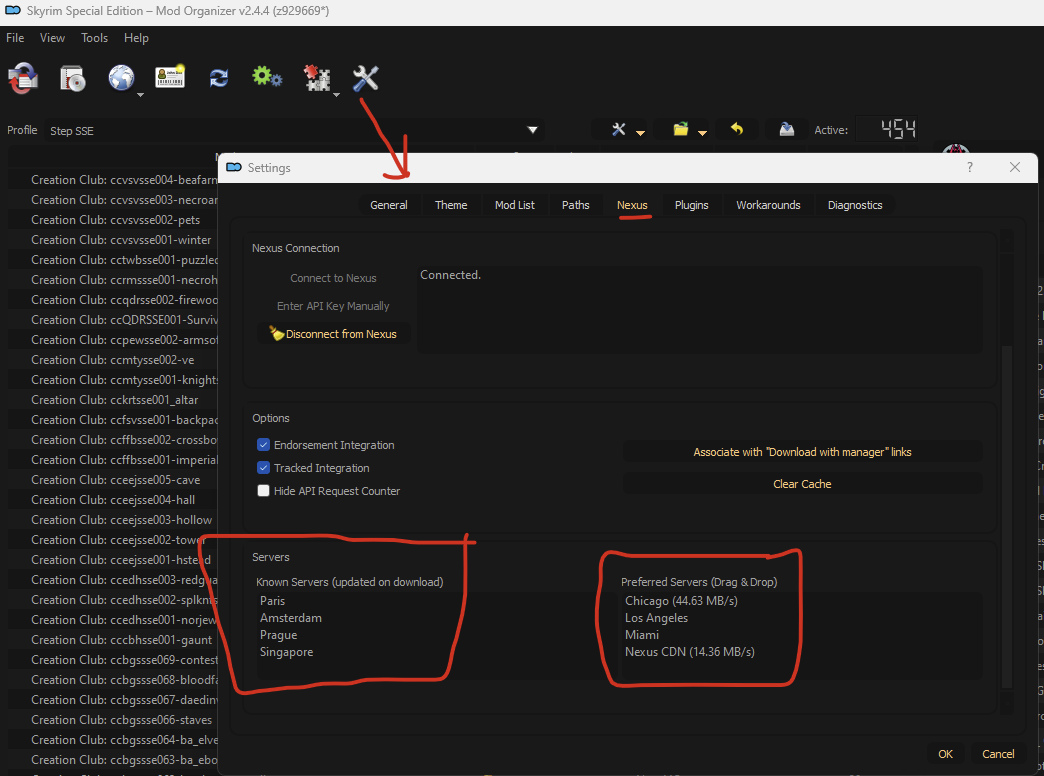
Play with this stuff using a server that is closest to you. then close restart MO ... or your PC if that doesn't resolve it.
-
xLODGen LOD 4 Optimize Unseen Comparison
z929669 replied to Mousetick's topic in General Skyrim SE Discussion & Support
Yeah, I thought that might be the case, which is why I edited my post.