DoubleYou
-
Posts
7,934 -
Joined
-
Last visited
Everything posted by DoubleYou
-
Hmmm... I think I prefer vanilla. I can see where someone might prefer this, however, especially if you were adding additional perks.
-

Smooth Shores Patches - Merge when asked?
DoubleYou replied to mooit's topic in General Skyrim SE Discussion & Support
The method of manually downloading, then Query Info on the download to fetch the metadata. -
ACCEPTED Fixed Alpha Maps (by ScottyX2, Neolithicjay)
DoubleYou replied to DoubleYou's topic in Fallout 4 Mods
Current guide up to this mod > Add this mod I didn't feel a vanilla compare was necessary to show that this is a very good mod. -
DROPPED Faraway Area Reform (by SparrowPrince)
DoubleYou replied to DoubleYou's topic in Fallout 4 Mods
I didn't include the generated terrain LODs in these compares. I also haven't generated terrain LODs in these compares. Vanilla > Vanilla + FAR > F4HDO > F4HDO + FAR -
ACCEPTED Fallout Texture Overhaul Stars (by Gorgulla)
DoubleYou replied to DoubleYou's topic in Fallout 4 Mods
Vanilla > F4HDO (no real change) > FTO Stars 1k > FTO Stars 2k > FTO Stars 4k This mod really benefits from the 4k texture. You actually have twinkling stars at 4k versus low-res stars at 1k. -
ACCEPTED Fallout Texture Overhaul Moons (by Gorgulla)
DoubleYou replied to DoubleYou's topic in Fallout 4 Mods
Vanilla > F4HDO (no real change) > Fallout Texture Overhaul Moons 1k (no difference was noticed using higher resolution textures) -
ACCEPTED Better Ammo Boxes (by DeviousMeth0ds)
DoubleYou replied to DoubleYou's topic in Fallout 4 Mods
Vanilla Vanilla + All Weapons HD Shotgun Shells texture (looks identical) F4HDO (upscaled but looks the same to me) Better Ammo Boxes with closest to vanilla options (Medium) Better Ammo Boxes with slightly different options (Medium) Better Ammo Boxes, same as previous, but High These textures are on such a small item that the higher quality textures are imperceptible. -
This is a mesh replacer. My experience is that these lights are typically ones you place throughout your settlement. However, we should check to ensure this mod doesn't break precombines or is perhaps included in the Unofficial Patch, as it is a quite old mod.
-
Slocum Joe Corporate HQ Reception Ceiling Fixed (by MrTroubleMaker)
DoubleYou replied to DoubleYou's topic in Fallout 4 Mods
Moved to 09-Fixes. -
NukaWorld Fixes the East Entrance (by MrTroubleMaker)
DoubleYou replied to DoubleYou's topic in Fallout 4 Mods
Moved to 09-Fixes. -
Smooth Shores Patches - Merge when asked?
DoubleYou replied to mooit's topic in General Skyrim SE Discussion & Support
You have the WTT Patch in there. That is not used for the current guide. Otherwise, you could do that, or you could simply install all the files as they are. You can leave them separate if you want to. The Merge instruction is mainly there to help users know which button to pick, as most would otherwise get confused about the difference between Merge and Replace. If you are installing as separate, there is no need to Merge at all if you prefer it that way. I'll often do this just to remember what files I installed. I do this quite often myself, which is why I know about explaining it. -
The fomod for this mod is bugged, as well as the archive version (cubemap BA2 bug... probably created via Archive2, which kills cubemaps). I have instructed to install this mod manually and to install as loose files in order to correct these two issues.
-
Smooth Shores Patches - Merge when asked?
DoubleYou replied to mooit's topic in General Skyrim SE Discussion & Support
When you download a file manually, MO2 doesn't retrieve the necessary metadata for it to know what mod it is. This metadata is very useful for many reasons. It allows: MO2 to know the Nexus id, so you can right-click the mod and click "Visit on Nexus" to see the mod page on Nexus The ability to check for updates for the mod when you right-click, All Mods, Check for updates. Better naming of mods based off the mod title instead of the archive title. Now, you may download mods manually and install them manually, but in order to successfully merge them, each successive file from the same mod must be given the exact same mod name at the install window: If you move the manually downloaded files to MO2's downloads directory, or if you go into MO2's Settings and change the Paths to Downloads to wherever you have been manually downloading your mod files, you will see in MO2's downloads pane that they have a red exclamation mark. If you right click the download and select "Query info," it will download the metadata information for the mod in the same manner as if you had downloaded it via MO2.
-
DROPPED Faraway Area Reform (by SparrowPrince)
DoubleYou replied to DoubleYou's topic in Fallout 4 Mods
This mod provides two useful textures: textures\terrain\detailnormals.dds textures\terrain\noise.dds The rest of the textures should be generated via xLODGen for our guide once it is complete, so the entire textures/terrain/Commonwealth textures will be overwritten and unused. Therefore I am recommending all users to install the Reduced Resolution file, so that the extra textures don't take as much space (the textures mentioned above are the same size). Optimally, we would only need to install these two textures. @TechAngel85, do you think @SparrowPrince would be willing to upload those two as a separate optional file? -
Smooth Shores Patches - Merge when asked?
DoubleYou replied to mooit's topic in General Skyrim SE Discussion & Support
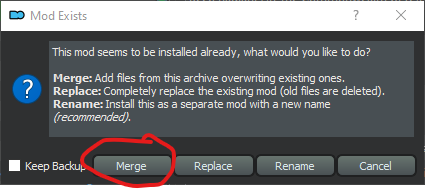
When we say Merge, we are always talking about the Merge button when installing the file in MO2.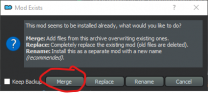
-
Reference the instructions for usage on the dev Fallout 4 guide, and you'll see how there really isn't another tool that can do this more simply.
-
This mod is included with the Previsibines Repair Pack, so I'm dropping it.
-
Fallout 4 HD Reworked Project Revised (by HalkHogan)
DoubleYou replied to DoubleYou's topic in Fallout 4 Mods
This mod breaks precombines. Everything he shows in his screens already looks good to me, and I'd really would rather avoid regenerating precombines if possible, so I'm going to drop this from the current dev guide. -
ACCEPTED Delightful Dead Fish (by 83Willow)
DoubleYou replied to DoubleYou's topic in Fallout 4 Mods
Vanilla > Fallout 4 HD Overhaul > Delightful Dead Fish -
Cryolator Cryo-Cell Fix (by The6thMessenger)
DoubleYou replied to DoubleYou's topic in Fallout 4 Mods
After testing, I was able to verify that this fix is included in the Unofficial Fallout 4 Patch, so I'm dropping it. -
Any patches that old are very outdated. If you are using the 2.0.0 guide on 1.5.97.0, with relevant installation modifications for SKSE mods, and using the Best of Both Worlds patch, our current patches will still work correctly.
-
Skyrim VR doesn't support esl files. They literally will not work. Also, you can't have more than 255 plugins on Skyrim VR. The error is telling you this. Since you are using DynDOLOD, you need to reduce that down to 253 at least.
-
DROPPED Better Landscape Grass (by flecked)
DoubleYou replied to DoubleYou's topic in Fallout 4 Mods
Moved from 06-Models & Textures to 09-Fixes. -
ACCEPTED FlaconOils Complete Retexture Project (by FlaconOil)
DoubleYou replied to DoubleYou's topic in Fallout 4 Mods
Yes, it is a real pain. I took what I preferred out of everything. Tech had the order right, just needed some fine tweaking. Getting rid of Langley's buildings was the big thing I found to improve it, as his changes just wouldn't mesh well with everything else. But Langley has the best wood textures I've seen so far, so that is most of the wood you are seeing here. Flaconoil's building textures are really good. Some things he has are not as good, however. If downstream mods don't fix the one's I'm not happy with, I'll probably look into seeing about only using some of the parts of this mod. -
Vanilla > Fallout 4 HD Overhaul > All Weapons HD