z929669
-
Posts
13,086 -
Joined
-
Last visited
Everything posted by z929669
-

Trees pop-in / flickering / brightness change
z929669 replied to SgtPowers's question in DynDOLOD & xLODGen Support
From the forum posing instructions at top of this forum's parent. You will need to provide logs as instructed in the OPs: Search the forum using the relevant keywords. Read the OPs! DynDOLOD 3.x OP1, OP2 DynDOLOD 2.x xLODGen OP1, OP2 Skyrim TVDT (occlusion) Post logs & bugreport.txt from the installation folder. Text sharing services like Paste.ee Each run log is appended to the existing log. Truncate logs to last meaningful full run. Post size limits: Watcher: 1 Mb, Citizen: 2 Mb -
It works. Super handy. SolidifyA seems best, but B and C also work
-
Good tip. I'm using 2020
-
Blended Roads stones look MUCH brighter than snow
z929669 replied to Noobsayer's topic in Step Skyrim SE Guide
Try using More Informative Console to identify the meshes/textures and searching for them in MO Data in right pane using the filter. This will tell you what mod is providing the assets. Almost certainly CL, but I'm not in a position to verify ATM. This sort of thing can also happen after loading a save and using COC/COW via console. I assume you aren't using TFC in the shot you posted (i.e., this is not LOD). You should also try loading up a new game to see if the issue persists. I assume you have all mods installed in the guide? Your issue is almost certainly with CL and/or BDS, so I would double check those install instructions. -
Blended Roads stones look MUCH brighter than snow
z929669 replied to Noobsayer's topic in Step Skyrim SE Guide
Did you disable the Cathedral Landscapes 'TEMP' mod to be used only during terrain LODGen? That may cause such issues. If you don't have that 'mod', revisit CL install instructions. It's one case where we don't instruct to merge multiple files from the same mod. If you did that, simply reinstall, choosing 'replace' for the main file, and then install the TEMP add-on. -
New Player looking to mod!
z929669 replied to Bhoopadoop's topic in General Skyrim SE Discussion & Support
See the guide links at top of forums. That's what we recommend -
CTD with Cathedral Weathers and Seasons - Help?
z929669 replied to SuperOwen's topic in Step Skyrim SE Guide
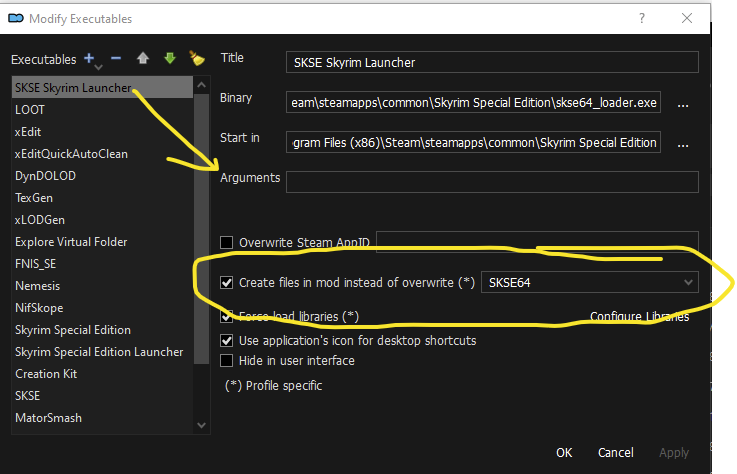
I can honestly relate to all arguments from all sides. I personally like the idea of preempting output related to SKSE into an SKSE-labeled mod, and similar for other files mediated by ther respective MO executables, but I also see the value of finding them (and dealing with them and reading the guidance DY provided) in Overwrite. This is why I removed that instruction at the behest of the crew ... I keep changing my mind about it. -
Got it, I wasn't sure what that last image was, TBH
-
It looks like it's only changing snow to the bluish tint where BDS would place snow ... not all LOD snow though.
-
Cannot exit items menu
z929669 replied to MrFF1990's topic in General Skyrim SE Discussion & Support
Probably a limitation of default controller support for the game. I actually use a controller as well and have added "(PERSONAL) Improved Xbox Controller Scheme" to my own setup under Interface section. I use the 'Full' version with no customizations to it's config, and I don't have this issue. If you do customize the config, I suggest you add that to a new 'mod' just after this one in the left pane so that it isn't overwritten in case of update ... something like "(CONFIG) Improved Xbox Controller Scheme". This is not in our mod list but it's an example of the kind of mod that is agnostic to and of the Step setup. -
CTD with Cathedral Weathers and Seasons - Help?
z929669 replied to SuperOwen's topic in Step Skyrim SE Guide
True, but they go to SKSE mod only if they are SKSE-mediated files (they wouls still go into overwrite if not mediated by SKSE). As I said, I suspected this is the reason why you want them in overwrite: so you know when and SKSE-mediated mod produces output. That's fair. Just stick to the current instructions, and you won't go wrong. ... an even better solution. I agree and will be altering my own setup likewise. "SKSE Plugin Output" is what I'll be calling it, and I will place it right after xEdit Output early in my mod's pane. -
The normal alpha (specular) matters, but the normal vectors are the main predictors (high green/red needed). This is evident in the shot of the fieldgrasstu*.dds I posted for this mod above in the post you quoted. Note that specular is essentially black where it overlaps the diffuse alpha, yet this mod's brightness for that grass is off the charts with complex grass. I have tested these grasses with a specular as in my second screen and a normal only slightly more green/red than in the first set above, but the normal must be as harsh or harsher than in my second normal. So this is really bright (this mod): but this is more muted as in my updated screen in my compares post (my version; note that I fixed the diffuse background of many textures that had black right to the edge of the alpha cutout): ... my version actually merges two normals. Darkening the specular alpha does have some impact as well, but the normal vectors have the main impact on reducing brightness.




-
I have been working on my own version of CL complex grass. It's definitely idiosyncratic the way the game renders grass normals ... it's all about the configuration of the normals. They must be very harsh to tone down the crazy brightness. I will also be redoing the vanilla complex grass afterwards. Screen example added to my compare above.
-
SKYRIMSE Collections of Nexusmods is in open alpha
z929669 replied to framx2l's topic in General Skyrim SE Discussion & Support
We think Collections will overtake Wabbajack, and we already have integrated support with Nexus and an unofficial partnership with Nexus. MO will also support Collections at some point. -
We know about this, and have been given tacit permissions to update that mod by the MA. Just waiting to sort out the details.
-
@Mousetick Thanks you for the analysis. I completely agree with your approach and now see why I wasn't completely happy with any of my glacier LOD in the compares I posted. So ... I vote to accept this mod WITHOUT using the CL optional textures in favor of using the TexGen texture created during LODGen. I will update the OP with these instructions. If we wind up using this mod, then we can simply add this renamed texture to the CR patch and add a note to the patch mod page warning those that may not want to use Just Ice. Above screens updated with note.
-
CTD with Cathedral Weathers and Seasons - Help?
z929669 replied to SuperOwen's topic in Step Skyrim SE Guide
If SKSE and xEdit are set up properly, any xEdit-written files will go into xEdit Output mod (which should always be enabled) or SKSE mod. I never get anything in overwrite under any circumstances. I think we should add this to the SKSE mod install instructions. I believe I had this in the SKSE64 instructions, but I removed it last Oct at the behest of @TechAngel85 or @DoubleYou or @Greg for some reason. Part of this conversation is the use case for recommending it. My guess is that some people want notification that files are written out related to SKSE by virtue of getting them in overwrite. Great for people who know what to do with them, but alarming for the less experienced (alarming MO warning icon at top right of MO).
-
FEEDBACK v2.0.0 - Feedback & Bug Reports
z929669 replied to DoubleYou's topic in Step Skyrim SE Guide
I agree that we need to look into moving to this new system and away from FISSES as more and more mods support it. -
Survival Mode makes Health Bar disappear
z929669 replied to FendisKhan's topic in Step Skyrim SE Guide
Hmmm. It sounds like the health bar display is linked comfort and healing. Maybe health improves at a trickle when comfortable, and the health bar disappears to indicate that (or to indicate that discomfort is not gradually reducing health). I suspect it's expected behavior, but I don't know for certain. -
The screens I posted are how the LODs look in game without using TFC as you must be doing in your screens. My comparisons are a 1:1 with the only diff being your mod. It's most certainly a 'proper' comparison I should have added the TFC comparisons, but it's essentially a moot point, because our users don't play that way ... this is just a real-use comparison of vanilla, DynDOLOD and this mod's LOD under Step, with and wo/ENB. As mentioned, I vote to accept it for Step (this is how we add mods to our guide versions ... it doesn't mean that its only 'acceptable'. It's proposed as getting the "ACCEPTED" tag)
-
Survival Mode makes Health Bar disappear
z929669 replied to FendisKhan's topic in Step Skyrim SE Guide
The point of survival mod is realism, so eliminating the health/magicka/stamina bar is expected for such mods. Is the display of the health bar inconsistent? You may want to re-read your post to be sure you are describing what you mean. -
Removing CR-Patch relevant mod from load order
z929669 replied to Morath's topic in Step Skyrim LE Guide
Good point. I edited my post with that info. Devil is in the details -
Forgot link
-
CTD with Cathedral Weathers and Seasons - Help?
z929669 replied to SuperOwen's topic in Step Skyrim SE Guide
Ditto everything Mousetick has mentioned in great detail. If you have this MO warning flag, then you did not follow the guide instructions carefully enough to avoid this and the missing masters issues. Revisit the Tools setup instructions. Be certain to expand all + Spoilers in orange text and follow those instructions. Revisit the mods related to the missing masters and reinstall according to the instructions. Be certain to 'hide' plugins per mod instructions for "Optional ESPs/plugins", and enable mods (left pane) as instructed (default is to always enable a mod in left pane after installing it). Always enable all plugins (right pane) before sorting with LOOT ... always check that none are disabled. Sometimes, reenabling a mod on left doesn't enable the mod's plugin on right. Lastly, click "Expand" in mod tables at right of each row where you see it to view mod install instructions. -
Removing CR-Patch relevant mod from load order
z929669 replied to Morath's topic in Step Skyrim LE Guide
It's actually pretty easy. You just need to: load up the Step LE mod list in MO sort with LOOT run xEdit from MO when prompted, right-click to select 'none' select only the CR patch (TIP: type 'step' in the filter) Wait for it to load (if prompted about mod groups, it doesn't matter ... press 'OK') expand the plugin master you want to eliminate click each record to evaluate if it should be removed from the CR patch* once finished, right click on the CR patch in left col, and select 'Apply Script' Choose "Remove Unused Masters" exit xEdit, and the plugin should be saved into the xEdit Output mod (or overwrite if guide instructions were not followed) move that into the CR patch mod with overwrite (TIP: right click any mod, and select "Open in Exlporer") disable the offending mod in MO This is from memory but more or less accurate. If you mess up, you can always reinstall the CR patch or whatever else you edited by mistake) * Click on every record in Non-essential Children and you'll see one or more columns in the right pane with names of the plugins these records are from at the top. If the right-most column is the Step CR Patch, right click on that column and select Remove to remove this record from the Step CR Patch. If the right-most column is Non-Essential Children or some other plugin, leave it alone and move on to the next record.