Bushranger
-
Posts
75 -
Joined
-
Last visited
-
Days Won
15
Everything posted by Bushranger
-
Step SkyrimSE Patches (by Step Modifications)
Bushranger replied to TechAngel85's topic in Step Skyrim SE Guide
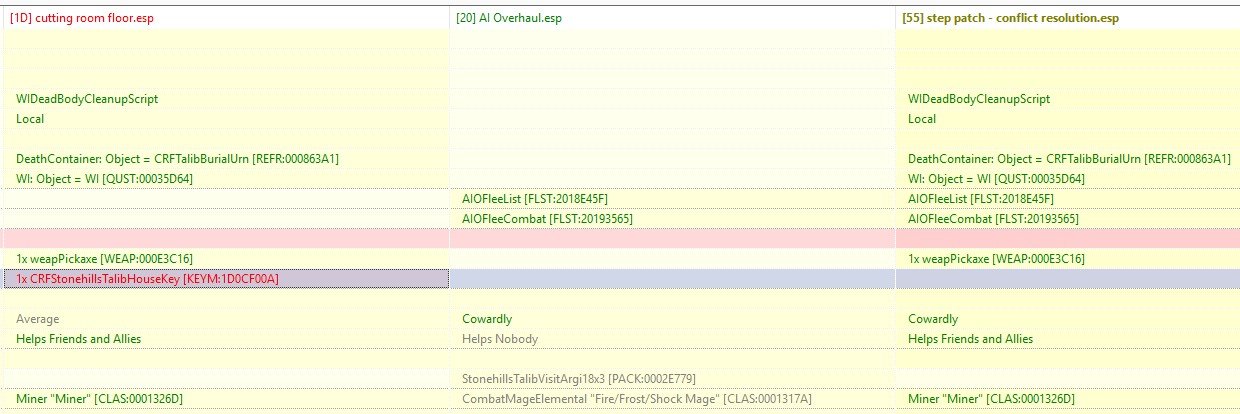
I've been tinkering with Step CR again and I've noticed that Talib, 00013609, has had most of Cutting Room Floor and AI Overhaul merged but their Stonehills House Key was left behind and is not included in their items. Was it missed or is there something I'm not seeing? I haven't played with Cutting Room Floor for a long time so I can't say I'm familiar with Talib in the Stonehills.
-
@sheson I'll apologize in advance if I ramble too much, I've spent all afternoon writing this and when I tried to attach the DynDOLOD logs I found they are compressed to 5,079KB so when the Step Attachments wouldn't accept them I went looking for somewhere to host them... and accidentally used the tab that had this post and lost what I typed. I'm trying to remember what I had written but I'm confused and my head is pounding as usual so I hope it can be understood. I've been trying to make a Skyrim Mod Collection I can play this year since November last year, something I've been working on almost every day for three months now and while I'm often left confused it's because people here offer advice and help that I've kept to trying to get a basic understanding. With updates, patches and some advice from you I used the 'Put worldspace references in the right cells' script on some Environs Mods and managed to remove all "Reference Attached to Wrong Cell" messages. As it's been too hot to go outside this weekend I spent yesterday trying to determine what was causing the other warning messages in DynDOLOD. I found that many Textures Do Not Match warnings about dwemer roads I was receiving are caused by Far Object LOD Improvement Project SSE. I also found through searching that this is known because it is spoken of in the FOLIP forum, and known by me because reading it again I remembered it here I was introduced to Additional DynDOLOD Resources. The many Textures Do Not Match warnings about Rock Cliffs in Majestic Mountains I was receiving are caused by the Additional DynDOLOD Resources, if I disable that mod and generate DynDOLOD then those warnings are not produced. I'm glad to know (or remember) what these are from. What I am still confused about is the "Filename * Does Not Adhere To File Naming Conventions" warnings I am always receiving about rwtcalmwater.dds I am fairly sure that this is caused by Realistic Water Two SE. I've searched in MO2 to see if there were any conflicts, I've searched here and I found that there was a post asking for calmwater.dds to be added to the ignore list. I also think a solution is found so that this is resolved, but now it seems that calmwater.dds has changed name to rwtcalmwater.dds and so now warnings are shown in DynDOLOD again. When I asked about that in the RWT forum though I've been told that others do not receive these warnings so it's not what I thought it could be and I should post here to ask about it. https://zerobin.net/?a9338a2e870ecfe2#S1jHDvc6Jd1Tm6lK4PKDxHKPm8JPXBpiwTFGEY0b8R8= DynDOLOD_SSE_log.txt https://www.mediafire.com/file/k77c75y5cravwtp/Logs_Report.7z/file Because ZeroBin keeps replying "Could not create paste. server error or not responding" and it's been more than an hour now of me trying to rewrite a lost post. Sorry it's two different formats Sheson.
-
ACCEPTED Realistic Water Two SE (by isoku/SparrowPrince/TechAngel85)
Bushranger replied to TechAngel85's topic in Skyrim SE Mods
Today was too hot to go outside and I've spent too long on DynDOLOD to walk away with a few things left unanswered so I spent it trying to find out what the warnings I had left were, especially after noticing this: While testing that I was confused with Realistic Water 2. They may not be Textures Do Not Match warnings but RWT2 was consistently giving 9 Filename * Does Not Adhere To File Naming Conventions: DynDOLOD 3.00 Alpha 198 has a post asking for calmwater.dds to be added to the ignore list. I also think a solution is found so that this is resolved, but now it seems that calmwater.dds has changed name to rwtcalmwater.dds and so now warnings are shown in DynDOLOD again. FAQ mentions CalmWater.dds in a way that I think refers to it as out of date but I do get confused. I've also seen other posts in mods like Better Watercolor and Transparency for Realistic Water Two suggest renaming rwtcalmwater.dds back to calmwater.dds but that seems very bad advice. -
This might just be me confused but I seem to be unable to update DynDOLOD. I noticed a couple weeks ago it had updated with the changelog message at the bottom of the window so I downloaded 3.00 alpha 198, I deleted the /tools/DynDOLOD and then extracted the update to /tools/DynDOLOD. I then went through and edited /tools/DynDOLOD/Edit Scripts/DynDOLOD/DynDOLOD_SSE.ini and /tools/DynDOLOD/Edit Scripts/DynDOLOD/TexGen_SSE.ini before later using MO2 to activate them with not much attention to the top where it lists exactly what is running and the bottom where it lists changelog. I ran it a couple of times at the beginning of this week where I've posted here about it. I also ran it again this morning after spending last night updating my mod list to try Spell Research and I noticed at the bottom that "A new version is available. Changelog." Only it's still DynDOLOD 3.0 Alpha 198 and what was most surprising was when I looked back it shows DynDOLOD 3.0 Alpha-197 x64 - Skyrim Special Edition (SSE) at the top of the window. I've spent the morning thinking I've done something wrong and tried to correct it by removing the tool connections from MO2 before closing it, following the update instructions and changing the /tools/DynDOLOD to /tools/DynDOLOD.old before installing it in a differently named folder and then connecting MO2 to those but it still shows as Alpha 197 and that A new version is available. I'm sorry if this is a lot but I do get confused easily, what have I missed?
-
I hadn't thought to run DynDOLOD again to see if it was repeatable. I probably should have done that so I ran it again this morning, I noticed that Worldspace Transition Tweaks had been updated to fix the references attached to wrong cells so I downloaded the new version (instead of using the edits I'd made) and I also redownloaded Skyrim Extended Cut - Saints and Seducers which is what the access violation mentioned just in case that had been corrupted. This mornings DynDOLOD generation completed so that's a relief about the access violation, still a little nervous about my hardware though... The crash log may show a crash about pathing but it crashed after I got onto the carriage for a ride to Winterhold. WTT - Skyrim To Solstheim's update is good as it has no more references attached to the wrong cell, but it's odd that Skyrim Extended Cut - Saints and Seducers now did show 2 references attached to the wrong cell. It hasn't been updated since I last downloaded a copy and before it just had the missing textures which is a known issue - why I also use DynDOLOD TexGen Fixes. I'm a little nervous to apply the script in xEdit and run DynDOLOD again for these two misplaced references... everything else seems to be working now.
-
DynDOLOD was terminated early with an Access Violation. I wrote it down to remember what it was... Checking for errors failed Access violation at address 0000000001EE49C2 in module 'DynDOLODx64.exe' (offset F249C2). Read of address 0000000000000000 for Skyrim Extended Cut - Saints and Seducers.esp EC_SS_S|TreasManiaChest "Chest" [CONT:0F04808F] I'm running DynDOLOD again to remove ENB and ENB support mods. This time with Dyndolod 3.00-68418-Alpha-198 and the updated DynDOLOD Resources SE. Skyrim Extended Cut - Saints and Seducers has not been updated and had gone through DynDOLOD generation in the past. DynDOLOD Access Violation.7z DynDOLOD_SSE_log.txt DynDOLOD_SSE_Debug.log.txt bugreport.txt and crash-2026-01-17-07-02-16.log While the DynDOLOD was being generated there was only FireFox with a Discord page, a couple of STEP pages and a couple of Nexus pages open up. MO2 and Notepad. After the Access Violation shut down DynDOLOD I checked memory in Windows Task Manager as the DynDOLOD Exceptions page instructs and ~27% was in use. I've included the crash report log from a couple days ago because it is also an access violation that came up while Skyrim was loaded. It suggests that it was Occlusion.esp modified by Vanilla Landscape Corrections.esp. I thought it was odd and I had been adjusting mods in preparation for the new load but as it was an Access Violation I ran a basic test with the Windows Memory Diagnostic Tool yesterday, it came up clear but now there has been another I'm not so sure... Also I've always been nervous that the Raptor Lake degradation would catch up with my i5 so it might be that I too confused to work it out myself now.
-
FEEDBACK v2.3 - Feedback & Bug Reports
Bushranger replied to z929669's topic in Step Skyrim SE Guide
This is a great one, thanks @CleverIdiot. I have no idea or say about an alternative to aMidianBorn Book of Silence armours/weapons but I do like the look since xavbio has based their designs on them. I also like that there are patches included for LeanWolf's Better-Shaped Weapons, I've also no idea if they're needed but it's nice that it's also taken into thought for the designs. So far I've added the CC options for Common Clothing Retexture SE along with the Leather Armors Retexture SE for the Netch armour, Silver Armor and Weapons Retexture SE for the armour and crossbow, and the Vigil Enforcer Retexture SE. Xavbio's Iron Armors and Weapons Retexture SE is just as dark as the texture in aMidianBorn's iron weapons so it doesn't help with my own lighting issue not seeing details well when I tried it. I have seen that it does cover the Headsman's Axe, the Iron Plate and the crossbow bolts aMidianBorn doesn't so it's also a nice addition. -
Update here to say that I should do what I read rather than try to work things out myself later. I'd read the Majestic Mountains Readme when I installed the mod in 04 - Foundation but I didn't try to do anything with snow until much later so by then I had forgotten the instructions it provides and became so confused. Following the instructions and replacing /textures/effects/projecteddiffuse.dds with renamed snow01.dds in RIS - Real Ice and Snow works as @T4GTR34UM3R instructs. 04 - Foundations Far Object LOD Improvement Project SSE Icy Mesh Remaster - Ice Glaciers - LOD - other fixes 06 - Models and Textures Icy Cave Remaster Icy Mesh Remaster - Vale cracks RIS - Real Ice and Snow (replaced /textures/effects/projecteddiffuse.dds with renamed snow01.dds - this is now RIS - Snow Only as RIM is providing all the Ice) RIS - Blended Roads Patch RIM - Real Ice reMastered Fixed Mesh Lighting (Ticked the Real Ice and Snow box) This is now how my Load Order looks and all seems to work well!
-
TESTING Community Shaders (by doodlum & the Community Shaders Team)
Bushranger replied to z929669's topic in Skyrim SE Mods
Now I'm back to looking through Community Shaders again if I understand this correctly CS Light and Light Placer replace ENB Light. That also means I should remove all these mods from the list and look for possible replacements as they use ENB Light: Elytra and Bliss Bug ENB Light ENB Lights For Effect Shaders ENB lights for Aetherium shards ENB Particle Lights - Dwemer Lanterns Particle Lights for ENB - Nordic Ruins Candles Particle Lights For ENB SE - Paragon Gems Radiant - Candles (ENB Lights) Rudy HQ - More Lights for ENB SE - Glowing Mushrooms Rudy HQ - More Lights for ENB SE - Torchbugs and Moths More Lights for ENB - Blood Splatter Fix Saints and Seducers Flora ENB Light I'm also debating with myself about Wetness Effects - Community Shaders which seems like a great addition. @doodlum Has a post there not to use it with Splashes of Storms so it would also replace Rudy fix for Splashes of Storms and ENB -
Discussion topic: Riekling Aim Improved by PixieBomb Wiki Link Rieklings are the best on Solstheim! I've added it to my Gameplay - Combat list and when I become the next Chief of Thirsk Hall this mod is certainly going to help my new tribes-kin
-
ACCEPTED aMidianBorn Book of Silence SE by CaBaL
Bushranger replied to z929669's topic in Skyrim SE Mods
I've been trying to battle Lighting, Snow and Ice on Skyrim for weeks! The Performance Benchmarking steps are to select "Breezehome" so that's become the standard I've used, then I would catch the wagon to Winterhold to see snow and ice and go into the Frozen Hearth. Ice worked well with RIM - Real Ice reMastered and though it took some time for me to remember what I read in the Majestic Mountains Readme the snow from RIS - Real Ice and Snow has been great once I replaced it's projecteddiffuse.dds with a copy of it's renamed snow01.dds. Lighting on the other hand has been confusing for me, no matter how I edited things or if I disabled lighting altogether it always looked like things were darker than it should be. It got me so confused I disabled everything except the 02 - Extenders and Alternate Start to follow the Performance Benchmarking steps and there were no longer dark shadows over the swords and shield on the wall... I tried again to work out what was causing that outside of the 18 - Lighting. Was it Soft Shadows that I'd installed in preparation for 2.4? No it wasn't that, I also removed RIS - Real Ice and Snow and reinstalled Fixed Mesh Lighting without selecting the patch for RIS just on the off chance since I was so confused... I'm posting it all here because it's not Lighting at all but the Sword and Shield textures themselves that make them look like they are in shadow and I found a post in aMidianBorn Book of Silence SE's page talking about it. aMidianBorn Book of Silence SE iron textures are extremely dark for me so I've a screenshot of it disabled and enabled with 18 - Lighting but without 21 - Post Processing: Are the Iron Weapons that dark usually for aMidianBorn Book of Silence SE or is it because I've installed the Weapons pack modular? As I'm using Ancient Amidianborn Dwarven Armory I've not included Dwemer in the Armors or Weapons pack and I'm now thinking of not including Iron in the weapons pack as well because how dark they are make it hard for me to see any details on them. -
I have only changed to Azurite Weathers this week, before that I was using Cathedral Weathers in the Step Guide and Relighting Skyrim + Ambiance was just as dark in places like Frozen Hearth screenshots I've posted before in 2025 are all with Cathedral Weathers. Also when I said that If I change the Graphics Driver gamma to 2.2 it became blown out I wasn't just talking about in Skyrim, everything was blown bright then. I took a screenshot of the Graphic Driver settings because it was washed out when I adjusted the settings. My Monitor is the ASUS ROG Swift PG329Q and I've found today that it does not have uniform brightness that many recommend using when a monitor is calibrated. There are several suggestions around the internet which preset to start with and then adjust the RGB to what they recommend (which always seem random to me because it's often very different person to person). Because I don't know what I'm really doing, and because I find it looks reasonable, I've been using the RTS/RPG GameVisual preset with Normal Colour Temp. What makes me extremely confused is that when I set the Graphics Driver gamma to 2.2 and took screenshots of what the monitor shown was washed out driver settings and the Frozen Hearth, those Screenshots then looked nice when I set the Graphics Driver gamma back to 1. Also while Shadow Boost with Dynamic Adjustment seems to not place the Frozen Hearth bar in such gloomy shadow it also makes the smoke particles in the Loading Screen worse. I'm starting to think almost all of this is because of the monitor.
-
I have Relighting Skyrim - SSE together with Ambiance - A Vanilla(plus) Ambient Lighting Overhaul The only difference in Lighting and Weather is I'm currently using Azurite Weathers in place of Cathedral Weathers. My game Display Settings were at default brightness, I've just gone in again to test it and used sg 1 in console before the screenshots to ensure gamma is 1. xLODGen was changed to 1.25 but when I edited the ini for TexGen and DynDOLOD I'm fairly sure that was about grass as I've only followed the Step Guide, I checked now and both are sRGBGamma=1.3 I can edit this to 1 and run DynDOLOD again. Monitor Gamma has been 2.2, but Graphics Driver has been 1. If I change that to 2.2 then the monitor seem to be very blown out. The screenshot does not show that though so now I'm really confused. With all this extra testing I have found that instead of Shadow Boost off having Shadow Boost - Dynamic Variable: On helps but the screenshots are not very different.
-
HDR off is a good instruction. Unfortunately I have always kept HDR off. I had also noticed that LOOT had placed both RealisticWaterTwo.esp and Ambiance.esp below step patch - conflict resolution.esp and step patch - lighting and weather.esp so I added them as masters to adjust the load order. It was not mentioned earlier because I have been altering CR quite a bit. Colour blindness also does not help trying to find a calibrated colour balance so I usually pick from the pre-made options on the monitor or just leave RGB all at 100 for the Colour Temp. Gamma 1.8, 2.2, 2.5? After trying again to get things sorted I've spent another hour with this reply window open. I tried lowering the Digital Vibrance % and I switched Colour Accuracy Mode from Accurate to Reference but still quite dark in some civilized places like Frozen Hearth. : From the Abandoned Prison to Frozen Hearth with Ambiance.esp : From the Abandoned Prison to Frozen Hearth with Darker Interior Ambient Fog.esp : From Abandoned Prison to Frozen Heath with Ambiance.esp after another hour calibrating monitor and graphics card again. NVIDIA Output colour settings. Ensuring HDR and shadow boost is off. Changing from accurate to reference colour accuracy mode. It still looks to me like he would have his bar brighter in the morning even if there are few customers in Winterhold. These screenshots are without ENB or CS.
-
After working on a mod list for a couple of months now I'm so close to getting something I think is wonderful to play and I've finally found that it's a combination of Ambiance, my monitor and the graphics settings that are what need to be solved to get this fixed. I've put up some screenshots before how dark interiors can be and that had me test both ENB and Community Shaders which both have perks. I also followed TheMilesO's advice in the first post on Q/A Post and checked the calibration of my monitor which did bring out that because of having ASUS Shadow Boost and Gamma settings (no idea why) enabled is why other settings have a knock-on effect to cause the graphics settings to cause that but trying to fix them still leaves it somewhat dark. There is the optional Darker Interior Fog Only option when installing Ambiance and that makes the Frozen Hearth not completely black, but it also makes all the dungeons and mines bright. Thankfully I found a solution and if others also find Ambiance - A Vanilla(plus) Ambient Lighting Overhaul (by TheMilesO) is too dark in civilized areas perhaps this could help: Dark Dungeons - Base Object Swapper (by Ness Lowland) has an Optional File: Darker Ambient Light - Dungeons and Caves Only. It provides an altered Ambiance.esp that does as it says. When I used it the Freezing Hearth was nice and visible with vanilla illumination but the Whistling Mine was dark and shadowy!
-
Discussion topic: High Detail Vanilla Dragon L.O.D. by Pieter82 Wiki Link A "High detail replacer meshes for the vanilla dragon LOD (Level Of Detail) meshes. Mesh replacer only. No plugin / ESP." I found this wonderful little mod while searching through Nexus as I was looking for something to replace a couple of missing textures in DynDOLOD and instead I ended up with a mod that gives dragons better impressions when they fly in from the mountains! After I read that it is compatible with Iconic's Dragon Retexture I had to add it to the ever-growing list of mods Step started me with
-
ACCEPTED Majestic Mountains (by T4gtr34um3r)
Bushranger replied to TechAngel85's topic in Skyrim SE Mods
While tinkering with this to decide which to pick I've found that the Lightside has one less file than Majestic Mountains or Majestic Mountains Darkside. Both of those possess /textures/clutter/statues/mehrunesdagon_n.dds while the Lightside does not and so is lighter both in colour and in weight! -
So I've just read too much into it then, as I do at times, and as it's not essential for playing the game I think I should be good to go then and stop worrying that it's not listed as activated in MO2. I believe I have everything in order then so I'll go through the list top to bottom and make sure it's all set and be good to start playing. Thankyou for settling my nerves
-
This post is one small question and then mostly Skyrim discussion. Is MarketplaceTextures.bsa a required archive? I'm asking this because I often, and easily, get confused. Yesterday I notice that MO2 is actively keeping MarketplaceTextures.bsa disabled but I assume it's a default asset like _ResourcePack.bsa so it should be used. I've come across textures in the past that were missing such as bench legs or end table sides that I've had to search Nexus for mods that replace them and that has made me nervous this may be causing that, or at least it could do that with other things so I've tried to get it enabled. Search on the forums here has resulted in Unchecked BSAs and other results from google talk about accidentally updating Skyrim (but I'm not trying to remove it to play at a lower edition) or Automatic Archive Invalidation (but that's not applicable for Skyrim). So overnight I deleted everything, cleared %appdata% and started with a fresh clean Skyrim installation and a fresh clean MO2 installation... and MarketplaceTextures.bsa was disabled from the very start. It's been 2 months now that's I've worked on getting a mod installation working and I've had great support here, thankyou! I just think I get too easily confused to do this as I've worked on it every day and something like this always comes up that I might have taken the wrong idea with. I'm starting to think if I'll ever end up simply starting to actually play Skyrim.
-
I've recently noticed that MarketplaceTextures.bsa is unchecked and so not being used when Skyrim is loaded. As Automatic Archive Invalidation is marked as not required for this game I haven't been able to find a way to enable it. I tried compressing it to add it to MO2 as it's own mod and while it was recognized it was still left unticked in Archives whether it was active or not in the left pane. How can I get so MO2 will have it active as it should be?
-
TESTING Community Shaders (by doodlum & the Community Shaders Team)
Bushranger replied to z929669's topic in Skyrim SE Mods
Some screenshots to show Community Shaders with the Step Guide Post-Processing: It looks good and it's a lot brighter than the ENB. Outside the Frozen Hearth in the day and in the night: Inside the Frozen Hearth was much brighter than the ENB for me. A comparison between the ENB and Community Shaders renting a room: ENB also needed to be tinkered with to get shadows working. Community Shaders had shadows working without any tinkering: The shadow from the college was much less for Community Shaders, it was the same time of day but I forgot to check for the weather when I took the screenshot. Some interior screenshots, the fireplace in the Frozen Hearth looks good with the Community Shaders and the students rooms in the College are very nice. The lights from the staff and the chaurus eggs by the student do seem a little off though so CS Light and the Light Placer might be a better thing to investigate.- 5 replies
-
- 2
-

-
- SKYRIMSE
- 21-post-processing
- (and 1 more)
-
TESTING Community Shaders (by doodlum & the Community Shaders Team)
Bushranger replied to z929669's topic in Skyrim SE Mods
I found ENB Light had meshes for Giant's Campfire so I think I had clicked the wrong settings when reinstalling that. It has been known to have missing textures. I'll also note one of the Additional Features for Community Shaders is Terrain Shadows so I've edited DoTerrainHeightMap=1 in ..DynDOLOD\Edit Scripts\DynDOLOD\DynDOLOD_SSE.ini. If I'm testing something I might as well test something -
TESTING Community Shaders (by doodlum & the Community Shaders Team)
Bushranger replied to z929669's topic in Skyrim SE Mods
I've had a quick look already and it seems nice... I haven't installed all the additional features listed on the Community Shader's page yet but I've already made a mistake! Oops. First though I haven't installed all of 21 Post-Processing. Along with ENB Series I've assumed that ENB Helper is not needed with Community Shaders. The Community Shaders page lists EVLaS as incompatible so I've disabled it. I've also not put in ENB Particle Lights - Dwemer Lanterns for as I've deviated from the Guide earlier and am using SRW0 Ancient Dwemer Metal, Ancient Dwemer Metal - My patches - Converted meshes to SE and AE and Ancient Amidianborn Dwarven Armory etc. The mistake I made was that when I went in to precache grass Community Shaders also ran for the first time and with it's welcome panel up listing End as the key to open it's settings menu and said that Enter or Escape would close that. I hit escape and instead of closing the panel it changed the bound key from End to Escape! I'll have to work out how to change that so I can open the settings menu. Edit: Updated it by deleting the settings in the SKSE override and going through the new/update installation process again. Tip of the day - Don't select Escape as the key to open Community Shaders. And a quick update because I don't have time to look into it now. DynDOLOD has ended with the Warning: File not found textures\effects\mxwoodburning.dds. This is reported for Embers XD.esp, Fires and Embers Flipping Fix.esp, Heart of the Reach.esp and Skyrim.esm so I'm not sure if it's one of the Community Shares shaders that has brought this in or if I've set something wrong with Embers EX.esp. -
Thanks, I'lll make sure to do that. ... The real reason I'm doing all this again, aside from looking closely at the ice and snow of course, is that looking around Winterhold so much made me find out that the ENB needed to be tinkered with because Frozen Hearth showed just how dark the interiors have become and even more so the big shadow cast by the College is wonky! SHIFT + F12 turning ENB off was the easiest way to correct that so instead of someone who would probably spend a long time tinkering with the ENB setting (and who is colour blind so trying to work out the R G B settings when people say things like "it works best when you make it more yellow" in the post is completely understood!) I'm removing 21 - Post Processing. It also means I've got some more FPS to spend so I've edited the GrassControl.ini to DynDOLOD-Grass-Mode = 2 Edit: Looking at it in MO2 there are no conflicts between FOLIP and IMR Glacier LOD so both after DynDOLOD Resources, out of curiosity since there are no conflicts is there importance FOLIP comes first?
-
After some more looking over this and trying to find snow to match the ice and mountains I've given more thought to your statement of overwriting Fixed Mesh Lighting. 04 - Foundation Additional DynDOLOD Resources DynDOLOD Resources SE Icy Mesh Remaster - Ice Glaciers - LOD - other fixes - Just using the IcyFixes main files that is all LODs, no meshes and no conflicts with FML, so moved back here. 06 - Models and Textures Icy Cave Remaster - Only overwrites SMIM, Skyrim Realistic Overhaul and USSEP Icy Mesh Remaster - Vale cracks - Only overwrites Skyrim Realistic Overhaul RIS - Ice Only - From the Miscellaneous Files in RIS - Real Ice and Snow. Fixed Mesh Lighting (Ticked the Real Ice and Snow box) More look at at what grvulture, RokHel and others have said RIS and IMR are closely related and it's just pick whichever. Bringing up suspicion of overwriting FML just had to stick in my head so I've got this to work for Just Ice and Glacier LOD. Edit: I should also mention there is one thing I'm unsure about. RIS - Ice Only has /textures/terrain/noise.dds That's well beyond my scope at the moment to know how it will change Cathedral Landscapes or Majestic Mountains.