z929669
-
Posts
13,086 -
Joined
-
Last visited
Everything posted by z929669
-
I need a lesson on external/internal billboards; I've read the doc many times, but want to understand better with defaults: Billboard2=DynDOLOD_flat_2x2_lod.nif Billboard3=DynDOLOD_flat_3x2_lod.nif Billboard4=Internal Billboard5=Internal Billboard6=Internal In the past, I found (and assumed) that setting 'billboard' at any LOD level produces what seems like a flat, single-plane billboard (maybe has two planes? But same single texture on all sides?). Setting billboard2 has always yielded better results by allowing use of the billboard normals. Question: Does billboard2 allow the 2x2 NIF to use all four HD billboard textures? How exactly does this differ from billboard4 (which evidently equals billboard5 and billboard6 under default config as noted above)? I read about sphere vs flat normals, but wondering if internal uses all four billboard textures? I assume that billboard2/3 should always give the potentially best result, but I want to confirm my assumptions.
-

Strange DynDoLOD and ftreeloaddistance behavior...
z929669 replied to Kanori24's topic in Skyrim LE Mods
Recommend changing to DynDOLOD v3 Alpha 39+. It has much better user support via GUI and provides all LOD assets necessary. Mod billboards are deprecated as well. Install into a clean new folder and reset connections via mod manager. Try TexGen default settings for your game resolution and use default DynDOLOD GUI settings to start. Recommend 'high'. -
That shouldn't be it. The software should be up to latest standards. If you can log into forums with that pass, you can (in theory) log into wiki using same. The only diff is that wiki expects capital first letter of your forum member name, so if it's 'ruedii' on forums, you must use 'Ruedii' on wiki. Can you post the errors and anything that could help us dig into the issue> Also, please try using a browser you never use so that we can rule out browser caching issues (clearing cache also works, but it is more difficult to accomplish this than one might think)
-
@sheson Hoping you can enlighten me on the following files that often get included with mods, but I don't get them when running TexGen/DynDOLOD 3. I have never understood how these are used when TexGen creates 5x billboards for trees/HD trees. Can you point to a resource to better understand or give an explanation here? dyndolodtreeslod.dds and dyndolodtreeslod_n.dds EDIT: Perhaps those files are only used for traditional "Generate tree LOD" option?
-
Strange DynDoLOD and ftreeloaddistance behavior...
z929669 replied to Kanori24's topic in Skyrim LE Mods
Using DynDOLOD 3, now? Then you can increase/decrease billboard lighting in TexGen and brightness of the models in DynDOLOD app. -
Strange DynDoLOD and ftreeloaddistance behavior...
z929669 replied to Kanori24's topic in Skyrim LE Mods
The answer is that those SFO LE mods probably don't have 3D trees. You are seeing the billboards starting at LOD8 but nothing at LOD4. If you are happy using billboards, just set billboard for LOD4 as well in the mesh rule. But you should be running DynDOLOD 3. Then TexGen will create HD billboards for you and you can set billboard2 at each level. Otherwise, you or someone else would need to make 3D hybrid trees for SFO LE. This problem doesn't exist for SFO SE, because I created 3D hybrids for that one (not sure about SFO LE though, but I assume no 3D trees for that). Vanilla trees should work fine though, because sheson has created 3D hybrids for all vanilla trees in SE and LE I think. These come packaged with the DynDOLOD application via tree rules in the DynDOLOD install location. -
That would be silly Read the doc I indicated in the DynDOLOD doc directory. You can set a rule to override in a text file:
-
The tree is too small. It's below the threshold set in TesGen_SSE.ini ; automatic tree/grass discovery - base record object bounds Sqrt((X2-X1)^2 + (Y2-Y1)^2 + (Z2-Z1)^2) >= Min[Tree|Grass]ModelVolume MinTreeModelVolume=512 MinGrassModelVolume=64 ; automatic tree/grass discovery - base record object bounds Z2 >= Min[Tree|Grass]ModelHeight MinTreeModelHeight=256 MinGrassModelHeight=32 See ../DynDOLOD/docs/help/TexGenConfiguration.html
-
They do sync immediately. Log in using 'Ruedii' and your forum password.
-
Use your forum username and password for access to the wiki.
-
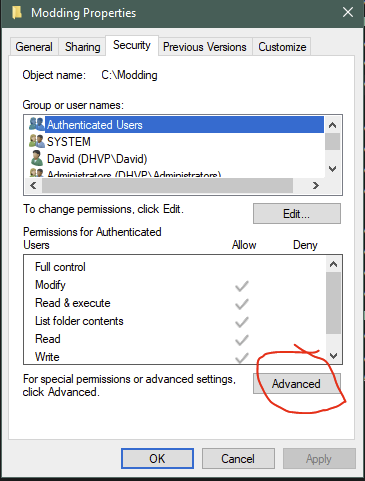
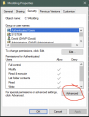
As I mentioned, DoubleYou is the developer of BethINI, so he will know. Taking ownership of a directory in Windows to avoid permissions issues with UAC: This is a last resort and should NOT be done in OS-sensitive areas. This is why we recommend install locations to places like DRIVE:/Modding/*
-
Installing on Desktop is also under your profile. Please try installing on c:\ drive. If it still doesn't launch, then you can try taking ownership of the directory and children where you install it under c:/ The only other reason I can think of that it won't launch is if you are missing some core .Net or basic libraries needed. @DoubleYou would know what the core dependencies are.
-
You need to delete entire directory contents and install updated alpha 39.
-
That location is inside your user profile. Not positive if it is under UAC control or not. Move folder to C:/Modding or the like. You don't need admin. As a last resort, you can take ownership of the location, but that's not necessary either.
-
Did you recently upgrade by extracting into the old DynDOLOD folder? Conflicting files will cause this sort of thing. Save any INIs you have customized and delete the previous install from the folder. Then install into empty folder and update new INIs with compatible settings from the old one(s).
-
Skyrim 10th Anniversary Edition Announced
z929669 replied to DoubleYou's topic in General Skyrim SE Discussion & Support
Yes, and this is enough of a change that it will likely require adjustments to the guide. We may want to postpone 2.0.0 release until after we have a chance to upgrade to the Anniversary Ed. Otherwise, we will be supporting two additional guides instead of one. It would be great if one guide would work either way, but that's tough to say at this point. -
Skyrim 10th Anniversary Edition Announced
z929669 replied to DoubleYou's topic in General Skyrim SE Discussion & Support
There is enough added content in that that we can probably expect that modding it will be slightly different ... independent guide and mod-version lineup, I expect. -
SKYRIMVR Proper way of ignoring Trees
z929669 replied to osteal's question in DynDOLOD & xLODGen Support
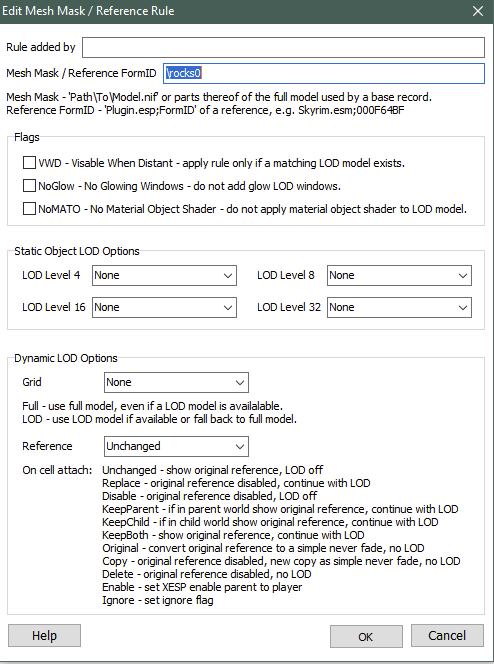
If you configure the '/tree' mesh rule like I have configured '\rocks0', then this would prevent all trees from being assigned to any object LOD (and your trees will pop in when you get close, which is normally what you would NOT want): Better solution: Discard any pregenerated LOD and billboards from your tree mod. Put back the default '\tree' rule. (fe= "for example). Fe, you can use SFO v2.72H (has only 3D models and no billboards ... it also has pregenerated LOD, which should be discarded). Then use the latest DynDOLOD alpha 39 to generate high quality billboards (via TexGen) and 2D or 3D trees as well as all other object LOD. Then you will have matching LOD for your entire load order. Your other questions are answered in the DynDOLOD doc inside the install location.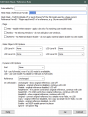
-
Yep, doing that now, and tested with a small chunk to confirm that it's working. Thanks
-
SKYRIMVR Proper way of ignoring Trees
z929669 replied to osteal's question in DynDOLOD & xLODGen Support
Not sure that will do it ... what you should have by deleting the line is that all trees will be treated as the last fallback line (root or '/'), which treats trees as: LODGen188=\,Level0,Level1,Level2,None,FarLOD,Unchanged,1,C:\Modding\Tools\DynDOLOD\Edit Scripts\DynDOLOD\Rules\DynDOLOD_SSE_High.ini ... if you used the high setting, fe. No billboards but all 3D object LOD for trees if 'Ultra' is ticked. Probably better to edit '/tree' mesh rule to have 'None' at all levels and for Grid and don't tick any of the Flags boxes. -
Failed to generate for Tamriel. Including logs for feedback: https://mega.nz/file/CVljUaKb#u9ishI_G6btfnFRYK4UpS8iDShSfr8yU-u8j3gtjAnw INIs in case they are interesting: TexGen_SSE.INIDynDOLOD_SSE.ini
-
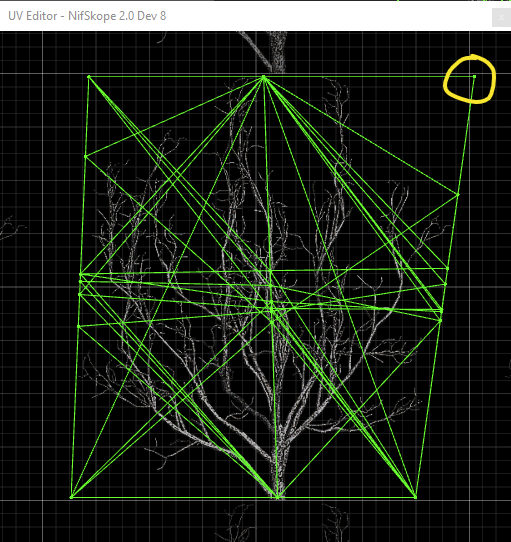
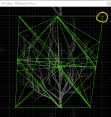
Thanks for the tip ... so drag each of these to left by hand with mouse? There are about 20 nodes here ... tried to select all and move at once, but it's eluding me. EDIT: I found that I can click/drag cursor over this area, and all nodes are selected and move at same time that way. Now just want to confirm that moving to left just inside vertical reference is all that's needed. Thanks in advance
-
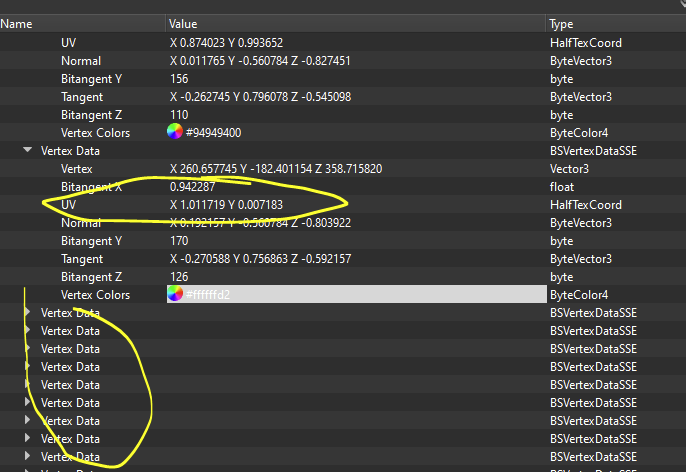
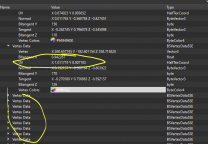
Checking and changing these hundreds of vertices manually only took you a couple of minutes for 20+ trees?
-
Thanks for the response and explanation. When you say that UV crowns should be manually 'fixed', are you saying that running the crowns through the re-uv automation will not do the same? If I am having the issues I mentioned with the crowns, practical way to address is to(?): Manually fix UV coordinates that are > [+/- ]0.2 (or is this redundant with next step?) run re-uv.bat using settings in default re-uv.txt, or do you suggest setting some of those to 'true'? Use NIF optimizer on the output crowns from #2 Rebuild hybrids from modified crowns test
-
@sheson I have some hybrid models that I recently constructed using hybrid.bat. The final models are triggering re-uv process and "out of bounds" messages in DynDOLOD_SSE_Tamriel.log as well as some errors probably related to 'bad' strung names and other issues (probably all associated with the crowns of the hybrids). Is it practical or possible to run the crowns through re-uv.bat to correct the UV issues and then rebuild the hybrids using hybrid.bat? I'm hoping that this will allow DynDOLOD to process object LOD using these hybrids, less the added effort to re-UV each run (to speed up object LODGen and reduce redundant log messages). If so, I want to do this, but need some guidance on how to configure re-uv.txt settings to process as much as possible via the automation (I don't see doc on this process as you have for hybrids.bat process). Here is the default config with some comments I'd like addressed: Worldspace=None <!--what goes here? Tamriel worldspace name? What is the format?--> GameMode=Convert5 <!--what goes here?--> UseOptimizer=True <!--Will this do basic corrections to mesh (e.g., bad string names) or to textures or both--> DontMergeShapes=True <!--what is being merged? Different from trunk/crown merge using hybrid.bat? Uses merge.bat and merge.txt settings?--> DontFixTangents=False <!--can you explain this?--> DontGenerateTangents=False <!--can you explain this?--> DontGenerateVertexColors=False <!--can you explain this?--> TextureAtlasMap=re-uv-miniatlas.txt <!--assume this is a default config that doesn't need modification?--> AtlasTolerance=0.2 <!--can you explain this?--> //Ignore all vertices with z <= ScaleXY //RemoveUnseenFaces=True //ScaleXY=-120.0 PathData=.\ <!--Is this TexGen_Output location or /meshes/ source?--> PathOutput=.\output\ 0 0 0.0 0.0 0.0 0.0 0.0 0.0 1.0 tiled.nif <!--can you explain this?--> Should I run crowns through NIF optimizer before/after?