Mousetick
-
Posts
1,263 -
Joined
-
Last visited
-
Days Won
113
Everything posted by Mousetick
-
I don't use Nemesis and I'm not familiar with it. Looking at its source code on github, it apparently has a -stage= command-line option to specify an output path. If this option is not specified, it defaults to Skyrim's Data directory. So logically if you were to specify an absolute path, such as for example ‑stage=C:\Nemesis_Output, outside of the Skyrim Data folder tree, all files written by Nemesis should end up there and not be detected by MO2 as overwriting any existing mod file. Then you'd have to copy or move the output into MO2's managed mods tree. If this works you could then try to point it directly to a MO2 specific mod folder, such as for example ‑stage="C:\Users\username\AppData\Local\ModOrganizer\Skyrim Special Edition\profiles\myprofile\mods\Nemesis Output", so that it's still outside of the Skyrim Data folder tree but it's magically managed by MO2 without it knowing. As I said, I don't use Nemesis. I won't be held responsible if your PC crashes and burns, or if all your mods are trashed, as a result of these experiments * Don't copy/paste my examples: I used non-breaking hyphens which wouldn't be recognized as valid command-line options. ** It'd probably be a good idea to create the (mod) folders before using them in the command-line option.
-
I guess you're referring to files such as scripts, facegen data or voice files? Not that I know of. FWIW, I use this workaround to "protect" original mod files that are overwritten in-place by tools launched from MO2: I pack the originals into a BSA, and the generated loose files end up in the tool's output folder configured in MO2 (Overwrite by default). This only works for files that can be packed into BSA, though. Alternatively, you could try to flag the mod folders as readonly in Windows Explorer, but I don't know if this would work well with MO2. It might trigger errors rather than fall back to the output folder. Also setting protection in a different place than MO2 would be confusing in the long run I think.
-
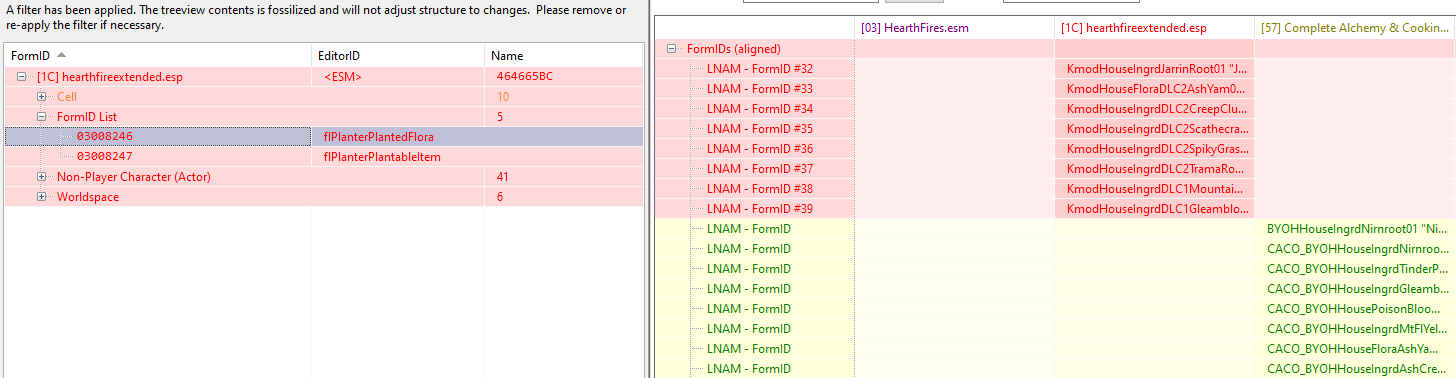
If you merge them the way shown in your screenshots, this will create the issue the OP reported. The 2 lists are defined separately but are actually intrinsically linked and their contents must match 1-to-1 in the same order: flPlanterPlantableItem contains the list of items that can be planted from the player's inventory (eg. Nirnroot ingredient). flPlanterPlantedFlora contains the list of items that are actually planted in the soil and are harvestable later (eg. Nirnroot tree). The game uses the first table to restrict the list of stuff that can be planted. Then it uses the second table to determine which harvestable to plant based on the ingredient or food chosen in the player's inventory, from the first table. Both work together like a lookup table or a key/value pair table, but since these data structures don't exist in plugins, it's split into separate "parallel" lists. Both tables must contain the same number of entries: the plantable item and the corresponding harvestable item must be at the same position in both tables. xEdit tries to be helpful by showing the common entries in flPlanterPlantableItem between HFE and CACO, but its guidance should not be followed in that case. If correct merging were to be done, each HFE entry should be listed first, before all the CACO entries, to match the entries merged in flPlanterPlantedFlora. However there is actually no need to merge HFE and CACO, as CACO already includes all items added by HFE. So merging them would result in duplicate entries, some using HFE harvestables, other using CACO harvestables. CACO, if used with HFE, should completely win and HFE entries should be discarded/ignored, so that only CACO stuff is used. Hope this helps.
-
There are conflicts between Hearthfire Extended and CACO, which could cause this behavior if they are incorrectly patched. This should normally be patched by the STEP CACO Patch, but perhaps it's bugged - I'm speculating, I haven't looked at it. Have you installed and activated the STEP CACO Patch? If you know how to use xEdit, you can modify the STEP CACO Patch or create your own patch on top, and edit these 2 records: 03008246 <flPlanterPlantedFlora> 03008247 <flPlanterPlantableItem> The CACO version should override everything and "win" on both records. HearthFire Extended version should be "lost". As illustrated below for one of the 2 records: That's expected, as the ability to plant these items is a specific feature of CACO. In vanilla, only a very small subset of items can be planted.
-
It's hard to tell given the unusually reddish color of the light, but it could be caused by sunlight leaking through the terrain. We don't know where the sun is at that hour in your game, but between 7-8 pm it's likely very low, probably below the horizon. Are you using a terrain underside mesh? ELVAS requires an underside mesh.
-
Mod Organizer 2 mods not showing up in game.
Mousetick replied to JPatt0n's question in Mod Organizer Support
Have you tried searching online? It only takes a few minutes and a little reading/viewing effort. Google search link: https://www.google.com/search?q=fallout+new+vegas+epic+mod+organizer+2 Interesting results at first glance: How to mod Fallout New Vegas on the epic games store [reddit] Viva New Vegas: There are also video guides/tutorials on Youtube. -
How to create merged patch for conflicting mods only?
Mousetick replied to Poncington's topic in xEdit
Max number of masters per plugin: 253 ALWAYS Max number of plugins in load order before Skyrim SE: 253 Max number of plugins in load order with Skyrim SE and later games: ~2200 (up to 253 "full" plugins + up to ~2000 "light" plugins) The (obsolete) xEdit merged patch method is a brute force method that pulls in all plugins in the load order and adds them as masters to the merged patch, whether they are actually used by the patch or not, whether they contain conflicts or not. It was ok as long as there were no more than 253 plugins in the load order. With Skyrim SE and later Bethesda games, which support more than 253 plugins in the load order, this method fails - hence why it's obsolete and unsupported. The manual method adds masters to the resulting patch on as needed basis. Even with large load orders containing more than 255 plugins, it's very unlikely that the patch depends on more than 255 masters. If that limit is reached, the manual method provides the flexibility to split patches into several patch plugins to work around the limit. Wrye Bash and other automated patchers also add masters as needed. -
How to create merged patch for conflicting mods only?
Mousetick replied to Poncington's topic in xEdit
Yes, we're all using the manual method. But it can be one big patch for the whole load order, or several, or many smaller patches for specific mods - it's up to you. What makes you think you necessarily have to make dozens of individual patches? Once one learns the manual method, with enough practice, there's no need for xEdit Merged Patches, or Wrye Bashed Patches, or Mator Smashed Patches at all... Though they can be useful as "starting points" in the learning process, to use as references/examples. -
How to create merged patch for conflicting mods only?
Mousetick replied to Poncington's topic in xEdit
Most people only use patches if they're installed with the mod's FOMOD, and that's it. Some more experienced people seek out and use separately made patches if they are available. By using a Bashed Patch, you're one step further. A Bashed Patch is not perfect, however. It can make mistakes or make choices that don't match your preferences. The tool doesn't know the mods' features or your intent. In your Miraak mask example, 2 mods modify the mask's enchantment: which one is "better", or which one do you want to use in the game? The tool doesn't know. So it makes a choice, based on some heuristics, which I don't know. I'm not familiar with either of these 2 mods, but why does Sneak Tools modify the Miraak mask? Is it an important feature of the mod? ZIA's changes to Miraak's equipment is on the other hand a prominent feature of that mod. So if you're using ZIA, wouldn't you want to use its changes, rather Sneak Tools' changes? Wrye Bash has no idea about any of these details. That sounds like a good approach. You can start with the Bashed Patch and make corrections or adjustments as needed in your own patch. The quality of available ready-made patches can vary greatly. Some are very good, some are made by users who don't know what they are doing, some contain subjective changes or choices that may not match your preferences. It's always a good idea to check the patches in xEdit and validate them yourself. -
How to create merged patch for conflicting mods only?
Mousetick replied to Poncington's topic in xEdit
That would be for merging plugins (i.e. combine one or more plugins into a big one, then throw away the source plugins and only use the merged one). The OP is talking about something else: a merged patch aka CR patch. -
How to create merged patch for conflicting mods only?
Mousetick replied to Poncington's topic in xEdit
Yes, it has its own logic for deciding how to resolve conflicts. Some of the logic is driven by Bash Tags attached to plugins. If you only want to the last change in the load order to win, then you don't really need a patch? That's silly. Please ignore, I misunderstood. If you want complete control over how conflicts are resolved, you need to create the merged patch manually in xEdit, there is no way around it. Automated tools only go so far, they don't know your personal preferences. -
How to create merged patch for conflicting mods only?
Mousetick replied to Poncington's topic in xEdit
Yes. You can find online tutorials on how to create a Bashed Patch with Wrye Bash. It can merge many types of records in addition to leveled lists. You select the types of records you want to merge when creating the Bashed Patch. The resulting patch is equivalent to what you were used to get with xEdit Merged Patch, which you should check afterwards in xEdit and tweak as needed. I don't think it matters whether you include DynDOLOD plugins or not, as the kind of records they contain are not considered for merging, AFAIK. I don't use WB myself so I can't help you further with details. -
How to create merged patch for conflicting mods only?
Mousetick replied to Poncington's topic in xEdit
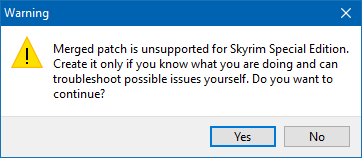
Nothing. That's the only way around. You should use Wrye Bash to create a merged patch, or create the merged patch(es) manually in xEdit. No one should use xEdit's 'Create Merged Patch' anymore. Except perhaps with Oblivion or Oldrim or Fallout 3/NV, as these games themselves have a hard 255 plugins limit, but even then Wrye Bash is the better automated tool. In fact searching online for help on xEdit's Merged Patch yields no useful results, particularly about your issue, as no one uses it. The xEdit documentation recommends against it: Attempting to create a Merged Patch in xEdit results in the following warning: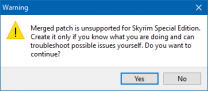
-
SKYRIMSE Crash Entering Windhelm via Main Gate
Mousetick replied to swsjr's topic in General Skyrim SE Discussion & Support
It's exactly the same crash each time. Something else is causing it. Oh well, it was a cheap shot. Are you in the middle of the Civil War? I'm asking because of the CW Catapult that was in the previous crashlog and is normally disabled. You may only discover the issue now but it may have been present all along and is only triggered by certain scripted environment changes. Other than that other likely culprits are the mods you added since the last time you entered Windhelm without crashing. Particularly those that affect Windhelm or Eastmarch. -
FEEDBACK v2.2.0 - Feedback & Bug Reports
Mousetick replied to z929669's topic in Step Skyrim SE Guide
The instructions are already there in the guide: 5.2.3 Restore the Original Vanilla Masters Using Steam's Verify Integrity of Game Files. It's really simple, and there is no risk of losing anything, since at that point the guide, the game folder should be freshly installed and pristine. Nothing has been manually installed in that folder (SKSE, ENB), yet. I'm not even sure if Steam removes files that are manually added to a game folder. I'd suggest removing the manual procedure that follows, which relies on the xEdit backups. Or at least not scolding the users for not following instructions: They had no opportunity given by QuickAutoClean to tick or untick the option -
SKYRIMSE Crash Entering Windhelm via Main Gate
Mousetick replied to swsjr's topic in General Skyrim SE Discussion & Support
There's still more to disable: (Name: WindhelmCandlehearthHallExterior, FormId: 00038382, File: `S3DTrees NextGenerationForests.esp <- Unofficial Skyrim Special Edition Patch.esp <- HearthFires.esm <- Update.esm <- Skyrim.esm`) Disable everything except USSEP and vanilla masters. Then try again, post crash log if it still crashes. I hope you made a save outside in front of the Windhelm gates. You're going to reload that save many times over -
FEEDBACK v2.2.0 - Feedback & Bug Reports
Mousetick replied to z929669's topic in Step Skyrim SE Guide
I tried a few things. What's happening is that QuickAutoClean uses the DontBackup setting, its value being set before using QuickAutoClean, from the last regular (i.e. non-QuickAutoClean) xEdit session. There is no UI to save with QuickAutoClean so there is no opportunity to toggle it at that point. I was incorrect to assume backups are never created. The correct answer is: "It depends" based on previous xEdit usage. Previous xEdit usage is unknown by the guide, so I don't think it should expect DontBackup has the desired value, without specific instructions to that effect. Even if users followed the System Setup Guide to the letter and reinstalled xEdit from scratch, they may still have an existing %LOCALAPPDATA%\Skyrim Special Edition\Plugins.sseviewsettings already configured from previous installations and usage. -
FEEDBACK v2.2.0 - Feedback & Bug Reports
Mousetick replied to z929669's topic in Step Skyrim SE Guide
You can ignore the sentence about the creation of a backup, as no backup is created in that case. That sentence appears to be a leftover from older documentation using a manual cleaning procedure. This doesn't apply to QuickAutoClean. xEdit automatically saves the plugin without creating a backup, there is no 'Save' UI presented to the user when closing the QuickAutoClean window. The reference to the backup should be removed: -
SKYRIMSE Crash Entering Windhelm via Main Gate
Mousetick replied to swsjr's topic in General Skyrim SE Discussion & Support
What does the crash log look like after disabling all mods involved? And you're only encountering this crash now? Hard to believe. Navmeshes are static, they either work or they don't, from start to end game. They have no state saved in the save file that could get out of whack over time. When was the last time you were able to enter Windhelm? What change did you make to the load order then, if any? -
Crash when I fast travel to Dawnstar
Mousetick replied to Clutchman's question in General Skyrim SE Support
Yes. I told you that, but apparently you didn't catch it: ASLAL is Alternate Start - Live Another Life. You can hover your cursor over the underlined abbreviation, and a tooltip should show what it means. -
GUIDE Skyrim Special Edition Grass LOD Guide
Mousetick replied to DoubleYou's topic in Game-Specific
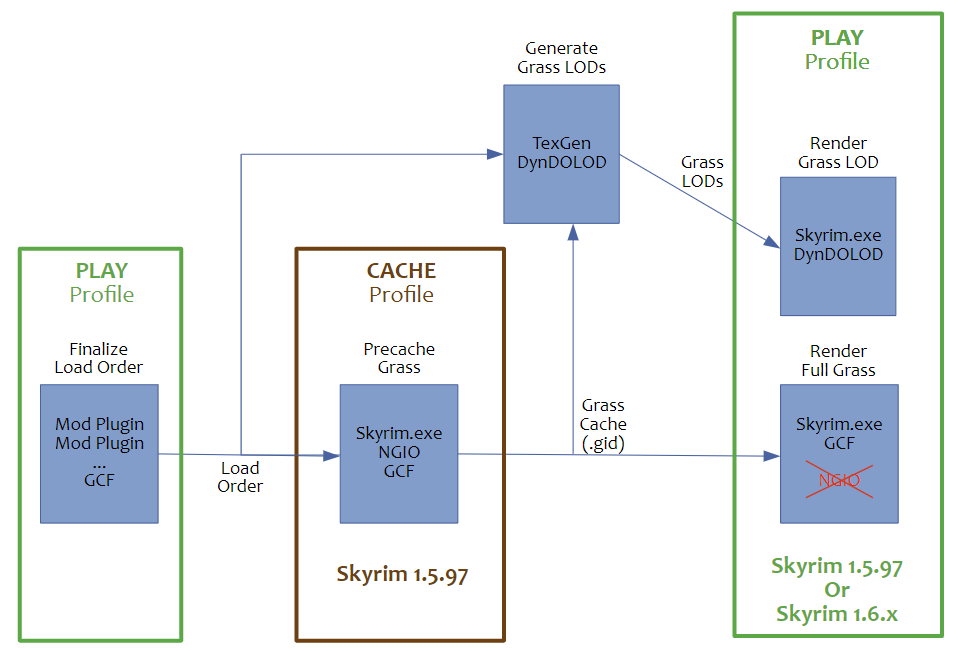
Updated flowchart to be more correct: Attached is SVG version. Reuse and edit as you wish. GCF Workflow.svg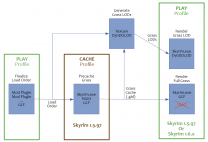
-
GUIDE Skyrim Special Edition Grass LOD Guide
Mousetick replied to DoubleYou's topic in Game-Specific
I'd like to add some clarification to my previous post as I feel it was too curt and not constructive. I don't like the guide in its current form in the sense that it's hard to read and it makes my head spin. It has no structure to speak of, and contains too much nitty-gritty verbiage owing to its lack of focus and trying to cover different subject matters altogether, even though they have actually very little in common. Precaching is a task unto itself, not tied in any way to LODs, and has no place buried inside a Grass LOD guide. It needs its own, separate wiki. The Grass LOD guide can simply begin with "Requires a NGIO grass cache matching the load order", skip all the precaching and NGIO-specific stuff, referring to the other wiki(s) as needed, and focus exclusively on Grass LODs with DynDOLOD. NGIO in-game rendering features and setup for full grass have no bearing on NGIO Precaching, and they concern an increasingly "niche" user base. They have no place mixed in with everything else inside a Grass LOD guide, or an hypothetical Precaching guide if it existed. They too, need their own, separate wiki. This bit here for example: What does this have to do with Grass LODs or Precaching? What does it affect regarding the generation of the cache or Grass LODs? Nothing... The recent edits attempting to clarify certain points actually make things less clear and too verbose, in my view. They wouldn't be needed if the guide focused on a single subject matter. Which is why I don't wish to add my own edits or contributions, as I feel it would make things even worse. This paragraph for example is particularly puzzling: In the "Big picture" diagram I posted above, the components and workflow phases are entirely separate. The only dependency that exists between them is the little arrow that connects them, which is basically shared "data", as opposed to shared function. Strictly speaking, they're not inter-dependent: they function and accomplish their work separately and autonomously. The documentation should naturally reflect this architecture. It's more intuitive, it makes sense, it helps to understand the concepts. It also helps the writer, who can focus on one topic without polluting it with irrelevant considerations and details. If the documentation is clouded with irrelevant verbiage and mixes together unrelated concepts/functions, it's confusing to both the writer and readers. Lastly, the documentation should focus on the most common scenarios for the majority of users. Special cases can be relegated to appendices - instead of being front and center, interspersed with the main text, which interrupts the flow and causes mental overload. For example, the split between 1.5.97 and 1.6.x players is only necessary because of one NGIO feature (ExtendGrassDistance=True) which "might" be used by a few and is not even recommended by DY. The special corner case is dictating that the documentation be overly complicated. I think this is backwards. All the separate wikis could be linked from a "Grass Portal" page giving an overview of the main components, processes, and scenarios. Users can pick and choose which topic to drill into based on their needs. An AE user who downloaded a 3rd-party grass cache can go to the Grass LOD wiki and not be inundated with irrelevant stuff. An AE user who wishes to generate their own cache can go to the Precaching wiki and not be inundated with irrelevant NGIO in-game rendering stuff. A 1.5.97 user who wishes to use NGIO for in-game rendering can go to the NGIO wiki without being inundated with irrelevant LOD stuff. And so on, and so forth... -- By the way, the current Guide has this: ExtendGrassDistance = True Is this intended? This is inconsistent with the remainder of the guide and the other NGIO settings shown, which assume and/or recommend False, along with DynDOLOD Mode 1 when generating LODs. -- In closing: the discussion of advanced topics does not preclude - or exempt from - structuration, focus, and clarity. It needs them even more if the goal is to teach and explain to others. Hope this helps. Thanks for reading. -
Crash when I fast travel to Dawnstar
Mousetick replied to Clutchman's question in General Skyrim SE Support
Try approaching Dawnstar from the opposite side of Shady Sam. He hangs around the jetty or in the small fenced "garden" next to the inn. You can also try to (temporarily) disable him in the console, before approaching Dawnstar: prid B00370FB disable See if it still crashes with him gone. -
Crash when I fast travel to Dawnstar
Mousetick replied to Clutchman's question in General Skyrim SE Support
From the crashlog you posted: ??? > "Hired Bodyguard" > FemaleHeadBreton > facegen (origin of NPC is unknown as it's a spawned NPC) ASLAL.esp > "Shady Sam" > MaleHeadBreton > facegen One of these NPCs may have corrupt/invalid facegen mesh. Since ASLAL's "Shady Sam" is always in Dawnstar, and the spawned NPC is probably not, it would seem "Shady Sam" may be the culprit. You'd need to look at several crash logs to confirm if "Shady Sam" is always involved in the crash while others are not. -
Troubleshooting: Color Channels Switched?
Mousetick replied to absentheverte's topic in Step Skyrim SE Guide
No clue about the root cause, something with the hardware and/or driver, by the looks of it. The missing column of pixels (on the far right I presume) will let whatever Windows has in the background show through, which may be distracting if it's brightly colored. I'd suggest you set a black desktop background and minimize other apps to taskbar while playing. But first you should try DY's suggestion above, which should stretch the game window to cover the entirety of the display, but might also trigger the color shift again