sheson
-
Posts
13,181 -
Joined
-
Last visited
-
Days Won
431
Everything posted by sheson
-
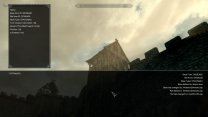
Here is a screenshot with DynDOLOD active that I generated with Alpha 64. Nothing changed how DynDOLOD will treat this reference (unset IsFullLOD, generate static object LOD for it) in years. Generate LOD for the current load order with either version and compare.
-
The screenshot from "inside" the tower shows that the model of the tower is loaded and showing. It is the same model and from id for outside the tower. Explain or show how DynDOLOD makes this same full model disappear, while being in the same cell and DynDOLOD does nothing to the full model. I can not replicate the issue with a vanilla load order + the mod.
-
Test with a new game.
-
Post a reference form id of a building or structure that goes missing while everything is working as it should, e.g. before generating LOD.
-
What is the last screenshot showing. Is that the building that goes missing?
-
Post the logs as explained in the first post.
-
Make sure to download the latest version and to unpack it into a new and empty folder. Do not overwrite or mix with older versions. The tools use standard OS functions to access files and folders. Whatever happens beyond these functions is out of the control of programs. Check the hints given by the event 1005 about disk problems and what to do about them. If the disk has no errors etc. check MO2 virtual file system / log. And again, UAC, antivir or any similar 3rd party programs that might control and interfere file access. It may be caused while trying to read a specific texture (via Texconv). So it could be either C (temp folder) or D drive.
-
If MO2 says it is waiting for X, it typically means that X is still active. It will at least mean the the virtual file system is still locked for that and anything else trying to use it probably has problems. Windows Defender is an anti virus. DynDOLOD 2.x is a different program. Any comparison to it is irrelevant. Check the Windows Event log for hints.
-
Use task manager to end Texconvx64.exe. Maybe reboot. Make sure that OS, UAC, antivir is not interfering with DynDOLODx64.exe, TexGenx64.exe, Texconvx64.exe or LODGenx64.exe. "Exception Message: Out of memory" Use the x64 version.
-
Cells that have no grass cache file won''t have grass LOD. Doesn't really make sense to only delete the file then not start the game to create the cell real quick.
-
Both https://dyndolod.info/Help/LODGen (which is linked from the message window that notified about that there we errors in LODGen) and https://dyndolod.info/Help/Grass-LOD explain the cause and solution to the error. Searching for the error https://stepmodifications.org/forum/search/?q=cgid end stream&quick=1&type=forums_topic&item=15606 also gives similar results. Object LOD generation is incomplete because it stopped and there wasn't a LODGen completed successfully message as explained on https://dyndolod.info/Generation-Instructions Do not attempt to use incomplete generations in the game.
-
Download and generate LOD with DynDOLOD Alpha 64. Download the latest DynDOLOD DLL Scripts (just updated the other day) and whatever DynDOLOD SKSE DLL you need. Test with new game.
-
Read https://stepmodifications.org/forum/topic/12466-fo4lodgen/ "There is no hard requirement for the plugins that define unused LOD models and the FO4LODGen - Main.ba2 to be loaded in the game. However, if you notice flickering LOD textures or other odd behavior keep them in the load order. Let us know if this happened so we can update the instructions."
-
I assume it means no logs. Provide information. You do not mention any of the Alpha versions. Follow the posts ans steps I exchanged with Thardrim https://stepmodifications.org/forum/topic/15606-dyndolod-300-alpha-64/?do=findComment&comment=255979 Read the latest post from Thardrim first https://stepmodifications.org/forum/topic/15606-dyndolod-300-alpha-64/?do=findComment&comment=256100
-
Check if it happens with DynDOLOD DLL https://dyndolod.info/Help/DynDOLOD-DLL Read the first post which log and debug log files, bugreport,txt to upload and how to use "Copy message to clipboard" when making posts.
-
Post the the coordinates, location. Make sure LOD was generated for this exact load order. Test with a new game. Give it time to initialize before moving. Do not increase movement speed for testing. Check papyrus log for errors.
-
Let us know if you find out. Typically I would check anything related to the graphics card, then maybe anti vir.
-
This vanilla bug and a workaround has been known since 2016. https://steamcommunity.com/app/489830/discussions/0/282992646969966995/ Changing the LOD distance helps so the bug doesn't happen with the typical fast travel routes. It is mentioned in the DynDOLOD FAQ since years, too. Dynamic LOD from DynDOLOD typically fixes this bug together with the tree LOD fast travel bug as well.
-
Make sure to set Level0 for LOD Level 4 as explained at https://dyndolod.info/Help/Ultra-Tree-LOD. Check the DynDOLOD_SSE_Tree_Report.txt which billboards and 3D LOD assets were found as explained at https://dyndolod.info/Help/Ultra-Tree-LOD.
-
Nothing really changed how this works in months or years even. I mean just check changelog of 62, 63 and 64...
-
Thanks for letting us know.
-
Test if there is anything different using this test version
-
Use the Windows Event Log Viewer to check the event log. It can be found in Administrative Tools. The log entries for finding the max possible resolution for the framebuffer are expected. Assuming you keep testing with latest Alpha-64? See what happens if you run TexGen without any mods for vanilla. Have you checked if Alpha-60 actually still works now?
-
GUIDE Creating Tree LOD Models (by The Step Team)
sheson replied to z929669's topic in Game-Specific
Yes I usually "flatten" the blocks in the process, remove everything that is not necessary for static resources.- 9 replies
-
- 1
-

-
- DynDOLOD 3
- tree lod
- (and 1 more)