sheson
-
Posts
13,180 -
Joined
-
Last visited
-
Days Won
431
Everything posted by sheson
-
Are you saying the same CELL x,y coordinate is defined twice in different plugins with different form IDs for these worldspaces or only once, but some are in a different plugin? AFAIK that is should not ever happen. Send me plugin in question so I can investigate and maybe try to determine what default / cell water/terrain to use.
-
The log is appended when DynDOLOD.exe is closed. Scroll to the bottom for the most recent generation log. It does not matter in what plugin type the MSTT overwrite is. The overwrites to references need to be in a ESM or ESL. Those are two different things and they both trigger large reference bugs. Whenever a reference is listed in the report, it will trigger the bug in the cell. Whenever a large reference uses a MSTT record without the flag it will trigger the bug in the cell. RWT happens to do both for some records, both have to be fixed. Other changes that can trigger the bug regardless of plugin type are for example IsInitiallyDisabled flag, Enable/Disable via XESP, changed scale or bounds on the base record that make an object smaller below a limit for large references etc.
-
Are you certain what you see is large reference flicker and the reference/plugin is not mentioned in the log? If that is the case I would like to know the plugin/form id and test. There are more factors than the two DynDOLOD checks for that can cause the flicker, also with ESM/ESL files. I would consider adding additional checks as well. Just check if DynDOLOD reports any of these plugins. To test if the flicker is caused by large reference bugs, use tll in console to turn off LOD. If flicker goes away and the object is still there loaded as full model, then it is a large reference or full LOD. To verify that the generated LOD is correct, open DynDOLOD\Edit Scripts\Export\LODGen_SSE_Tamriel.txt in a text editor and search for the form id (ignore the first 2 digits for the load order in case it changed) of the object. A line for a large reference has a column "-LargeRef". Alternatively you could check the BTO that the object is part of a BSSubIndexTriShape that has "-LargeRef" in its name. Either the game is broken and unusable or the a plugin that causes large reference bugs are broken and unusable. So I would either turn off large references or remove plugins that cause problems. You could try moving the overwrites to an ESL. In reality the game needs to be fixed, so spending any time on workarounds is a waste IMHO. Simple as that
-
Dynamic Distant Objects LOD - DynDOLOD for Skyrim and Enderal 2.98
sheson replied to sheson's topic in DynDOLOD & xLODGen
CK won't help you. We successfully replaced and surpassed all LOD generations features with xLODGen. To generate pre-rendered LOD textures you need to create side views of the objects in a similar way like tree billboards are created. Then merge and edit the side views in an image program. -
Issue with replacement model "ShipwreckLargeXX_LOD.nif"
sheson replied to soupdragon's question in DynDOLOD & xLODGen Support
I am looking at the files and will provide an update "soon". -
Problems with generating 3D LODS for Realistic Aspen Trees
sheson replied to Eruntinco's question in DynDOLOD & xLODGen Support
This is what I get using EVT Skyrim version with the RAT install option This is what I get with RAT Skyrim SE version and renamed 3D LOD meshes. I also redid the LOD textures from the 4k version. Here are the updated 3D LOD resources for RAT SE I am going to include in the next version. -
Q: Skyrim: ILS or CTD A: More LOD uses more memory and this can cause infinite loading screen (ILS) or crash to desktop (CTD) if the game is not setup correctly. Double check heap memory usage (block 1) with Memory Blocks Log from https://www.nexusmods.com/skyrim/mods/50471/ and adjust SKSE or SSME memory settings. Or use alternative OSAllocator from crash fixes with pre-loader. Remove satefy-load if it is used to verify it doesn't cause CTD. Set ExpandSystemMemoryX64=false in enblocal.ini A: If heap memory is not the cause of CTD see ..DynDOLOD\Docs\DynDOLOD-README.txt for checking if a missing or invalid nif model used for dynamic LOD is the cause. Let me know what you find. Looks like a texture that is being put onto the atlas is causing trouble. It might have to do with the odd installation path of the game. Check ..DynDOLOD\Edit Scripts\DynDOLOD\cache\DynDOLOD_SSE_tamriel_textures_used.txt for a list of textures to check and verify.
-
The log you upload has two runs and both times the error was Cannot create file LODGen_TES5_DLC01FalmerValley.txt". The file can not be accessed because it is used by another process Cannot create file LODGen_TES5_Blackreach.txt". The file can not be accessed because it is used by another process When running DynDOLOD only run one instance at a time. Verify that UAC, antivirus or any other third party program is not blocking access to folders/files. From the manual: From the DynDOLOD Standalone archive copy the content of the 'DynDOLOD' folder [..] into a new 'DynDOLOD' folder outside of special OS folders like 'Programs Files' or 'Program Files (x86)', the SteamApps or game folders and Mod Organizers virtual file structure. Do not mix with old versions or xEdit installation. I assume you mean HomesMerge.esp. It has nothing to do with another program blocking access to a log file. There is no use randomly picking a plugin name from some other parts of the log.
-
Problems with generating 3D LODS for Realistic Aspen Trees
sheson replied to Eruntinco's question in DynDOLOD & xLODGen Support
I have no idea what you could do to make the opaque/transparenct pixels of the source DXT1 texture to all of sudden be not be the exact same way opaque/transparenct in the texture atlas. The source texture or atlas are most likely being overwritten or you are looking at something way to close which is impossible to do with LOD / does not matter with LOD when looked at from afar. Compare both the source texture and its version in the LOD atlas Textures\DynDOLOD\LOD\DynDOLOD_Atlas_Tamriel.dds in an image viewer. LOD typically starts beyond the loaded cells, which is typically just 2.5 cells away unless you changed uGrids. Post a screenshot. -
https://forum.step-project.com/topic/13451-xlodgen-terrain-lod-beta-for-fnv-fo3-fo4-fo4vr-tes5-sse-tes5vr/page-13?do=findComment&comment=223540 https://forum.step-project.com/topic/13451-xlodgen-terrain-lod-beta-for-fnv-fo3-fo4-fo4vr-tes5-sse-tes5vr/page-9?p=221095&do=findComment&comment=221095 https://forum.step-project.com/topic/13451-xlodgen-terrain-lod-beta-for-fnv-fo3-fo4-fo4vr-tes5-sse-tes5vr/page-8?p=220612&do=findComment&comment=220612
-
Problems with generating 3D LODS for Realistic Aspen Trees
sheson replied to Eruntinco's question in DynDOLOD & xLODGen Support
So the 3D LOD generates just fine and it seems the problem is with third party diffuse textures. DXT1 uses 0/1 transparency, so converting to it is a good choice since then you have full control over each pixel to make sure it is either transparent or opaque. So if the result of converting with nvdxt.exe seems to be too thin / missing pixels, lower the threshold for the conversion until the result in the game is acceptable. Black splotches usually mean that a background pixel was set to transparent. So the threshold for conversion was set too low. Can also be fixed easily with an image editing program. -
FAQ: Exception in unit xxx line xxx: FormID [xxx] references a master which is not available in file [xx] xxx.esp A: There is a plugin in the load order with errors. Check the load order for errors with xEdit.exe before generating LOD. Fix all errors. See this video for help. If error persist upload/post to pastebin etc. the entire log as requested
-
Issue with replacement model "ShipwreckLargeXX_LOD.nif"
sheson replied to soupdragon's question in DynDOLOD & xLODGen Support
Thanks for the files. This is fixed in version 2.42. You can optimize the meshes a bit further in nifskope by removing the NiTriShapes Alpha02 and Object01 which seem to be duplicating other shapes. Also, right click on the remaining NiTriShapes, select Mesh, Remove Duplicate Vertices. For compatibility reasons, it's better to use BSFadeNode for the root node instead of NiNode. Just right click the NiNode, select Block, Convert, Bethesda, BSFadeNode. For performance reasons I suggest to change the file names to ShipwreckLarge01_LOD_0.nif and ShipwreckLarge02_LOD_0.nif so that the high triangle count models are only use for LOD level 4 and the existing LOD models for level 8 and 16. I added a LOD texture generation rule for shipwoodfloor01.dd that will create a shipwoodfloor01lod.dds with the alpha channel removed. To create it just run TexGen and install the output before running DynDOLOD. However, do not change the full texture paths in the LOD nifs, just leave the full textures assigned as they are. LODGen will take care of the re-UV and LOD texture replacements automatically. -
Dynamic Distant Objects LOD - DynDOLOD for Skyrim and Enderal 2.98
sheson replied to sheson's topic in DynDOLOD & xLODGen
In that case do not use merge patches function while it still has bugs. -
https://forum.step-project.com/topic/12479-dynamic-distant-objects-lod-dyndolod-241/page-5?do=findComment&comment=208587
-
I am testing different ways to automatically bake grass, but no promises or ETA.
-
Dynamic Distant Objects LOD - DynDOLOD for Skyrim and Enderal 2.98
sheson replied to sheson's topic in DynDOLOD & xLODGen
FAQ: Exception in unit xxx line xxx: Duplicate FormID [xxx] in file [xx] xxx.esp A: There is a plugin in the load order that duplicates an existing form id. Check the load order for errors with xEdit.exe before generating LOD. Fix all errors. See this video for help. Often caused by a broken bashed patch. Use a newer version to create the patch. -
Beta 22 fixes that water bug in Tamriel in case SSE-Terrain-Tamriel.esm is not loaded that we discussed with Zanderat and David2408
-
When doubling the resolution of textures it means quadruple the file size.
-
You at least need to rerun LODGen.exe to update static object LOD after changing LOD resources. I just tested 3D tree LOD generation with ELOS Oaks Autumn Colours SSE. I let it overwrite DynDOLOD Resources SE. Nothing overwriting ELOS Oaks Autumn Colours SSE. Everything looks normal here, nothing is white.
-
All instruction are mod manager agnostic. Adding command line parameters to an executable is a basic OS function. To automatically apply them one can use windows shortcuts or batch files for example.
-
I suggest to read the included Terrain-LOD-Readme.txt. Normals of higher mip maps levels will be steeper instead of going more flat. They will react stronger to light instead of less. Terrain LOD level 32 is used in game for the map and the furthest distance (unless you set LOD level 16 distance so high it pushes level 32 out of the max render distance of about 100 cells). You can delete or overwrite any LOD files you want. The game just loads them and displays them. There is no plugin/save game involvement. I don't know what it is you want to do, but the arguments are valid. You create LOD with different resolutions and then compare visuals and resource usage for yourself. Higher resolutions has more detail, less resolution has less detail. But you might not even see the all the detail anyways because the texture is far away / uses a high mip map level anyways. The normals size depends on baking option and compression. As already explained the textures\terrain\noise.dds is an overlay that modifies the brightness. It adds noise, so an area that uses the same terrain texture doesn't look monotonous. Terrain LOD files have a specific path structure in the data folder. As explained already, generating terrain meshes will overwrite existing files. Generating terrain textures will skip over existing files. xLODGen generates LOD for the current load order based on the current plugins and assets in the load order. If you deactivate mods their plugins/assets will not be used. There are plugins/mods that make changes that can affect tree and object LOD generation negatively. Terrain LOD is fine so far.
-
Yes ESM/ESL both work as explained in the bug report SkyrimSE-LargeRefGrid.html included in DynDOLOD standalone: In this context ESM and ESL file means plugins that have the filename suffix *.esm, *.esl without or with their ESM/ESL flags set or *.esp files that have their ESM/ESL flags set. The issues are with *.esp files that do not have their ESM/ESL flags set. So either just renaming to ESM/ESL or setting the ESM/ESL flag "fixes" the bugs caused by overwriting large references.
-
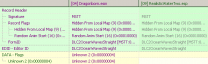
This is the DynDOLOD support forum. If you require help with xEdit or have feature suggestions you should post that on the appropriate xEdit forums. DynDOLOD will report overwritten large references and MSTT base records which are used by large references where the last overwrite does not have the required flag set. See attached screenshot of xx02ADC5 as example. The plugin removes the flag.
-
When a new row of cells attaches, the game first loads all object and then unloads LOD. All games using the same old engine do this. That is like a brief second. The large reference bugs caused by plugins overwriting large references is well known and documented in the Skyim SE documentation of DynDOLOD. There are also messages about it listing all plugins/references causing the bug in the DynDOLOD log.