z929669
-
Posts
13,086 -
Joined
-
Last visited
Everything posted by z929669
-
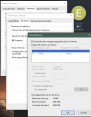
You should check your Windows memory management settings in case you have throttled them by setting pagefile size. Make sure you have a pagefile for Windows defined using your fastest drive with plenty of unused space. You can also check background processes and programs that may be running. If you are generating occlusion with a web browser open with a bunch of tabs and other programs running, you will have less memory available. Right click taskbar and select Taskmanager to see what background programs may be hogging resources and close them (if you know what they are and they are unneeded). Go to the Performance tab to see available resources. Right click Windows Start Menu icon, select System > Advanced System Settings: ... check that virtual memory is assigned to your fastest drive and Windows is managing:

-
Per the NET Script FW readme: This is the .NET framework for Skyrim SE (https://www.nexusmods.com/skyrimspecialedition/mods/21294) 1. Requirements DLL Plugin Loader - https://www.nexusmods.com/skyrimspecialedition/mods/10546 or SSE Engine Fixes skse64 Preloader - https://www.nexusmods.com/skyrimspecialedition/mods/17230 https://stepmodifications.org/wiki/SkyrimSE:SSE_Engine_Fixes
-

OBLIVION Oblivion crashing after Mod Organizer closed
z929669 replied to Ghalium's question in Mod Organizer Support
Please reference Ch4-5 of our System Setup Guide for MO installation recommendations. Also see the first Ch of that article for game install and other recommendations. Your Oblivion is installed under a location that does have UAC governance, so it could still be an issue if you are using default Win directory security. -
@sheson Will correct me if any of my assumptions are wrong: LTM has no 3D models, and it replaces several vanilla trees that Myrkvior also replaces (and also has the 3D models). Therefore, only tree billboards will be available using the 'winning' textures for the these trees. If LTM textures are wrong or have wrong paths, your logs will show the errors. The author supplies tree billboard1, but TexGen 3 should generate billboard1/2 even if the 3D models are missing (I think), so there should be billboard conflicts that TexGen output overwrites. If you are using billboards for all tree mesh rules, then trees should look consistent (if object bounds are defined in the LTM plugin ... if not, then no TexGen billboards created I think, which may explain smaller output), but if you are using 3D trees mesh rules, you will have inconsistencies with tree LOD. For this reason, I would not use LTM with Mrykvior at this time until proper 3D models are available for LTM.
-
It's probably your SKSE64 setup. https://stepmodifications.org/wiki/SkyrimSE:SKSE64 Then install https://stepmodifications.org/wiki/SkyrimSE:PapyrusUtil_SE
-
NMS Index Page Dev
z929669 replied to TechAngel85's topic in General No Man's Sky Discussion & Support
OK, working on a demo in DEV -
NMS Index Page Dev
z929669 replied to TechAngel85's topic in General No Man's Sky Discussion & Support
OK, first the index ... but I wanted to understand the other pieces to see if anything can be consolidated. For example, you proposed "Entity" as the 'thing' common to all of the 'Index' names. Are all headings in the Index really 'entities' or are they just names listing many different concepts that warrant their own 'chapters' or 'topics'? If they are all game eitities, then I would propose Property:Entity If they are all 'topics', I would go with Property:WhateverTheyAre Looks like they are all really just 'topics' listed in what we are calling an 'index'. If true, It may be best to go with Property:NMS_Topic. Once we have this down, you can create that Property in DEV and add the "Allows Values" table just as we have for Property:Game, adding any other info to the table you want. The only specs that matter on this page are the [[Allows value::]] strings and [[Has type::Text]] declaration. EDIT: Actually, forget all of that. I am now thinking that Property may not be the best way to do this. Let me mock something up in DEV that we can work on. I may not be making all the right assumptions. -
NMS Index Page Dev
z929669 replied to TechAngel85's topic in General No Man's Sky Discussion & Support
So let's work out what you are calling "GameFile". According to Game Structure, the game directory path has the following folder structure: Game Files root AUDIO BANKS_INTERMEDIATE FONTS INPUT LANGUAGE MATERIALS METADATA MODELS MUSIC PIPELINES PLAYTOGETHER PROMO SCENES SHADERS TEXTURES TPFSDICT UI Is this the content of ..\Steam\steamapps\common\No Man's Sky\ ? Configuration Files Where are the config files located? That page says here: ../Binaries/SETTINGS ../Binaries/SETTINGS/HDR ... but I don't see a Binaries folder above Save Files What is a 'recluded' folder? Saves appear to be included under: %LOCALAPPDATA%\Roaming\HelloGames\NMS\ with related data under: ..\Steam\steamapps\common\No Man's Sky\Binaries\SETTINGS\ ... so this is same dir as Config files? Game File SubCats Biome Global Texture XML How do these fit into the above? -
NMS Index Page Dev
z929669 replied to TechAngel85's topic in General No Man's Sky Discussion & Support
OK, just nevermind all that^ ... I already know the answer. All I ask is that we STOP creating hundreds of Cats in our live wiki. Let's do all such work in DEV going forward as I explained previously. Each one of those pages just adds data that will never go away, increasing the size and complexity of our live wiki DB. Let me think about how we can do this stuff in the simplest way possible and using as much of the existing org as possible. If we need to create a few added NMS-specific cats, then so be it, but I'd like to see how best to use what we have and apply the NMS stuff to that. Index is definitely a property. GameFile seems more like a Category. As I mentioned, Tutorial = Guide and Reference = Reference unless I am missing something. -
NMS Index Page Dev
z929669 replied to TechAngel85's topic in General No Man's Sky Discussion & Support
Ok, so the 'Index' really just looks like a way to organize (Categorize) information. This seems unnecessary, since MW already lets you do this in any number of ways via Categories and Category Tree extension ... see: https://stepmodifications.org/wiki/Category:Games. So they want a nav method it seems like, because they don't like the options available on the wiki. The same goes for the top nav bar. Why are we reinventing the wheel? This is a novel website design just for them and that game. The wiki provides the means to navigate, and we can expose that a bit more for that namespace, I think. Seems like a ton of unnecessary maintenance being created. So Index, NMSPage, and the NPS navbar are all unnecessary overhead that we are now committed to maintaining. It would be sooooo much simpler if they used the wiki natively so that we can dispense with all the extra work maintaining a completely unique paradigm for a single game. I have mentioned all of this before, so probably won't make a diff. Now, the GameFiles, Reference, and Tutorial stuff are all data org, so that's valid for providing the game info needed for modding that game; however, I think we should use our existing cat structure for this game as we do all others ... drilling down from Games: https://stepmodifications.org/wiki/Category:SkyrimSE All of our games have this exact structure, and so can NMS. The following don't fit in the general structure and most of these could go under "NonMansSky General Guides" ... or we can use Properties. We already have a Reference Category. Tutorials are Guides ... we have a Category for that too. I do really hate the idea of maintaining the NMS website if they are not going to adopt standard Step wiki practice within our org structure. The direction we are going adds both maintenance and performance overheads unnecessarily. It was one thing if they were going to maintain it, but now it seems to be on us ... so it should be OUR way (which will give them all the info they have now but in standard Step and wiki formats). If you insist that we MUST continue doing it the way THEY want it, then we at least need to make it work within the structure we have, which means continuing this conversation but not by creating an entirely unique Category structure that stands apart from all other games and a SMW structure solely to support the concept of their unique navigation preference. Very frustrating ...
-
Yes, the gallery link works
-
Your image links seem to be 'yours', so when we open them, we get this error: You should have a gallery for each of the files you upload to ImageBox. Hovering on them, you will see a 'share' link. From there, you can click "full size" to get the code for the sharable links. Here is a "Gallery link" I have: https://imgbox.com/g/va2ay91xP1 You can also use links for each image: https://imgbox.com/nFbtL9Q8 https://imgbox.com/Ujqv2rHC https://imgbox.com/53zsEeMZ https://imgbox.com/stEinY75 https://imgbox.com/3gugbBFb https://imgbox.com/ydUBzAqe https://imgbox.com/3WK74EYC https://imgbox.com/rav6jniC ... or BB code for posting on many forums. NOTE: You will still want to save as jpg format so that they don't take forever to load from the service.

-
NMS Index Page Dev
z929669 replied to TechAngel85's topic in General No Man's Sky Discussion & Support
No ... not exactly. Let's work via the page you created. I will leave some comments there and we can come up with a strategy. Nevermind, let's discuss here: GameFiles seem to be folder names that house NMS game assets? Please define the Index ... it seems like an arbitrary categorization of information (like at the end of a book)? What are GameFile subcats you are proposing? How do they relate to GameFiles? Could you define all proposed NMS Cats (GameFile, Index, Reference, Tutorial)? They each seem unrelated to one another (which is fine), but if there are relationships, we should identify them ... example: Are GameFiles, References, or Tutorials listed under Index? Do GameFiles have Tutorials? Are Tutorials a form of Reference? Just want to conceptualize the bigger picture. -
There is an image format called a 'jpeg' or 'jpg' ... you are uploading 'bmp', which is much larger (as is 'png') use any image program to convert to jpg and watch the size dwindle. You can also possibly set your screen capture software to save in jpg format. If you have several images, you can use a free service like ImageBox (or a plethora of others). Why on Earth would you expect a ad-free website hosting free services to allow transient posters the ability to upload > 1 Mb? Disk space costs $. If you meet the posting threshold, you will get up to 2 Mb per post. Most forums (e.g., Nexus) have very limited post-upload capacity or don't allow uploads to posts at all. Use More Informative Console to discover what plugin is providing the missing textures/models on that building.
-
NMS Index Page Dev
z929669 replied to TechAngel85's topic in General No Man's Sky Discussion & Support
A property can hold any value of data type 'whatever', so numbers, text, page, etc. You simply assign the Property value like [[Entity::Textures]] on the page. There is also another way to assign the property silently using this format or using {{#set:Entity|Textures}} I think. Then that property and its value are associated with the page. You can examine our existing Properties and how they are used: https://stepmodifications.org/wiki/Special:Properties -
CTD after character creation
z929669 replied to BreadWiz42's topic in Fallout 3 - Clear & Present Danger
No prob -
Yeah, but our settings work nicely for Cathedral Landscapes. See sheson's post about grass textures/models in addition to modifying the RGB values for your needs (more red/green and less blue possibly to get a better match to the brown grasses). Looks like you have dark green grass in foreground, brown in short distance (LOD4?) and then light green farther out (LOD8?). Play with your LOD level distance settings to help determine what's what. You can do this without regenerating LOD. Seems like you have some strange contrasts and possibly some conflicting grasses that are defined in parts of the same area. You can also regen LOD using red 0.5 and blue/green = 0 to get an idea of the affected areas (LOD grass). Also, if grass model object bounds are not set, you will not get LOD for those grasses. Check the grass plugins you are using. Possibly simplify your grass setup.
-
NMS Index Page Dev
z929669 replied to TechAngel85's topic in General No Man's Sky Discussion & Support
Yes, essentially the same principle as Cats, but Properties allow values and also allow you to share Property values across cats, subcats and sub-subcats. Also, don't forget that you can use combinations of Properties, Cats, and other Concepts in Concepts (dynamic cats) ... or a Concept can be based upon any single of these. I can't think of a use case offhand, but maybe you will see the value. Read up on when to use Cats. Properties and Concepts to get ideas. It could be useful to set up Cats or Concepts for Reference and Tutorials, but you would know better with your understanding of how it all works together. EDIT: The Properties you have listed are actually "Allowed Values" for the property, which I assume is NMS_Entity? That's fine, but I would drop the 'NMS_' prefix from each, since it's redundant and throttles them to NMS alone. Properties should be treated like Facts as in they are generic to anything (like a number). The specificity of the context is understood by how the data are used ... in your case, for NMS_Entity (which could also just be 'Entity' and used for any game). -
NMS Index Page Dev
z929669 replied to TechAngel85's topic in General No Man's Sky Discussion & Support
Sounds good ... still should consider using at least one NMS Property though. We may find use for more as we go (as I work with the data and understand more about what it means and how it's used) -
NMS Index Page Dev
z929669 replied to TechAngel85's topic in General No Man's Sky Discussion & Support
Actually, it may be that NMSPage Template could be used for all of this along with Form:NMSPage maybe. or possibly something entirely new, but hopefully you see where I am going. There should be a way to largely automate everything you want to accomplish with a GUI form that ultimately does all of the work (create pages, assign cats and properties). This is definitely stuff that we should be mocking up and testing in DEV, since it can get messy and may need major revisions possibly from the ground up over several iterations. No caching out there or users, so rebuilding data is not disruptive, and cleanup is a matter of restoring a DB backup if necessary. In SMW, I think of Properties as 'Facts' in a relational DB star schema ... Categories are more like 'Dimensions' ... Concepts are dynamic cats defined by queries against Facts and/or Dimensions -
NMS Index Page Dev
z929669 replied to TechAngel85's topic in General No Man's Sky Discussion & Support
OK, so after examining the OP and some of the markup: The potential overlapping cats like "Textures" should probably fall under a new Property called something like "NMS_Components" ... you name it ... some term that apples to all of those headings irrespective or whether or not they are Indexes, GameFiles, or References. So Property:NMS_Components will have page content analogous to Property:Game, where it is of type=Text and has strictly "allowed values". This allows us to circumvent the reused cats problem by calling the property value on the relevant pages. These pages could also have multiple cats corresponding to each parent cat, but we still would have the issue of 'shared' cats with different parents and a sort of cat loop or redundancy. Property resolves this nicely. On these same pages, you can have Category:Index (or one of the other two). No need for "Textures" to be a subcat of Index, GameFile, or Reference cats. It is a property associated with a page and that page's cat. Use a Template to generate pages that fall under Indexes, GameFiles, or References ... this makes assignment of Properties and Categories automatic based on criteria included in the Template (which can also use a Form so that users don't need to worry about calling the Template correctly ... same as ANY of our Templates, BTW ... see Form:GuideVersion, which uses a few Templates to build the ModList pages ... this is a very complex example, but you can see that any ModList page is just a bunch of Template calls built by the form ... same is true of Form:Mod mediated by Template:Mod) Use Categories sparingly and avoid creating cats that will only have a single page. If you have 40 cats, each with a single page, then find the commonalities among the 40 and associate the 40 pages using < 40 cats ... probably < 10 or 40/3 (number of 'master' Index, GameFile, or Reference pages) This is the 'index' page ... are there analogous 'GameFile' and 'Reference' pages? You could simplify if your framework houses all three using a similar structure or heirarchy. Then one Template/Form could be used to build out all of this for each 'new' "NMS Component". Listing the components in pages like the NMS Index page linked in the OP can be achieved using queries just like you are doing now. Concepts can also be incorporated, depending on other stuff you may want to do (allow users do download lists in CSV or XLSX, or tabulate results ... all kinds of stuff (see Result Formats on SMW). -
CTD after character creation
z929669 replied to BreadWiz42's topic in Fallout 3 - Clear & Present Danger
This almost always comes down to a mod not playing nicely due to invalid options/version OR due to plugin sorting issues. Try disabling Alternate Start and re-sorting with LOOT (if applicable for FO3). Then test. If you don't crash, you know Alt Start isn't plaing nicely with something. Try disabling mods in batches (leaving Alt Start enabled). I would disable the last half of mods and then first half with Alt Start enabled. Note that you should run LOOT each time mod list changes (note all LOOT messages), checking that all plugins are activated beforehand. Whichever half contains the faulty mod, split that list in half, and so on. -
If you look closely at each log file and the timestamps inside, you will see that they consist of multiple logs from multiple runs. You only need to post the relevant run logs. Alternatively, delete all logs and run again, but that obviously isn't necessary. I generally delete/move my logs between runs to avoid having to parse them. Also see sheson's previous post.
-
Try following our WIP instructions for Grass LODGen settings. You need to modify RGB values in DynDOLOD_SSE.ini (see screens). All WIP LODGen settings are also out there: https://stepmodifications.org/wiki/SkyrimSE:2.0.0#Grass_LOD_Configuration
-
OK, then we should simply copy over the changes to DEV so that I can fiddle with the site CSS there first to avoid issues. There is also no CSS caching on DEV, so changes can be seen in real time.