sheson
-
Posts
13,382 -
Joined
-
Last visited
-
Days Won
445
Everything posted by sheson
-
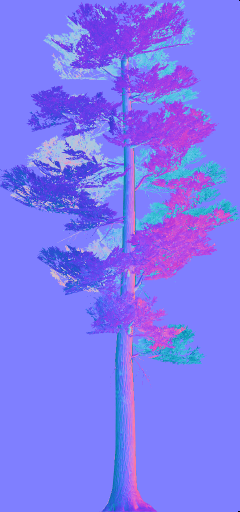
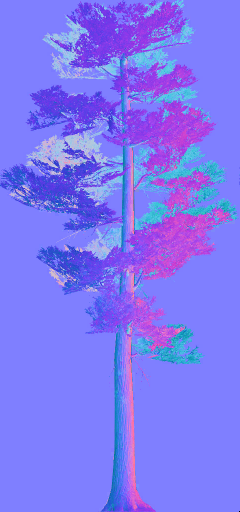
The files in ..\DynDOLOD\Edit Scripts\Shaders last changed in 2022 From left to right. TexGen Alpha-109 from January 2023, TexGen Alpha-166 from January 2024, current TexGen There is no change how the normal map vectors are calculated as far as I can tell. The generated normal map texture is the result of the normal vector, bi/tangents vectors and the normal map texture. In simple terms, the normal map textures being generated is the result of how the model reacts to light from the front + left/right and top/bottom - without the vector ever going "negative" into the opposite direction. Using NifSkope shining direct light from behind to illustrate: If I had to guess, what changed is the full models or its textures in the recent Enderal update. I assume that is why I have a different model, since I didn't have time to apply the update yet. Dark aeras mean the combined vectors face away from the light source. In addition, this tree uses doublesided flag. The back faces are always darker since they face the opposite direction of the normal vector of the triangle. The question is, does the full model look drastically different at about the same distance compared to Billboard4 using these textures. If so I suggest to test applying a bit of "smoothness".




-
Moved to the appropriate thread for the error message. The Dark Brotherhood Reborn - Patch Collection https://www.nexusmods.com/skyrimspecialedition/mods/34909 "General Tweaks" install option fixes this error and others. The patch mod is linked from the original mods description. If you carefully read the error message and Click on this link for additional explanations and help for this message to open https://dyndolod.info/Messages/Unresolved-Form-ID you find tips and hints, including a video which explains how to fix this particular type of error with xEdit in case the patch mod is not sufficient. In case the unresolved form ID is for a script property and the intended record can not be determined or the property has been removed from the script, remove the property from the properties listing via right click, Remove in xEdit. The patch restores the actual correct form ID so the Dragon Claw display now works properly.
-
Warning: File not found textures\. The missing texture is "textures\" as the period denotes the end of the sentence. https://dyndolod.info/Messages/File-Not-Found-Textures The texture can not be found. This can happen if not all required textures where included in the download archive of a mod or there are typos in the *.NIF files. Open the NIF in NifSkope to check and to fix it. The NIF defines "textures\" instead of the glow/detail map for SmallPineBranches and should typically be the same as the diffuse texture for tree branches or empty. The NIF defines "textures\" instead of a normal map texture for SmallPineMainTrunk and should point textures\landscape\trees\treepineforestbarkcomp3_n.dds If the intention is to not define a texture, the slot should be empty.
-
Thanks for letting us know. You are welcome.
-
If you are OK with the results, then there is nothing else to do. Enjoy.
-
How to the select the relevant .bto LOD meshes for a modded object
sheson replied to TommyH's question in DynDOLOD & xLODGen Support
if you generate DynDOLOD output, you can use the DynDOLOD SkyUI MCM - You Are Here page to see which BTO files cover the current location the player is in. https://dyndolod.info/Help/Mod-Configuration-Menu#You-Are-Here Alternatively, you can look up the coordinates for Tamriel on a map like this one https://www.nexusmods.com/skyrim/mods/106448. I suggest to not check "Build atlas" in xLODGen, so the generated BTOs use the vanilla atlas if possible and the single texture files if not. If the "Build atlas" is checked, then there is the risk of conflicts with other mods including a different object atlas texture with their custom BTOs. If more than one mod includes BTOs for the same area, the BTOs to load last will win and not include the LOD from the overwritten BTOs. Pre-made LOD only looks and works correctly for the same load order it was generated for. Pre-made LOD is only somewhat useful for console users that can not generate it for themselves. -
Read https://dyndolod.info/Official-DynDOLOD-Support-Forum#Post-Logs which DynDOLOD log and debug log and which xLODGen log to upload. Try to make a useful screenshot of the area. Maybe try to use tfc in console to get closer. https://dyndolod.info/Official-DynDOLOD-Support-Forum#In-Game-Screenshots
-
Great about terrain LOD. Get xLODGen terrain LOD beta 111. It should fix the the issue with the materials. Let me know if it works, also test in the game that object LOD has the expected materials/textures.
-
Add logfiles as attachment or paste them to pastebin or upload them to a file service as explained in my signature. That is just too much text for the form to handle properly. I have no issue with the vanilla archives. Test if there is anything different with this version https://mega.nz/file/8AoQxCjS#5fF8QqkM02JDQTwYMepR_kZPyLfWKbAu6wzjAPwp6bk If the same error message shows, get latest xEdit 5.15f from the xEdit discord #xedit-builds channel. Load the load order in it and in case it loads without error, start the Asset Browser with CTRL+F3 and try to unpack / copy a one of the mentioned textures with it. If there is also an error report it on the discord. If it works with it let me know. Always set a dedicated output folder outside of game and mod manager manager folders with -o and then install output as a mod. The game should not be installed to special Windows folder like Program Files x86 to avoid issues with UAC or antvir etc.
-
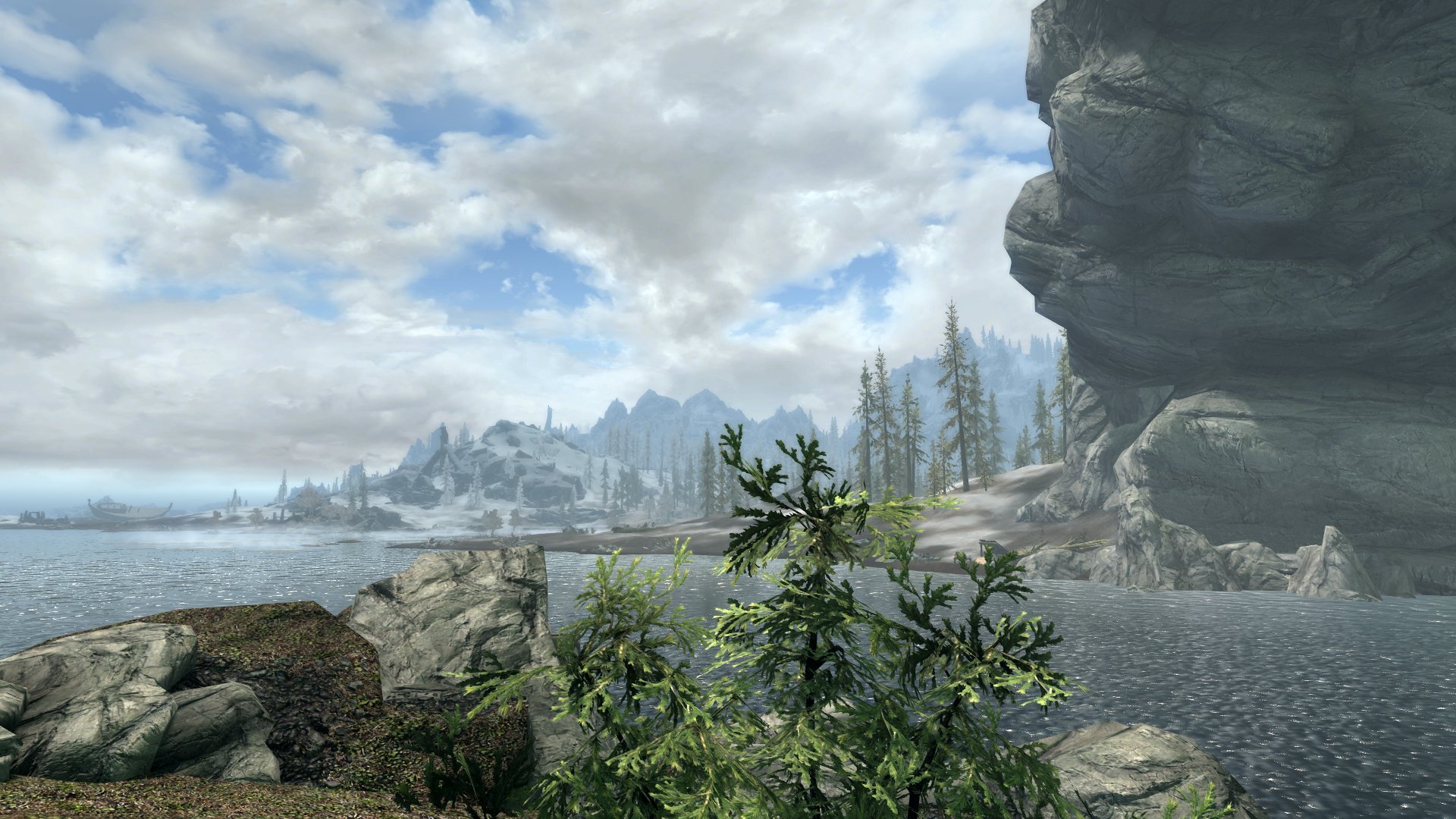
I can see the statue just fine from the path below Solitude. There is a rock a bit further down to the Lighthouse where you can be a bit higher, too.
-
I asked for screenshots and if the statue has a form id or goes away when disabling LOD with tll. If you post a 9 minute video, then please give the timestamps where the parts are that contain the requested information (does it go away with tll or does it have a form at the far away distance) and shows the interesting parts. The first few seconds of the video show that you are in the air. If you use tcl or tfc, then occlusion and LOD are not always working correctly as if you were moving around normally in the game. Doublecheck things behave the same while running around normally in the game. The DynDOLOD log you uploaded shows that LOD was generated without DynDOLOD DLL NG in the load order. The output is not useable with DynDOLOD DLL NG. Please read https://dyndolod.info/Official-DynDOLOD-Support-Forum#Post-Logs or my signature how to zip and use a file service for large log files. I have said noting about the solitude rotor so far, because I did not realize the "it" referred to the rotor and not the Azura statue. Everything I wrote above was about the statue and how occlusion and LOD works. With DynDOLOD DLL NG certain dynamic LOD objects will be using Far Grid again like they used to in Skyrim LE instead of the forced Near Grid because of large reference bugs. So the the rotor will show further than before. Large reference means a full is shown inside the large ref grid of typically to 11x11 cells instead of 5x5 uGrids. The distance where the full model switches to LOD is pushed out up to 3 cells in any direction. Normally the statue has static object LOD generated regardless and should show the same distance. Provide the debug log and timestamps in the video to the interesting parts or screenshots. Doublecheck LOD distances are not changed by other mods. Test if the status behaves any differently with Occlusion.esp disabled. Object LOD has two snow shaders. if you want to change the brightness of that snow cover you need to edit the records. https://dyndolod.info/Help/Snow-Ash-LOD-Shader The shader are applied in the game and do not affect LOD generation or vice versa. If the issue is with terrain LOD, then see https://dyndolod.info/Help/xLODGen#Terrain-LOD-Textures-Brightness Provide a timestamp or screenshot that properly show the problem.
-
Read https://dyndolod.info/Official-DynDOLOD-Support-Forum#Post-Logs which DynDOLOD log and debug log to upload. See https://dyndolod.info/Official-DynDOLOD-Support-Forum#In-Game-Screenshots how to make useful screenshots, in particular I would be interested in a screenshot that shows the statue floating. Try to click on it to see if it is a reference with a form ID or test if it goes away when toggling LOD of wth tll. Occlusion hides LOD meshes that are occluded by terrain LOD. If you see something in the distances, it means it is not occluded by terrain or it is not actually tree, object or terrain LOD. Occlusion disables an entire LOD quad (4x4, 8x8, 16x16 cells in case of object LOD) only if everything from the entire LOD quad is occluded for the cell you are currently. While the statue might be hidden, the mountain rocks which are in the same LOD right before or next to it are not for example. If you can see something being rendered, then it is not too far away? See https://dyndolod.info/How-LOD-Works The max render distance for everything is about a 100 cells Typically terrain LOD renders all the way and object and tree LOD distances are shorter. If you believe object LOD renders too far, then you can decrease the object LOD distances in https://dyndolod.info/Help/Mod-Configuration-Menu#Settings for example. None of the above is affected dynamic LOD normally, so using DynDOLOD DLL or DynDOLOD DLL NG should not make a difference. The fix depends on what the actual issue is, which we do not know yet.
-
You only selected the MarkarthWorld in both runs, correct? You also did not post TexGen logs, you ran it before right, all billboards textures were generated by it? What using the other 10GB or so, is that dedicated to video memory? If you do not have a dedicated graphics card, this might have to do with the issue. Read through the list of https://dyndolod.info/FAQ#High-memory-usage-Out-of-memory anyways, even just to really rule these possibilities out. Do both of these at the same time to see if they makes a difference: add the -memory command line argument In the C:\Games\DynDOLOD\Edit Scripts\DynDOLOD\DynDOLOD_SSE.ini, add a line TextureCache=10 under [DynDOLOD]
-
https://dyndolod.info/Help/DynDOLOD-Resources DynDOLOD requires the Core Files of DynDOLOD Resources for Skyrim/Enderal or DynDOLOD Resources SE for Skyrim Special Edition/Enderal SE/Skyrim VR to be installed in the current load order. Do not remove or rename any of the Core Files. You can delete the *.psc files from DynDOLOD DLL NG. You can delete the *.pdb, it is only useful in case of crashes when using crash logger. The runtime version is irrelevant to LOD generation and DynDOLOD DLL NG will always support 1.5.x for the foreseeable future.
-
No idea what issue DynDoLOD needs the "source" folder to work relates to or which "source" folder you are referring to. pdb files typically contain debug data for exe or DLL. Unclear what you are referring to. DynDOLOD generates the LOD patch from meshes, textures and game plugins.
-
Upload the FO4LODGen_log.txt and bugreport.txt if it exists. Make sure that you are actually starting the xLODGenx64.exe from the xLODGen terrain LOD beta 110 archive and not an older version.
-
If it runs through now, then it is hard to pinpoint a specific reason. As I suggested in an earlier post, check memory usage of DynDOLOD in Windows task manager and check if it has sub processes like LODGenx64.exe or Texconvx64.exe that might be using lots of memory. The task manager can show both main and video memory usage. When you have to generate again in the future, see the answers for https://dyndolod.info/FAQ#High-memory-usage-Out-of-memory first to test different settings and without enabling the real time log, in particular: If DynDOLOD runs out of memory while generating atlas textures, add a line TextureCache=10 to ..\DynDOLOD\Edit Scripts\DynDOLOD\DynDOLOD_[GAME MODE].INI. If there are still problems, set MaxTextureSize=8192 in the same INI file. If too many concurrent LODGen processes running at the same time consume all available memory, limit their total number by changing the MaxLODGen setting in ..\DynDOLOD\Edit Scripts\DynDOLOD\DynDOLOD_[GAME MODE].INI. So next time, try setting TextureCache=10 and MaxLODGen=2 to see if it makes a difference.
-
Upload a crash log from Crash Logger. No crash logs were provided. If it doesn't crash anymore, then that's great and I do not need crash logs anymore.
-
We do not really need users to tell us about game updates or changes. ElminsterAU just pushed the upate to the xEdit github like 5 minutes ago.
-
The DynDOLOD log and debug are the same as from this post https://stepmodifications.org/forum/topic/17510-dyndolod-300-alpha-169/?do=findComment&comment=278595 which show that LOD billboards were not found and then no LOD generation was started. Check the dates and content of the log files are the ones from the last generation. The DynDOLOD_SSE.ini shows that ; RealTimeLog=1 is commented out. Remove the semicolon and any spaces in order to have the setting take effect.
-
This archive does not seem to contain a DynDOLOD_SSE_realtime_log.txt or a new DynDOLOD log and debug log.
-
Read https://dyndolod.info/Official-DynDOLOD-Support-Forum#Post-Logs which DynDOLOD log and debug log to upload when making posts. Whatever ever it is you are doing, this is not how modding or usingxEdit, xLODGen, TexGen or DynDOLOD work at all. They load plugins like the game does. There is no need to rename plugins. Renaming plugins is going to result in issues. Use a mod manager. Install these tools properly and start them from the mod manager. See https://dyndolod.info/Installation-Instructions See https://dyndolod.info/Generation-Instructions how to run TexGen and DynDOLOD. Notice that there are no instructions to rename any plugins but it says to finalize the load order. Do not invent unnecessary steps. Report the actual problem instead. Replacing plugins with another means, that whatever the replaced did, will be missing from the load order at generation time and plugin requiring it as a master will have unresolved form ID errors. LOD is made for the load order at generation time, if the load order changes afterwards, then LOD might not match or work correctly. See https://dyndolod.info/Help/Ultra-Tree-LOD how to generate 3D tree LOD. Under Requirements is says: Skyrim 3D Trees and Plants - Install Skyrim3DTrees and Plants 3dLOD Resources. There is no need to rename 3D tree LOD model files. DynDOLOD automatically falls back to the standard object LOD filename convention. I suggest to to learn basic modding practice by following a modding guide.
-
Still no DynDOLOD log or debug, which are saved, when you close DynDOLOD via clicking X top right. Only kill it via task manager if closing via X top right does not work for a minute. In that case, edit ..\DynDOLOD\Edit Scripts\DynDOLOD\DynDOLOD_SSE.ini with notepad and add RealTimeLog=1 under [DynDOLOD] at the top. Then start DynDOLOD. Once it shows the options window, check the ..\DynDOLOD\Logs\ folder that DynDOLOD_SSE_realtime_log.txt is being created. Upload the realtime log. If there is no realtime log, reboot and try again. If it still does not work, upload your version of DynDOLOD_SSE.ini. With the log we have a good chance to troubleshoot this more quickly.
-
No crash logs were provided. Without generating and installing DynDOLOD output there are obviously no data files in the game data folder for the DLL to load. Could you test if there is anything different with DynDOLOD DLL NG and Scripts Alpha-18 that uses the "old" commonlibsse-ng? You can get it from https://dyndolod.info/Help/Large-Reference-Bugs-Workarounds
-
https://dyndolod.info/Generation-Instructions#2-Generate-The-LOD-Mod-with-DynDOLOD Ignore wrong 3rd party advice to temporarily disable plugins, mods, meshes or textures. Such advice is categorically wrong or outdated. In case of issues, solve the cause or use appropriate mesh mask rules or settings for desired results. One main purpose of LOD generation is to improve the performance (by reducing resource usage), which includes generating object LOD or dynamic LOD for lazily IsFullLOD flagged full models. If the replacement with automatically created (HD) tree LOD billboards has no good visual results, a proper 3D LOD assets should be created as is being practiced by or for most tree mods since years. https://dyndolod.info/Help/3D-Tree-LOD-Model It is also possible to use mesh mask rules to either use the full model for object LOD and/or dynamic LOD or to do nothing to a reference (keep things as they are). https://dyndolod.info/Help/Mesh-Mask-Reference-Rules Mod authors can include proper LOD assets and/or mesh mask rules in their mod so things work automatically for users as intended and practiced since a decade https://dyndolod.info/Mod-Authors If help is needed with creating LOD assets or mesh mask rules to achieve the desired results, then provide a link to the mod and if possible useful screenshots as explained at https://dyndolod.info/Official-DynDOLOD-Support-Forum#In-Game-Screenshots LOD assets and mesh mask rules can also be included with future releases of DynDOLOD.