sheson
-
Posts
13,386 -
Joined
-
Last visited
-
Days Won
446
Everything posted by sheson
-
You only would need change the scale of the root BSFadeNode to 1 and typically leave other transformation alone unless you flatten the hierarchy. For example if there are NiNode with transformation in the full model and you end up with copying a BSTriShape out of it directly under the root BSFadeNode, the NiNode transformation should be applied to the BSTriShape first. As I just mentioned in the other post, in NifSkope, right click, Transformation, Apply. While I typically would suggest to address these things in full models to make things easier for everybody, such changes should only be done by the original tree mod, since it will change the CRC32 of the full model...
-
All fMeshLOD* settings apply to full models. Typically they control fade behavior of BSLODTriShape (and maybe others) blocks
-
What I mean is the separated crown into its own input NIF for LODGen is not used by TexGen in this process. https://dyndolod.info/Help/3D-Tree-LOD-Model#Crowns-Leaves-and-Branches The trunk billboard texture/text is rendered by TexGen from the separated trunk NIF. https://dyndolod.info/Help/3D-Tree-LOD-Model#Trunks LODGen then combines the two for the 3D tree LOD model. https://dyndolod.info/Help/3D-Tree-LOD-Model Translation from NiNodes can be applied to child blocks and then also to vertices from The NiTriShape/BSTriShape in NifSkope with a right click, Transform, Apply. That would be similar to the "Zero Transforms" from the 3DSMax NIF import/export plugin.
-
You should create proper static NIFs with collision, animation, skin, bone data etc. removed. They should be simple NiTriShape/NiTriShapeData or BSTriShapes. Copy/paste the relevant Shapes blocks from the full model tree NIF to an empty one. However, I am also pretty quick removing blocks with the keyboard combinations. To optimize meshes you need to use Blender/3DSMax native optimize/decimation features or use a 3rd party plugin like Simplygon, which is free for our use. I do not use Blender, so I can not help with steps there.
-
I assume the download link on that page must have worked 5 or 6 years ago ... https://mega.nz/file/sdYSzISS#whKMZ9nzvxXro8kwhUgWvcjYJDh8btr3hgOpUBDWr7k
-
https://stepmodifications.org/forum/topic/18689-tree-lod-scale-troubleshooting/ If a 3D tree LOD model does not match the size of the full model tree, then there is a problem with the 3D tree LOD model. As explained before, while the game typically ignores translation, rotation, scale on the root node when placing references, LOD generation does not. Remove any translation, rotation and scale from the root of the 3D tree LOD model. https://dyndolod.info/Help/Ultra-Tree-LOD#3D-Tree-LOD-Brightness
-
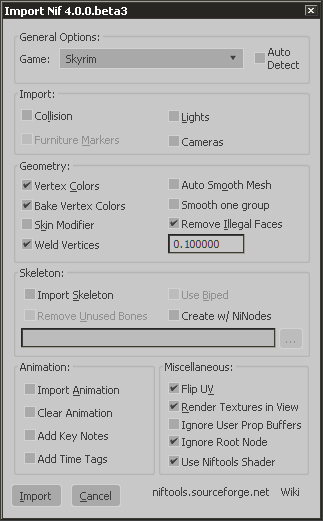
The root node transformation is ignored by the game. It is not ignored by object LOD generation by CK and thus by LODGen. For 3DSMax check "Ignore Root Node" when loading a NIF or make the appropriate changes to the NIF with NifSkope beforehand. For 3DSMax uncheck "FlattenHirachy", "Collapse Transforms" and/or "Zero Transform" in order to keep transforms as they are if so desired when saving a NIF.
-
https://dyndolod.info/Help/3D-Tree-LOD-Model The basic idea is to split a full model into two static (collision, animation, skin, bone data etc. removed) files. See any of the crowns ..\DynDOLOD\docs\trees.ultra\tools\hybrids\input\*passthru_lod.nif and trunks ..\DynDOLOD\Edit Scripts\DynDOLOD\Render\Skyrim\Billboards\DynDOLOD\lod\trees\*_trunk.nif included in the DynDOLOD Standalone download archive. Everything else that is not needed is properly removed to avoid issues or errors. The separated crowns for the 3D tree LOD model creation is irrelevant for TexGen. It just creates the billboards textures and text files from the trunks.
-
Support for ENB Complex Grass In LOD
sheson replied to z929669's question in DynDOLOD & xLODGen Support
https://dyndolod.info/Help/TexGen#Grass-HD-Grass-Tree-HD-Tree-Rendered HD Grass LOD billboards are for optional grass LOD generation. The option becomes available if grass models using ENB complex grass textures are found in the load order. Typically it is assumed that ApplyToBasicGrass=true is set in enbseries.ini, so HD grass LOD billboards will be generated for all grasses by default. Set ForceComplexGrass=0 in ..\DynDOLOD\Edit Scripts\DynDOLOD\TexGen_[GAME MODE].ini to generate both types of grass LOD billboards. Set ForceComplexGrass=2 to always force HD Grass LOD billboards. -
See https://dyndolod.info/Help/Texture-Resolution#Determine-Sensible-Texture-Resolutions LOD is either transparent or opaque with a fixed threshold of 128, e.g. there is no alpha blending only alpha testing.
-
https://dyndolod.info/Help/Ultra-Tree-LOD#Generating Depending on the mesh mask rules the LOD for such trees will use (hybrid) 3D tree LOD models (if available) or use tree LOD billboards directly or as fallback in case a 3D tree LOD is not found. The default fallback is defined by the TreeFullFallBack=1 setting in ..\DynDOLOD\Edit Scripts\DynDOLOD\DynDOLOD_[GAME MODE].ini. 1 = Billboard, 2 = Bilboard2 etc.
-
DynDOLOD Resources SE core files are outdated
sheson replied to Tiphereth's question in DynDOLOD & xLODGen Support
The version.ini in textures is created by TexGen. This is about the version in meshes only. Test if it still reports out of date DynDOLOD Resources after disabling the DynDOLOD Resources SE 3 Alpha. If it says DynDOLOD Resources version information can not be found, the outdated DynDOLOD Resources seem to be removed already and all is well. If it still reports that the DynDOLOD Resources are outdated with a version number that is not 3.00 and there is no loose version.ini file, it is probably in a BSA. In MO2 menu Tools, Settings, Workarounds tab, check the box Enable archives parsing, then check the in the MO2 right window data tab again for the file. If it find a BSA/mod If that still finds not anything, start xEdit and load all plugins. Once it loaded, start the Asset Browser with CTRL + F3, and enter version.ini into the filter field. Check the Containers column for the version.ini in meshes. Data means loose file. If a BSA is reported its filenname should be enough to know which mod it comes from. -
https://dyndolod.info/Help/Large-References#Large-Reference-Bugs Watch the video. That is the bug caused by initial disabled large reference. A large reference or its enable parent that has the Initially Disabled flag can trigger the bugs. The type of plugin does not matter. It is the cause for the example shown in the video above - the problematic large reference is defined in Skyrim.esm. DynDOLOD can create workarounds for some occurrences, including the vanilla one shown in the video. For all others, a warning message Initially disabled large reference is written to the message log. This particular bug has been addressed by DynDOLOD since years by making a non large reference copy and hiding the large reference underground. With the the large reference bugs workarounds enabled, it is fixed keeping the actual large reference.
-
Moved to the thread with similar posts and discussion. https://dyndolod.info/Official-DynDOLOD-Support-Forum#Copy-and-Paste-Text, If the option Copy this message to clipboard is available on a message prompt, use it to copy and paste the text. Error: Texconv error C0000005 textures\architecture\windhelm\500wall_n.dds "Q:\SSE Mods\DynDOLOD\Edit Scripts\Texconvx64.exe" -nologo -gpu 0 -y -aw 256 -f R8G8B8A8_UNORM -o "C:\Users\User\AppData\Local\Temp\TexGen_SSE" "C:\Users\User\AppData\Local\Temp\TexGen_SSE\D647E8B8B72A4F8C8D2782282F57C55B.dds" Check the Windows event log for related message. Test running Texconvx64 on the command prompt directly. Make sure the OS, UAC, anti vir or some other 3rd party crap ware is not preventing TexConv from running. Make sure there are no hardware, , memory, BIOS, overclocking etc. issues. Install latest Visual Studio 2015, 2017, 2019, and 2022 x64 Install latest graphics drivers.
-
See what happens if you remove that last plugin and in case the assertion still happens, the next last plugin and so on. Edit: the CRC32 for your version of Nature of the Wild Lands - Autumn Birches.esp is different than what I get for the latest version 2.4. Test the latest version of the mod. Existing or not existing 3D tree LOD assets are irrelevant to this problem. Also, read the rest of my post about the duplicate Editor ID.
-
Unresolved script properties that stop the process mean, that the scripts are most likely not working as intended, e.g. instead of a containing the form the property is now "none". There will be most likely will be related scripts errors in the papyrus log. It is not possible for patchers, including DynDOLOD, to work with unresolved form IDs. Also, since it is likely that something does not work as intended trying to ignore the error (and in case the patching process gets lucky and the underlying xEdit code does not directly throw errors/assertions) it could happen that the created patch risks to be broken or not working correctly itself. If you mean large references, adding them or overwriting them only works correctly if that happens in master files. https://dyndolod.info/Help/Large-References Regarding the error, check if a plugin overwrites the base record 0007614B and in particular what it does to the CNAM - Tree Data. If there doesn't seem anything wrong with the overwritten base record and the CNAM - Tree data, there is a chance that because DenserFallForest.esp adding new base records with a duplicate editor ID is causing problems. <Debug: Duplicate editor ID TreeAspen04 in DenserFallForest.esp TreeAspen04 [TREE:FE038ADA] and Skyrim.esm TreeAspen04 [TREE:0005FADA]> <Debug: Duplicate editor ID TreeAspen01 in DenserFallForest.esp TreeAspen01 [TREE:FE038ADB] and Skyrim.esm TreeAspen01 [TREE:0006A9E6]> <Debug: Duplicate editor ID TreeAspen03 in DenserFallForest.esp TreeAspen03 [TREE:FE038ADC] and Skyrim.esm TreeAspen03 [TREE:0006C9D4]> <Debug: Duplicate editor ID TreeAspen02 in DenserFallForest.esp TreeAspen02 [TREE:FE038ADD] and Skyrim.esm TreeAspen02 [TREE:0006C9D5]> <Debug: Duplicate editor ID TreeAspen06 in DenserFallForest.esp TreeAspen06 [TREE:FE038ADE] and Skyrim.esm TreeAspen06 [TREE:0007614A]> <Debug: Duplicate editor ID TreeAspen05 in DenserFallForest.esp TreeAspen05 [TREE:FE038ADF] and Skyrim.esm TreeAspen05 [TREE:0007614B]> Editors IDs should be unique in an entire load order.
-
DynDOLOD Resources SE core files are outdated
sheson replied to Tiphereth's question in DynDOLOD & xLODGen Support
The DynDOLOD Resources version file only exists in the DynDOLOD Resources archive. Maybe some other mod incorporated them erroneously. Disable the DynDOLOD Resources SE 3 mod and then check in MO2 right window data tab which other mod is reported for containing the file Meshes\DynDOLOD\lod\version.ini -
That is great. I would be nice if you could upload the log and debug log of the successful generation.
-
DynDOLOD Resources SE core files are outdated
sheson replied to Tiphereth's question in DynDOLOD & xLODGen Support
It can only report that DynDOLOD Resource 2.88 is installed if the 2.88 version file has been installed and is the last to overwrite. Remove the DynDOLOD Resources 2.88 for DynDOLOD 2.x from the load order, left window of MO2. There should only be the latest version of DynDOLOD Resources SE 3 be installed and active. -
Moved to the DynDOLOD 3 Alpha thread. See the first post with log, debug log (they are created when closing the tool) and bugreport.txt if it exists to upload when making posts. Also see https://dyndolod.info/Official-DynDOLOD-Support-Forum#Post-Logs how to enable the RealTimeLog in case there is no log/debug log. As explained, if the option "Copy this message to clipboard" is available, copy and paste the text instead posting a screenshot. https://dyndolod.info/Messages/Exceptions#Assertion-failure You seem to mention the xEdit error check but did provide of the error messages. https://dyndolod.info/Messages/Deleted-Reference
-
Sorry about that. They are the same thing, you can just rename it. Or download this test version of TexGenx64 https://mega.nz/file/NF5GnabC#akrKNgpcYUXf8oiupO5oDpR6te6lV3e_j1zxU1Wp35k
-
Use NifSkope to make these changes to the 3rd party LOD assets: In emlonghousetgc_lod_0.nif change the string Cube.001 to Cube.005 in the header. In rifthallofkynetgc_lod_0.nif replace the textures for BSTriShape "Roof" / BSLightingShaderProperty / BSShaderTextureSet with the correct ones from the full model textures\architecture\whiterun\wrdragontileblack01.dds and textures\architecture\whiterun\wrdragontile01_n.dds. Same for riftvilemyrinntgc_lod_0.nif BSTriShape "Roof.002" / BSLightingShaderProperty / BSShaderTextureSet
-
NIF files are either in BSA files or exist as loose files in the data folder. Use the MO2 right window data tab to find them and which mod supplies them. Enable archives parsing in the MO2 Settings/Workarounds. If no such files exist in the load order, check with xEdit which plugin is the last to overwrite the mentioned base records.
-
See what happens with this text version https://mega.nz/file/NIBG0Y6a#yzzBZkitznqZ2kMXWFIH9hiT1pHMGdsAzTxWOjgr36s Remove old logs and bugreport.txt first. Upload new log, debug and bugreport.txt.
-
What does this have to do with moving Skyrim to another drive? The log tells you which data folder is used. Is it not correct? https://dyndolod.info/Messages/Windows-Registry-Key Read the explanations for log messages and the summary, for example https://dyndolod.info/Messages/File-Not-Found-Meshes https://dyndolod.info/Messages/Deleted-Reference https://dyndolod.info/Help/LODGen Remove whatever mod contains the outdated LOD assets mentioned in the LODGen log file not found messages. Those filenames shouldn't exist in the load order anymore.