sheson
-
Posts
13,383 -
Joined
-
Last visited
-
Days Won
446
Everything posted by sheson
-
Child worldspaces like Whiterun etc. use the parent world Tamriel for LOD. Markarth is the exception.
-
https://dyndolod.info/How-LOD-Works https://dyndolod.info/Help/Object-LOD An object LOD *.BTO at least covers 4x4 (8x8, 16x16) cells and can only contain representation/be created for/from existing references/base records and assets. What assets actually depict is irrelevant. Existing *.BTO are irrelevant for LOD generation.
-
https://dyndolod.info/Help/Ultra-Tree-LOD "Ultra tree LOD" or "LOD trees in object LOD" are the terms used for when LOD for trees is done in object LOD instead of the standard tree LOD system. You can not use a feature that uses object LOD without updating object LOD.
-
Read the first post which log and debug log to upload when making posts. Also read https://dyndolod.info/Official-DynDOLOD-Support-Forum, in particular https://dyndolod.info/Official-DynDOLOD-Support-Forum#Read-Log-and-Error-Messages, https://dyndolod.info/Official-DynDOLOD-Support-Forum#Copy-and-Paste-Text and https://dyndolod.info/Official-DynDOLOD-Support-Forum#Post-Logs See https://dyndolod.info/Messages/Windows-Registry-Key
-
Read https://dyndolod.info/Official-DynDOLOD-Support-Forum#Post-Logs. Also upload the debug log and the papyrus log as explained. The log you upload shows: Session started with existing DynDOLOD output and closed without doing anything. Session started with existing DynDOLOD output and closed without doing anything. Session started with existing DynDOLOD output and generating tree and dynamic LOD for BSHeartland with warnings about something missing from DynDOLOD.esp Session started with existing DynDOLOD output and generating tree and dynamic LOD for BSHeartland with warnings about something missing from DynDOLOD.esp There is no log for the initial generation that is being loaded. The error in the DynDOLOD.esp itself needs reporting and investigated. It is not really clear what the problem with the LOD generated for Tamriel is in regards with that missing record in the DynDOLOD.esp. Generate tree LOD for BSHeartland from scratch without loading any existing DynDOLOD output. Install that output. Make sure this output works as desired. Keep that log and debug log (which gets replaced with every session). In case there are issues report with those logs (and papyrus logs in case dynamic LOD was generated and does not activate). Make a backup of that output. Once that all works as desired, generate LOD for Tamriel as desired with the DynDOLOD output still active to add LOD for Tamriel to it. Merge both outputs, overwriting all older files form the first generation. If there are issues, upload that log and debug log in addition to the log and debug log from the first generation.
-
You did not upload any useful text file or log, just a frame parent that links to files on your drive. See https://dyndolod.info/Official-DynDOLOD-Support-Forum. See https://dyndolod.info/FAQ "Not seeing all worldspaces in the selection box" Some worlds added by plugins are filtered out by default, because generating LOD for them might not be useful or requires special attention. Remove the worldspace name from the filter file ..DynDOLOD\Edit Scripts\DynDOLOD\Configs\DynDOLOD_[GAME MODE]_worldspace_ignore.txt. Search for the mod, plugin or the worldspace name on the official DynDOLOD support forum for more information. See https://dyndolod.info/Mods/Beyond-Skyrim-Bruma. The in game MCM is a result of the generated LOD mod and the selected options. It does not affect its creation. In DynDOLOD 3 Alpha the Generate static LOD is now just "Object LOD". Generate dynamic LOD is now just "Dynamic LOD" See https://dyndolod.info/Help/Advanced-Mode Only select Tree LOD in the advanced option and nothing else to generate tree LOD only for the selected worldspaces. DynDOLOD 3 should pretty much work the same as DynDOLOD 2 in regards to Bruma and what is discussed in the thread. Also read https://dyndolod.info/Help/Seasons and also https://dyndolod.info/Mods/Maps-And-Map-Mods In any case, it is not possible to generate LOD for data that does not exist or with LOD assets that are missing.
-
Large reference bugs workarounds requirements not met
sheson replied to RainingTacco's question in DynDOLOD & xLODGen Support
Clicking the link "Click on this link for additional explanations and help for this message" of the message prompt should open https://dyndolod.info/Help/Large-Reference-Bugs-Workarounds: For the Large reference bugs workarounds check box and options to become available on the advanced mode window, the DynDOLOD DLL NG and Scripts must be installed and every plugin containing deleted references needs to be cleaned. When DynDOLOD is started, a log message will notify if the large reference bugs workarounds are enabled, for example: Large reference bugs workarounds: enabled (DynDOLOD.DLL: NG, Scripts: NG, Deleted references: no) From your log: Large reference bugs workarounds: disabled (DynDOLOD.DLL: NG, Scripts: NG, Deleted references: yes) In case a deleted reference is found, the debug log will contain a line like this: [DeletedReferencesChecks] <Debug: Deleted reference Update.esm [REFR:000C8701] (places TreeDeadShrub [TREE:000A731C] in GRUP Cell Temporary Children of FrostflowLighthouseExterior01 [CELL:00008F29] (in Tamriel "Skyrim" [WRLD:0000003C] at 15,21))> From your debug log: <Debug: Deleted reference ccvsvsse004-beafarmer.esl [REFR:00042AB6] (places RockPileS01FieldGrass01 [STAT:00021E70] in GRUP Cell Temporary Children of ccVSVSSE004FarmExterior01 [CELL:000099B4] (in Tamriel "Skyrim" [WRLD:0000003C] at -18,0))> -
That could be a sign of hardware, BIOS setting, overclocking, cooling, unstable power supply etc. If it worked, then there is nothing further to do right now. If it happens again later, upload new logs including the TexGen_SSE_Debug_log.txt
-
Read the first post which debug log and bugreport.txt (if it exists) to also upload when making posts. https://dyndolod.info/Official-DynDOLOD-Support-Forum#Post-Logs Also check the Windows Event log for hints.
-
Broken Bashed Patch? (Can not copy from WayshrinesIFT)
sheson replied to UltraHex's question in DynDOLOD & xLODGen Support
Wrye bash messing up the persistent cell was a problem in older versions of wrye bash that was supposed to be fixed years ago. Report it on their discord/github -
Read https://dyndolod.info/Official-DynDOLOD-Support-Forum#Post-Logs which log and debug log to upload when mkaing posts. Do not post screenshots of logs, texts or messages as explained at https://dyndolod.info/Official-DynDOLOD-Support-Forum#Copy-and-Paste-Text Read additional explanations and help for a message by clicking on the Click on this link for additional explanations and help for this message link of the message as explained at https://dyndolod.info/Official-DynDOLOD-Support-Forum#Read-Log-and-Error-Messages. it should open https://dyndolod.info/Messages/Unresolved-Form-ID The screenshot of the log shows Complete Crafting Overhaul_Remaster.esp being loaded before Skyrim.esm. This is not going to work. Fix the load order of plugins or whatever is causing it. A patch might have out of order masters. Investigate and fix whatever other errors reported by the xEdit loader that might need fixing. Unknown record type probably means the file is corrupt.
-
Broken Bashed Patch? (Can not copy from WayshrinesIFT)
sheson replied to UltraHex's question in DynDOLOD & xLODGen Support
Nothing sticks out. Would like to see the content of the persistent cell for the patched and also Block 0,0; Sub-Block 0,0. Test what happens if you right click the reference in xEdit and "copy as override into" a new plugin. Try this: Test the problem happens when only selecting the Blackreach worldspace to speed up tests. Make a backup of the patch. Right click remove everything but the Worldspace and everything in it from the patch Clean masters Test if problem still happens. Make backup. Right click remove all Blocks and only keep the persistent cell. If problem does not happen, restore backup and remove persistent cell instead, test and then remove half the blocks, then sub-blocks, then cells, then references at a time, restore backup if problem goes and remove other half, repeat until only one cell or reference remains. If problem happens only with the persistent cell, test if removing all references makes a difference. If it does, again remove half until you have one left. Once you it narrowed down and the source of the problem does not seem obvious, clean masters again and upload the patch. -
Moved to the DynDOLOD 3 Alpha thread. TexGen is probably waiting for a TexConv process to finish. Add LockTexconv=1 under [TexGen] in B:\Mods\Skyrim\DynDOLOD\Edit Scripts\DynDOLOD\TexGen_SSE.INI and see if that changes anything. It helped users with the same problem a couple pages back where TexGen seems to be stuck or stopped.
-
As is quite obvious by the log messages and the log file name, the tool is running in the default FO4 mode. You did not set the game mode with the -sse command line as explained in the first post of this xLODGen terrain LOD beta thread. Skyrim crashes when trying to load meshes that are in the FO4 NIF format. Use the -m command line to provide the path to the INI folder instead of only the Skyrim.ini with the -i as explained in the first post.
-
Broken Bashed Patch? (Can not copy from WayshrinesIFT)
sheson replied to UltraHex's question in DynDOLOD & xLODGen Support
Read https://dyndolod.info/Official-DynDOLOD-Support-Forum#Post-Logs which entire log and debug log to upload when making posts. As explained, the log starts with "... starting session". https://dyndolod.info/Messages/Can-Not-Copy-Record Look up all the records from the error message by their form ID in xEdit. Typically the error is triggered by the last plugin to overwrite one of the listed records - even if everything appears to look OK on first glace. If the record itself has no overwrites, check the CELL and WRLD records, in particular in the bashed patch. Provide screenshot of the record(s) and xEdit. Which Wrye Bash version. -
Read https://dyndolod.info/Official-DynDOLOD-Support-Forum how to provide logs and information when reporting problem or asking quesitons. DynDOLOD does not change how LOD works https://dyndolod.info/How-LOD-Works, there will always be a visible switch between LOD and full model. Consider using 3D tree LOD in the first LOD level as explained at https://dyndolod.info/Help/Ultra-Tree-LOD https://dyndolod.info/FAQ "Object LOD model and full model show at the same time causing texture flicker" DynDOLOD does not change cell sized water/LOD water. It is unclear what is flickering in the second post.
-
The TexGen log is from version 2.x. That explains why you can not find certain log files. When using 2.x you need to download and install 3rd party billboards as explained in the documentation of DynDOLOD 2.x included in its download archive. There is no DynDOLOD log in the archive you uploaded. You said you were using DynDOLOD 3. Also use TexGen 3 to generate the required billboard for DynDOLOD 3. See https://dyndolod.info/Downloads were to download everything. Then see https://dyndolod.info/Installation-Instructions and https://dyndolod.info/Generation-Instructions.
-
Read https://dyndolod.info/Official-DynDOLOD-Support-Forum which logs and debug logs to upload when making posts. Also read how to make and provide useful screenshots. 2. See https://dyndolod.info/FAQ "Billboard tree LOD does not match close-up full model trees" and "Something does not have LOD". If you post logs, also post the DynDOLOD_[GAME MODE]_Billboards_Used_[WORLDSPACE].txt and DynDOLOD_[GAME MODE]_Object_Report.txt mentioned by those answers. 1. Without the aforementioned tree LOD assets there can be no trees on the map, no matter what. So resolve 2. first.
-
Read https://dyndolod.info/Official-DynDOLOD-Support-Forum#Post-Logs which log, debug log and bugreport.txt (if it exists) to upload when making posts. This is a OS / file system problem. DynDOLOD uses a OS function to rename rename (move) the file from the first source file to the second destination file failed. This means there is a problem accessing the source files or copying it to the destination filename because they are blocked by other processes, UAC, anti vir etc. or the destination file already exists but can not be replaced. Try to do the same with Windows File Explorer, e.g cut/paste the file. Typically the source file should still exist and can just be used as if the move to the output folder was successful.
-
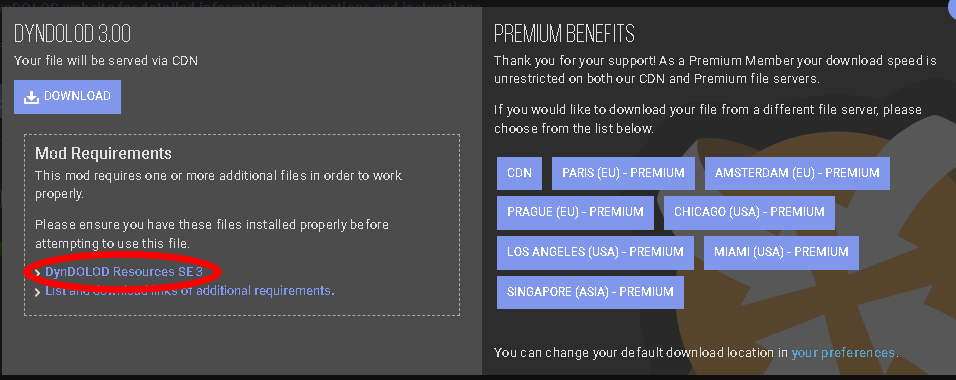
Moved to the DynDOLOD 3 Alpha thread. Read the first post how not to post screenshots of messages and instead use the "Copy message to clipboard" link in order to paste text. https://dyndolod.info/Official-DynDOLOD-Support-Forum DynDOLOD Resources SE core files are outdated DynDOLOD 3 Alpha requires DynDOLOD Resources SE 3 Alpha. You have DynDOLOD Resources SE 2.x for DynDOLOD 2.x installed. This is explained and linked in the first post of the DynDOLOD 3 Alpha thread. The official online documentation that can be opened by clicking the "Online Help" or using the "Click on this link for additional explanations and help for this message" link from the message would lead you to https://dyndolod.info/Downloads, which has the links. Pay attention to the requirements on Nexus when downloading DynDOLOD 3 Alpha. It also has the link: Searching this forum for the message finds this thread https://stepmodifications.org/forum/topic/18692-dyndolod-resources-se-core-files-are-outdated/
-
Really read the message. The message states a fact. The version of the DynDOLOD Resources Core files which are installed in the load order is older than the version required by the DynDOLOD Standalone version you are using. The download archives available on the different DynDOLOD mods on Nexus are always the latest versions for their respective game and DynODLOD 2.x/3.x versions . So are the download links on the first post. No actual information was provided. If you require further help, upload the log.
-
TexGen is being terminated prematurely, suddenly closes
sheson replied to 3fast5you's question in DynDOLOD & xLODGen Support
All I ask is this: Install latest driver only without any bloatware. Set RenderSingle=1. In case there is still a problem, upload new log, debug log or realtime log and bugreport.txt. Make sure you are not overclocking or have other hardware issues, like unstable CPU, memory etc. -
TexGen is being terminated prematurely, suddenly closes
sheson replied to 3fast5you's question in DynDOLOD & xLODGen Support
Do what I suggested in this post: https://stepmodifications.org/forum/topic/17510-dyndolod-300-alpha-128/?do=findComment&comment=271741 Add RenderSingle=1 under [TexGen] in H:\Modding\Tools\DynDOLOD\Edit Scripts\DynDOLOD\TexGen_SSE.ini and check if it makes a difference. It helped other people one or two thread pages back that also had an exception in the NVIDIA driver nvoglv64.dll The realtime log shows that it is not set to 1 -
See the first post or https://dyndolod.info/Official-DynDOLOD-Support-Forum#Post-Logs which log and debug log to upload when making posts. https://dyndolod.info/Official-DynDOLOD-Support-Forum#Use-Search TexGen is probably waiting for a TexConv process to finish. Add LockTexconv=1 under [TexGen] in B:\Mods\Skyrim\DynDOLOD\Edit Scripts\DynDOLOD\TexGen_SSE.INI and see if that changes anything. It helped users with the same problem a couple pages back where TexGen seems to be stuck or stopped.
-
Read https://dyndolod.info/Official-DynDOLOD-Support-Forum#Post-Logs which entire DynDOLOD log and debug log to upload when making posts. Not sure why you are calling "warning" messages about missing script properties "errors". See https://dyndolod.info/Messages, https://dyndolod.info/Help/Summary-Of-Messages and in particular https://dyndolod.info/Messages/Property-Not-Found-In-Scripts: In case the error occurs with the vanilla and DLC game files, consider using the Unofficial Skyrim Legendary Edition Patch or Unofficial Skyrim Special Edition Patch. In case the error occurs with paid mods from CreationClub, consider using the Unofficial Skyrim Creation Club Content Patches. If help with a specific message is required, provide the logs as explained and ask a specific question.