ikonomov
-
Posts
99 -
Joined
-
Last visited
-
Days Won
2
Everything posted by ikonomov
-
It was a snow covered area with loose/smaller rocks surrounded by some large rocks. Using the tll command revealed the area to be part of a large reference. When the cell fully loads there appears to be another mesh of snow cover on top of the loose/smaller rock area that's partly covering it. It doesn't seem to be related to fast traveling. Once the LOD is turned off the flickering disappears. So I guess the problem is from the LODs, but looking closely at those two meshes they are almost on the same plane, next to each other overlapping, it seems reasonable to see this especially if some z-fighting is to be expected as with the water line.
-
Thank you for the reply. Lots of things must be obvious to you, but probably less obvious for the rest of us. Sorry for the trivial questions. If some z-fighting is to be expected then I think the 550 for all LOD8, LOD16 and LOD32 seems to work fairly well. There is still a little bit of flickering, but the water line looks to be almost intact and I see little change to it going into LOD4. It must be a good balance I think. There is one big rock wall that I was looking at which was exhibiting a huge amount of z-fighting. I looked at it closer and I don't think the problem is with the LODs. When I'm right next to it I can clearly see a landscape mesh and a flat rock mesh overlapping and fighting with each other as they are mostly on the same plane. The two meshes slowly shift from one to the other as I'm walking right next to it. The only way this wouldn't have shown in the Terrain LOD redone is if he edited that mesh manually, which I don't think he did, so it must be that I simply didn't notice it before.
-
Actually I'm still seeing flickering around the edges between water and land at a distance with 550 for Optimize Unseen for LOD8 and LOD16. When I tried On and Off it was more pronounced covering larger areas. I'm observing this by looking at the shallow water area north of Morthal. I'm standing near the Lord Stone in the mountain. Any suggestions to minimize this? Thank you Edit: I noticed some z-fighting in other places like around rocks. Prior to using xLODGen for terrain textures I was using only Terrain LOD Redone and I don't remember seeing much of z-fighting then. Do you have any insight about why there seems to be more with xLODGen?
-
sheson, if you would, can you comment on my previous post. What would be your recommendation to use for LOD8 and LOD16?
-
This is probably expected behavior, but in the shallow waters north of Morthal I noticed some z-fighting with fairly large areas flickering. It is only happening at a distance, so it must be either in LOD8 or LOD16. Having the Optimize Unseen to On and Off results in the same behavior from what I could see, but with 550 it disappeared. I have uLargeRefLODGridSize=11 (Ultra) and with 550 if there is some shifting going on when I get closer into LOD4 (Optimize Unseen Off) it is too far for me to see it. So for some people 550 might be the preferred setting to use for LOD8 and LOD16 as well as the LOD32 map meshes.
-
On the subject of mentioning insignificant things, I'm not sure if this is intentional, but in the .ini files for DynDOLOD (DynDOLOD_SSE.ini and the others) I've noticed Open Cities Skyrim;OpenCities for WarnModFileName, where previously in v.2.x it was just Open Cities Skyrim.
-
The "Information and Discussion" link on the nexus for 3.0 are still pointing to the old url forum.step-project.com and it's not redirecting properly anymore to this thread.
-
I use 1440p and a while back with 2.x version I specifically tested 256, 512 and 1024 making screenshots and afterwards zooming in on the images and really trying to find improvement differences and there were none. And I mean ABSOLUTELY none. I really did go out of my way to find them. I think it would be a really good idea to specify what texture resolutions to use for what monitor resolution even as a guide rather than a recommendation. That's just how the mind works for somebody that has spent lots of money on a video card, the standard recommended setting must just not be good enough unless it specifically says what to use. It doesn't matter that somebody is trying to see 2000x2000 pixels in a 5x5 square on their screen, they'll still keep on trying. I would suggest, if possible, to implement four settings for say 1080p, 1440p and 4k and "custom" resolutions. That way the custom would be the only way to be able to manually specify the texture resolution in case somebody is using custom textures that require manual selection.
-
Yep, scaling is just one more thing that the Win OS is not doing very well. I'm not having a problem here, I'm using a single 27" 1440p monitor with 125% which is not causing issues for the vast majority of programs even if their scaling method is not 100% conforming to MS standards (whatever those may be). The 4k monitor that I have on the other computer just made me aware about how bad scaling really is in Windows and made it easier for me to spot when it might cause issues beyond the 125% that I normally use. Sadly Compatibility settings for high DPI haven't been working for some programs for a while now. It used to be that if the OS detects that a program is not DPI aware it would simply scale its interface and everything would look blurry and upscaled but proportional to what it would look at 100%. Then when you turned off scaling or gave application priority for scaling Windows would display it the same as it would be at 100%. Not anymore, I'm not sure in what update they made the change, but now text is almost always upscaled according to the Windows DPI scaling regardless of compatibility settings for an individual program. Programs that are not specifically designed to scale will either be blurry or text will be upscaled, sometimes not being able to fit inside its field. At least that has been my experience with this after some testing and experimentation.
-
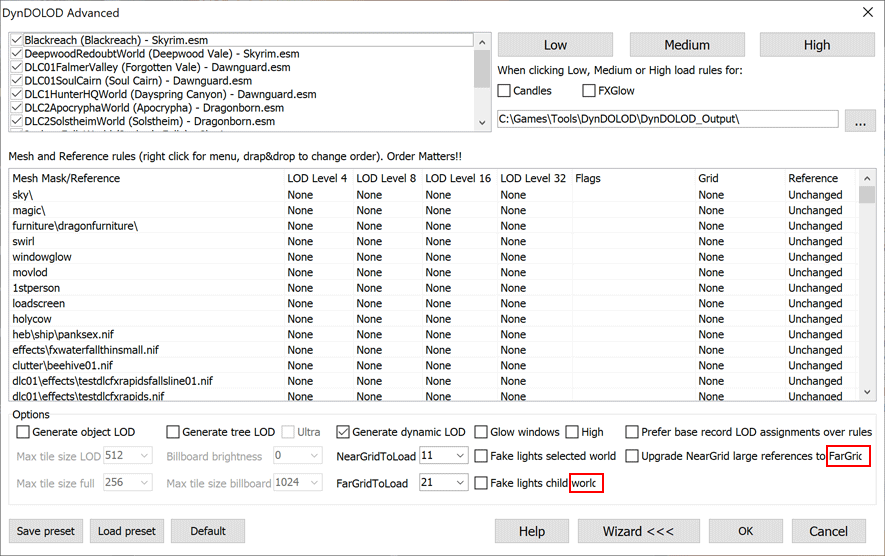
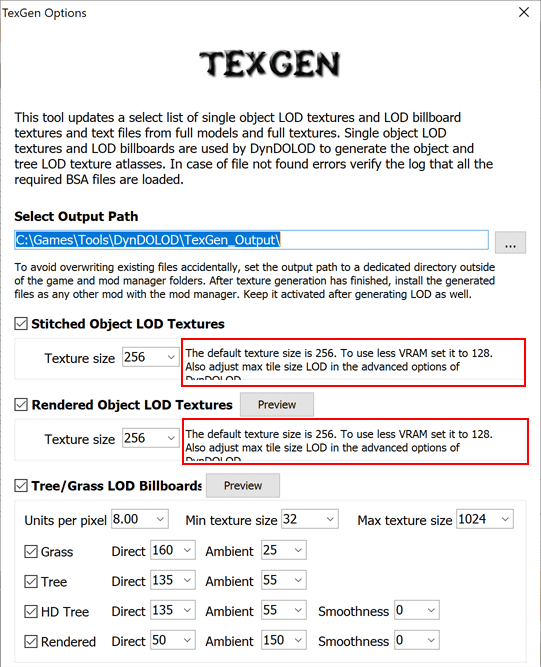
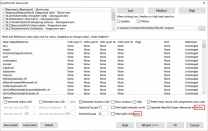
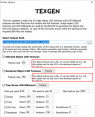
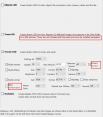
I've had issues before because of scaling in other programs, as everybody probably does on windows using anything other than 100%, but it's only really obvious when it's higher than say 150%, which I have on one computer connected to a 4k TV. This is with the newest versions of xLODGen, DynDOLOD and TexGen. If I'm not mistaken the previous version of DynDOLOD did not scale at all, possibly related to a newer MS visual studio C++ version used. Maybe you can increase the text fields a little, to minimize the chances of it happening. The screenshots were taken at 200% to make it more visible where it happens.
-
Thank you for adding the link. I am ashamed to admit how many hours I worked on that one texture file, trying probably more than 40 versions in-game. It would be awesome if people find it useful. Also thank you for the explanation about DynDOLOD and xLODGen. I have been using SSEEdit for a long time now, which must originate from xEdit the same way as your programs do. I think it would be a fantastic idea to combine terrain LOD generation into TexGen, the same way you added the tree billboard generation. I must admit that I have been shying away from xLODGen to generate the terrain because of the introduction on the first page even thought I've done quite a bit of modding myself with SSEEdit. While most people must be trying first, and then reading, I read the post quite a few number of times before deciding to try it lol.
-
I have been using 3.0 with grass billboards for a few weeks now without any obvious problems that I could find. The only thing I could see is that the interface for TexGen and DynDOLOD seem to scale now with Windows 10 DPI scaling, and while on my end the text seem to just fit at 1.25%, my guess is that with higher scaling it might pose a problem. I have recently started using xLODGen and I think I noticed the same issue there as well. The previous version of DynDOLOD did not use scaling I think, which might be preferable. I'm sure there are good reasons for it, but my vote goes to move this project to beta so more people can enjoy using it. The grass billboards seem to make as big of an improvement to the game's visuals as the original DynDOLOD was to vanilla game, if not more. Once at beta we could contact GamePoets and suggest an update to his awesome tutorial videos, including a section for using xLODGen together with the new 3.0 and billboards.
-
I decided to try xLODGen yesterday and see if I can get some better terrain lod textures than the terrain mod I had previously to use together with DynDOLOD 3.0 and grass billboards. The results are fantastic, and despite my initial expectations it was very easy to generate, really no different to using DynDOLOD. I also made a 1024x1024 noise texture that I want to share that gives slightly more detail https://www.nexusmods.com/skyrimspecialedition/mods/47057/. I also tried 2048x2048 noise texture, but it looked too nice lol. Once the cell rendered there was a decrease in quality and detail rather than the other way around. I think 1024x1024 is a happy medium that gives slightly more detail to the 512 one included on the first page. The overall brightness has also been ever so slightly increased. I have a suggestion that I want to give purely from a new user perspective. From what I could find, there are two really well done videos for using DynDOLOD by the awesome guy from GamerPoets, but none for using xLODGen. Since most people using xLODGen will likely be familiar with DynDOLOD, is it possible to have the default output folder for xLODGen to be something like say "xLODGen_Output" the same way it is for TexGen or DynDOLOD? This way it will be consistent with the other two programs and also allow people to manually install the files and be able to easily uninstall them later. I run mine with -sse -o:"C:\Games\Tools\xLODGen\xLODGen_Output\" command line, which does the same thing, but why not have it the same as DynDOLOD and TexGen. Thank you sheson for your amazing work. Edit: In addition, I think it would be really nice if we can have xLODGen uploaded on the nexus preferably together with DynDOLOD for Skyrim SE. I know they are completely different projects, doing different things, but all three work best together for SSE.
-
Ah, so with the mip maps the texture size must not matter. I thought it could lessen video memory load and while downsizing use the opportunity to edit the brightness in those textures before re-compressing them again. I did try darkening the texture, reported in the next post. This would be greatly appreciated.
-
No crash for me around Kynesgrove or the mine-entrance. I walked around a bit to make sure.
-
My math skills are totally out today. 1024x512 (1/16), 512x256 (1/64), 256x128 (1/256). I did some testing changing the branch texture of that tree and the brightness of the highlights. The result wasn't as effective as I had hoped. I really thought the brighter colors in that texture had a lot to do with it, but it turned out not so much. I should have manually changed some of those vertices and called it a day. Looking for the "ultimate" solution turned out to be more elusive than I had thought. Still, a bit of lower global brightness really makes a noticeable difference, enough to the point of making those highlights not being obvious. Having a brightness control I think would really help with the transition between the full models and Static LOD4. Normally the game applies a certain level of brightness fog at that distance, which results in a jump in brightness, but with a bit of finer adjustment to some of the objects it can be made slightly more subtle. Hopefully this reduction in size and a brightness adjustment can be implemented. If not, oh well... Will start playing and report something useful if I find. Thank you sheson for all your help and making this monumental project that I simply can't wrap my mind around how you've made it.
-
I agree. I think you've put it as accurate as it can be said. I keep writing and then deleting gratitude sentences, as they feel inadequate. Thank you
-
Actually that was 1/16th and 1/64th the size. Maybe 256x128 was too far, I think a little detail was lost downsizing it that much, but certainly at 512x256 there was no perceivable difference. Even at 1/2 both dimensions at 1024x512 would be 1/4 the reduction in texture size, which means no loss in quality because of re-compression. And most importantly, giving us the freedom to edit the highlights or the overall brightness of those files! Edit: Testing...
-
Nope, the bright highlights are still there. I tested at 512x256 and 256x128 textures sizes for that tree. A notable observation was that I hardly saw any difference in detail of those Static LOD4 trees on my monitor at 1440p at original texture size vs 1/4 and 1/8 size. It got me thinking, maybe there could be a setting to generate smaller textures for those trees. This way we can have some control over the brightness of those Static LOD4 tree textures, the same way we currently have it for the billboards. This will also make it easier to have the same control for all kinds of trees and all parts of the trees. As a bonus maybe even squeeze a few extra frames. While testing I also decided to really push it to see what those triangles are doing to reflect so much light, so I did one test setting the textures to 32x16 😄 The result was pretty interesting, some very abstract and artistic looking pine trees, but also quite revealing and I think I finally saw what is going on. It turns out when light hits those triangles at a certain angle they are able to reflect quite a lot of light, and in those particular trees at that particular time of the day it just so happens that this effect gets pretty strong. We already knew this, but now I saw it very clearly.
-
Yes, but the new textures must still be the same dimensions, no? Edit: Nevermind, forgot .nif files do that automatically. Testing...
-
I was thinking of a way to test it, but I'm not sure how I can easily make the mesh use lower resolution texture atlas. I thought about "simulating" lower res image by downsizing and then upsizing the texture file, but I don't think this will give an accurate representation. Assuming there is some merit in this idea, would this even be possible to do in DynDOLOD? Have the Static LOD4 meshes use lower resolution texture files?
-
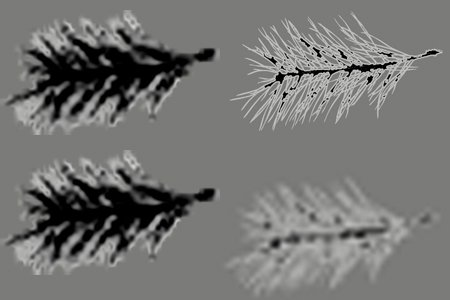
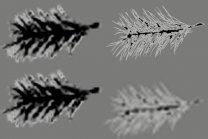
I have been studying those needles for quite some time, as you can imagine 🙂 and I think I might have another explanation for the bright highlights. I noticed that even when the trees are still in their full model, not in Static LOD4, the highlights start to become progressively stronger the further I move away from them. I wonder if the problem might not be from the limited shader at LOD4, but from the texture of those branches. I wish I can test it, but I wonder if the textures have lower resolution if the brightness effect can be minimized. I'm attaching a picture that sort of shows this idea, I've exaggerated it a bit to make it more clear. I don't know if this would be something that can be easily done during texgen and dyndolod generation, to generate lower resolution textures for the Ultra trees, and then have the Static LOD4 trees use them, but I thought it might be something else worth exploring.
-
I'm attaching a version with 0.9 modifier. In my game it definitely looks to be an improvement. Especially when those trees are in front of some darker background the highlights really stand out and look unnatural. As small of an adjustment as this is, it seems to help make those highlights looking more natural. I'm not sure if the trunk is a billboard, but if it is it still looks part of the tree being already very dark. In the autohotkey script I have to run a loop for the number of vertices, but suspect it won't take that long to change it for all trees. Are all the used tree lod meshes in the main folder Data\Meshes\DynDOLOD\lod\trees, or the subfolders as well? Hopefully it can be done in DynDOLOD generation, but at least now I know how I can fix the problem in my game. treepineforest05passthru_lod.nif
-
OK. After some testing I think I've come up with something interesting. Rather than editing individual vertices, using an autohotkey script I modified the three RGB values for all of them with 0.8 multiplier. Similar to my small brightness modification to the grass, I am seeing a much better transition between the full model and the Static LOD4. The model should get progressively darker as it gets closer, hopefully without big jumps in brightness, and with the current 0.8 it doesn't seem to be much change, so perhaps 0.9 or 0.85 might be better. Most importantly, however, the highlights are not as obvious and distracting. This tree was the most distracting before, but now the other ones are the ones that stand out having "burned out" or yellow needles. I'm attaching the .nif if you like to see. I wonder, is this something that can be automated during DynDOLOD generation? To have an RGB modifier for all vertices. In my own game if I'm going to keep this change, I'll have to apply it to all trees I think in order to have all of them have similar brightness. With the autohotkey script I think I can do it in a reasonable amount of time, but I'm thinking that if this was possible during DynDOLOD generation it can benefit different builds with other trees as well. treepineforest05passthru_lod.nif
-
Got it. It's interesting to see from your screenshot that the highlights in the other trees trees don't seem as strong and obvious as it is in my game. It looks like you are using some kind of weather mod or ENB, correct? I wonder if that might be another solution for me, to just try a weather mod or ENB.