sheson
-
Posts
13,382 -
Joined
-
Last visited
-
Days Won
445
Everything posted by sheson
-
You might need to create a lodsettings file with a stride of 512. It looks like you just copied an existing file instead of creating one. However a stride over 256 is untested with xLODGen generation. It looks though like terrain LOD meshes have been generated for the found area. I have no idea if CK or the game support loading LOD beyond the origin + stride or support a stride > 256. The reason is, that the working playable area in the game is from -64 to +64 (it is possible one direction has -128 to +128) Beyond that activators and other stuff stops working properly. So, there is not much use of a worldspace being larger than +- 192 or maybe +-256 until somebody fixes that in the engine. Hence for now supporting a stride over 256 does not seem to be needed. Injecting the cells might cause problems, too. Best would be an esm adding the cells normally. I would test if a worldspace with -256 to 256 with a LODsettings file with the correct -256, -256 SW origin and a stride of 256 works. See LODSettings-File-Readme.txt If you can not get it to work, upload the plugins(s).
-
Texconv error 80004005 with file that doesn't exist
sheson replied to aufisch's question in DynDOLOD & xLODGen Support
There really seems to be a texture just named ".dds" Use xEdit Asset Browser started with CTRL F3 to also check the contents of BSA archives. Put textures\.dds into the Filter field and that hopefully shows you a BSA file which should lead you to the mod. -
New test version https://mega.nz/file/ZFgFXD5D#32kUMWdQVnU9TzSb2kWVS0sUvNcRHPiNTLRoq3Ahb5k Creates on-demand linear full textures used by HD LOD or if using atlas texture might not be be possible. For mountain LOD for example. Use Texconv with fixed conversion for now, so the sRGBGamma setting in TexGen/DynDOLOD INIs for the OpegnGL shaders has no effect for that atm. Use ParallaxGen_Diff.json from ParallaxGen 0.5.6 or higher to automatically keep matching LOD models with CRC32 in their filename. Existing 3D tree LOD models should continue to match with this. Make sure to remove all existing patched meshes (that could have LOD) in the load order before running ParallaxGen for the entire load order.
-
https://dyndolod.info/Official-DynDOLOD-Support-Forum#Post-Logs If there are suspected problems related to dynamic LOD or the DynDOLOD SkyUI MCM in the game, enable and upload the entire c:\Users\[USERNAME]\Documents\My Games\[Skyrim|Skyrim Special Edition|Skyrim VR]\Logs\Script\Papyrus.0.log. To enable papyrus logging add/edit these line in the Skyrim.ini... DynDOLOD does not generate the papyrus log. The game creates it after doing the changes to the INI for the game as explained. The papyrus log you uploaded seems to be from 2023. Create current one. If the waterwheels replacements work in a new game but not when loading a save game, make sure to follow the clean save routine https://dyndolod.info/Help/Clean-Save If the save never saw a DynDOLOD output before or your are sure it is a clean save (report which is the case), test if deactivating/activating DynDOLOD from its SkyUI MCM make the waterwheels appear. See https://dyndolod.info/Help/Mod-Configuration-Menu-NG No screenshots about the new problem have been provided. That indeed sounds like an occlusion plane problem. Maybe you are missing patch. https://dyndolod.info/FAQ#Full-models-disappearing-going-in-and-out-of-view Verify the problem does not happen with DynDOLOD output disabled. https://dyndolod.info/Official-DynDOLOD-Support-Forum#Rudimentary-Troubleshooting. DynDOLOD typically does not change or affect any occlusion planes. Only the Solitude Occlusion Planes patch from DynDOLOD Resources does that. However, that should not affect anything outside of the SolitudeWorldspace. DynDOLOD typically does not affect collision of full models.
-
Upload the SSELODGen_log.txt instead of the LODGen.txt that shows successful object LOD generation. Download the latest xLODGen terrain LOD beta from the first post. Unpack it into a new and empty folder. Then generate terrain LOD for the workspace and upload the new SSELODGen_log.txt and bugreport.txt if it exists.
-
Read the first post and/or https://dyndolod.info/Official-DynDOLOD-Support-Forum#Post-Logs which DynDOLOD log and debug to upload when making posts. Upload c:\Users\[USERNAME]\Documents\My Games\Skyrim Special Edition\SKSE\skse64.log Consider installing crash logger, disable crash logging in .Net Script Framework and upload that crash log. Just because DynDOLOD is in the load order or happens to be listed in a world or cell record does not mean it caused the crash. See https://dyndolod.info/Official-DynDOLOD-Support-Forum#Rudimentary-Troubleshooting The crash may be related to 0x000D9394, a record that is not being touched by any DynDOLOD plugin. Or it may be related to some kind of problem with loading or processing the SKSE cosave data. Test with a new game. In case of updating make sure to follow https://dyndolod.info/Help/Clean-Save
-
You upload the TexGen log and debug log instead of the DynDOLOD log and debug log. The xEdit screenshot still has folded elements. Unfold them as explained in https://dyndolod.info/Official-DynDOLOD-Support-Forum#xEdit-Screenshots to make sure they contain the same values etc. in the overwrite as in the source. It looks like the only difference is the Has Distant LOD flag, which typically does not cause such visual issues. Full models are not affected by LOD, so turning LOD off with tll not having an effect is expected. Test if the problem goes away with DynDOLOD output disabled as explained https://dyndolod.info/Official-DynDOLOD-Support-Forum#Rudimentary-Troubleshooting If you change the load order after generating LOD, check the base record again. If there are discrepancies because additional plugins make changes to the base record used by the reference but are overwritten/reverted by DynDOLOD plugins, generate new LOD from scratch, or manually forward the changes with xEdit. Generating terrain LOD with xLODGen is not going to affect objects (references that can be clicked with a form id, like roads for example) or terrain in the active cells.
-
Upload the papyrus log as explained in https://dyndolod.info/Official-DynDOLOD-Support-Forum#Post-Logs Upload the DynDOLOD.log from DynDOLOD DLL NG as explained in https://dyndolod.info/Help/DynDOLOD-DLL#Troubleshooting Upload DynDOLOD_NG_Tamriel.txt and DynDOLOD_NG_Worlds.txt from the DynDOLOD ouput ..\SKSE\plugins\DynDOLOD_Data\ folder Test with a new game, with coc riverwood from main menu console for example and report if problem still happens. They are supposed to be replacements once dynamic LOD is active.
-
Read the first post and/or https://dyndolod.info/Official-DynDOLOD-Support-Forum#Post-Logs which DynDOLOD log and debug log to upload when making posts. Verify the problem does not happen without DynDOLOD being active. See https://dyndolod.info/Official-DynDOLOD-Support-Forum#Rudimentary-Troubleshooting If the load order changed, you might need to generate new DynDOLOD plugins, as they are build from the winning records at the time LOD is generated and whatever mods you are using might be making different changes to the base record. Check the base record in xEdit to see if the changes of the last plugin are carried forward properly. https://dyndolod.info/Official-DynDOLOD-Support-Forum#xEdit-Screenshots
-
Read the firs post and/or https://dyndolod.info/Official-DynDOLOD-Support-Forum#Post-Logs which DynDOLOD log and debug log to upload when making posts. Read this https://dyndolod.info/Messages/Internal-File-FormID-Is-A-HITME The reason why plugins contain HITMEs or the reasons why they are caused are unrelated to the header version or the header version being changed. Of course it always possible that a 3rd party tool has its own specific requirements to work correctly and create valid plugins. Unrelated to HITMEs: Plugins that have records < 0x800 need to be version 1.71. Plugins that have only records >= 0x800 can be 1.70 or 1.71 If you want to use plugin of version 1.71 with older runtimes you need BEES for them to work. Ask questions about xEdit on the xEdit discord. There will most likely be also knowledgeable folks that can answer questions about CK.
-
Without logs I have no idea what you actually generated or using. So the answers may apply or not. Read the first post and/or https://dyndolod.info/Official-DynDOLOD-Support-Forum#Post-Logs which DynDOLOD log and debug log to upload when making posts. https://dyndolod.info Always use the latest versions. Newer versions fix bugs, add new features, contain updated/new assets and configuration files to support the (sometimes still updated) vanilla game and for existing, new or updated mods. Using the latest version, providing feedback and reporting of all problems with requested logs to the official DynDOLOD support forum is a requirement to participate in the alpha test. Do not waste time using older versions or reporting problems with older versions. https://dyndolod.info/Changelog Version 3.00 Alpha 173 DynDOLOD DLL NG and Scripts - added DynDOLOD SkyUI MCM NG settings for NearGrid and FarGrid DynDOLOD DLL NG Changelogs Version Alpha-31 added DynDOLOD SkyUI MCM NG settings for NearGrid and FarGrid
-
Read the first post and/or https://dyndolod.info/Official-DynDOLOD-Support-Forum#Post-Logs which DynDOLOD log and debug log to upload when making posts. https://dyndolod.info/Help/Dynamic-LOD Dynamic LOD uses two distances, the so called NearGrid and FarGrid to control the visibility (enable state) of the dynamic LOD references. The size of the grids can be set on the advanced mode settings. https://dyndolod.info/Help/Advanced-Mode#Dynamic-LOD NearGridsToLoad sets the NearGrid cells diameter around the player. FarGridsToLoad sets the FarGrid cells diameter around the player. https://dyndolod.info/Help/Mod-Configuration-Menu-NG#Settings Dynamic LOD NearGrid sets the distance of dynamic LOD references assigned to the NearGrid. FarGrid sets the distance of dynamic LOD references assigned to the FarGrid. https://dyndolod.info/FAQ#Performance DynDOLOD is a set of tools that generates a LOD mod based on the load order and the options/settings made by the user. The visual results and the performance impact are what the user chooses it to be. Based on the settings and user choices, the resource requirements and performance impact can be less, same or more than the LOD of the vanilla game while the visual result is always vastly superior. The tools give you the control over things that are normally not possible, do not exist or hard to achieve. Sensible presets exist as a base. SE vanilla does not show the Solitude windmill fan beyond the uLargeRefLODGridSize. With DynDOLOD it either shows up to the NearGrid or FarGrid distances depending on setup and settings. Not everyone has the same powerful hardware. Once there are lots of mods, high res models, 4k and 8k textures, not well optimized 3rd party 3D tree LOD models and grass LOD, not wasting unnecessary CPU/GPU cycles for showing full models on the other side of the map is becoming more important.
-
Delete old logs and bugreport.txt Then run this test version https://mega.nz/file/NJxETboB#utOXAe6P6dAVQ-O-d43wlX8VNFTegdTF0Vr2lRZ4TrA Upload new logs, bugreport.txt if problem persists.
-
https://dyndolod.info Always use the latest versions. ... Do not waste time using older versions or reporting problems with older versions. https://dyndolod.info/Installation-Instructions Use 7-Zip to unpack the entire DynDOLOD Standalone archive into a new and empty 'DynDOLOD' directory that is outside of special OS folders like 'Programs Files' or 'Program Files (x86)', User, Documents, Desktop, Download and also not in SteamApps, game, Data or any mod manager folders. For example C:\Modding\DynDOLOD\. Ensure that the directory structure is preserved. See Updating how to update existing installation and save games. Do not mix new/old versions. Properly install the latest version. If there is a problem with the latest version, upload new log, debug log and bugreport.txt.
-
Please upload Unmarked Locations Pack AIO - JK's Sinderion Lab Patch BOS_SWAP.ini
-
The generated billboards don't match the tree model
sheson replied to kites's question in DynDOLOD & xLODGen Support
Read https://dyndolod.info/Official-DynDOLOD-Support-Forum#post-Logs which DynDOLOD log and debug log to upload when making posts. Provide useful screenshots of the full model and the LOD area to show the problem as explained in https://dyndolod.info/Official-DynDOLOD-Support-Forum#In-Game-Screenshots If something changes brightness based on distance, then it is because of post processing effects, that have nothing to do with LOD meshes, textures or the tools that have generated them. See https://dyndolod.info/FAQ#Billboard-tree-LOD-does-not-match-close-up-full-model-trees Use the billboard brightness setting to make billboards darker overall. Consider using ultra tree LOD with 3D tree LOD models. Could also switch from no shadow to shadow. https://dyndolod.info/How-LOD-Works If the player moves around, new rows of cells attach so that the player is always in the center cell. When new cells attach, the game first loads the ground and lowers the terrain LOD meshes by a fixed amount under the ground and disables water LOD for the cells, loads all trees and disables their tree LOD, loads all objects and their full models and then disables object LOD for the cells. ... LOD does not cast or receive shadows. This can be mitigated by the ENB distant shadow effect or Screen-Space Shadows. If large reference bugs workarounds are used, tree full models can be made to also load outside the active cells, to push their swap distance further away. -
The generated billboards don't match the tree model
sheson replied to kites's question in DynDOLOD & xLODGen Support
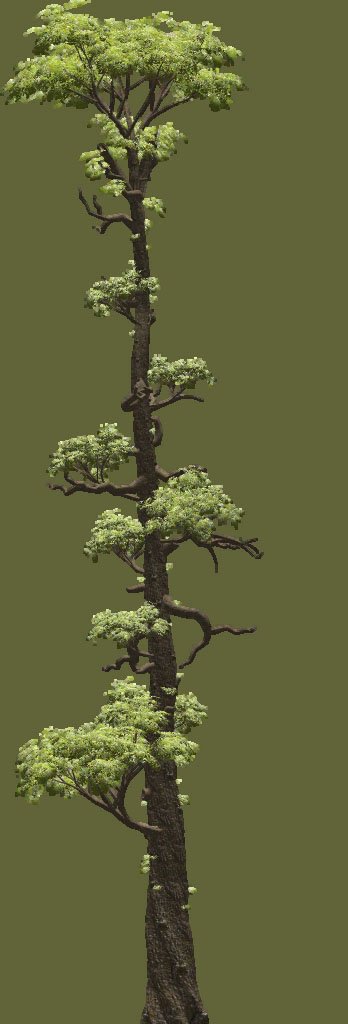
Also provide the results of the troubleshooting steps you asked for. TexGen, NifSkope, Billboard for treepineforest01_0001306d, one of the 5 trees of the main mod. They all look like the same tree: Compare to D:\DynDOLOD 3.00-68518-Alpha-176-1722974426\DynDOLOD\TexGen_Output\textures\terrain\lodgen\skyrim.esm\treepineforest01_0001306d.dds and the winning full model Meshes\landscape\trees\treepineforest01.nif Consider reporting the actual problem as explained in https://dyndolod.info/Official-DynDOLOD-Support-Forum. From the log: TexGen 3.0 Alpha-176 x64 https://dyndolod.info Always use the latest versions. ... Do not waste time using older versions or reporting problems with older versions. https://dyndolod.info/Official-DynDOLOD-Support-Forum#Use-the-Latest-Versions https://dyndolod.info/FAQ#Billboard-tree-LOD-does-not-match-close-up-full-model-trees

-
The generated billboards don't match the tree model
sheson replied to kites's question in DynDOLOD & xLODGen Support
Read https://dyndolod.info/Official-DynDOLOD-Support-Forum#Post-Logs which TexGen log and debug log to upload when making posts. Provide a link to the tree mod. https://dyndolod.info/Help/TexGen Use the Preview button and compare the shown billboard texture for a full model how it looks in NifSkope. Compare the generated billboard textures in the output folder to preview. If they are indeed different, upload a generated billboard texture as example. -
Adding the mod to DynDOLOD_SSE_mod_world_ignore.txt is the correct fix, also for medium, high child to parent copies that are supposed to copy trees in general. No need to do anything about the editor IDs. By editing the file again you might have fixed something like a trailing space etc.
-
Well the change of the editor ID of the base record explains why the IgnoreChildEDIDLow=treeaspen does not match anymore. Maye something went wrong with editing the DynDOLOD_SSE_mod_world_ignore.txt file. Replaces D:\Modding\Tools\DynDOLOD\Edit Scripts\DynDOLOD\Configs\DynDOLOD_SSE_Mod_World_Ignore.txt with the one attached DynDOLOD_SSE_mod_world_ignore.txt If that still does not work, edit D:\Modding\Tools\DynDOLOD\Edit Scripts\DynDOLOD\Configs\DynDOLOD_SSE_childworld_WhiterunWorld.ini, find the line IgnoreChildEDIDLow= and change treeaspen to aspen
-
The source xx00590C in TheAutumnOfWhiterunRemastered.esp is placed in WhiterunWorld. Adding ,Tamriel should not make a difference, but if you like test it anyways - since something is amiss in the first place. Might be seasons related. Upload the new DynDOLOD log and debug log. Can you upload screenshots of xEdit showing xx00590C in TheAutumnOfWhiterunRemastered.esp and then whatever base record it uses?
-
Note the editor ID of the references, which indicates the plugin and form of the "source" and that they are "Childs". The mod The Autumn of Whiterun (AOW) adds trees to the child world and trees at close but still different enough position in the parent world, so they are not discovered as matching pairs. The relevant answer in https://dyndolod.info/FAQ#Out-of-place-or-floating-objects is this: Some mods are made with disregard to generating LOD or require updated rules and configs for best compatibility. This is especially true for mods modifying the walled cities. Users are asked and welcome to provide feedback to the official DynDOLOD support forum in order to get everything working with as much compatibility as possible. Include a link to the mod and screenshots (with open console / form id) to show the issues if possible. If the reference is added by a DynDOLOD plugin, follow the "pluginname_formid" information found in the Editor ID of the reference to find the plugin from which this reference originates. Also see How to ignore all references of a child worldspace for copying to parent worldspace and LOD. See https://dyndolod.info/Help/Child-Parent-Worldspace-Copies According to the logs the setting for Child->parent was the default "Low" so it should not make copies of treeaspen in the ifrst place. Did you edit DynDOLOD_SSE_childworld_WhiterunWorld.ini in any way? Just testing vanilla with the mod alone and low setting it does not copy the trees as expected. Regardless, do this for now: Edit D:\Modding\Tools\DynDOLOD\Edit Scripts\DynDOLOD\Configs\DynDOLOD_SSE_Mod_World_Ignore.txt and add this line: TheAutumnOfWhiterunRemastered.esp=WhiterunWorld Next alpha version will include that update. Then generate LOD again to test and report back that it fixed the issue as expected.
-
Thanks. Added the reference to the potentially wild edit ignore list.
-
There is really no need for all these elaborate explanations. Just state the request. Something like 1. and 2. has already been requested and will be included in the next beta version. Combining shapes into several supershapes based on certain shader settings and passthrus like the later games also has already been requested and will be added to LODGen at some point. It is on the to do list. It just takes more consideration and time. Combining meshes to reduce draw calls is the main reason for having LOD in the first place.
-
From the log: Error: Could not execute "Z:\mnt\nvme0n1p3\skyrimmodlists\STEP\Tools\xLODGen\Edit Scripts\Texconvx64.exe" -nologo -y -m 1 -sepalpha -aw 256 -srgb -f R8G8B8A8_UNORM -w 8 -h 8 -o "C:\users\steamuser\Temp\SSEEdit" "C:\users\steamuser\Temp\SSEEdit\39F9011240394BBAA77C9EFA8D9F385F.dds"> <Error creating textures for cell [-14,32] Could not create alpha layer with LDirtPath01 [LTEX:000B424C] (Textures\Landscape\DirtPath01.dds, Textures\Landscape\DirtPath01_N.dds) for [LAND:00004DAA]: A call to an OS function failed>. Error converting textures: A call to an OS function failed Search the forum for the error message finds this relevant thread: https://stepmodifications.org/forum/topic/19354-linuxproton-a-call-to-an-os-function-failed/ Check that thread. The hover hints for Bake normal-maps explains: Bake blended normal-maps of landscape textures onto terrain model-space normals. Automatically applied to all LOD levels.