sheson
-
Posts
13,181 -
Joined
-
Last visited
-
Days Won
431
Everything posted by sheson
-
On console check tree LOD distance value before/after with getini "fTreeLoadDistance:TerrainManager" If it changes you have a script or DLL changing it (typically FPS stabilizer). If not there might be a occlusion plane/box added by a plugin hiding it (typically eFPS - Exterior FPS boost but I do not see its plugin in the log either).
-
Does it happen with the entire DynDOLOD output disabled?
-
Does it still happen if you hide the scripts folder in DynDOLOD Resources SE?
-
You have SSE FPS Stabilizer installed?
-
Read https://dyndolod.info/Official-DynDOLOD-Support-Forum#Post-Logs,which log and debug log to upload when making posts. Unresolved formIDs are not ITMs. The error message tells you that SkyfallEstate.esp wants to use a record with with formID 343960AF, which does not exist in its own plugin. That needs to be fixed on way or another. Click on the the "Click on this link for additional explanations and help for this message" to open https://dyndolod.info/Messages/Unresolved-Form-ID for further explanations as explained on the first post: In case the unresolved form ID is for a script property and the intended record can not be determined or the property has been removed from the script, remove the property from the properties listing. For example, in case of xx0B35E5, the propery name "NotEnoughCash" and checking the script hints that it probably should link to MESG xx3960AA "You do not have enough money!"
-
Moved to the DynDOLOD 3 Alpha thread. Read the first post which log, debug log and bugreport.txt to upload when making posts. If there is a message prompt, use the "Copy message to clipboard" link to copy and paste the entire text of the message when making posts. Read the answers for "High memory usage / Out of memory" at https://dyndolod.info/FAQ
-
Read the first post which log and debug log to upload when making posts. Provide the cell coordinates from DynDOLOD SkyUI MCM You Are Here. Check if you you are crossing cell borders. Make sure a new Occlusion.esp was generated with the object LOD for this load order / LOD generation and is active and nothing overwrites it.
-
Read https://dyndolod.info/Official-DynDOLOD-Support-Forum#Post-Logs which log and debuglog to upload when making post. Do not post screenshots of messages, use the "Copy Message to clipboard" link to paste the text instead. As explained at https://dyndolod.info/Official-DynDOLOD-Support-Forum#Read-Log-and-Error-Messages, make use of the "Click on this link for additional explanations and help for this message" to open https://dyndolod.info/Messages/Unresolved-Form-ID The message already suggets what the most likely problem is. The patch was probably made for different version of the Better Dynamic Snow SE plugin. The patch either needs updating or the mod is, so they are in sync.
-
Either cceejsse005-cave.esm has been modified or more likely one of its masters is the wrong/outdated version. Probably Dawnguard.esm. Load cceejsse005-cave.esm with xEdit. In the xEdit Options (hamburger menu top left), General, uncheck Hide Ignored and Hide "never shown", so that the worldspace records show the large references. Then check cceejsse005-cave.esm for errors. It should report unresolved formID, probably starting with 02, which means Dawnguard.esm. Make sure Dawnguard.esm and cceejsse005-cave.esm are form the same game version.
-
Request to add Mists of Tamriel.esp to DynDOLOD_SSE_mod_world_ignore.txt
sheson replied to kojak747's question in DynDOLOD & xLODGen Support
If you want all models to not have any type of LOD regardless of plugin and worldspace name, it would be more straight forward and future proof to include rules with the mod setting all LOD levels and Grid to none, just like the first sky\ rule for example. Just like with sky\ use the folder names like mistsanimated\ or mistsvolumetric\ for the mesh mask and all models inside them will be covered. https://dyndolod.info/Mod-Authors#How-to-add-a-rule-file-for-a-plugin If preferred I can include such rules with the next DynDOLOD 3 version. -
Read the first post which log, debug log and bugreport.txt to upload when making posts. The debug log contains the discovered OpenGL version. As epxlained on the first post, search this thread for similar reports and answers. https://stepmodifications.org/forum/search/?q=OpenGL invalid operation&quick=1&type=forums_topic&item=17510 Optional AMD drivers seem to still have issues. Use a recommended driver version like 22.5.1
-
Moved to the DynDOLOD 3 Alpha thread. Read the first post which log and debug log to upload when making posts. If the stuck object LOD goes away when turning all LOD off with tll in console, see the answers to Object LOD shows in active exterior cells at https://dyndolod.info/FAQ If the LOD objects can be clicked and have formIDs in a DynDOLOD plugin, see the answers to Out of place or floating objects at https://dyndolod.info/FAQ
-
Moved to the DynDOLOD 3 Alpha thread. Read the first post which log and debug log to upload. Make sure to follow the steps for Open Cities as explained at https://dyndolod.info/Mods/Open-Cities-Skyrim Test with a new game. Provide a screenshot with More Informative Console information as explained https://dyndolod.info/Official-DynDOLOD-Support-Forum#In-Game-Screenshots.
-
Read the first post which log and debug log to upload when making posts. The diffuse texture mountainslabHQlod.dds is typically not used by anything in the game. Are there any visual issues in the game?
-
Honestly my setup does not even matter that much. The records in DynDOLOD.esm and the script using the OnLoad event are in use by everybody since Skyrim Special Edition support was added beginning 2017. You will remember testing with DynDOLOD 2.x and older version of SSE Engine Fixes. Hundred of thousands of users and diozens of guides use this combination without anyone reporting any similar issue since many years. It seems there is something unique and obscure involved that is needed for this to happen. I test things with 1.5,97 and 1.6.640 - typically alternating between the current SE plugins with the 4 CC and AE with all CC, on Windows 7 and 10 usually, sometimes 11. NVidia graphics. You might want to test if the Papyrus Tweaks have an effect https://www.nexusmods.com/skyrimspecialedition/mods/77779
-
Thanks. Was there really no debug log in the log folder?
-
You uploaded the LODGen log, which is the command line tool that generates the terrain LOD meshes. Upload the SSELODGen_log.txt, which contains the log lines from LODGen. Only you can check and answer the question if the generated LOD meshes and textures are installed and are overwriting everything else. Increase the resolution of the diffuse and normal-map textures as desired. Check the the bake normal-map box. Type tll in console to disable all LOD, what remains are the active cells. The full terrain fades to the diffuse terrain LOD texture in a circle around the center cell without the normal-map terrain LOD texture, which make it look seems flat with less detail - unfortunately nothing can be done about that directly. Only beyond the active cells will the baked normal-map textures take effect. As already mentioned by DoubleYou, try to use a more detailed noise texture but remember its downside is that it is applied to all terrain LOD equally. If you have problems or questions regarding settings from a guide or other tool, you need to ask at the appropriate forum of the guide. LOD generation does not affect or change how far full grass renders. The max is to the edge of the active cells.
-
The toml is a settings file that controls which SSE Engine Fixes options are enabled or disabled. We learned we can influence when the stutter starts by disabling things in SSE Engine Fixes, however even with every option disabled the stutter still happens. Meaning it is not a particular fix/option it can be attributed to but more likely some code that is already used.
-
The problem goes away if you disable the underside in the game via opening console and clicking it, then typing disable/enable? Toggle the LOD with tll as before to be able to click it. Make sure to install More Informative Console so you know the underside is selected and not some cloud. If that is the case, lowering eventually has to make terrain LOD be above/in front of it. Also make sure That all terrain LOD levels (and the underside) have been generated for the current load order. Skyrim SE lowers terrain LOD in the distance (that is why at a certain distance it only happens at the edge of the screen), so you need to account for that.
-
LODGenx64.exe failed to generate object LOD for one or more worlds
sheson replied to nolbear's question in DynDOLOD & xLODGen Support
I might be blind but the link does not seem to contain the DynDOLOD log and debug log. The log would say exactly which LODGen log shows the issue. If you check LODGen_SSE_DLC2SolstheimWorld_WIN_log.txt or LODGen_SSE_Tamriel_WIN_log.txt yourself as explained, the error message seems to be self explanatory. For example: Error writing D:\Tools\DynDOLOD\DynDOLOD_Output\Meshes\Terrain\DLC2SolstheimWorld\Objects\\DLC2SolstheimWorld.4.-36.-12.WIN.bto There is not enough space on the disk. -
Something is going wrong with billboard textures being used directly instead of being put/used on the atlas. You can see from the crash report at the well documented address SkyrimSE.exe+0D6DDDA and the stack that it lists TEXTURES\terrain\LODGen\Skyrim.esm\TreePineForestSnowL02_0005D2DA.dds The Crash happens because its resolution is either not power of 2 or a multiple of 4. It might be used by the object LOD mesh Meshes\Terrain\Tamriel\Objects\Tamriel.4.-48.24.BTO mentioned in the stack. (Rhere most likely will be several more BTO doing this) It should not be used directly, but on the object LOD atlas, where its resolution doesn't matter. From the provided logs I can not determine why it happens. Use the legal game version. Do not install DynDOLOD into any game folders. I suggest to use DynDOLOD 3 Alpha instead. Do not install any third party billboards and let TexGen generate them instead.
-
Moved to the DynDOLOD 3 Alpha thread. Read the first post which debug log to upload as well. Read https://dyndolod.info/Messages what a particular message means and what/if something needs to be done about it. Also read https://dyndolod.info/Help/Summary-Of-Messages, which groups similar messages to show them with their explanations to make it easier to check and learn about them. For example see https://dyndolod.info/Messages/Overwritten-Large-Reference and click through to https://dyndolod.info/Help/Large-References to learn about large reference bugs. https://dyndolod.info/Mods/Beyond-Skyrim-Bruma File not found errors are because not all required assets for LOD generation ship with the mod. https://dyndolod.info/Messages/Max-Tree-LOD-Billboard-Count-Of-256-On-Atlas-Exceeded You might have installed third party billboards that add billboards for small bushes and shrups that typically do not have LOD. See https://dyndolod.info/Help/Tree-Grass-LOD-Billboards#3rd-Party-LOD-Billboards https://dyndolod.info/Generation-Instructions#Prerequisites Clean and error check the load order with xEdit. Clean every plugin that LOOT suggests to clean If you require help with a specific message, problem or mod then ask a specific question.
-
Always use the latest alpha version. Do not waste time using older versions or reporting problems with older versions and Use search to find similar questions and answers as explained on the first post. The problem was already reported, discussed and fixed in the latest alpha version. https://dyndolod.info/Changelog Version 3.00 Alpha 106 TexGen.exe/DynDOLOD.exe - fixed an out of range error because of undefined worldspace bounds https://dyndolod.info/Installation-Instructions Use 7-Zip to unpack the DynDOLOD Standalone archive into a new and empty 'DynDOLOD' directory ...
-
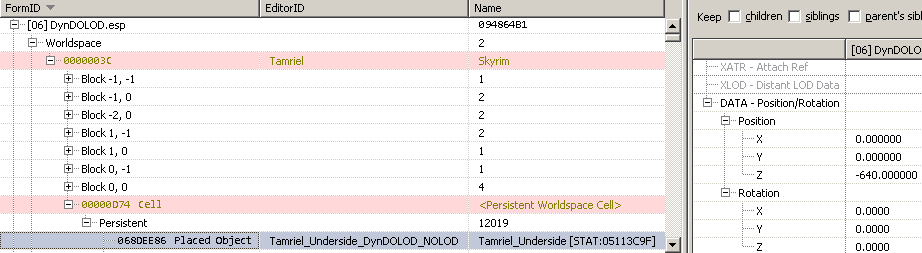
You have tried increasing the fSplitDistantMult to 1.5 or 2? Open DynDOLOD.esp in xEdit. In the left tree view, unfold DynDOLOD.esp, unfold Worldspace, unfold 00000003C Tamriel, unfold 00000D74 Cell, unfold Persistent. Click on the column header FormID to flip its sort order. The terrain underside reference should be first record now. Click it in the left tree view to shows its data in the right window. Scroll the right window down to the bottom and unfold the DATA - Position/Rotation. Double click or right click the value in the row Position / Z in order to edit it. Close xEdit to save. If there is a problem with renaming, find the saved plugin in MO2 Overwrite folder and rename the filename manually.
-
Moved to the DynDOLOD 3 alpha forum. Read the first post which log and debug log to upload. What are the LOD distance values? Provide a screenshot of the DynDOLOD SkyUI MCM Settings page. if you change the height in the advanced settings it should directly affect the z value of the reference that adds the underside mesh in the DynDOLOD plugin. Use xEdit to change the z position manually without having to run DynDOLOD / underside only generation.