sheson
-
Posts
13,382 -
Joined
-
Last visited
-
Days Won
445
Everything posted by sheson
-
Read the first post and/or https://dyndolod.info/Official-DynDOLOD-Support-Forum#Post-Logs which entire LODGen log and DynDOLOD log and debug log to upload when making posts. Test with LODGenx64.exe instead by renaming or moving LODGenx64Win.exe
-
Read https://dyndolod.info/Official-DynDOLOD-Support-Forum#Post-Logs which entire log and debug log to upload when making posts. https://dyndolod.info/Messages/Textures-Do-Not-Match, https://dyndolod.info/Mod-Authors For best results, shapes in LOD models that use stitched object LOD textures should have the same shaders/full textures as the shapes with the same name in full models.
-
Read the first post and/or https://dyndolod.info/Official-DynDOLOD-Support-Forum#Post-Logs which TexGen and DynDOLOD log and debug log to upload when making posts. Read https://dyndolod.info/Official-DynDOLOD-Support-Forum#In-Game-Screenshots how to make useful screenshots with more informative console.
-
Read the first post and/or https://dyndolod.info/Official-DynDOLOD-Support-Forum#Post-Logs which TexGen and DynDOLOD log and debug log to upload when making posts. Read https://dyndolod.info/Official-DynDOLOD-Support-Forum#In-Game-Screenshots how to make useful screenshots, also of the full model with more informative console. Make sure that none of the outputs are being overwritten by other mods.
-
The Combine Worldspace for LOD combines terrain, object and tree LOD. The plume does not have object LOD that could be combined. Only if references have tree or object LOD after LOD for their worldspace is generated can their LOD be combined.
-
Clear browser cache or force a refresh.
-
Use xEdit to set the Has Distant LOD flag on the base record F0228ED6. That should fix it regardless of the uLargeRefLODGridSize setting.
-
Test if it also happens after changing to uLargeRefLODGridSize=7 or higher
-
If you are unable to make the requested useful screenshots with more informative console, provide the form id of the reference and base record in text. If you believe properly troubleshooting issues in order to actually fix their cause is a waste of time, then do not participate in the alpha test and use DynDOLOD 2.98 instead. Using the full model for object LOD should have no effect on the engine not unloading the object LOD. There can still be obvious shadow flicker.
-
See https://dyndolod.info/Official-DynDOLOD-Support-Forum#In-Game-Screenshots how to make useful screenshots with more informative console. Check if anything of this applies: https://dyndolod.info/FAQ#Out-of-place-or-floating-objects
-
https://dyndolod.info/How-LOD-Works If the player moves around, new rows of cells attach so that the player is always in the center cell. When new cells attach, the game first loads the ground and lowers the terrain LOD meshes by a fixed amount under the ground and disables water LOD for the cells, loads all trees and disables their tree LOD, loads all objects and their full models and then disables object LOD for the cells. Having to wait for the full models to load before being able to disable the object LOD can take a noticeable time, in which the full models and their object LOD are both rendered for a brief time. In case the full model and the LOD model occupy the same 3D space (which for example can be the case for structures), their different lighting and textures can noticeable z-fight (texture flicker).
-
Persistent cell not found for worldspace
sheson replied to Radongas's question in DynDOLOD & xLODGen Support
Read https://dyndolod.info/Official-DynDOLOD-Support-Forum#Post-Logs which entire DynDOLOD log and debug to up load when making posts. It means that the worldspace does not have a persistent cell defined. https://dyndolod.info/Mod-Authors In order for DynDOLOD to list a worldspace, a valid ..\LODSettings\*.lod file for the worldspace is required. Create it with xLODGen. In addition the worldspace needs to not have a parent worldspace defined to be used for LOD and its persistent cell needs to exist. -
Moved to the DynDOLOD 3 Alpha thread. Read the first post and/or https://dyndolod.info/Official-DynDOLOD-Support-Forum#Post-Logs which DynDOLOD log and debug log to upload when making posts. Read https://dyndolod.info/Official-DynDOLOD-Support-Forum#In-Game-Screenshots how to make useful screenshots in the game with more informative console. https://dyndolod.info/Mods/Open-Exterior-Cities In case of Open Cities Skyrim make sure to click the Low, Medium or High button in order to load mesh mask rules for the plugin.
-
Read the first post and/or https://dyndolod.info/Official-DynDOLOD-Support-Forum#Post-Logs which DynDOLOD log and debug log to upload. https://dyndolod.info/Official-DynDOLOD-Support-Forum#Use-Search https://dyndolod.info/FAQ#Object-LOD-model-and-full-model-show-at-the-same-time-causing-texture-flicker https://dyndolod.info/Help/Large-References https://dyndolod.info/Help/Large-Reference-Bugs-Workarounds
-
Executing LODGen.exe returned error code C0000135
sheson replied to Torwak's question in DynDOLOD & xLODGen Support
It takes about 5-10 minutes for the vanilla game. https://dyndolod.info/FAQ#Long-running-time-or-output-several-GB-in-file-size -
Executing LODGen.exe returned error code C0000135
sheson replied to Torwak's question in DynDOLOD & xLODGen Support
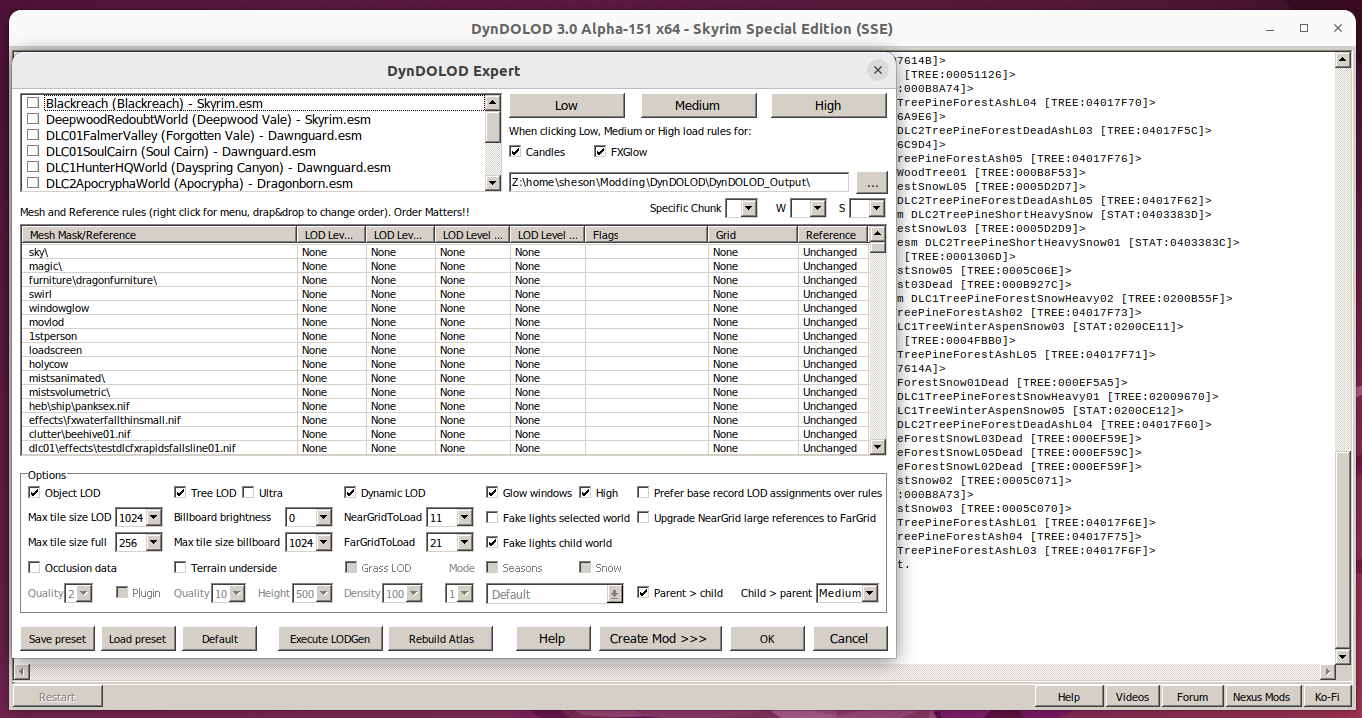
Latest version still displays fine in a Ubuntu test setup I did a while ago. I can't really help with such problems.
-
https://dyndolod.info/Help/Child-Parent-Worldspace-Copies#Individual-Child-Worldspace-Configuration For a child worldspace to actually be considered for copying of references, a configuration file with the worldspace Editor ID needs to exist at ..\DynDOLOD\Edit Scripts\DynDOLOD\Configs\DynDOLOD_[GAME MODE]_childworld_[WORLDSPACE].ini. https://dyndolod.info/Help/Child-Parent-Worldspace-Copies#Settings-for-Parent-gt-Child ScanParent - set to 1 to copy references that have LOD from the parent worldspace to the child worldspace. It is disabled by default for Markarth. Set ScanParent=1 in DynDOLOD_SSE_childworld_MarkarthWorld.ini
-
See the first post/and or https://dyndolod.info/Official-DynDOLOD-Support-Forum#Post-Logs which TexGen log, debug log and bugreport.txt - if it exists - to upload when making posts. https://dyndolod.info/Messages/Exceptions#Range-check-error Always use the latest version of DynDOLOD/TexGen as explained above. This is a bug with the tools encountering unexpected situations. Make a report with the log, debug log and bugreport.txt as explained on the official DynDOLOD support forum.
-
Let me know if this test version fixes this https://mega.nz/file/wAwHnbiQ#845ObhNZ48pmbFK-Qv6aG0hheuQaMj-hZM6At1lQzRE
-
Need of help to remove the grass seam.
sheson replied to delweyn's question in DynDOLOD & xLODGen Support
The ComplexGrassBacklightMask setting will only have any effect if you also change the ComplexGrassBillboard=5. If it needs changing should be obvious when the sun is low in the morning / evening and the grass LOD sides facing away from it are too dark compared to full grass. -
Need of help to remove the grass seam.
sheson replied to delweyn's question in DynDOLOD & xLODGen Support
Read https://dyndolod.info/Official-DynDOLOD-Support-Forum#Post-Logs which TexGen and DynDOLOD logs and debug logs to upload when making posts. https://dyndolod.info/Help/Grass-LOD#Settings With No Grass In Objects full grass can render past the active cells, so Grass LOD can either start right beyond the active exterior cells (uGridsToLoad) which equals to Mode/DynDOLODGrassMode=1 (better for performance) or beyond the large reference distance (uLargeRefLODGridSize) which equals to Mode/DynDOLODGrassMode=2. If No Grass In Objects is not used, set Mode to 1, obviously. Without No Grass In Objects extending full grass, generating grass LOD with mode 2 makes no sense. https://dyndolod.info/Help/Grass-LOD#Settings In case the grass LOD brightness or color seems off (it might depend on weathers or ENB settings), try different Direct/Ambient settings for grass LOD billboards in TexGen. In addition or alternatively change the GrassBrightnessTop*/ComplexGrassBrightnessTop* and GrassBrightnessBottom*/ComplexGrassBrightnessBottom* settings in ..\DynDOLOD\Edit Scripts\DynDOLOD\DynDOLOD_SSE.ini - those settings help if the color tone is off. Especially the image based lighting effect from ENB has a big impact on the brightness and color tone of the grass LOD. Additional complex grass lighting and time of day settings will obviously not apply to object LOD, as they are separate meshes and shaders. Do not use them so full grass and grass LOD match better for all weathers/times. When using complex grass and the side facing away from the light direction is too dark it can be brightened with the backlightmask. In the ..\DynDOLOD\Edit Scripts\DynDOLOD\DynDOLOD_SSE.ini set ComplexGrassBillboard=5 and set ComplexGrassBacklightMask to a value like 25, which means 25% of the light is applied to the side facing away from the light source. If the result is too dark, raise the value. If the result is too bright, lower the value. Which brightness settings work best depend on the grass mod and the ENB and maybe weather mod. -
Ulvenwald 3D LODs + Beyond Reach = CTD
sheson replied to Morti's question in DynDOLOD & xLODGen Support
The tools save the log and debug when they are closed normally. Always use the latest version. Do not unpack newer DynDOLOD version over older DynDOLOD versions. Read and follow https://dyndolod.info/Installation-Instructions Use 7-Zip to unpack the DynDOLOD Standalone archive into a new and empty 'DynDOLOD' directory that is outside of special OS folders like 'Programs Files' or 'Program Files (x86)', User, Documents, Desktop, Download and also not in SteamApps, game, Data or any mod manager folders. For example C:\Modding\DynDOLOD\. https://dyndolod.info/Generation-Instructions#Prerequisites Do not install any 3rd party tree LOD billboards. Use TexGen to generate all desired LOD billboards. As explained at https://dyndolod.info/Messages/File-Not-Found-Textures, check/install https://www.nexusmods.com/skyrimspecialedition/mods/69323 to fix File not found texture errors in TexGen. Fix NIFs with a root block is NiNode https://dyndolod.info/Messages/Root-Block Clean plugins that have deleted references https://dyndolod.info/Messages/Deleted-Reference Fix unresolved Form IDs https://dyndolod.info/Messages/Unresolved-Form-ID If the problem persists, upload new crash report, DynDOLOD log and debug and whatever BTO is being reported. -
Ulvenwald 3D LODs + Beyond Reach = CTD
sheson replied to Morti's question in DynDOLOD & xLODGen Support
Those are the TexGen log and debug log. Upload the DynDOLOD log and debug log. -
Ulvenwald 3D LODs + Beyond Reach = CTD
sheson replied to Morti's question in DynDOLOD & xLODGen Support
Read https://dyndolod.info/Official-DynDOLOD-Support-Forum#Post-Logs which DynDOLOD log and debug log to upload when making posts. Obviously upload the object LOD mesh mentioned in the crash log Meshes\Terrain\arnimaDUPLICATE003\Objects\arnimaDUPLICATE003.4.0.-8.BTO The crash is most likely caused by a third party texture used by the BTO. -
Thanks for letting me know. That will help to fix it or add the cells to the large reference bugs workaround in the next alpha version.