sheson
-
Posts
13,382 -
Joined
-
Last visited
-
Days Won
445
Everything posted by sheson
-
Report which mod the full model is from. Report which plugin overwrites 00084DB3 and which plugins the base record is from and which plugin is the last to overwrite it. Report which plugin overwrites 000680FF and which plugins the base record is from and which plugin is the last to overwrite it. Report which mod the mesh rule is from or if it was added manually.
-
The screenshots show that the model being used is GiantCampfire01Burning.nif which is the filename of the full model and not a LOD model (that would be giantcampfire01burning_dyndolod_lod.nif for example). A mesh mask rule was specifically added to replace the existing references with a dynamic LOD reference using the full model. mesh mask: giantcampfire01 LOD4/8/16/32: None Grid:FarFull Reference: Replace See https://dyndolod.info/Help/Mesh-Mask-Reference-Rules It is not clear what the visual problem with the full model is or how is it visually different from the original reference / base record. It should look just the same, just render further.
-
https://dyndolod.info/Official-DynDOLOD-Support-Forum#In-Game-Screenshots When making screenshots in the game, make them in broad daylight. Use console command 'sw 15e' to change to the default weather or 'sw 81a' for sunny weather. If you want to show a problem with LOD, I suggest to not make a full model tree the center of an the screenshot. https://dyndolod.info/FAQ#Entire-LOD-missing Increase terrain LOD, object LOD or tree LOD distances in the DynDOLOD SkyUI MCM Settings. Can be caused by [MapMenu] uLockedObjectMapLOD=32 in Skyrim.ini (or SkyrimCustom.INI or a mod INI), especially if there are no object LOD level 32 meshes (which is the vanilla/default). See Trees on the Map for further explanations. Pay attention to the instructions of ACMOS.
-
DynDOLOD is being terminated prematurely, suddenly closes
sheson replied to VulKun's question in DynDOLOD & xLODGen Support
https://dyndolod.info/Official-DynDOLOD-Support-Forum#Post-Logs If there are no logs or debug logs because the tool is being terminated prematurely, check the Windows Event log for related messages. Add RealTimeLog=1 under [TexGen] or [DynDOLOD] in ..\DynDOLOD\Edit Scripts\DynDOLOD\[TexGen|DynDOLOD]_[GAME MODE].INI respectively. Then execute the tool again to generate the real-time debug log in the Logs folder in real time and upload the entire file. -
Unable to create destination directory: D:\Programas\XlodGen\ The OS, UAC, anti vir etc. prevented the tool from creating the output path. Also from the first post: Unzip into a dedicated folder outside of any Steam, game or mod manager folders or special Windows folders like Program Files, Users, Desktop, Documents, Downloads etc. It is not a good idea to install tools and things into Steam folders.
-
Programs can not cause Windows/ the PC to crash. BSOD or PC crashes are always a hardware, BIOS settings, driver or OS problem. The log shows things loading...
-
Windows typically uses \ as path separator, so using something else might cause the mask not to match.
-
https://dyndolod.info/Official-DynDOLOD-Support-Forum#In-Game-Screenshots Note that multi pass snow shaders can prevent full models from being selected. Temporarily disable any mod that prevents getting the form ID of full models in case getting the information is not possible otherwise. The provided DynDOLOD log and debug log contain the log messages from the actual LOD generation so I can not look up anything, like the actual rules that were active at the time or what happened with the references. The DynDOLOD_SSE_Object_Report.txt does not seems to list the mentioned base record or any base record using the mentioned full model, which means no rules matched. Upload the log and debug log from the last LOD generation.
-
Read the first post and/or https://dyndolod.info/Official-DynDOLOD-Support-Forum#Post-Logs which DynDOLOD log and debug log to upload when making posts. Provide useful screenshots of the full model references with more informative console as explained in https://dyndolod.info/Official-DynDOLOD-Support-Forum#In-Game-Screenshots
-
Enable and upload the papyrus log as explained in https://dyndolod.info/Official-DynDOLOD-Support-Forum#Post-Logs Also upload C:\Users\Jay29\\Documents\My Games\Skyrim VR\SKSE\DynDOLOD.log While probably not related, do not install DynDOLOD into MO2. https://dyndolod.info/Installation-Instructions Use 7-Zip to unpack the DynDOLOD Standalone archive into a new and empty 'DynDOLOD' directory that is outside of special OS folders like 'Programs Files' or 'Program Files (x86)', User, Documents, Desktop, Download and also not in SteamApps, game, Data or any mod manager folders. For example C:\Modding\DynDOLOD\. Ensure that the directory structure is preserved. See Updating how to update existing installation and save games.
-
https://dyndolod.info/Official-DynDOLOD-Support-Forum Report the actual problem or error message without making assumptions or asking leading questions. Read the explanations and tips below, especially about what information and logs to provide and how. Read the first post and/or https://dyndolod.info/Official-DynDOLOD-Support-Forum#Post-Logs which DynDOLOD log and debug log to upload when making posts.
-
Just bridgelong02.nif is sufficient to match that full model.
-
Unfortunately it seems that the DynDOLOD debug log was already overwritten. So, the mod that actually change the bridge in tis case is the Lux Orbis - Patch. City Entrance Overhaul Windhelm uses the vanilla bridgelong01.nif AFAIK - for which a LOD model exists. Merge attached meshes and textures with DynDOLOD Resources and then generate object LOD for Tamriel. Check if the LOD model looks OK. Post an new screenshot for comparison if possible. It is possible that the pre-rendered LOD texture does not match your setup as well (That will be better with the next alpha versions of the DynDOLOD Standalone and DynDOLOD Resources). So, if you want to use the full model for LOD, then the mesh mask rule would be: Mesh Mask: bridgelong02.nif VWD: checked if you installed attached LOD model, otherwise leave unchecked LOD Level 4: Full LOD Level 8: Full (or Level1 if you installed attached LOD model) LOD Level 16: Full (or Level2 if you installed attached LOD model) Grid: Far Full or Far LOD Reference: Unchanged bridgelong02_lod.7z
-
Read the first post and/or https://dyndolod.info/Official-DynDOLOD-Support-Forum#Post-Logs which DynDOLOD log and debug log to upload when making posts. Also upload ..\DynDOLOD\Logs\DynDOLOD_SSE_Object_Report.txt Post a useful screenshot of the full model with more informative console as explained in https://dyndolod.info/Official-DynDOLOD-Support-Forum#In-Game-Screenshots Unless a mod replaces the full model with a NIF for which a LOD model does not exist, a rule (to use the full mode for LOD) is typically not required.
-
Moved to the appropriate thread for the message. See https://dyndolod.info/Official-DynDOLOD-Support-Forum#Use-Search Use the Copy message to clipboard link in order to copy and paste the text of the message instead of uploading screenshots. See https://dyndolod.info/Official-DynDOLOD-Support-Forum#Copy-and-Paste-Text Read https://dyndolod.info/Official-DynDOLOD-Support-Forum#Post-Logs which DynDOLOD log and debug log to upload when making posts. The error message window has a link Click on this link for additional explanations and help for this message that opens https://dyndolod.info/Messages/Unresolved-Form-ID. See https://dyndolod.info/Official-DynDOLOD-Support-Forum#Use-Search#Read-Log-and-Error-Messages. https://dyndolod.info/Messages/Unresolved-Form-ID Clean and error check the load order with xEdit to find and fix unresolved form ID errors before generating LOD. Start by checking the plugin and record with xEdit mentioned in the Error in ... message. The error is in SMTX_Woodcutter.esp and the record is xx0016E6 In case the unresolved form ID is for a script property and the intended record can not be determined or the property has been removed from the script, remove the property from the properties listing via right click, Remove in xEdit. Doing so will fix the unresolved form ID error and not change how the script is currently working (or not). If the mannequin is not working, it might be possible that the record that should be linked is xx002371 in SMTX_Woodcutter.esp. However, it really should be fixed by the author or someone who has the time and ability to properly test the mod and script, papyrus log etc. You may also want to read the comments of the mod.
-
I suggest to ask that question on a forum, discord etc. dedicated to Fallout. The answer also depends on the used list of mods. As far as modding guides go, this guide seems popular at the moment https://vivanewvegas.moddinglinked.com/lod.html
-
Do you have a question or require help? Read the first post and/or https://dyndolod.info/Official-DynDOLOD-Support-Forum#Post-Logs which DynDOLOD log, debug log and papyrus log to upload when making posts. Use search as explained in https://dyndolod.info/Official-DynDOLOD-Support-Forum#Use-Search to find threads like https://stepmodifications.org/forum/topic/19336-dyndolod-not-initializing-and-not-showing-up-in-mcm/ Moved the post to that thread.
-
Active scripts are normal if the game is saved and a script is currently running. It will continue and finish once the save is loaded. That is not the cause of script bloat. DynDOLOD-README.txt Dynamic LOD uses papyrus scripting. The scripts are passive, very light weight, highly optimized and use threading. Please test thoroughly before using for a play-through. Follow update instruction in the manual if generating new DynDOLOD plugins. DynDOLOD uses scripts for dynamic LOD since 10 years and has millions of unique downloads/users and a support forum with 10 thousands of posts , which also document the development, problems and their rapid solutions. There was never a report about save bloating, which is expected since the scripts do not use any of the methods that could cause save bloating. Also see https://dyndolod.info/FAQ#Script-instances Script instances are harmless. A script instance is just data for a script that is currently not active, so the script can execute more efficiently the next time it is active. The scripts of DynDOLOD are not at all script intensive. There are no scripts that are constantly running. It uses small highly optimized papyrus scripts for dynamic LOD, which run in parallel only when needed at the moment dynamic LOD models are enabled or disabled. Consider using the large reference bugs workarounds were all of the dynamic LOD is done in the DynDOLOD DLL NG instead of papyrus scripts.
-
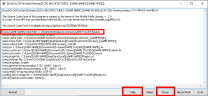
Read https://dyndolod.info/Official-DynDOLOD-Support-Forum#Post-Logs which TexGen log and debug log to upload when making posts. This indicates TexGen using a different game data path. Checking or uploading the logs helps identifying such issues easily. See the screenshot at https://dyndolod.info/Messages how the messages log prints a line Using [GAME NAME] Data Path. If the detected path is wrong, see https://dyndolod.info/Messages/Windows-Registry-Key how to update it. https://dyndolod.info/Messages/Windows-Registry-Key In case a game version is used that does not seem to use a registry key, or if there are multiple active installations of the same game mode in different paths and constantly updating the Windows Registry via the launcher or manually with Regedit.exe is not an option, use MO2 Fix Game Registry Plugin or set the path to the data folder of the game with the -d:"c:\path\to\game\data\" command line argument. This could have been avoided by RTFM which opens by clicking the "Help" button. There also is a Forum button.
-
Since by default there is no such rule yet, most of the meshes will match the last "/" rule. Look at it for comparison. Adding/Inserting the new rule for "mountains" will change the LOD model used for LOD Level 8 to the same LOD model that is used for LOD Level 4. See https://dyndolod.info/How-LOD-Works and https://dyndolod.info/Help/Object-LOD See https://dyndolod.info/Help/Grass-LOD#Performance for an example of such a rule for "mountains". Check the VWD flag so that the rule applies whenever a LOD model exists for a full model that matches "mountains" in its filename, just like the default "/" rule. See https://dyndolod.info/Help/Mesh-Mask-Reference-Rules#VWD-Visible-When-Distant Set Far LOD (or Near LOD), so the LOD model is used for dynamic LOD. See https://dyndolod.info/Help/Mesh-Mask-Reference-Rules#Grid and https://dyndolod.info/Help/Dynamic-LOD Use Unchanged so the dynamic LOD model unloads when the full model loads when its cell attaches. See https://dyndolod.info/Help/Mesh-Mask-Reference-Rules#Reference
-
https://dyndolod.info/Updating#2-Update-DynDOLOD-Installation Install any new version of DynDOLOD Resources with the mod manager as usual, replace the old version. Install any new version of DynDOLOD DLL as required, replace the old version.
-
See https://dyndolod.info/Official-DynDOLOD-Support-Forum#Post-Logs See https://dyndolod.info/Official-DynDOLOD-Support-Forum#In-Game-Screenshots Static object LOD meshes and textures is not affected by what DLL is used for dynamic LOD. How the static object LOD mountains look, is defined by the object LOD mesh and the textures it uses. Information about that can be found by searching for the base record form ID or the editor ID in ..\DynDOLOD\Logs\DynDOLOD_SSE_Object_Report.txt and then looking up in MO2 right windows data tab which mods contain the used assets. See https://dyndolod.info/Help/Object-LOD With the filenames of the used assets it is possible to determine which mods they come from. Also see https://dyndolod.info/Mods/Majestic-Mountains - when using that mod, the LOD models should come from it. The used textures should come from it and/or TexGen. The color/brightness of the snow LOD shaders is defined by the records mentioned in https://dyndolod.info/Help/Snow-Ash-LOD-Shader The vertex colors are set in the LOD models. The vertex color alpha value does not affect brightness or color, tough. It controls the amount of snow cover. The lowoer, the more rock can be seen. The higher the more of the rock is covered.
-
Read the first post and/or https://dyndolod.info/Official-DynDOLOD-Support-Forum#Post-Logs which DynDOLOD log and debug log to upload when making posts. Test if something is actually LOD by disabling all LOD with tll in console as explained in https://dyndolod.info/Official-DynDOLOD-Support-Forum#Rudimentary-Troubleshooting If the object in question remains it is typically the full model - unless the reference is being added by DynDOLOD and/or shows using a model with _LOD_ in the filename as shown by more informative console. The screenshots of the GiantObelisk seem to show the full model in both cases. The shown problem with the sky blue showing instead of textures is most likely releated to parallax in some way, like a missing _p.dds texture. In regards to snow on mountains it is unclear what might be LOD or full model, so do the tll test as explained above and-or check if you can click them with console open and get the more informative console information for them. In case it is LOD, see https://dyndolod.info/Help/Snow-Ash-LOD-Shader. DynDOLOD itself does not changes any of the snow shaders used by full models or LOD, so check in xEdit which is the last plugin to overwrite the menitioned records, but note there will be always a difference in the coverage between LOD and full model even if you can make the color/brigthness match. Also see https://dyndolod.info/How-LOD-Works. DynDOLOD does not change how the engine works.
-
LOD does not use/support parallax and does not have any related settings AFAIK.
-
The DynDOLOD SkyUI MCM - Settings page shows the current INI settings for the LOD distances. You can create default INIs by deleting/moving the current INIs and start the games launcher or use BethINIs. In case the INIs have proper values and they show 0 in the MCM after starting a new game, let me know. https://dyndolod.info/Help/Mod-Configuration-Menu#Static-Object-LOD Settings from Prefs.INI. See object LOD explanations. https://dyndolod.info/Help/Object-LOD#Settings The distances of the object LOD levels can be controlled with below INI settings - either in the DynDOLOD SkyUI MCM or the Prefs INI. https://dyndolod.info/Help/Mod-Configuration-Menu#Tree-LOD Setting from Prefs.INI. See tree LOD explanations. https://dyndolod.info/Help/Tree-LOD#Settings The maximum distance of tree LOD can be controlled with below INI setting - either in the DynDOLOD SkyUI MCM or the Prefs INI.