sheson
-
Posts
13,378 -
Joined
-
Last visited
-
Days Won
445
Everything posted by sheson
-
Error: OpenGL: framebuffer objects unsupported
sheson replied to Kattmandu's question in DynDOLOD & xLODGen Support
The current link is in post https://stepmodifications.org/forum/topic/20153-error-opengl-framebuffer-objects-unsupported/page/2/#findComment-282545 -
Get the test version of DynDOLOD from this post https://stepmodifications.org/forum/topic/20141-dyndolod-300-alpha-182/page/685/#findComment-284024. Install this test version of DynDOLOD DLL NG https://mega.nz/file/4UwnwSyY#Ow0ce_wewK8lOhfKYN4dP1y1cFNAT9oIGsrx4yFAu3k Generate a new LOD patch from scratch with the test version. Test everything works in the game as expected and report results.
-
DynDOLOD Resources SE version information not found
sheson replied to jjensson's question in DynDOLOD & xLODGen Support
The also requested DynDOLOD log was not provided. "Looks like doing something wrong" is not a problem description. No copy or screenshot of the text entered into the MO2 Arguments fields was provided. It is unclear why you believe there should be a scripts folder in the physical data folder. The debug log reports the data folder to be Using Skyrim Special Edition Data Path: D:\Steam\steamapps\common\Skyrim Special Edition\Data\ If you want to use the command line argument of xEdit (and thus of the tool modes xLODGen, TexGen and DynDOLOD) to point to a different data folder instead of updating the Windows Registry, read https://dyndolod.info/Help/Command-Line-Argument (linked from the page https://dyndolod.info/Messages/Windows-Registry-Key), which explains: Refer to the manual of the mod manager how to add executables and command line arguments for them: Mod Organizer - Arguments field The example on the page https://dyndolod.info/Help/Command-Line-Argument shows this: -d:"[path to Data folder]" for example -d:"c:\GOG Games\Skyrim Special Edition GOG\Data\" So replacing the path between the double quotes as explained, would change the argument to enter into this: -d:"D:\Game\Skyrim SE - Wunduniik IV\Game Root\Data\" As explained, use copy and paste to avoid mistakes. -
meshes\dyndolod\lod\clutter\campfire01landburning_dyndolod_lod.nif from DynDOLOD Resources seems to be overwritten by an outdated version from a mod. The file should not contain any collision data, including unsetting the BSX Bit 1: Havok flag. There should then be no need for an additinal no havok version.
-
The webiste www.file-upload.net wants me to disable ad-blocker in order to be able to download the files. Can you use another service?
-
Edit ..\SKSE\plugins\DynDOLOD_Data\DynDOLOD_NG_Worlds.txt in the installed DynDOLOD output and change to debug=true and add a new line right underneath it debuglevel=2 Then start the game and reproduce the issue as usual. Upload c:\Users\[USERNAME]\Documents\My Games\Skyrim Special Edition\SKSE\DynDOLOD.log.
-
DynDOLOD Resources SE version information not found
sheson replied to jjensson's question in DynDOLOD & xLODGen Support
Read https://dyndolod.info/Official-DynDOLOD-Support-Forum#Post-Logs which DynDOLOD log and debug log to upload when making posts. Use the link Copy message to clipboard and paste it as text instead of posting screenshots of messages as explained in https://dyndolod.info/Official-DynDOLOD-Support-Forum#Copy-and-Paste-Text Click the link Click on this link for additional explanations and help for this message link of the message as explained in https://dyndolod.info/Official-DynDOLOD-Support-Forum#Read-Log-and-Error-Messages to open https://dyndolod.info/Help/DynDOLOD-Resources and scroll down to the Troubleshooting section: If the version information or a required resource file can not be found, it means that the file with the version information or the resource file which are installed with the DynDOLOD Resources can not be found in the data folder (the standard OS functions which are used to check if a file exists returns a file not found error). Verify that the correct game data folder is being used for the checks. Check the top of the log messages that the tools are started in the desired game mode and check that the correct game data path was found in the Windows registry key. For example: Using Skyrim Special Edition Data Path: C:\SteamLibrary\steamapps\common\Skyrim Special Edition\Data\ If you know these answers already, why did you not mention or posted the logs and did not mentioned the Windows Registry at all - or the command line being used for that matter? Read and follow the https://dyndolod.info/Installation-Instructions: Refer to the manual of the mod manager how to add the DynDOLODx64.exe and TexGenx64.exe executables, for example Mod Organizer, Vortex. If the tools are started without setting a Game Mode with a command line argument, a message window will prompt for the desired Game Mode. For Steam versions of the game, use the game launcher to set the current location of the game in the Windows Registry. See Windows Registry Key for more. Read the linked page https://dyndolod.info/Messages/Windows-Registry-Key See above posts and answers. -
This is the one cell pre-loading of objects that have no LOD already existent in Skyrim LE. The precursor to the actual large reference system. If it works the same as in LE, it requires an RNAM entry also for every adjacent cell it should preload (in addition to its own cell?). Only objects that have no LOD flags load one cell ahead to avoid showing both. Persistent large references typically never unload once they have been loaded. AFAIK Fallout 4 does not have/support BSDistantObjectLargeRefExtraData in NIF/BTO. Custom, proof of concept NIFs can be created with NifSkope.
-
Error: OpenGL: framebuffer objects unsupported
sheson replied to Kattmandu's question in DynDOLOD & xLODGen Support
Thanks for the feedback. If you like test again with default settings with the new test version from this post https://stepmodifications.org/forum/topic/20153-error-opengl-framebuffer-objects-unsupported/page/2/#findComment-282545 to see if it runs through without having to use any single threads settings. -
No tree LOD with ultra tree LOD option
sheson replied to JohnDoe9001's question in DynDOLOD & xLODGen Support
If they only contain LOD meshes and textures then yes, e.g ..\meshes\terrain\* and ..\textures\terrain\* As long as DynDOLOD output overwrites xLODGen output that is not going to change anything in the game. -
No tree LOD with ultra tree LOD option
sheson replied to JohnDoe9001's question in DynDOLOD & xLODGen Support
The screenshot shows that object LOD meshes from the DynDOLOD output are being overwritten by files in the MO2 Overwrite folder. The files from DynDOLOD output that are overwritten will never be used by the game. There should never be any LOD files in the MO2 overwrite folder at any point when following instructions of tools properly. Best to delete them. The overwrite order of mods/outputs that have no conflicting files is irrelevant. https://dyndolod.info/Installation-Instructions Install the Core Files from either DynDOLOD Resources or DynDOLOD Resources SE depending on the used game version as any other mod. Typically overwrite everything else unless another mod specifically instructs to overwrite DynDOLOD Resources. Refer to Load/Overwrite Orders for detailed explanations. https://dyndolod.info/Help/Load-Overwrite-Orders https://dyndolod.info/Generation-Instructions Typically generate and install terrain LOD meshes and textures with xLODGen before generating the LOD mod with DynDOLOD It seems you generated more than just terrain LOD with xLODGen. There is no reason for that when using DynDOLOD to generate tree and object LOD. Again, make sure DynDOLOD output overwrites everything and none of its files are being overwritten. https://dyndolod.info/Generation-Instructions#1-Generate-The-Required-LOD-Assets-with-TexGen Install the contents of the output path or the *.zip archive as a mod. It should overwrite everything. https://dyndolod.info/Generation-Instructions#2-Generate-The-LOD-Mod-with-DynDOLOD Install the contents of the dedicated output path or the *.zip archive as a mod. It should overwrite everything. -
No tree LOD with ultra tree LOD option
sheson replied to JohnDoe9001's question in DynDOLOD & xLODGen Support
The uploaded BTO contains LOD for trees (as billboards, since 3D tree LOD models were not found) in the object LOD mesh as expected. I suggested to actually verify and make sure that this is the case. You would do this in MO2, left mod window flags and/or properties or the right window data tab to show which mod is providing the BTOs. If the above mesh is actually loaded and used by the game, you should see LOD for trees around the center of the map just as you should the other LOD included in he file. Another possibility would be the area of the ..\textures\dyndolod\lod\dyndolod_tamriel.dds being transparent. Upload that texture. -
No tree LOD with ultra tree LOD option
sheson replied to JohnDoe9001's question in DynDOLOD & xLODGen Support
Upload a LOD level 4 BTO from the generated object LOD meshes, for example ..meshes\Terrain\Tamriel\Objects\Tamriel.4.0.0.bto Make sure the generated output is installed as a mod, activated and none of its files are being overwritten. -
Great! Thanks for testing.
-
No tree LOD with ultra tree LOD option
sheson replied to JohnDoe9001's question in DynDOLOD & xLODGen Support
What is the "issue" referred to in the title of this thread? Do not make people search for information in other threads/forums etc. Provide all relevant information here directly. See https://dyndolod.info/Official-DynDOLOD-Support-Forum. Upload ..\DynDOLOD\Logs\DynDOLOD_SSE_Object_Report.txt Make a screenshot of DynDOLOD SkyUI Settings page, see https://dyndolod.info/Help/Mod-Configuration-Menu-NG#Settings Make sure the generated object LOD is installed as a mod, activated and not being overwritten. -
Property not found scrips warning with Magnus Pilgrim mod.
sheson replied to DUGDUG's question in DynDOLOD & xLODGen Support
Scripts files ending in *.psc in Source sub-folders do not matter. Only scripts ending in *.pex in the ..\Data\Scripts\ folder matter. MO2 right window data tab shows you the winning mod from which the script is being used. Best option would be to check if there is patch for the involved mods, check the comments of both mods and/or ask the mod authors etc. Or just decide which mod/plugin/script should take priority and which should not work as expected when it comes to the standing stones on Solstheim. -
Read the first post and/or https://dyndolod.info/Official-DynDOLOD-Support-Forum#Post-Logs which DynDOLOD log and debug log to upload. Do it with PineAtlas.dds you uploaded. When I use it, the background colors are kept on the object LOD atlas texture.
-
The mipmaps of that PineAtlas.dds texture are fubar. Pixels that should be opaque are transparent. How confident are you that the PineAtlas.dds you uploaded is the source of the texture used for this DynDOLOD_Sovngarde.dds atlas texture? Based on the logs seems to be same texture. The background ended up as black, which I can not reproduce. Really odd. Generate with this test version of https://mega.nz/file/NZYQURiY#UlwAXjaerPtRzHNxeNM1War9f8aFLKXM40cSBsoKb6Y and upload new atlas texture and DynDOLOD log and debug log. If it complains about Texconvx64.exe, replace with this one https://mega.nz/file/QV4w1YRY#vHCnSwg69AOLZOB1BpErWV2Tki7wDaq_UH7xDM4WfIY
-
Property not found scrips warning with Magnus Pilgrim mod.
sheson replied to DUGDUG's question in DynDOLOD & xLODGen Support
https://dyndolod.info/Messages/Property-Not-Found-In-Scripts This can happen in case scripts are updated or being overwritten. It can be a sign of load order conflicts of two mods requiring different versions of a script or of a mod author not properly error checking and cleaning up after making changes. Assuming the mod in question is Pilgrim - A Religion Overhaul, it contains a version of ..\scripts\dlc2standingstonescript.pex which contains the script properties, so it is probably being overwritten by another mod and most likely means whatever Pilgrim.esp wants or expects the script to do won't work properly. Double check which mod the script actually comes from in MO2 right window data tab. -
You did not upload the any new logs, reports or in-game screenshots about the issue from the last LOD generation. Also upload ..\DynDOLOD\Edit Scripts\Export\LODGen_SSE_ObjectAtlasMap_Tamriel.txt Also upload ..\DynDOLOD_Output\textures\DynDOLOD\LOD\DynDOLOD_Tamriel.dds Also upload the changed assets for the full/LOD tree in question.
-
It won't fix the transparent pixels probably being too dark to begin with. Different tools might use different sampling algorithms when shrinking textures (e.g. create mipmaps). So the color/brightness outcome might be (a bit) different, but usually that feature is more about having better control over the alpha-to-coverage of mipmaps. Tree LOD in the game itself can have a dark outline if the transparent color is dark or black. In case of transparency on/off DXT1 texture compression for example, transparent pixels are treated as black as their color information does not exist anymore.
-
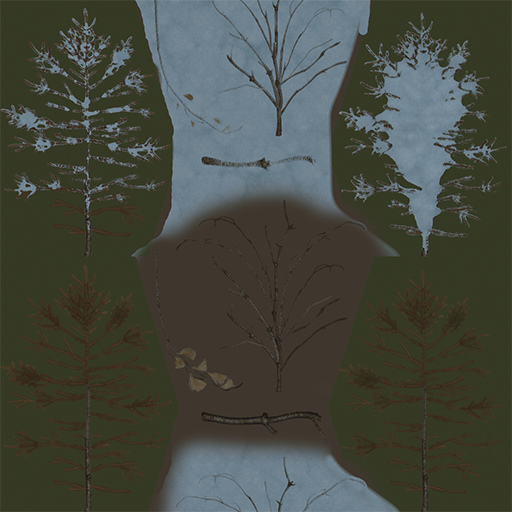
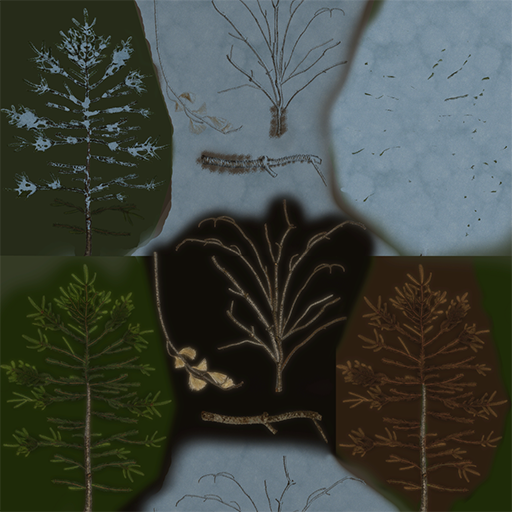
OK, in this case TexGen is irrelevant, since the 3D tree LOD model uses the full texture. A texture is an image that can have up to 4 channels, red, green, blue and alpha. Depending on the texture compression format or save options, the alpha channel can work the same as the color channels (from fully transparent to fully opaque) or a simply be transparency on/off. A "full" alpha channel is preferred for everything to work properly. Read intro of https://dyndolod.info/Help/3D-Tree-LOD-Model. If you only wanted to change thinness/thickness of the full or 3D tree LOD models, then you can change the NiAlphaProperty Threshold in the NIFs without changing textures. However remember that editing the full model NIF means its CRC32 changes, so you will need to update the CRC32 part of the filename of 3D tree LOD model accordingly. The bold part of treepineforestdead05_7B6546E1passthru_lod.nif The mipmaps of the full texture do not matter in this context, as the 3D tree LOD models does not set "usemipmaps", the mipmaps of the object LOD texture atlas used by the LOD will be generated. If you want to use the 3D tree LOD to use the mipmaps of the full texture add that to the shape names of 3D tree LOD NIF. "TreePineForest05_1:1 Crown" to "TreePineForest05_1:1 Crown UseMipMaps" See https://dyndolod.info/Help/3D-Tree-LOD-Model#Shape-Names Now, the problem that only a particular branch is too dark compared to the other ones from the the same texture can be because of the branches being surrounded by to dark pixels. Even if they are transparent, their color information might be used for sampling lower resolutions/mipmaps. Compare the fill around the "dead" branch in the middle of DeadAtlas.dds left, PineAtlas.dds right: You could try filling the almost black background fill around the dead branch in the middle with a more appropriate color that matches the actual branch more closely similar to the other branches. If the background were complete black, DynDOLOD would will the area automatically with the average color of the entire texture, which in case of "atlas" textures like this could be off as well. This applies to when the texture is added to the object texture atlas. See https://dyndolod.info/Updating In case a new mod only updates textures ... Start DynDOLOD in expert mode, select all or only the affected worldspaces and click the Rebuild Atlas button to update the atlas textures. Then install the DynDOLOD output, overwriting the existing DynDOLOD output.
-
Also upload the DynDOLOD and TexGen log. What is the tree mod? Why are you editing full textures to begin with? Just edit the alpha threshold of the full/LOD model instead. When editing textures, make sure the transparent parts - especially adjacent to visible pixels - have matching color and brightness. Make sure to use an alpha channel.
-
Check and confirm that the test version from the linked post works as expected https://stepmodifications.org/forum/topic/20153-error-opengl-framebuffer-objects-unsupported/page/2/#findComment-282545
-
Create a new text file in a (new) mod folder so it ends up in the game data folder like ..\Data\DynDOLOD\DynDOLOD_SSE_TexGen_noalpha_updateesm.txt You can change "updateesm" in the filename to any plugin filename in the load order as long as it is not "skyrimesm", "dawnguard", "dragonborn", "wyrmstoothesp". In case snow01.dds comes with a mod that has a plugin, use its filename. Add these 4 lines: 0 1 1 1 textures\landscape\snow01.dds 0.5 0.5 0 0 textures\lod\snow01lod.dds 1 1 0 1 1 1 textures\landscape\snow01.dds 0.5 0.5 0.5 0 textures\lod\snow01lod.dds 1 1 0 1 1 1 textures\landscape\snow01.dds 0.5 0.5 0 0.5 textures\lod\snow01lod.dds 1 1 0 1 1 1 textures\landscape\snow01.dds 0.5 0.5 0.5 0.5 textures\lod\snow01lod.dds 1 1 The first 0 in each line has the same function as the tree LOD brightness setting, e.g. set it to -10 or -20 for all rows to create a darker version of the LOD texture whenever TexGen runs. See https://dyndolod.info/Help/TexGen-Configuration#Stitched-Object-LOD-Textures and https://dyndolod.info/Mod-Authors#How-to-add-LOD-textures-creation-rules-to-TexGen for more details.