sheson
-
Posts
13,181 -
Joined
-
Last visited
-
Days Won
431
Everything posted by sheson
-
Record ... is being overridden by record
sheson replied to narphous's question in DynDOLOD & xLODGen Support
You need to adjust the first two digits of the form id xxAF0500 to the load order for the plugin Thieves Guild Requirements.esp in order for the FormID field of xEdit to find it. Look up the reference for the bridge in the DynDOLOD plugin and check its EditorID to know the plugin + form id of the reference it is representing. In case it points to a DynDOLOD plugin, repeat until you find the original source. Let me know what you find. -
Bethesda folder and file naming conventions stipulate that different assets never have the same filename. The DynDOLOD manual explains how automatic full model file name to LOD model matching works. It addition the CRC32 of full model can be used to bind a specific LOD model to a specific full model. The next DynDOLOD Resources 3 LE/SE versions will have a dedicated LOD model for the second rock02.nif. They will also have an LOD model updates for the building from the other post.
-
The load order of plugins changed after DynDOLOD.esp was generated. Either resolve the conflict of the base record in xEdit manually or generate LOD from scratch for the new load order.
-
The model scaling is taken into account. However, if there are references that set a scale considerable higher than TreeModelHeightMultiplier in the TexGen.ini then the billboard might be too small for that tree. The (max) scale set on references is not yet part of the automatic process.
-
The way you describe the problem there can not really be anything wrong with the ultra tree LOD if it looks fine while loaded in the distance. The object LOD is just disabled after the full models faded in, there is no fade out or anything. So that should mean any artifacts while the full models fade in should only have to do with the full models. Disable LOD with tll in console. Then check how those full models load. I would expect they would still have the same artifacts.
-
So this is a different reference than the other day. Does the error happen (almost) every time but with different records?
-
Upload the TexGen and DynDOLOD logs and debug logs as explained in the first post. Have you check the diffuse and normal textures of the tree LOD billboards created by TexGen for that tree if they look weird? Check the log for error messages. Base Record 0008E844 defines the full model Enderal\architecture\AncientRuins\Rock02B.nif. There is no rock2b_lod.nif? Maybe you mean 0008E83A? Its full model filename meshes\enderal\architecture\ancientruins\rock02.nif collides with meshes\enderal\medievalpack\rocks\rock02.nif for which the included LOD model is. I will have to address that with an updated rule. Provide worldspace cell coordinates or a reference form id from console of the building in the first two screenshots.
-
Which settings are the "best" depends on the game, load order, setup, performance and personal preference. So as I always, I suggest to make screenshots and compare different settings yourself. Or refer to a modding guide and/or a comparisons made by users who play/mod the game.
-
Record ... is being overridden by record
sheson replied to narphous's question in DynDOLOD & xLODGen Support
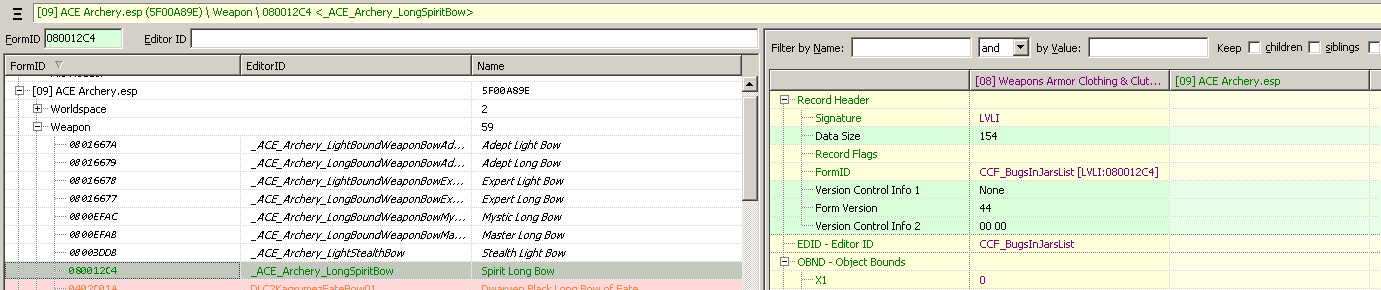
With SSEEDit 4.0.3 from Nexus I get the exact same error message when loading the plugins: [00:06] Background Loader: Warning: Record [LVLI:060012C4] in file Weapons Armor Clothing & Clutter Fixes.esp is being overridden by record [WEAP:040012C4] in file ACE Archery.esp. The load order ID shown in the message is matching the Master Files Index for the mentioned plugin. Or one higher if the record is in the mentioned plugin. I.e. they are no yet adjusted to the actual load order when this error happens. When I go to xx0012C4 in Weapons Armor Clothing & Clutter Fixes.esp I can indeed see that is being replaced by ACE Archery.esp. I am not sure what the purpose of injecting weapon records into the other plugin is exactly.
-
The defaults are perfectly fine. Using anything but BC5 for normal and specular textures does not really make any sense. The diffuse format of the vanilla single object LOD textures is typically DXT5. There won't be any visual improvements by using BC7 max over BC7 quick over using DXT5. If vertex colors are checked there can be issues with interiors using the LOD from parent worldspaces. As you can see from the screenshots on the first post, using backlight power helps with tree LOD lighting. Increasing the alpha threshold will make LOD for trees and other objects using transparency appear to be thinner.
-
Record ... is being overridden by record
sheson replied to narphous's question in DynDOLOD & xLODGen Support
These messages are from the xEdit Background loader. Are you using a recent xEdit version? https://github.com/TES5Edit/TES5Edit/releases What did you do to any of these plugins initially that they have these errors? -
Click the "Help for this message" link as explained on the first post. The system cannot find the path specified typically means the OS, UAC, antivir or some other 3rd party crap ware is blocking write access to the mentioned destination path. Add an exception to whatever it is that is blocking access. It is also possible another process or program is accessing the same folder or file and this preventing write access. In case closing other programs does not help, a reboot typically helps in these cases. Remove old files from the destination/output path, which might prevent creating the new files because they are blocked by other programs etc Search the forum for the error message as explained on the first post. https://stepmodifications.org/forum/search/?&q=system cannot find path specified&search_and_or=and You have what? You mean BSD? Blues Screen of Death is caused by hardware, BIOS settings, OS, driver problems etc. Load entire load order into xEdit. Enter the form ID into the FormID field top left and hit Enter. Remember to adjust the first two digits to the load order ID shown for arnima.esm
-
Is that "Checking for errors failed" repeatable and always the same record REFR:1227A9C0 ? Does it happen if you only select the ArnimaVoid worldspace? Is any plugin overwriting 1227A9C0 ?
-
Explain how this is supposed to speed up anything. The crucial parts for the large array data are already compiled SKSE DLL plugins. Or the other way around, what part of the current scripting do you believe could be or needs speeding up? That is fantastic. Good to know this works. I may add that it's done automatically for the cases where "crown" needs the face normal spell.
-
This happens because the UV of the branches has coordinates < 0.0. After inserting new vertices and triangles in order to have untitled UV, LODGen runs the face normals and update tangents spell. In this case this destroys the original normals. You can replicate the problem in NifSkope by running the face normal spell there. In case you do not want want to fix the UV to be inside 0.0 and 1.0, you could try to add spherenormals to the shape name to test if that helps. Also next LODGen included in the next alpha will properly respect the "Texture Clamp Mode" on on the BSShaderProperty. So you can just set CLAMP_S_CLAMP_T to "fix" the UV to be inside 0.0 and 1.0 without having to edit the UV itself.
-
You are participating in the DynDOLOD 3 Alpha test. Do not follow instructions for DynDOLOD 2.x. Instead read the included manual and instructions. Click the the "Help for this message link" as explained at https://dyndolod.info/Official-DynDOLOD-Support-Forum for help and explanations for the message, which notifies about errors in the load order. Follow its advice to install the unofficial Skyrim Special Edition Patch in case of errors in the DLC. Do not post screenshots of the message window, instead use Copy message to clipboard as explained at https://dyndolod.info/Official-DynDOLOD-Support-Forum
-
Can Not Copy Resource / The system cannot find the path specified
sheson replied to ravenRpg38's question in DynDOLOD & xLODGen Support
You have conveniently not listed anti-vir in the list, or mentioned adding an exception to it as suggested by the "Help for this message" link and the all the recent posts about Windows Defender you read after searching for the error message. -
Gap between full grass and grass LOD
sheson replied to spcarso's question in DynDOLOD & xLODGen Support
That's in the DynDOLOD-README.txt. This only affect dynamic LOD. It stops updating the player position until speed is lower again. it won't affect other LOD types. Yes the distance shadow is a very rough and quick estimate for performance reasons. -
Gap between full grass and grass LOD
sheson replied to spcarso's question in DynDOLOD & xLODGen Support
Use ENB with distance shadows as alternative. -
Gap between full grass and grass LOD
sheson replied to spcarso's question in DynDOLOD & xLODGen Support
Looks like grass LOD was generated for mode 2, but NGIO is currently running mode 1. If grass LOD was generated with mode 1 and the gap goes away when using uGridsToLoad 5, then NGIO might be hardcoded to 5 cells for DynDOLODGrassMode = 1. If that is the case set Set DynDOLODGrassMode = 2 and use mode 2 for grass LOD generation to use uLargeRefLODGridSize cells distance. Or keep using sane uGridsToLoad 5. Near/Far Grids are a concept of dynamic LOD and never have anything to do with terrain/object/tree LOD meshes/textures or other mods. -
Click the "Help for this message" link as explained in the first post. If this does not help any further, upload the logfiles and bugreport as explained in the first post. As explained on the first post, do not post screenshots of error messages. Use the "Copy message top clipboard" link instead and then paste the text.
-
It is the same issue based on what? Have you looked at the event log? Post it. If the same load order and setup runs through all of sudden without problem, then OS, driver settings, anti vir could be likely the problem. What do you mean there are "hundreds of comments with the same thing"? xLODGen/DynDOLOD not writing a log/bugreport is a very rare thing. 2 cases IIRC.
-
DynDOLOD does not process QUEST records, once the xEdit background loader completed without issues. Finalize the load order and fix all errors before generating LOD. If you believe the xEdit error check is making wrong reports about errors, I suggest to make a bug report on the xEdit discord. If you believe DynDOLOD is making a wrong error report, see the first post what logfile to include when making posts. If you need help fixing errors in plugins or the load order, see the first post what logfiles to include when making posts and ask qualified questions about it.
-
Nothing changed about TexGen generation or atlas creation. Can't really check the crown without the full texture for the branches.
-
The log message are not code. They typically use plain English words. There is nothing normal about warning or errors. They indicate problems that need to be at least checked and often corrected. Unless you rather troubleshoot mysterious CTD or game issues later. The reported issues could be because of hardware/driver issues, for example like overclocking, heat or bad memory timings etc. If there is no debug log, check the windows event log.