sheson
-
Posts
13,177 -
Joined
-
Last visited
-
Days Won
431
Everything posted by sheson
-
I did a quick test with DynDOLOD 2.21 and didn't find a problem with snow on the mountains as you can see from the picture. The material snow shader is removed from the static LOD as expected. I am not sure why that wouldn't work in your case if SCO - Summer Edition is the last overwrite for those base records. You can check the export file for LODGen.exe DynDOLOD\Edit Scripts\Export\LODGen_Tamriel.txt for \tSnow (the \t is for tab if you have a text editor like notepadd++ that can search for it). Only a 2 dozen pieces from the Dawnguard Castle have the snow shader. Objects like MountainCliff02_HeavySN have that tabulator position empty. Depending on the installation option regarding glaciers/icebergs: If you are using the 'Ice - Retextured' to cliffs option, I suggest to not install or delete the Meshes\lod\ folder from SCO - Summer Edition. Make sure these meshes do not overwrite DynDOLOD Resources. However, keep Textures\lod\ folder from SCO - Summer Edition and have it overwrite DynDOLOD Resources. TexGen Output should overwrite both DynDOLOD resources and all other mods including SCO - Summer Edition If you are using the 'Ice - Standard' option, I suggest to not install or delete both the Meshes\lod\ and the Textures\lod\ folders from SCO - Summer Edition. TexGen Output should overwrite both DynDOLOD resources and all other mods including SCO - Summer Edition
-
I take it you ran TexGen beforehand? I will need to with test for myself and probably add a couple rules or other things to make it compatible. I will post here again about it once I had the time. RL is a bit buy right now
-
Yes the vanilla tree LOD can only be straight up. The cut-off angle hardcoded into xEdit is 30 degrees, so if the tree itself is leaning more than that it won't be done as tree LOD, but typically as static LOD. I remember there are palmtrees that are in itself bendy. Those should probably always be done as 3D static LOD if performance/setup permits. If you generate tree LOD again with different settings/setup, it will replace all old tree LOD. It can not merge. Trees not done as tree LOD but still matching mesh rules will be either done as 2D or 3D static LOD depending on settings and availability of a 3D LOD model.
-
Dynamic Distant Objects LOD - DynDOLOD 2.21
sheson replied to sheson's question in DynDOLOD & xLODGen Support
The LOD data is not the problem, so generating it again won't change anything. It is most likely a memory/engine problem. Also test with SKSE memory patch instead and crash fixes disabled. Test different ENBoost settings, the ReservedMemorySizeMb especially. Are you using cow from main menu or normal travel within the game? Using cow from one worldspace to another can cause stuck problems as well. -
A different approach to adding mesh rules?
sheson replied to Megaloblast's question in DynDOLOD & xLODGen Support
Can you explain "mesh rules error"? The mesh rules either match part or all of a full model nifs filenames or not. The reference rules either match an existing plugin + form id or not. If you create a plugin and want its MNAM data take precedence over mesh rules add it to DynDOLOD\Edit Scripts\DynDOLOD\DynDOLOD_TES5_mod_default_lod.txt If you want to release your mod I'll add it to the file for next release. Static LOD level 32 is ignored in Skyrim and Skyrim SE. The map uses static LOD level 16 by default (can be set in ini) -
If you are using ultra trees (and installed the correct EVT hybrids), the trees should be identical in their branches so the resulting flicker between models should be minimal. Check the full model fMeshLOD for trees is "disabled", so full models always show all details. The full model may be animated/swaying so they don't match perfectly for that time both are showing, maybe lowering the amount of animated/skinned trees could help. I also could imagine shadow on full model on no shadow on LOD model to have more of an affect. Try lowering shadow distance for a test.
-
Exception in unit userscript line 651
sheson replied to Aeralisk's question in DynDOLOD & xLODGen Support
The exception is so late in the process that if you saved the DynDOLOD.esp and all LODGen.exe finished without an error you may not have to worry about this. Check all DynDOLOD\Logs\LODGen_[worldpace]_log.txt files ending with LOD level 4 total triangles x reduced to y Log ended at hh:mm:ss If that is the case you can proceed and everything should work just fine. The log only shows the exception one time, I wonder if it happens again if you try again. Are you using MO? Did you maybe "unlock" MO while DynDOLOD/LODGen were still running? This could also be because of antivirus. -
I can not "fix" how the engine works. It may take longer because there is more data loaded. Read the Performace section of the manual for pointers. The change maybe more obvious because LOD can only have 2 different snow shaders and neither is matching the full model shaders. To lesson that you could make all/most mountains use the same snow shader and set the HD-LOD snow shader to the same values. Also LOD does not have shadows, there is nothing that can be done about that.
-
The same tree can not get 2D and 3D LOD in the same generation. Either tree LOD was generated earlier or later OR maybe the load order changed after tree LOD was generated, exposing an engine bug. The load order change can be as simple as changing the priority of an esp. But that engine bug is usually 2D LOD tree and full model in attached cells showing at the same time.
-
DynDOLOD is using tree LOD generation of xEdit/TES5LODGen. If the same tree has tree LOD and 3D static LOD, there must be tree LOD files active that were not generated in the same run as 3D static LOD. LODGen.exe is a c# program so whatever .NET 4.x supports. Using anything but a-z/0-9 minus or underscore in paths or filenames is just asking for trouble. The built-in command line parser from windows will probably fail unless things are properly quoted but even then it is brittle. The built-in ini parser where = is used to separate names and values will probably fail unless values are quoted. User errors like this will cause programs to fail.
-
This is how the engine works. It displays LOD and when a cell attaches it loads all full models. Once all full models are loaded the LOD is disabled. In the meantime both models show.
-
Dynamic Distant Objects LOD - DynDOLOD 2.21
sheson replied to sheson's question in DynDOLOD & xLODGen Support
Either the static LOD meshes Meshes\Terrain\Tamriel\Objects\*.bto or their texture atlas Textures\DynDOLOD\LOD\DynDOLOD_Atlas_Tamriel.dds is being overwritten or not in sync.. -
Dynamic Distant Objects LOD - DynDOLOD 2.21
sheson replied to sheson's question in DynDOLOD & xLODGen Support
Skyrim FAQ: Tree LOD: LOD trees textures cut off mid-way -
DynDOLOD default settings in MCM
sheson replied to Bolzenschuss's question in DynDOLOD & xLODGen Support
The default values based on quality setting are just that: some default values, they are not perfect. Set them to your liking in SkyrimPrefs.ini [TerrainManager] If you use BethINI they are on the "View Distance" tab Distant Object Detail Level 4 = fBlockLevel0Distance Level 8 = fBlockLevel1Distance Level 16 = fBlockMaximumDistance and the "Foliage" tab Trees Far-off Tree Distance = fTreeLoadDistance -
DynDOLOD default settings in MCM
sheson replied to Bolzenschuss's question in DynDOLOD & xLODGen Support
The default settings depend on the Skyrim launcher quality settings. Not that they matter in any way. -
weird lights in distance and close up
sheson replied to Bolzenschuss's question in DynDOLOD & xLODGen Support
Read the manual and select different generation options like unchecking fake lights in parent/child worlds.. -
Dynamic Distant Objects LOD - DynDOLOD 2.21
sheson replied to sheson's question in DynDOLOD & xLODGen Support
Sounds like static LOD is not unloading. Save and reload. Test with new game, use 'cow arminaduplicate003 0 0' from main menu If using crash fixes with OSAllocators check custom memory settings. Make sure to use proper ini settings by using BethINI -
Check all plugins for errors in xEdit and fix them before generating LOD. Disable bashed patch,0.esp before generating LOD. Try generating from scratch without existing DynDOLOD.esp,
-
CTD in certain areas near Whiterun with DynDOLOD
sheson replied to jackyaz's question in DynDOLOD & xLODGen Support
No need to renegerate. The files were always causing CTD regardless of using DynDOLOD or not. It is just the they are active further away with DynDOLOD. -
Dynamic Distant Objects LOD - DynDOLOD 2.21
sheson replied to sheson's question in DynDOLOD & xLODGen Support
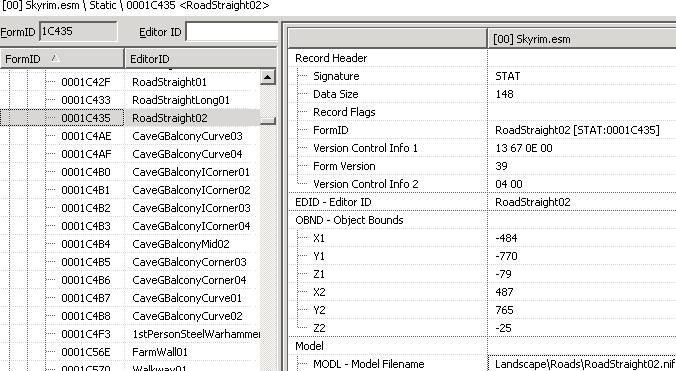
The base Form IDs 1C435 and 1C42F are for road models like Landscape\Roads\RoadStraight02.nif. DynDOLOD does contain or change those models.
-
CTD in certain areas near Whiterun with DynDOLOD
sheson replied to jackyaz's question in DynDOLOD & xLODGen Support
I will post here and on ENB forum if I find out the cause. It maybe just a flag in the nifs -
CTD in certain areas near Whiterun with DynDOLOD
sheson replied to jackyaz's question in DynDOLOD & xLODGen Support
I suggest to remove all new files in effects folder added by last update 15/11/2016 - Improved embers found in various firepits and sconces, now controllable by [WINDOWLIGHT] parameters. Not quite sure why anyone would want to control firepits and scones by WINDOWLIGHT instead of FIRE? No need to generate LOD again, it will just the vanilla files automatically. If you want to investigate more closely: Most fxfires have a LOD version in DynDOLOD\lod\effects\fxfire...dyndolod_lod.nif Only if it uses a non dyndolod_lod.nif for LOD does it cause a crash when using such a mesh with the neverfade flag. For example fxfirewithembers01_lite.nif Not sure why yet, I didn't have time to look at the new nifs yet what might cause this. Instead of removing the particle meshes for example, you could copy the working vanilla fxfirewithembers01_lite.nif to fxfirewithembers01_lite_dyndolod_lod.nif and any other that doesn't exist already. Then generate LOD. It will then use the vanilla mesh for LOD which are know to not cause CTD. However, latest particle patch and vanilla fires can then look obviously different due to the changes. I will have to look further into this when I have more time. -
Dynamic Distant Objects LOD - DynDOLOD 2.21
sheson replied to sheson's question in DynDOLOD & xLODGen Support
Enter the base Form ID it mentions into xEdit Form ID field top left and press enter. This will show the data for the referenced base record and the used nif model. Make sure that file exists in the load order and is not corrupted. You can use the xEdit assets browser with CTRL+F3 to load it into nifskope or better use nifscan to check it for errors. If neither shows errors, remove or reinstall any mod that is supplying the problematic nifs. -
CTD in certain areas near Whiterun with DynDOLOD
sheson replied to jackyaz's question in DynDOLOD & xLODGen Support
When testing to generate LOD for only a few mods at a time, look closely for any mods that only modify that area. Either the game crashes because of memory issue or because of a nif. IF the problematic nif is listed in the papyrus log it will be one of the very last lines. Any nifs earlier work fine. -
CTD in certain areas near Whiterun with DynDOLOD
sheson replied to jackyaz's question in DynDOLOD & xLODGen Support
Assuming memory patch is working or you are us OSAllocators and that there are no message about nifs in the generation log. Usually crash fixes is pretty good at showing a useful error message listing the ref and base form id of the a missing or corrupted nif if it is causing a problem. Make sure all the nifs from that list exist in the load order / are not corrupt. You can do this by using the assets browser (CTRL+F3) of xEdit to open them in nifskope (see this part of video). It can also be caused by a nif that is already active so it won't be in that list. Try make the list smaller by slowly approaching the area only attaching a row of 5 new cells at a time (use tb to show cell borders, tll to disable static LOD, then it becomes obvious). Wait a second before attaching the next row. If all that doesn't help to find the problem, generate LOD for only a small amount of mods. Start with only for Legendary and USLEP for example. If that works generate LOD with some more mods, check it works and so on until you can narrow down after which mod(s) the problem started.