sheson
-
Posts
13,181 -
Joined
-
Last visited
-
Days Won
431
Everything posted by sheson
-
The debug log is saved right after the log is appended to the normal log file. Are sure there is none? Did the last session complete successfully and was there no error when saving/closing? Did you remove all the third party billboards and generated them with TexGen instead? https://dyndolod.info/Generation-Instructions#Prerequisites and https://dyndolod.info/Help/Tree-Grass-LOD-Billboards#3rd-Party-LOD-Billboards You should clean plugins with deleted reference as explained in the summary and https://dyndolod.info/Messages/Deleted-Reference
-
Read the first post which debug log to also uploaded when making posts. Provide links to the involved mods and mention which different download or install option were selected if they exist.
-
Moved to the DynDOLOD 3 Alpha thread. Read the first post which log and debug log to upload. Also see https://dyndolod.info/Official-DynDOLOD-Support-Forum#In-Game-Screenshots. See if you can get some form ids for the actual full trees.
-
What DynDOLOD version are you using? LOD can only be added for references that exist. LOD is generated with the LOD assets found in the load order.
-
Support for ENB Complex Grass In LOD
sheson replied to z929669's question in DynDOLOD & xLODGen Support
I was just going to suggest to use face normals function on all 4 sides and save and test with that billboard to see if it makes a difference for you. It should be ever so slightly brighter at noon. Save to a new filename and add it to the GrassBillboardX list in the DynDOLOD INI and set ComplexGrassBillboard to its number. If the nif has a BSTriShape, unfold the Vertex Data list and then any Vertex Data in block details and then click on Normal. -
Support for ENB Complex Grass In LOD
sheson replied to z929669's question in DynDOLOD & xLODGen Support
Nifskope shows the normal vectors when you click on "Normals" in the block details of the NiTroShapeData to check their values. -
Support for ENB Complex Grass In LOD
sheson replied to z929669's question in DynDOLOD & xLODGen Support
You have not opened DynDOLOD_flat_4x2alt_lod.nif in Nifskope and checked the normal vector values... The vectors are not angled. They are correct (as if the plane is not angled) and match the way the normalmap texture of the billboard is generated. The vectors are not variable. The vectors rotate with the Model. That is the standard for everything including full grass. Of course the normal vectors of the full model and flat billboard model point in different directions. The reason is obvious when checking the models. The normal vectors of the full model are baked into the billboard normal map texture together with the normal map texture of the complex grass texture.- 58 replies
-
- 1
-

-
- SKYRIMSE
- complex grass
- (and 2 more)
-
Support for ENB Complex Grass In LOD
sheson replied to z929669's question in DynDOLOD & xLODGen Support
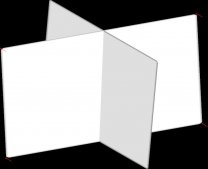
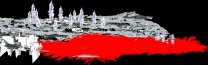
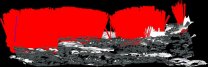
The direction of the normal vectors of full grass NIF with Nifskope. These normal vectors are baked into the normal map textures of the HD grass LOD billbaord. The direction of the normal vectors in DynDOLOD_flat_4x2alt_lod.nif with NiSkope. The direction of normal vectors of complex grass LOD billboards in BTO with NikSkope. The direction of normal vectors of basic grass LOD billboards in BTO with NikSkope. As is obvious in the game and my video the complex grass billboards are lit from the side the sun is shining from (e.g. the direction the normal vector faces), while the opposite face is darker. Just like the full complex grass. Hence the sun facing side of full complex grass and their billboard is brightest when the sun is near the horizon. Basic full grass and its grass LOD has the same brightness of either side of the their double-sided triangle and are brightest at noon when the sun is highest. Hence their normal vector face upwards. In every case, full grass and LOD grass has x, y, z rotation and in every case the normal vectors are rotated accordingly with the model.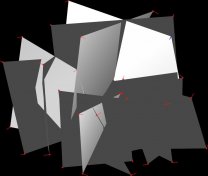
-
Support for ENB Complex Grass In LOD
sheson replied to z929669's question in DynDOLOD & xLODGen Support
-
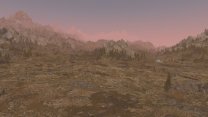
Is there anything preventing you from reading this https://dyndolod.info/Messages/Internal-File-FormID-Is-A-HITME? If you want to provide information which settings you used, then provide the actual settings you used. I have no connection to third party wikis, guides or information nor do I know what they contain. If you compared/checked a couple BTO containing the expected object LOD, then there is no need to upload the DynDOLOD output. The object LOD meshes and textures work fine: The problem is then not with the output files itself. Either the output is not installed, the game does not load the object LOD meshes or does not show them. Those reasons are not directly connected to DynDOLOD / LOD generation. The known things to do that are short LOD distances or maybe DLL plugins like the Season of Skyrim. Maybe the LOD files are too large for your game setup and the game has resource issue loading them, though in that case I would rather crashes. If it is none of that, I suggest to double check the mod manager and or file access issues. Your screenshot did not show any problems with terrain LOD so there is no need to check or upload terrain LOD meshes. You did not report TexGen errors and there weren't any errors in the DynDOLOD log about missing TexGen output or LOD textures. You screenshot does not show missing texture. There is no need check or upload the TexGen.
-
The official DynDOLOD documentation https://dyndolod.info is not a Wiki. As explained in the documentation, ultra tree and grass LOD are generated to the object LOD. So the problem is missing object LOD https://dyndolod.info/Help/Object-LOD There is no obvious problem in the logs. Everything seems to have generated as it should. Check one ore more of the generated BTO files are not empty / small file size. Especially the files for LOD level 4 should be several MB if they include ultra tree and grass LOD. Doublecheck the object LOD distance settings in the DynDOLOD SkyUI MCM Settings, try if changing them makes a difference. Test with default INIs. Unrelated but you should really fix or remove the plugins with HITMEs. https://dyndolod.info/Messages/Internal-File-FormID-Is-A-HITME
-
Read the first post which log and debug log to upload. The first post and my signature also explain to use a file or text sharing service. If there is no standard tree LOD, increase the standard tree LOD distance in https://dyndolod.info/Help/Mod-Configuration-Menu#Settings https://dyndolod.info/Help/Grass-LOD#No-Grass-LOD-Check-List Tree and object LOD are just meshes and textures that are loaded by the game directly. They are not affect by save games.
-
Support for ENB Complex Grass In LOD
sheson replied to z929669's question in DynDOLOD & xLODGen Support
There is nothing easy about editing shaders. The default (LOD) shader has no clue what the current data represents. It simply has some shader flags/values and textures to do math with. Finding/Using a unique combination of flags/settings in the LOD shader may not be trivial. Complex grass tests where done with Vanilla Complex Grasses for ENB and ENB 0.475 with only the complex grass effect enabled and any multiplier/amount means it does not affect things.- 58 replies
-
- 1
-
-
- SKYRIMSE
- complex grass
- (and 2 more)
-
Support for ENB Complex Grass In LOD
sheson replied to z929669's question in DynDOLOD & xLODGen Support
The generated grass LOD billboards have a diffuse and normalmap texture for the default (LOD) shader and are then added to the object LOD diffuse/normalmap atlas textures. The default (LOD) shaders are not made by ENB to support a single at texture that contains both diffuse and normalmap. Only the ENB full grass shader needs/supports that. There is no reason to use that workaround for shaders that already support the usage of more than one texture.- 58 replies
-
- 1
-

-
- SKYRIMSE
- complex grass
- (and 2 more)
-
Support for ENB Complex Grass In LOD
sheson replied to z929669's question in DynDOLOD & xLODGen Support
Of course the normalmap texture is being used when grass LOD billboards for complex are generated. Use the Preview option of TexGen and change the drop down from Diffuse to Normal and compare that to whatever grass has no complex texture. The default for complex grass is set to 0.75 together with the default for TexGen for exactly this reason, so people can increase brightness. It should leave a bit more fidelity. Nobody is ever going to need to double the brightness. Also, with the vanilla complex grass and vanilla game weathers and no other ENB effects but complex grass enabled there seemed to a slight red tint, hence its brightness is a bit lower. -
Read the log message and pay attention to the summary. https://dyndolod.info/Messages and https://dyndolod.info/Help/Summary-Of-Messages For example: Warning: Overwritten large reference in Hidden Hideouts of Skyrim City Edition - Merged.esp ... Warning: Overwritten large reference in Lux Orbis - Great Village of Mixwater Mill patch.esp... Warning: Overwritten large reference in The Great Village of Mixwater Mill.esp ... -> https://dyndolod.info/Messages/Overwritten-Large-Reference Warning: Deleted reference Update.esm ... Warning: Deleted reference Dawnguard.esm ... Warning: Deleted reference Watchtowers of Skyrim.esp ... Warning: Deleted reference Natasha's Falkreath.esp ... -> https://dyndolod.info/Messages/Deleted-Reference
-
Read the first post which log and debug log to upload when making posts. https://dyndolod.info/How-LOD-Works Having to wait for the full models to load before being able to disable the object LOD can take a noticeable time, in which the full models and their object LOD are both rendered for a brief time. In case the full model and the LOD model occupy the same 3D space (which for example can be the case for structures), their different lighting and textures can noticeable z-fight (texture flicker).
-
Support for ENB Complex Grass In LOD
sheson replied to z929669's question in DynDOLOD & xLODGen Support
What? Creating grass LOD billboards with complex grass texture are supported since Alpha 87. https://dyndolod.info/Changelog Read the official DynDOLOD documentation and ignore third party posts/guides especially if they are older. Nowhere in the DynDOLOD documentation does it say to change these vaues to 0.5 or 1.0. If a user needs to change these settings still depends on weather mods and ENB effects or whatever else might change post processing etc. The actual values depends on the mods, settings etc. As already explained, the defaults for grass is for the vanilla game and the "default settings tested with vanilla complex grass and all other ENB effects disabled." Why would using Level 0 LOD models change anything about z-fighting - if anything they match full models closer, thus are more likely to z-fight. What does this have to do with complex grass? Read this https://dyndolod.info/Changelog. Read corresponding explanations of the DynDOLOD documentation like https://dyndolod.info/Help/TexGen or https://dyndolod.info/Help/Grass-LOD https://dyndolod.info/Help/Grass-LOD Note that HD Grass LOD billboards for ENB complex grass use double the triangles, so in case performance is of concern, use half the density. https://dyndolod.info/Help/Grass-LOD#No-Grass-LOD-Check-List https://dyndolod.info/Updating This has nothing to with complex grass. DynDOLOD stores some data in that folder since its inception several years ago. The files should not be deleted when updating. They should survive an update purposefully. Plugins.sseviewsettings is from xEdit. -
Moved to the DynDOLOD 3 alpha thread. Read the first post which log and debug log to upload when making posts. See https://dyndolod.info/FAQ answers for "Object LOD model and full model show at the same time causing texture flicker" and maybe "Object LOD shows in active exterior cells" If it is neither of those two settings, provide a screenshot https://dyndolod.info/Official-DynDOLOD-Support-Forum#In-Game-Screenshots
-
Read the first post which log and debug log to upload when making posts. See https://dyndolod.info/FAQ answers for "Object LOD model and full model show at the same time causing texture flicker" and maybe "Object LOD shows in active exterior cells"
-
TexGen is being terminated prematurely, suddenly closes
sheson replied to 3fast5you's question in DynDOLOD & xLODGen Support
Are you clicking/doing anything after it prompts to save/exit? Switch to default theme to see if it makes a difference. Upload a debug log from TexGen or DynDOLOD from a successful run. -
TexGen is being terminated prematurely, suddenly closes
sheson replied to 3fast5you's question in DynDOLOD & xLODGen Support
Add realtimelog=1 to TexGen_SSE.INI/DynDOLOD_SSE.ini and upload that log if it happens again. See if it happens when using the default "Windows" theme. -
The mod Castle Volkihar Rebuilt changes the reference of the tower so it has an enable parent, to switch it out with a version that has the roof fixed. Such reference have dynamic LOD instead of static object LOD. Right now it is not possible to automatically address this, but it is a planed feature for a future versions in case LOD Level 32 is used for map - since it does not show in the game world and the map could simply use the initial version regardless. Does the island come into view when you get closer? The game renders about a 100 cells into the distance and everything beyond just vanishes. You might want to increase object LOD distance for LOD Level 16 fBlockMaximumDistance in SkyrimPrefs.INI or https://dyndolod.info/Help/Mod-Configuration-Menu#Settings so the max distance is shows object LOD on top of the terrain LOD.
-
I generally do not recommend using full model trees for object LOD generation because of the performance impact and time required to generate the huge LOD meshes. A better working solution might be to keep the LOD resources installed and use the usual "tree" mesh rule with Level0 for LOD Level 4, Billboard* for LOD Level 8/16 and just change Grid from "Far LOD" to "Far Full". Then only the few case of dynamic LOD should be using the full models. Let me know if that works out, e.g. if you do not crash at the spot afterwards or look up the STAT base record (it will have a new form ID but same EditorID) that it uses the full model. If you do not want to generate LOD again, you can manually update all the STAT base records using such tree LOD models in xEdit to use the full model instead.
-
Replacing NIF files is safe. There seem to be a lot of problematic 3D tree LOD models in the the two "3D Hybrid LODs" archives of the mod. The models contain NiSwitch nodes instead of being static 3D tree LOD models as explained in https://dyndolod.info/Help/3D-Tree-LOD-Model. They might work for object LOD generation as LODGen might be able to extract what it needs and remove duplicate stuff on the fly, but the way the NIFs are made they cause CTD when used directly in the game for dynamic LOD. They probably a (couple) dozen references here and there that could be problematic. They need to be fixed. I made the 3D tree LOD a real static model by copying the actual crown BSTriShape to the root node and removed all the uneeded/interfering blocks. Comparing the NIFs in Nifskope should make it clear. It might be possible to automate this if the split crown NIFs are made available.