sheson
-
Posts
13,382 -
Joined
-
Last visited
-
Days Won
445
Everything posted by sheson
-
SnowGrass appearing among (seasonal) grass LODs in the WR tundra
sheson replied to clearing's question in DynDOLOD & xLODGen Support
If you have the "same issue", then the same answers and troubleshooting steps apply. See https://dyndolod.info/Official-DynDOLOD-Support-Forum -
See https://dyndolod.info/Official-DynDOLOD-Support-Forum#In-Game-Screenshots Based on the provided screenshots, the terrain LOD textures are and/or the noise texture are wrong. See https://dyndolod.info/Help/xLODGen
-
The DynDOLOD log and debug you uploaded both show a "DynDOLOD Resources SE version information not found. Verify correct installation" message. See https://dyndolod.info/Help/DynDOLOD-Resources#Troubleshooting and https://stepmodifications.org/forum/topic/18695-dyndolod-resources-se-version-information-not-found You need to close the tool properly so it can save the new log and debug log with messages about LODGen. See https://dyndolod.info/Help/LODGen C0000005 - If happening randomly can be a sign of hardware issues like CPU or memory being unstable. Reduce memory requirements. See Out of Memory below. See FAQ High Memory Usage / Out of Memory. See https://dyndolod.info/Help/LODGen#Out-of-Memory and https://dyndolod.info/FAQ#High-memory-usage-Out-of-memory
-
Linux/Proton: A call to an OS function failed
sheson replied to itsdnoftheworld's question in DynDOLOD & xLODGen Support
https://dyndolod.info/Downloads#Additional-Requirements Microsoft Visual C++ Redistributable packages for Visual Studio 2015, 2017, 2019 and 2022 for Texconvx64.exe .NET Framework 4.8 (typically included with Windows 10/11) for LODGenx64.exe .NET Desktop Runtime 6 for LODGenx64Win.exe https://dyndolod.info/Installation-Instructions Install Microsoft Visual C++ Redistributable packages for Visual Studio 2015, 2017, 2019 and 2022. Install .NET Desktop Runtime 6. -
Interesting Water LOD Interaction with Realistic Waters 2 on Alpha 180
sheson replied to LF111's question in DynDOLOD & xLODGen Support
No worries. It's great we finally solved all issues. In the meantime I also had a quick look/test with editing the CS shaders. At some point the ENVMAP bool is not true anymore, so this looks like something that is determined in the game code. -
Interesting Water LOD Interaction with Realistic Waters 2 on Alpha 180
sheson replied to LF111's question in DynDOLOD & xLODGen Support
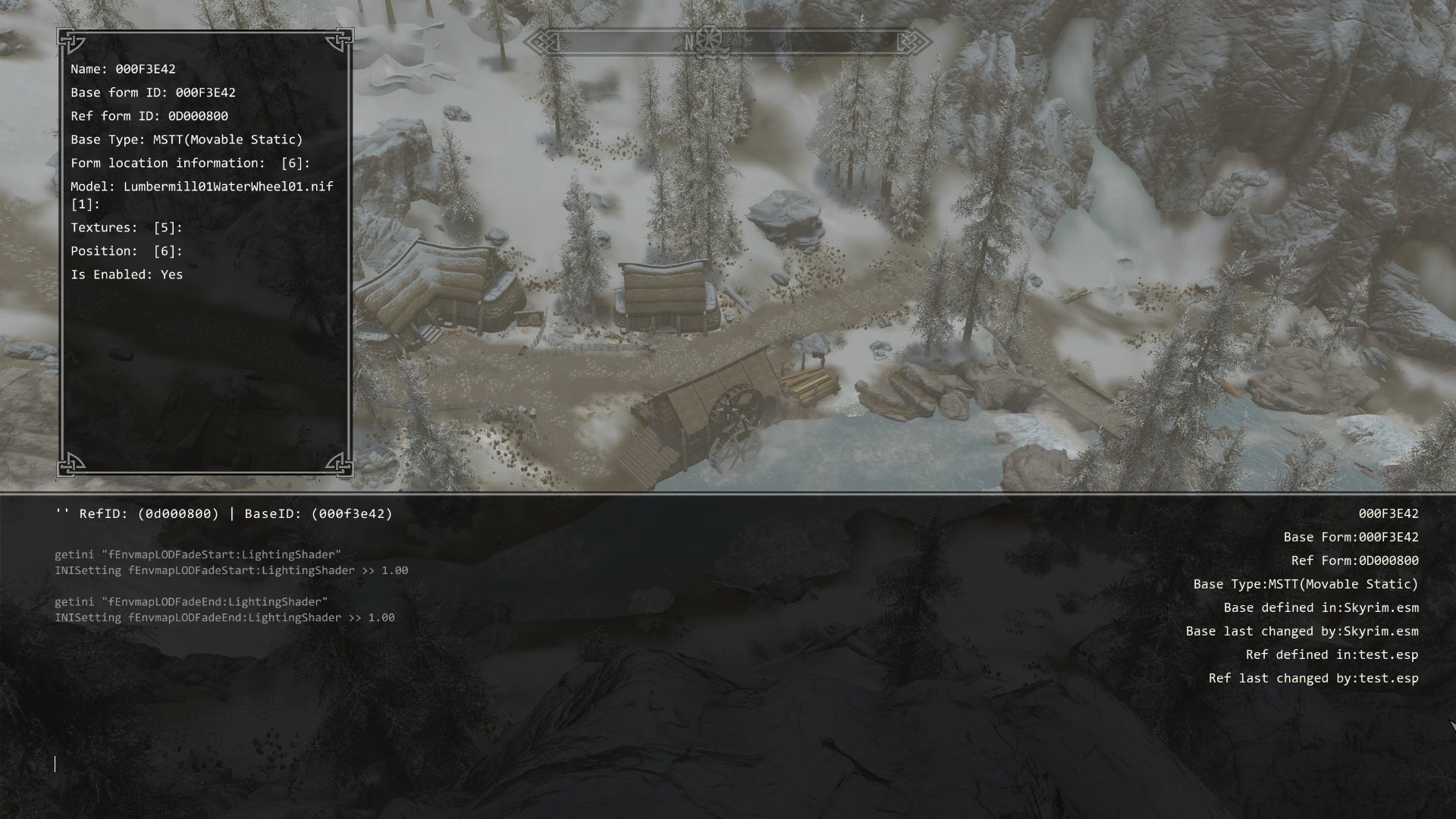
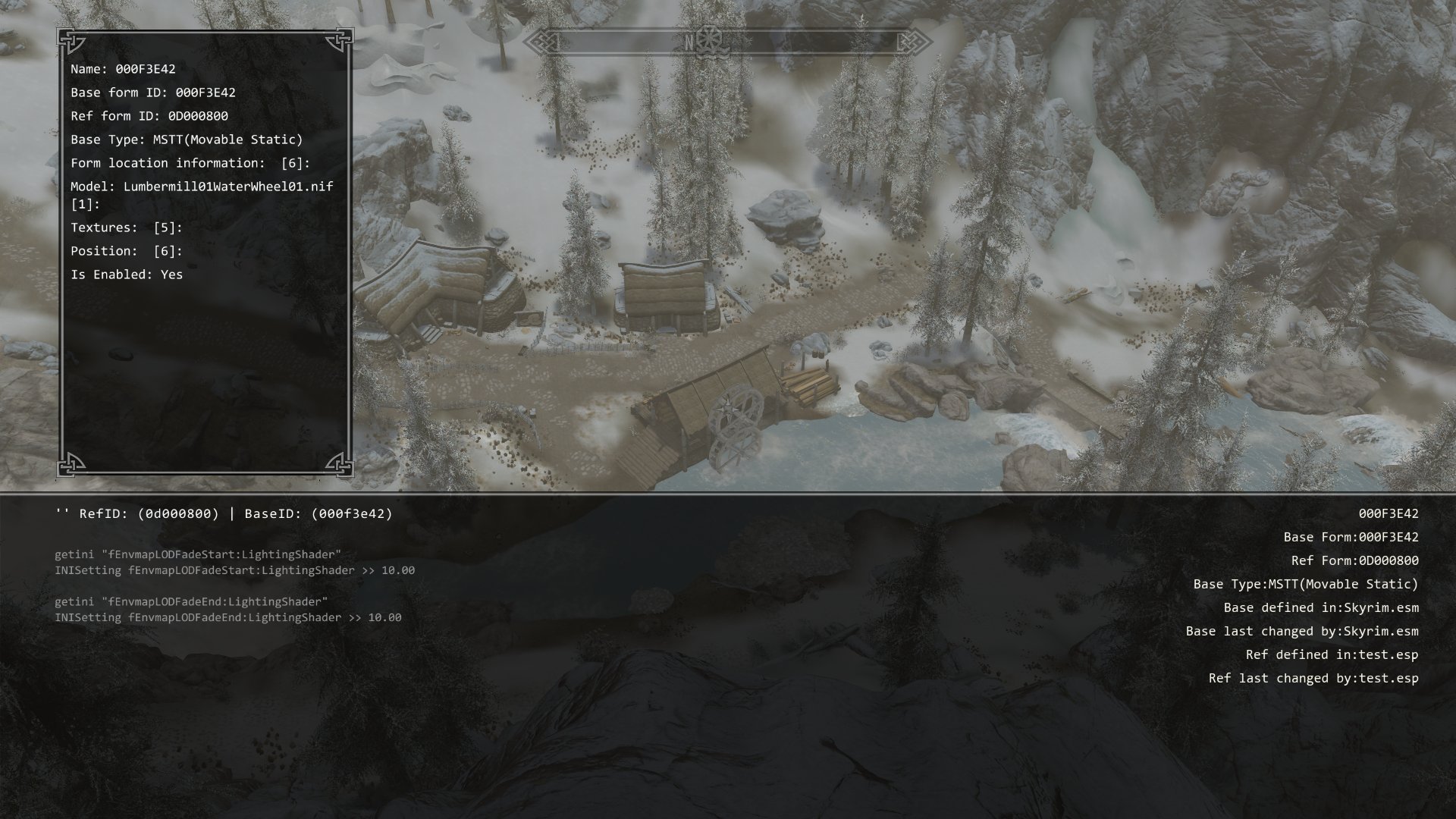
The test esp does the same thing as the DynDOLOD.esp. It places a full model with the IsFullLOD flag. This is a shader or post processing effect. A fix is to increase the settings in the SkyrimCustom.INI . Only changing them in the game with console commands does not seem to have an effect. I my test I could also increase the distance by lowering the fov to 15 before starting to walk backwards. That could mean, the less models require this effect, the further away it is shown on the visible models. If the modified vanilla bottom wheel fades out earlier than the test wheel, then it seems like the engine fades out the effect based on god knows what. Unsetting the Envmap_Light_Fade flag on the BSLightingShaderProperty in the NIF does not seem to have an effect.- 45 replies
-
- 1
-

-
- water
- reflection
- (and 1 more)
-
Interesting Water LOD Interaction with Realistic Waters 2 on Alpha 180
sheson replied to LF111's question in DynDOLOD & xLODGen Support
The first picture seems to show that the lower vanilla waterwheel having the problem while the top one from the test plugin is OK? -
DynDOLOD 3 Error: File not found SkyrimSE.exe
sheson replied to Jacque's question in DynDOLOD & xLODGen Support
From the log: Using Skyrim Special Edition Data Path: C:/skyrim/Data/\ ... Error: File not found SkyrimSE.exe Traditionally, the Windows OS uses backslash \ as path separator. Do not mix different path separators. See the command line examples at https://dyndolod.info#Skyrim-Special-Edition-GOG-Skyrim-Anniversary-Edition-GOG, https://dyndolod.info/Mods/Skyrim-Special-Edition-GOG-Skyrim-Anniversary-Edition-GOG or https://dyndolod.info/Help/Command-Line-Argument Use a single backlash \ as path separator. Enter the updated paths as shown in the examples. -
Interesting Water LOD Interaction with Realistic Waters 2 on Alpha 180
sheson replied to LF111's question in DynDOLOD & xLODGen Support
fEnvmapLODFade[Start|End] 1.0 - this is about the distance it changed after walking backwards. fEnvmapLODFade[Start|End] 10.0 - same distance as above but now it "works" With 10.0 it stays the same also far outside the active cells. The wheel works the same in DynDOLOD. The reason this full model is treated differently seems to be the IsFullLOD flag. If the distance seems shorter with DynDOLOD activated, it is because of the settings/game engine doing things differently, presumably dynamically adapting to things or workload.
-
"Path not allowed" for TexGen/DynDOLOD, but not a system/game folder
sheson replied to Vraylle's question in DynDOLOD & xLODGen Support
As explained in the instructions, the dedicated output path should be outside of any mod manager folders. The tools try to protect unsuspecting users from themselves. -
Interesting Water LOD Interaction with Realistic Waters 2 on Alpha 180
sheson replied to LF111's question in DynDOLOD & xLODGen Support
Setting the mentioned INI settings to 10.0 should increase the distance before this effect happens. If you already set 10.0, test with 20.0 -
Interesting Water LOD Interaction with Realistic Waters 2 on Alpha 180
sheson replied to LF111's question in DynDOLOD & xLODGen Support
Verify via console getini that the settings (just do 10.0 then) make it into the game. If no change, without any DynDOLOD output active, install the the test.esp. Go to Anga's mill. There should be 2 wheels, a second one above the other. Compare how they look at different distances. test.esp -
Interesting Water LOD Interaction with Realistic Waters 2 on Alpha 180
sheson replied to LF111's question in DynDOLOD & xLODGen Support
DynDOLOD enables or disables references. That means, what DynDOLOD does is make the wheel show or not show. It always the same full NIF and full textures regardless of distance. There is no darker/wet/correct or incorrect wheel being switched. This can be verified with more informative console always showing the same formd ID and NIF. Any lighting changes based on the distance or viewing angles are typically from shaders and their (fade) settings. Sometimes also mipmaps. None of which are directly affected or changed by DynDOLOD. What we know from the past is that more models using certain effects active at the same can affect the fade distances of those effects. Doublecheck in the game with console getini the already mentioned [LightingShader] settings. https://stepmodifications.org/wiki/Guide:Skyrim_INI/LightingShader Also test the other 2, fRefraction and fSpecular. See if setting those both start/end to 1.0 in the Skyrim.INI or SkyrimCustom.INI makes a difference. Wetness effects might affected by the Specular settings. If setting 1.0 to everything does not make a difference, try 5.0 or 10.0. Obviously the updated LODGen version will be included in the next release version, as practiced since a decade. RWT has obviously no direct affect on object LOD meshes since it does not include any LOD models. https://dyndolod.info/Mods/Waterfalls -
Interesting Water LOD Interaction with Realistic Waters 2 on Alpha 180
sheson replied to LF111's question in DynDOLOD & xLODGen Support
Do you know what mods might affect that wetness effect? If have a hard time too "see" what the screenshots are supposed to show, especially how it is supposed to look different from vanilla. What mod changes the used textures? textures\architecture\farmhouse\WoodWalkway01.dds textures\architecture\farmhouse\WoodWalkway01_n.dds Is there any difference setting iMaxDesired to 0 in console? e.g. setini "iMaxDesired:Particles" 0 Is there any difference unchecking Enable Shaders in the Community Shaders in-game UI? The change in xLODGen is to change the base color alpha from 1.0 to 0.99 for a non-LOD passthru shape BSEffectShaderProperty. -
Interesting Water LOD Interaction with Realistic Waters 2 on Alpha 180
sheson replied to LF111's question in DynDOLOD & xLODGen Support
Test if making the Skyrim.INI/SkyrimCustm.INI changes to the decal and evmap fade settings as explained in https://dyndolod.info/Help/Glow-LOD make a difference. If not check/report if any mod is replacing the lumbermill01waterwheel01.nif -
Interesting Water LOD Interaction with Realistic Waters 2 on Alpha 180
sheson replied to LF111's question in DynDOLOD & xLODGen Support
Replace C:\Skyrim DynDOLOD\DynDOLOD 3.00-68518-Alpha-180-1724627136\DynDOLOD\Edit Scripts\LODGenx64Win.exe with this version https://mega.nz/file/IUYk3J5C#dpWyLBQodYSaSvD3BwhBiNUxgGWtHr7UgFxv1fE4xHY Start DynDOLOD in expert mode and select the desired worldspaces and click the Execute LODGen button to generate new object LOD meshes. See https://dyndolod.info/Help/Expert-Mode#Execute-LODGen Replace old object LOD meshes with the new ones. Hopefully that fixes it.- 45 replies
-
- 1
-
-
- water
- reflection
- (and 1 more)
-
Interesting Water LOD Interaction with Realistic Waters 2 on Alpha 180
sheson replied to LF111's question in DynDOLOD & xLODGen Support
Just use a free file service like you did with the debug log. -
Interesting Water LOD Interaction with Realistic Waters 2 on Alpha 180
sheson replied to LF111's question in DynDOLOD & xLODGen Support
The defined water record in cells is irrelevant for LOD. LOD water users the water record defined on the winning worldspace record. -
Interesting Water LOD Interaction with Realistic Waters 2 on Alpha 180
sheson replied to LF111's question in DynDOLOD & xLODGen Support
The last plugin to overwrite the worldspace record defines which water record is used for LOD. If you start changing the load order underneath without making sure the definition might become wrong. You need to make sure the correct record for the water LOD is defined by the winning plugin. Make extra sure that disabling/enabling mods and deploying in Vortex actually has the desired effect in the physical data folder by double checking the actual files. We encountered issues with water reflections caused by certain effect shader settings in object LOD meshes about 2 years ago. Though, that specific case didn't look like this and has been fixed. If just hiding the meshes folder from the DynDOLOD output has an effect on the issue, then use binary search to narrow it down to a specific or a handful of files: hide half the Tamriel*.BTO files, if the error goes away, hide the other half. Continue to do so until only one or a handful files remain. Then upload those files. -
"Path not allowed" for TexGen/DynDOLOD, but not a system/game folder
sheson replied to Vraylle's question in DynDOLOD & xLODGen Support
Read https://dyndolod.info/Official-DynDOLOD-Support-Forum#Post-Logs which log and debug LOD to upload when making posts. Copy the message text to the clip board and paste its text as explained in https://dyndolod.info/Official-DynDOLOD-Support-Forum#Copy-and-Paste-Text https://dyndolod.info/Generation-Instructions Select a dedicated output path. The dedicated output path should be outside of special OS folders like 'Programs Files' or 'Program Files (x86)', User, Documents, Desktop, Download and also not in SteamApps, game or any mod manager folders. Report where the tools are installed and what the folder you are trying to set for the output. -
https://dyndolod.info/Generation-Instructions#Prerequisites Clean and error check the load order with xEdit. https://dyndolod.info/Generation-Instructions#1-Generate-The-Required-LOD-Assets-with-TexGen Make sure all mods, plugins and patches (that affect affect trees, grasses or any textures) are enabled and their overwrite order is sorted. ... In case of issues, solve the cause .. . Disabling plugins, mods, meshes or textures is a troubleshooting step and not a fix. https://dyndolod.info/Generation-Instructions#2-Generate-The-LOD-Mod-with-DynDOLOD Finalize the load order as explained in the prerequisites above. Clean and error check the load order with xEdit. Make sure all mods, plugins and patches (that affect exterior cells and worldspaces and base records used by references in exterior cells) are enabled and their overwrite order is sorted. Ignore wrong 3rd party advice to temporarily disable plugins, mods, meshes or textures. .. In case of issues, solve the cause or use appropriate mesh mask rules or settings for desired results. Disabling plugins, mods, meshes or textures is a troubleshooting step and not a fix. https://dyndolod.info/Messages#Warning-and-Error-Messages Some errors stop the process with a dedicated pop-up window with further details and a "Click on this link for additional explanations and help for this message" link which directly opens a listed message below. Problems that stop the process are because of errors in the setup, mods, load order, unknown situations, bugs with the tools or third party issues (like OS, antivir, drivers, crapware, hardware etc.) that prevent a successful or safe LOD patch generation. As explained in the Generation Instructions, finalize the load order, install mods, sort and resolve conflicts. Clean and error check the load order with xEdit before generating LOD. Error checking the load order with xEdit will report many of the stop errors like unresolved Form ID in a single run. It also is possible to dry run most things a bit quicker by checking dynamic LOD only in the advanced mode. Problems in plugins should be fixed or the mod should not ne used at all. Not fixing a problem that stopped the process pretty much guarantees there will be an issue in the game. If the problem is properly investigated to find out its severeness it can also be fixed in the process. DynDOLOD is based on xEdit. Most of the errors that stop the process are from the xEdit background loader and the xEdit error check.
-
None of the used full models have LOD models. The vanilla game does not have LOD models nor did anybody ever create any AFAIK. None of these objects are expected to have LOD representation. You will need to add mesh mask / reference rules for them if you want these objects to have LOD. See https://dyndolod.info/Help/Mesh-Mask-Reference-Rules For example, for this specific animated banner to have dynamic LOD: Mesh Mask / Reference Form ID: Unmarked Locations Pack - All In One.esp;00061846 All flags unchecked LOD 4, 8, 16, 32: None Grid: Near LOD or Far LOD Reference: Unchanged If you want all animated banners of this type to have dynamic LOD, enter CivilWarBannerImp03.nif into the Mesh Mask / Reference Form ID field instead For example, for this specific flag post to have static object LOD: Mesh Mask / Reference Form ID: Unmarked Locations Pack - All In One.esp;000523F4 All flags unchecked LOD 4: Full LOD 8: Full or None LOD 8, 16 32: None Grid: Near LOD or Far LOD Reference: Unchanged If you want all the poles to have static object LOD using their full model, enter CivilWarBanner01.nif into the Mesh Mask / Reference Form ID field instead.
-
DynDOLOD is being terminated prematurely, suddenly closes
sheson replied to VulKun's question in DynDOLOD & xLODGen Support
I would be nice if you could upload the real time log so I could look into improve the handling of the problem. -
Read the first post and/or https://dyndolod.info/Official-DynDOLOD-Support-Forum#Post-Logs which DynDOLOD log and debug log to upload when making posts. Make a useful screenshot of the full model with more informative console as explained in https://dyndolod.info/Official-DynDOLOD-Support-Forum#In-Game-Screenshots https://dyndolod.info/FAQ#Something-does-not-have-LOD For something to have LOD, a LOD model or a LOD Billboard is required to be installed in the load order. Check the ..\DynDOLOD\Logs\DynDOLOD_[GAME MODE]_Object_Report.txt to find which LOD models have been found and which models are used for LOD representation. If a LOD model does not exist, mesh mask / reference rules can be used to use the full model for LOD. Upload the mentioned DynDOLOD_SSE_Object_Report.txt as well.
-
Interesting Water LOD Interaction with Realistic Waters 2 on Alpha 180
sheson replied to LF111's question in DynDOLOD & xLODGen Support
The issue that could probably happen regarding LOD water would be an outdated worldspace record in the last plugin after changing the load order. See https://dyndolod.info/Help/Terrain-LOD-and-Water-LOD At the moment DynDOLOD does not create, update or otherwise change terrain LOD or water LOD. How the LOD water looks for an entire worldspace is defined by worldspace record. How water looks in an active cell is defined by the cell record. The worldspace and cell records from the winning plugins are copied to create the DynDOLOD or Occlusion plugins. Hence the load order needs to be finalized before generating the LOD patch with DynDOLOD and/or generating Occlusion.esp. https://dyndolod.info/Updating#New-or-Updated-Mods-or-Plugins If a plugin is added or updated it is possible that there are new conflicts which require solving. This can either be manual conflict resolution or updating or generating LOD from scratch.