hosaf
-
Posts
9 -
Joined
-
Last visited
Everything posted by hosaf
-
Im using seasons of skyrim. When running dyndolod should i select all seasons (spr, sum, aut, win) in dyndolod advanced menu or selecting seasons then only select default will be enough?
-

Is This Errors Important for Dyndolod?
hosaf replied to hosaf's topic in General Skyrim SE Discussion & Support
Thanks. Im just curious about these; Warning: Could not resolve Parameter 1 Warning: Quest Stage not found in ... Warning: Quest Alias not found in ... Warning: Navmesh triangle not found in ... Warning: Could not resolve alias Warning: internal file FormID is a HITME: 03000809 (should be 02000809 ) Error: Could not be resolved type errors and how to solve? I couldnt find any step by step guide about these errors. Another question. Im using seasons of skyrim. When running dyndolod should i select all seasons (spr, sum, aut, win) in dyndolod advanced menu or selecting seasons then only select default will be enough? -
I am about to finish my modlist only remain dyndolod. Before run dyndolod i run check for errors script from sse edit and i got this log. Would you look at this log and tell me which errors important and how can i solve? Please tell the solution for fixing this errors step by step. I uploaded sseedit error log, my modlist, pluginlist and load order. sseediterrorcheck.txt loadorder.txt modlist.txt plugins.txt
-
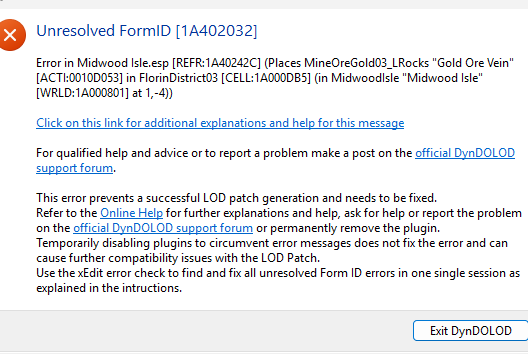
I added my modlist, load order, sse edit errors and of course dyndolod summaries. I did undelete and disable references for all installed mods in sse edit before run dyndolod. I created a new text file for all dyndolod summaries. This is the reason too much attachment. Since there are too much logs i dont know which one i should add. Sorry about this. Here unresolved formid error; Here dyndolod summaries which is not completed due to unresolved formid error; filenotfoundmeshes.txtfilenotfoundscripts.txtfilenotfoundtextures.txtoutdatedbilboards.txtpotantielwildeditreferences.txtpropertynotfoundinscript.txtrootblock.txttexturesdonotmatch.txt Here sse edit check for errors log; sseedit.txt Lastly here my modlist and load order modlist.txtloadorder.txt Would you help?
-
i am trying to generate grass cache with mo2 precache grass plugin. It generated without issue around 565000 then keeps crashing. It gives these errors; DLC2SolstheimWorld(12,13) failed 2 times; skipping DLC2SolstheimWorld(15,13) failed 2 times; skipping DLC2SolstheimWorld(12,14) failed 2 times; skipping DLC2SolstheimWorld(17,13) failed 2 times; skipping DLC2SolstheimWorld(17,13) failed 2 times; skipping DLC2SolstheimWorld(13,12) failed 2 times; skipping etc How to fix it? I updated my mod list i added a lot things so this is complete new issue. I addet crashlogger, latest ngio-ng and my modlist. CrashLogger.log NGIO-NG.log modlist.txt Here the videos about modlist and sseedit https://pixeldrain.com/u/H8DyN2Ag - modlist https://pixeldrain.com/u/8c6Aj6nk - sseedit. (I used Apply filter->select only grass option)
-
Precache Grass crash at the beginning
hosaf replied to hosaf's topic in General Skyrim SE Discussion & Support
I found the guilty; it was quick loot re. -
Precache Grass crash at the beginning
hosaf posted a topic in General Skyrim SE Discussion & Support
I dont know what causing it when i try to run mo2 precache grass plugin game open then closed after a few seconds. I am not using whole step guide but i am using LOD section which is grass cache-xlodgen-texgen and output. https://pixeldrain.com/u/aWuyhmj9 I showed all my mods here please watch it and tell me which mod causing it. crash-2025-06-16-13-46-29.log -
Dyndolod resources se core files outdated
hosaf replied to hosaf's question in DynDOLOD & xLODGen Support
My dyndolod was outdated after sent this post i figured but now i got different error. -
Dyndolod resources se says "core files outdated install newer version" so I cannot use dyndolod. How to fix this?