AlteriusZhang
-
Posts
5 -
Joined
-
Last visited
AlteriusZhang's Achievements

Watcher (1/12)
0
Reputation
-
Can't get Dyndolod to run anymore.
AlteriusZhang replied to AlteriusZhang's question in Mod Organizer Support
Why the **** would I make something up like this? My bugged plugin was Wearable Horns SE. I didn't download the plugin fix and it was crashing Dyndolod/TexGen on load. This was the error I got: <Error: RecipeBookHorns [COBJ:FE0002D3] has invalid ObjectID 0012D3 for a light module. You will not be able to save this file with ESL flag active.> If you don't believe me, install it and find out for yourself. -
Can't get Dyndolod to run anymore.
AlteriusZhang replied to AlteriusZhang's question in Mod Organizer Support
Problem fixed. It wasn't some registry issue or any of that. It was one of the .esps in my load order that had a invalid registry something. Fixing this fixed the issue. -
Can't get Dyndolod to run anymore.
AlteriusZhang replied to AlteriusZhang's question in Mod Organizer Support
Also, I already have ini files in the Documents/My games/Skyrim Special Edition folder. As I've mentioned. I was able to run DynDoLod before. It just stopped working recently. My Skyrim steam install hasn't been touched in years until the game just updated itself a few days ago, and I had to downgrade it. EDIT: I've managed to use the Steam console to get my hands on the 1.5.97 exe and ran it once. Got to the man menu and exited. I tried running DyndoLod again and I still get the same error. -
Can't get Dyndolod to run anymore.
AlteriusZhang replied to AlteriusZhang's question in Mod Organizer Support
The only reason I messed with the command line is because the original steps weren't working, and I had to troubleshoot errors from the various posts on this forum. I've already tried launching the game from steam already, multiple times, but in offline mode (not sure it matters), at least to the point of getting the launcher running. I was unable to run the game because it would just go back to desktop. Probably because the Skyrim.EXE was modified because steam updated my game, and I had to use that downgrade tool to downgrade it back to 1.5.97. -
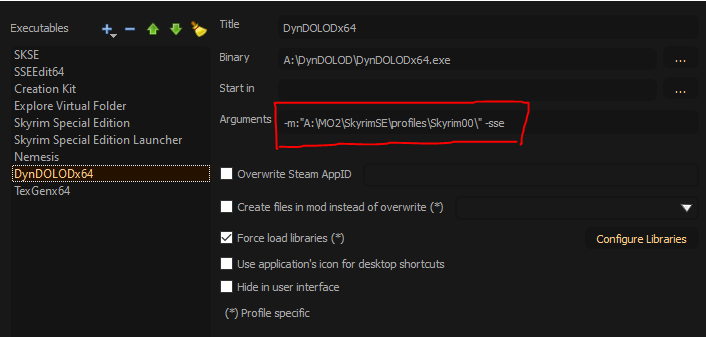
I'm having problems getting Dyndolod to run, either through Mod Organizer, or directly from the executable. I keep getting the following errors: [00:00:00.047] DynDOLOD based on xEdit x64 (2EE40120) starting session 2023-06-26 22:09:47 [00:00:00.052] Game Mode: TES5 [00:00:00.055] Game Name: Skyrim [00:00:00.057] Using Skyrim Data Path: [00:00:00.060] Using Scripts Path: A:\DynDOLOD\Edit Scripts\ [00:00:00.063] Using Cache Path: [00:00:00.065] Using Temp Path: C:\Users\17082\AppData\Local\Temp\TES5Edit\ [00:00:00.068] Using ini: [00:00:00.072] Fatal: Could not find ini I know I have to use the argument parameters for the executable, and I have it set in Mod organizer as the following: I'm assuming this is where I put it. But I still get the same error. I added the line to change the INI files. I'm not sure what INI files it's referring to, but I'm assuming its the SkyrimPrefs and Skyim inis. I have the correct resource, DLL, and scripts for my version of Skyrim installed in MO2: As you can see, I was able to run Dyndolod before, but that was 2 years ago, and I recently added some mods that need new LODs. Anyone tell me what I'm missing here? I followed the STEP guide, and watched several videos to make sure I wasn't missing something obvious. Thanks in advance.