Bersaelor
-
Posts
2 -
Joined
-
Last visited
Bersaelor's Achievements

Watcher (1/12)
0
Reputation
-
Stuck at `Press any Button` in SkyrimVR
Bersaelor replied to Bersaelor's question in DynDOLOD & xLODGen Support
Thank you @sheson for the reply, I read through FAQ and made sure it is the 1.4.15 that is installed. Here is my current load order and version: I had not checked the log file yet, let's see: In line 7 it says Dyndolod loaded correctly). It also says in the following line that EngineFixesVR was not loaded correctly, so I tried disabling the Engine Fixes VR mod. That made the log file look great, with no more issues, but the game was still the same, stuck at the `Press any button`. SKSEVR runtime: initialize (version = 2.0.12 010400F1 01D812389FBC7FCC, os = 6.2 (9200)) imagebase = 00007FF6DD980000 reloc mgr imagebase = 00007FF6DD980000 config path = C:\Program Files (x86)\Steam\steamapps\common\SkyrimVR\Data\SKSE\skse.ini plugin directory = C:\Program Files (x86)\Steam\steamapps\common\SkyrimVR\Data\SKSE\Plugins\ checking plugin C:\Program Files (x86)\Steam\steamapps\common\SkyrimVR\Data\SKSE\Plugins\\DynDOLOD.DLL plugin C:\Program Files (x86)\Steam\steamapps\common\SkyrimVR\Data\SKSE\Plugins\\DynDOLOD.DLL (00000001 DynDOLOD 000000F5) loaded correctly (handle 1) checking plugin C:\Program Files (x86)\Steam\steamapps\common\SkyrimVR\Data\SKSE\Plugins\\EngineFixesVR.dll couldn't load plugin C:\Program Files (x86)\Steam\steamapps\common\SkyrimVR\Data\SKSE\Plugins\\EngineFixesVR.dll (Error 126) checking plugin C:\Program Files (x86)\Steam\steamapps\common\SkyrimVR\Data\SKSE\Plugins\\higgs_vr.dll registering plugin listener for SKSE at 2 of 3 Plugin 2 registered for controller state with sort 66 Plugin 2 registered for poses with sort 66 plugin 2 allocated 4096 bytes from branch pool plugin 2 allocated 4096 bytes from local pool plugin C:\Program Files (x86)\Steam\steamapps\common\SkyrimVR\Data\SKSE\Plugins\\higgs_vr.dll (00000001 HIGGS 00000001) loaded correctly (handle 2) checking plugin C:\Program Files (x86)\Steam\steamapps\common\SkyrimVR\Data\SKSE\Plugins\\LocationalDamageSKSEVR.dll registering plugin listener for SKSE at 3 of 4 plugin C:\Program Files (x86)\Steam\steamapps\common\SkyrimVR\Data\SKSE\Plugins\\LocationalDamageSKSEVR.dll (00000001 LocationalDamageSKSEVR Plugin 00000072) loaded correctly (handle 3) checking plugin C:\Program Files (x86)\Steam\steamapps\common\SkyrimVR\Data\SKSE\Plugins\\misvr.dll registering plugin listener for SKSE at 4 of 5 plugin 4 allocated 512 bytes from branch pool plugin 4 allocated 512 bytes from local pool plugin C:\Program Files (x86)\Steam\steamapps\common\SkyrimVR\Data\SKSE\Plugins\\misvr.dll (00000001 MISVR 00000001) loaded correctly (handle 4) checking plugin C:\Program Files (x86)\Steam\steamapps\common\SkyrimVR\Data\SKSE\Plugins\\skee64.dll plugin C:\Program Files (x86)\Steam\steamapps\common\SkyrimVR\Data\SKSE\Plugins\\skee64.dll does not appear to be an SKSE plugin checking plugin C:\Program Files (x86)\Steam\steamapps\common\SkyrimVR\Data\SKSE\Plugins\\skyrimvrtools.dll registering plugin listener for SKSE at 5 of 6 plugin C:\Program Files (x86)\Steam\steamapps\common\SkyrimVR\Data\SKSE\Plugins\\skyrimvrtools.dll (00000001 SkyrimVRTools 00000023) loaded correctly (handle 5) checking plugin C:\Program Files (x86)\Steam\steamapps\common\SkyrimVR\Data\SKSE\Plugins\\SkyUI-VR.dll plugin C:\Program Files (x86)\Steam\steamapps\common\SkyrimVR\Data\SKSE\Plugins\\SkyUI-VR.dll (00000001 SkyUI 00000001) loaded correctly (handle 6) checking plugin C:\Program Files (x86)\Steam\steamapps\common\SkyrimVR\Data\SKSE\Plugins\\SpellWheelVR.dll registering plugin listener for SKSE at 7 of 8 plugin C:\Program Files (x86)\Steam\steamapps\common\SkyrimVR\Data\SKSE\Plugins\\SpellWheelVR.dll (00000001 SpellWheelVR 00001085) loaded correctly (handle 7) checking plugin C:\Program Files (x86)\Steam\steamapps\common\SkyrimVR\Data\SKSE\Plugins\\VRFpsStabilizer.dll registering plugin listener for SKSE at 8 of 9 plugin C:\Program Files (x86)\Steam\steamapps\common\SkyrimVR\Data\SKSE\Plugins\\VRFpsStabilizer.dll (00000001 VRFpsStabilizerPlugin 000010C1) loaded correctly (handle 8) checking plugin C:\Program Files (x86)\Steam\steamapps\common\SkyrimVR\Data\SKSE\Plugins\\vrik.dll registering plugin listener for SKSE at 9 of 10 registering plugin listener for (null) at 9 of 10 plugin C:\Program Files (x86)\Steam\steamapps\common\SkyrimVR\Data\SKSE\Plugins\\vrik.dll (00000001 VRIK 00000051) loaded correctly (handle 9) dispatch message (0) to plugin listeners sending message type 0 to plugin 2 registering plugin listener for (null) at 2 of 10 sending message type 0 to plugin 3 registering plugin listener for SkyrimVRTools at 3 of 10 sending message type 0 to plugin 4 sending message type 0 to plugin 5 sending message type 0 to plugin 7 registering plugin listener for SkyrimVRTools at 7 of 10 sending message type 0 to plugin 8 sending message type 0 to plugin 9 dispatched message. dispatch message (1) to plugin listeners sending message type 1 to plugin 2 dispatch message (-223367450) to plugin listeners sending message type 1 to plugin 3 sending message type 1 to plugin 4 sending message type 1 to plugin 5 dispatch message (40008) to plugin listeners sending message type 40008 to plugin 9 sending message type 40008 to plugin 2 sending message type 40008 to plugin 3 sending message type 40008 to plugin 7 dispatched message. sending message type 1 to plugin 7 dispatch message (-114845097) to plugin listeners dispatch message (-223367450) to plugin listeners dispatch message (-190676273) to plugin listeners dispatch message (1894215871) to plugin listeners sending message type 1 to plugin 8 sending message type 1 to plugin 9 dispatched message. init complete hooked dinput dispatch message (6) to plugin listeners sending message type 6 to plugin 2 sending message type 6 to plugin 3 sending message type 6 to plugin 4 sending message type 6 to plugin 5 sending message type 6 to plugin 7 sending message type 6 to plugin 8 sending message type 6 to plugin 9 dispatched message. Reading translations from Interface\Translations\SkyUI_SE_ENGLISH.txt... Reading translations from Interface\Translations\Run For Your Lives_ENGLISH.txt... Reading translations from Interface\Translations\RaceMenu_ENGLISH.txt... Reading translations from Interface\Translations\RaceMenuPlugin_ENGLISH.txt... dispatch message (8) to plugin listeners sending message type 8 to plugin 2 sending message type 8 to plugin 3 plugin 3 allocated 256 bytes from branch pool plugin 3 allocated 256 bytes from local pool sending message type 8 to plugin 4 sending message type 8 to plugin 5 sending message type 8 to plugin 7 sending message type 8 to plugin 8 sending message type 8 to plugin 9 plugin 9 allocated 1024 bytes from branch pool dispatched message.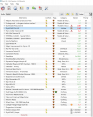
-
I just finished the installation guide in the manual, generated the TexGen and the Dyndolod mod and put it at the end of my Mod Organizer list of mods. When starting Skyrim VR, I get the `Press any button` popup but it also shows a Dyndolod related popup (I believe with an 'OK` below, it's hard to see much more, since the `Press any button` covers it). I don't know if that is an error, it could just be the ''DynDOLOD successfully initialized' message. Anyway, the two popups seem to cancel each other out, I can press any button the Oculus Quest Controllers, nothing will happen. Apparently the popup message from Dyndolod steals the UI -interaction from the `Press any button`...